
- Posts: 608
- Thank you received: 13
Custom Invoice problems
- mohairbears
-
 Topic Author
- Offline
Less
More
11 years 10 months ago #179737
by mohairbears
Custom Invoice problems was created by mohairbears
-- HikaShop version -- : 2.3.3
-- Joomla version -- : 3.3.6
-- PHP version -- : 5.4.24
-- Browser(s) name and version -- : Firefox 33.0.3
-- Error-message(debug-mod must be tuned on) -- : none
Hi, I am trying to customise the invoice and would like to move the 'shipping address' to where the 'Billing address' currently is, I have tried to do this in order/invoice and managed to do this BUT when I change anything in this file it will then not print? is this the correct file to amend?
I have bought the PDF plugin and cannot get that to work as it produces this error
Fatal error: Call to undefined function mb_strlen() in /home/mohairbe/public_html/plugins/hikashop/attachinvoice/attachinvoice.php on line 292
-- Joomla version -- : 3.3.6
-- PHP version -- : 5.4.24
-- Browser(s) name and version -- : Firefox 33.0.3
-- Error-message(debug-mod must be tuned on) -- : none
Hi, I am trying to customise the invoice and would like to move the 'shipping address' to where the 'Billing address' currently is, I have tried to do this in order/invoice and managed to do this BUT when I change anything in this file it will then not print? is this the correct file to amend?
I have bought the PDF plugin and cannot get that to work as it produces this error
Fatal error: Call to undefined function mb_strlen() in /home/mohairbe/public_html/plugins/hikashop/attachinvoice/attachinvoice.php on line 292
Please Log in or Create an account to join the conversation.

11 years 10 months ago #179750
by Jerome
Jerome - Obsidev.com
HikaMarket & HikaSerial developer / HikaShop core dev team.
Replied by Jerome on topic Custom Invoice problems
Hi,
The invoice PDF plugin use PHP Multibyte function in order to support UTF8 languages.
php.net/manual/en/function.mb-strlen.php
You have to be sure that your server handle the multibyte functions ; it is maybe a module to activate in your PHP server configuration.
For your printing error ; I am sorry but I don't understand the issue. Without a look to your page it is difficult to see what could be the problem.
Regards,
The invoice PDF plugin use PHP Multibyte function in order to support UTF8 languages.
php.net/manual/en/function.mb-strlen.php
You have to be sure that your server handle the multibyte functions ; it is maybe a module to activate in your PHP server configuration.
For your printing error ; I am sorry but I don't understand the issue. Without a look to your page it is difficult to see what could be the problem.
Regards,
Jerome - Obsidev.com
HikaMarket & HikaSerial developer / HikaShop core dev team.
Please Log in or Create an account to join the conversation.
- mohairbears
-
Topic Author
- Offline
Less
More
- Posts: 608
- Thank you received: 13
11 years 10 months ago #179831
by mohairbears
Replied by mohairbears on topic Custom Invoice problems
Hi, PDF solved now thanks.
Where the shipping address & the invoice is placed on the invoice I need to swap their positions as I use a peel off invoice paper so the shipping address appears on the left of the invoice instead of the right.
Is there a way to alter the PDF invoice as the order number appears on there very large? plus the above would need to be changed?
thanks
Where the shipping address & the invoice is placed on the invoice I need to swap their positions as I use a peel off invoice paper so the shipping address appears on the left of the invoice instead of the right.
Is there a way to alter the PDF invoice as the order number appears on there very large? plus the above would need to be changed?
thanks
Please Log in or Create an account to join the conversation.

11 years 10 months ago #179852
by nicolas
Replied by nicolas on topic Custom Invoice problems
Sure.
You can edit the file plugins/hikashop/attachinvoice/attachinvoice/invoice.php and change the code in it.
Swapping the addresses is easy.
Just change the line:
$addresses = array('billing_address','shipping_address');
to:
$addresses = array('shipping_address','billing_address');
You can edit the file plugins/hikashop/attachinvoice/attachinvoice/invoice.php and change the code in it.
Swapping the addresses is easy.
Just change the line:
$addresses = array('billing_address','shipping_address');
to:
$addresses = array('shipping_address','billing_address');
Please Log in or Create an account to join the conversation.
- mohairbears
-
Topic Author
- Offline
Less
More
- Posts: 608
- Thank you received: 13
11 years 10 months ago #180107
by mohairbears
Replied by mohairbears on topic Custom Invoice problems
Thanks Nic...
One more then I think I have this sorted.
Is it possible to increase the white space between the 2 address boxes?
thanks
One more then I think I have this sorted.
Is it possible to increase the white space between the 2 address boxes?
thanks
Please Log in or Create an account to join the conversation.

11 years 10 months ago #180115
by Xavier
Replied by Xavier on topic Custom Invoice problems
Hi,
I think that you can add a "<td>" between the two addresses, so add:
After:
Or add css properties at the top of the file in the <style> area.
I think that you can add a "<td>" between the two addresses, so add:
Code:
<td class="my_class"></td>
Code:
<td valign="top">
<fieldset>
<legend><?php echo JText::_('HIKASHOP_'.strtoupper($oneAddress)); ?></legend>
<?php
if(!empty($order->$oneAddress->address_company)) echo $order->$oneAddress->address_company.'<br/>';
echo $order->$oneAddress->address_title.' '.$order->$oneAddress->address_firstname.' '.$order->$oneAddress->address_lastname.'<br/>';
echo $order->$oneAddress->address_street.'<br/>';
echo $order->$oneAddress->address_post_code.' '.$order->$oneAddress->address_city.' '.$order->$oneAddress->address_state.'<br/>';
echo $order->$oneAddress->address_country.'<br/>';
if(!empty($order->$oneAddress->address_telephone)) echo JText::sprintf('TELEPHONE_IN_ADDRESS',$order->$oneAddress->address_telephone).'<br/>';
if(!empty($order->$oneAddress->address_vat)) echo JText::_('VAT_NUMBER').' : '.$order->$oneAddress->address_vat.'<br/>';
?>
</fieldset>
</td>
Or add css properties at the top of the file in the <style> area.
Please Log in or Create an account to join the conversation.
- mohairbears
-
Topic Author
- Offline
Less
More
- Posts: 608
- Thank you received: 13
11 years 9 months ago #182964
by mohairbears
Replied by mohairbears on topic Custom Invoice problems
Hi Xavier, I have another problem with the PDF plugin invoice.
As you can see from the attached the wording from the 'Information' box (taken from custom fields, field type - text area) go's off the page?
Can you please advise how to prevent this.
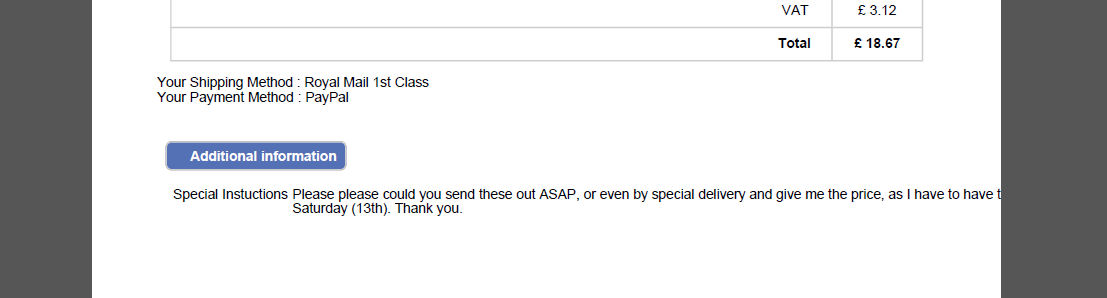
thanks
As you can see from the attached the wording from the 'Information' box (taken from custom fields, field type - text area) go's off the page?
Can you please advise how to prevent this.
thanks
Please Log in or Create an account to join the conversation.
11 years 9 months ago #182982
by Xavier
Replied by Xavier on topic Custom Invoice problems
Hi,
In the invoice.php file, you can potentially add a max-width property on the div displaying these instructions.
In the invoice.php file, you can potentially add a max-width property on the div displaying these instructions.
Please Log in or Create an account to join the conversation.
- mohairbears
-
Topic Author
- Offline
Less
More
- Posts: 608
- Thank you received: 13
11 years 9 months ago - 11 years 9 months ago #183087
by mohairbears
Replied by mohairbears on topic Custom Invoice problems
Hi, Cannot find a div that refers to this?
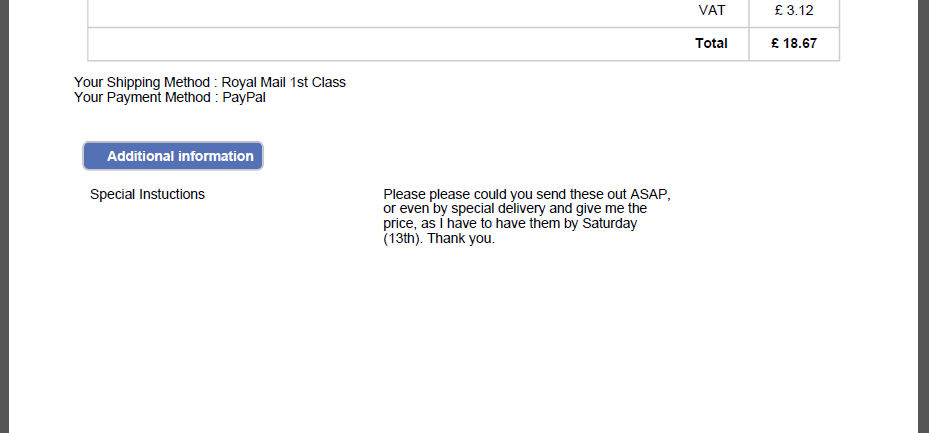
I have sort of solved it using .hikashop_order_custom_fields_fieldset td{width: 250px;} but this leaves the text mid page and increasing/decreasing the px either moves it across the page or narrows the text box itself? below is what I have but I would like to remove the white space.
Another problem I have is when no VAT is charged a minus (-) sign is in from of the £, see below.

I have sort of solved it using .hikashop_order_custom_fields_fieldset td{width: 250px;} but this leaves the text mid page and increasing/decreasing the px either moves it across the page or narrows the text box itself? below is what I have but I would like to remove the white space.
Another problem I have is when no VAT is charged a minus (-) sign is in from of the £, see below.
Last edit: 11 years 9 months ago by mohairbears.
Please Log in or Create an account to join the conversation.
11 years 9 months ago - 11 years 9 months ago #183233
by nicolas
Replied by nicolas on topic Custom Invoice problems
Hi,
Try with such CSS instead:
.hikashop_order_custom_fields_fieldset td{width: 450px;}
.hikashop_order_custom_fields_fieldset td.class{width: 120px;}
And for the taxes, instead of:
if($taxes != 0){
change that code to:
if($taxes > 0){
in the invoice.php file.
Try with such CSS instead:
.hikashop_order_custom_fields_fieldset td{width: 450px;}
.hikashop_order_custom_fields_fieldset td.class{width: 120px;}
And for the taxes, instead of:
if($taxes != 0){
change that code to:
if($taxes > 0){
in the invoice.php file.
Last edit: 11 years 9 months ago by nicolas.
Please Log in or Create an account to join the conversation.
Time to create page: 0.193 seconds