
- Posts: 42
- Thank you received: 2
Cancelled order not returning stock
10 years 9 months ago #224940
by spoonbow
It's amazing how the omission of a semicolon can absolutely ruin an otherwise pleasant evening.
Cancelled order not returning stock was created by spoonbow
-- HikaShop version -- : 2.6.0
-- Joomla version -- : 3.4.7
-- PHP version -- : 5.4.43
Changing an order's status from Confirmed to Cancelled or Refunded does not return items in the order to inventory. If I manually edit quantity or delete item from the order, then those items are returned to inventory as expected. I don't see this problem anywhere else on the forum, so I'm guessing it's something I have set wrong in the configuration, but can't find anything in the docs that indicates as much. Any suggestions on where to start looking?
Thanks!
-- Joomla version -- : 3.4.7
-- PHP version -- : 5.4.43
Changing an order's status from Confirmed to Cancelled or Refunded does not return items in the order to inventory. If I manually edit quantity or delete item from the order, then those items are returned to inventory as expected. I don't see this problem anywhere else on the forum, so I'm guessing it's something I have set wrong in the configuration, but can't find anything in the docs that indicates as much. Any suggestions on where to start looking?
Thanks!
It's amazing how the omission of a semicolon can absolutely ruin an otherwise pleasant evening.
Please Log in or Create an account to join the conversation.

10 years 9 months ago #224970
by nicolas
Replied by nicolas on topic Cancelled order not returning stock
Hi,
How did you configure all the settings of the "order" section of the Hikashop configuration ?
Could you provide a screenshot ?
Something might be wrong there, like for example the "Cancelled order statuses" setting.
How did you configure all the settings of the "order" section of the Hikashop configuration ?
Could you provide a screenshot ?
Something might be wrong there, like for example the "Cancelled order statuses" setting.
Please Log in or Create an account to join the conversation.
10 years 9 months ago #225022
by spoonbow
It's amazing how the omission of a semicolon can absolutely ruin an otherwise pleasant evening.
Replied by spoonbow on topic Cancelled order not returning stock
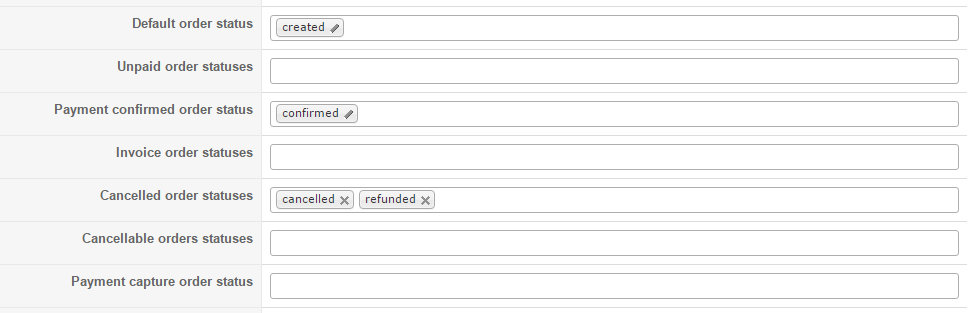
Order config is at default, screenshot attached.
Also tried cancelling order from the order edit screen, same result, stock not returned.
No errors returned with Joomla debug on, no errors in server PHP log.
Also tried cancelling order from the order edit screen, same result, stock not returned.
No errors returned with Joomla debug on, no errors in server PHP log.
It's amazing how the omission of a semicolon can absolutely ruin an otherwise pleasant evening.
Please Log in or Create an account to join the conversation.
10 years 9 months ago #225031
by nicolas
Replied by nicolas on topic Cancelled order not returning stock
Hi,
This looks ok.
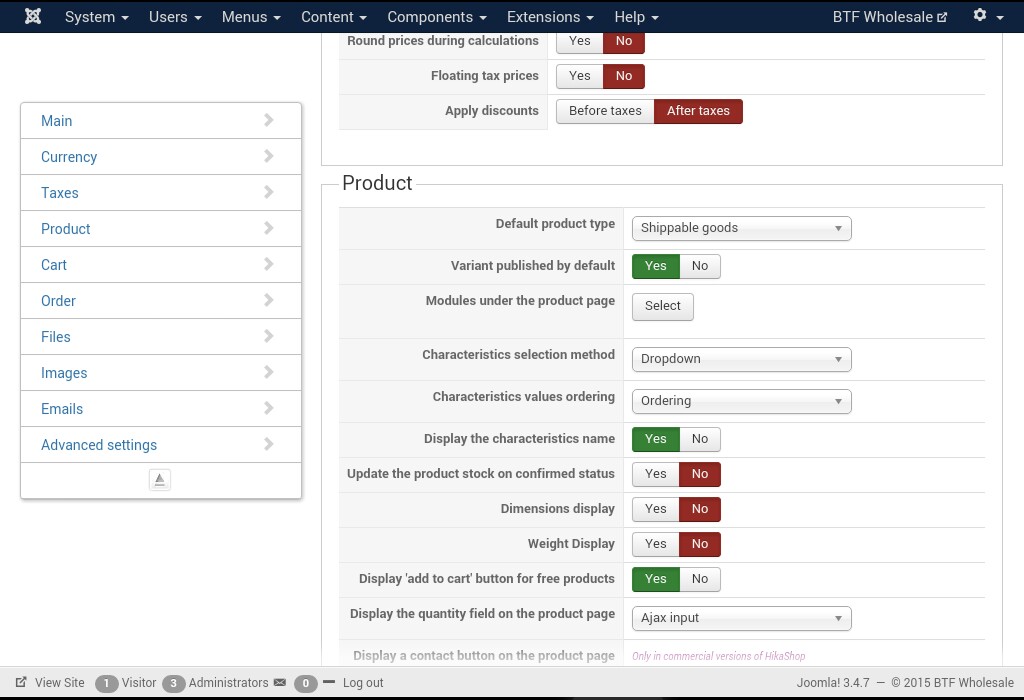
How did you configure the "Update the product stock on confirmed status" setting ?
Also, do you have any mass actions configured in the menu System>Mass actions which could interfere with the orders ?
Or maybe custom plugins or third party plugins integrating with HikaShop ?
This looks ok.
How did you configure the "Update the product stock on confirmed status" setting ?
Also, do you have any mass actions configured in the menu System>Mass actions which could interfere with the orders ?
Or maybe custom plugins or third party plugins integrating with HikaShop ?
Please Log in or Create an account to join the conversation.
10 years 9 months ago #225068
by spoonbow
It's amazing how the omission of a semicolon can absolutely ruin an otherwise pleasant evening.
Replied by spoonbow on topic Cancelled order not returning stock
See screenshot. No mass actions configured. This is actually a fresh install of Hikashop Starter on a fresh default install of Joomla located on a subdomain of my commercial Hikashop site. Not sure if that is a factor. Seems unlikely as the two installs utilize separate databases.
It's amazing how the omission of a semicolon can absolutely ruin an otherwise pleasant evening.
Please Log in or Create an account to join the conversation.

10 years 8 months ago #225732
by Xavier
Replied by Xavier on topic Cancelled order not returning stock
Hi,
All the settings are indeed correct, if the order status is Created and you change it to Cancelled or Refunded so the product stock should be incremented. I just tested it on my end and it is working as expected.
Are you changing an order status from "Created" to a cancelled order status ?
All the settings are indeed correct, if the order status is Created and you change it to Cancelled or Refunded so the product stock should be incremented. I just tested it on my end and it is working as expected.
Are you changing an order status from "Created" to a cancelled order status ?
Please Log in or Create an account to join the conversation.
10 years 8 months ago #225745
by spoonbow
It's amazing how the omission of a semicolon can absolutely ruin an otherwise pleasant evening.
Replied by spoonbow on topic Cancelled order not returning stock
Xavier,
Thanks for the reply. I have tried changing the order to both "Cancelled" and "Refunded" with the same result. The status changes on the order, but the stock is not returned. If you would like, I can provide you with an admin login via PM and you can test and review settings.
Matt
Thanks for the reply. I have tried changing the order to both "Cancelled" and "Refunded" with the same result. The status changes on the order, but the stock is not returned. If you would like, I can provide you with an admin login via PM and you can test and review settings.
Matt
It's amazing how the omission of a semicolon can absolutely ruin an otherwise pleasant evening.
Please Log in or Create an account to join the conversation.
10 years 8 months ago #225781
by Xavier
Replied by Xavier on topic Cancelled order not returning stock
Hi,
Another thing, in Configuration > Main > Order could you try to fill all the settings for the order statuses.
If that doesn't help, so yes you can give us a backend access via our contact form, don't forget to give a link to that topic in your message.
hikashop.com/support/contact-us.html
Another thing, in Configuration > Main > Order could you try to fill all the settings for the order statuses.
If that doesn't help, so yes you can give us a backend access via our contact form, don't forget to give a link to that topic in your message.
hikashop.com/support/contact-us.html
The following user(s) said Thank You: spoonbow
Please Log in or Create an account to join the conversation.
10 years 8 months ago - 10 years 8 months ago #225844
by spoonbow
It's amazing how the omission of a semicolon can absolutely ruin an otherwise pleasant evening.
Replied by spoonbow on topic Cancelled order not returning stock
Filling in all the fields seems to have solved the problem. Thanks!
Follow up - Finally had time to test the fields one by one. Seems that the critical field is "Invoice Order Statuses". Setting that field to "Confirmed" causes the inventory to behave properly.
Follow up - Finally had time to test the fields one by one. Seems that the critical field is "Invoice Order Statuses". Setting that field to "Confirmed" causes the inventory to behave properly.
It's amazing how the omission of a semicolon can absolutely ruin an otherwise pleasant evening.
Last edit: 10 years 8 months ago by spoonbow. Reason: Update solution
The following user(s) said Thank You: pepecortez
Please Log in or Create an account to join the conversation.

Less
More
- Posts: 235
- Thank you received: 4
9 years 10 months ago #256853
by janvankuijk
Replied by janvankuijk on topic Cancelled order not returning stock
I did everything in this topic to make it work on
www.toyscompany.nl
.
The stock isn´t corrected on cancellation of an order.
The strange thing is that if I fill orderstatuses in 'cancelled order statuses' t hey are all deleted on save. See attachment.
Jan
The stock isn´t corrected on cancellation of an order.
The strange thing is that if I fill orderstatuses in 'cancelled order statuses' t hey are all deleted on save. See attachment.
Jan
Please Log in or Create an account to join the conversation.
9 years 10 months ago #256878
by nicolas
Replied by nicolas on topic Cancelled order not returning stock
Hi,
Without any order status in the cancelled order statuses option, I'm not suprised it doesnt revert the stock upon cancellation of the order.
But I don't see why you wouldn't be able to save that option.
Could you provide a backend access and a link to this thread via our contact form so that we could have a look at the problem ?
www.hikashop.com/support/contact-us.html
Without any order status in the cancelled order statuses option, I'm not suprised it doesnt revert the stock upon cancellation of the order.
But I don't see why you wouldn't be able to save that option.
Could you provide a backend access and a link to this thread via our contact form so that we could have a look at the problem ?
www.hikashop.com/support/contact-us.html
Please Log in or Create an account to join the conversation.
9 years 10 months ago #256892
by nicolas
Replied by nicolas on topic Cancelled order not returning stock
Hi,
I'm not able to login to your backend with the user account you provided. I'm getting the error:
Username and password do not match or you do not have an account yet.
I'm not able to login to your backend with the user account you provided. I'm getting the error:
Username and password do not match or you do not have an account yet.
Please Log in or Create an account to join the conversation.
Less
More
- Posts: 235
- Thank you received: 4
9 years 10 months ago #256949
by janvankuijk
Replied by janvankuijk on topic Cancelled order not returning stock
Strange!
I tried it myself and succeeded.
Sent you again the credentiaqls.
Jan
I tried it myself and succeeded.
Sent you again the credentiaqls.
Jan
Please Log in or Create an account to join the conversation.
9 years 10 months ago #257059
by nicolas
Replied by nicolas on topic Cancelled order not returning stock
Hi,
I was not able to login with the new access
I've checked on your website but I didn't had any problem to change the order statuses settings:
take.ms/seeQP
Maybe try with another browser.
I was not able to login with the new access
I've checked on your website but I didn't had any problem to change the order statuses settings:
take.ms/seeQP
Maybe try with another browser.
Please Log in or Create an account to join the conversation.
Time to create page: 0.257 seconds