
- Posts: 608
- Thank you received: 13
Order confimation emails not being sent
- mohairbears
-
 Topic Author
- Offline
Less
More
10 years 7 months ago - 10 years 7 months ago #230025
by mohairbears
-- HikaShop version -- : 2.6.1
-- Joomla version -- : 3.48
-- PHP version -- : 5.3
-- Browser(s) name and version -- : fifrefox
-- Error-message(debug-mod must be tuned on) -- : none
Hi, I am having issues since my service provider (Heart Internet) took their whole customer portfolio down for over 24 hours
For some reason 'order confirmed' email won't send but 'order created' will? I have checked the obvious and all are enabled, not showing any PHP error either.
I have tried reinstalling Hikashop and no change, emails are sending from our server as well.
Another problem is that when a change is made in 'orders' in the backend, the chnage is not reflected until you manually refresh the page?
I had someone come in to the shop on Saturday who works in IT and he had a quick look but could not solve it, attached is a document he put together.
thanks
Order confimation emails not being sent was created by mohairbears
This attachment is hidden for guests.
Please log in or register to see it.
Please log in or register to see it.
-- HikaShop version -- : 2.6.1
-- Joomla version -- : 3.48
-- PHP version -- : 5.3
-- Browser(s) name and version -- : fifrefox
-- Error-message(debug-mod must be tuned on) -- : none
Hi, I am having issues since my service provider (Heart Internet) took their whole customer portfolio down for over 24 hours
For some reason 'order confirmed' email won't send but 'order created' will? I have checked the obvious and all are enabled, not showing any PHP error either.
I have tried reinstalling Hikashop and no change, emails are sending from our server as well.
Another problem is that when a change is made in 'orders' in the backend, the chnage is not reflected until you manually refresh the page?
I had someone come in to the shop on Saturday who works in IT and he had a quick look but could not solve it, attached is a document he put together.
thanks
Last edit: 10 years 7 months ago by mohairbears. Reason: file did not attach
Please Log in or Create an account to join the conversation.

Less
More
- Posts: 12953
- Thank you received: 1778
10 years 7 months ago #230091
by Mohamed Thelji
Replied by Mohamed Thelji on topic Order confimation emails not being sent
Hello,
Hello,
1.
Reading that thread will probably help you :
Can you give me more information through some screenshots for example about how you exactly applied your changes to your order ?
Thanks.
Hello,
1.
Reading that thread will probably help you :
2.HikaShop uses the standard joomla email sending functions. If you have a problem only on that email, it means that the problem is the content of the email.
Fist, you should check your different settings in the hikashop configuration under the tab mail. The encoding might not be correct for your email server, it could the ad name option , etc.
What you could try also is to send an email via the interface in sales when changing an order information. Does that work ? If yes, then, the problem is really the content of the order creation notification.
It could also be that your hosting company doesn't allow you to send more than one email per thread and at the end of the checkout, two emails are sent (1 to the customer and 1 to the vendor). So you might want to check on that with your hosting company.
Can you give me more information through some screenshots for example about how you exactly applied your changes to your order ?
Thanks.
Please Log in or Create an account to join the conversation.
- mohairbears
-
Topic Author
- Offline
Less
More
- Posts: 608
- Thank you received: 13
10 years 7 months ago - 10 years 7 months ago #230144
by mohairbears
Replied by mohairbears on topic Order confimation emails not being sent
Hi, I have read everything I can find on this subject and the email seems ok? how come it is sending the 'created' email but nothing else? etc. 'confirmed' & 'shipped' emails cannot be sent. I created an order this morning and from the screen dump you can see I got the creation email ok but when the order status is changed nothing is sent? I have found that I can send by selecting 'email' from inside the order so I guess this shows nothing wrong with the email config?
The other refresh problem is screen dumped below, this only effects the 'orders' age? I suspect this could also be having an impact of the email? (just for info: the screen shots are for the refresh problem when sending emails I tick the box)
(I normally send the email changes via mass actions but this now freezes when using with a blank screen)
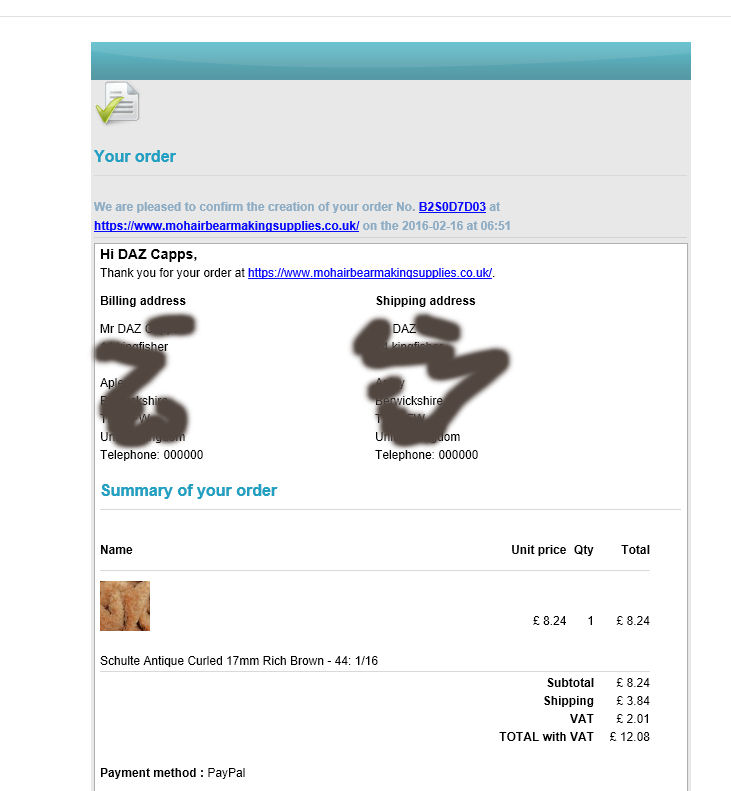

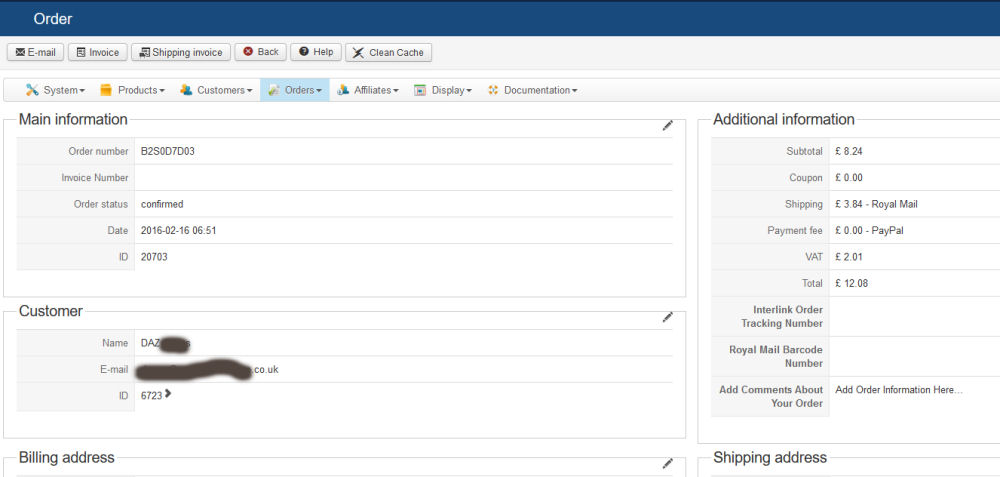
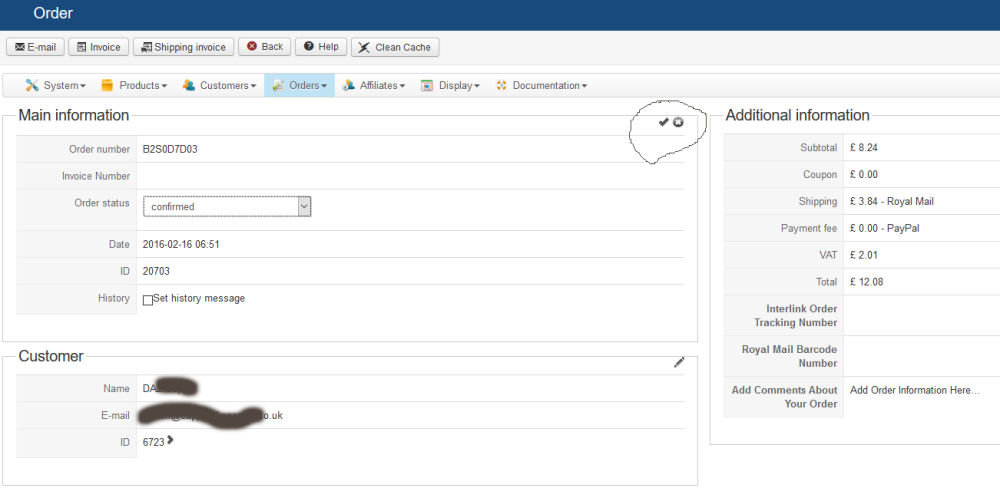
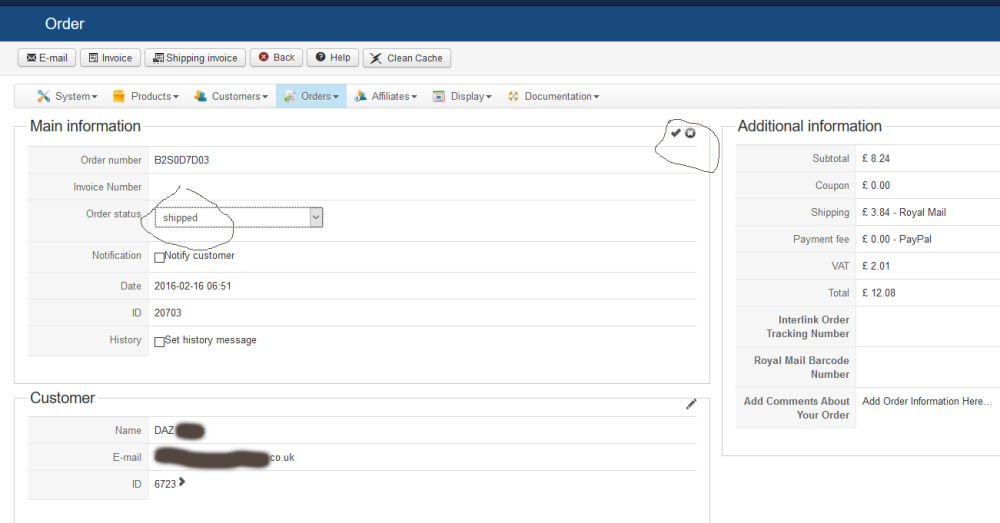
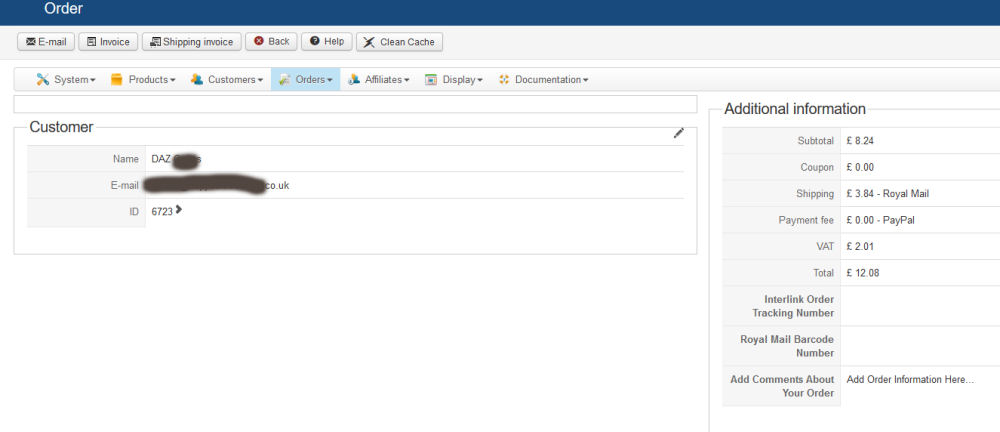
The other refresh problem is screen dumped below, this only effects the 'orders' age? I suspect this could also be having an impact of the email? (just for info: the screen shots are for the refresh problem when sending emails I tick the box)
(I normally send the email changes via mass actions but this now freezes when using with a blank screen)
Last edit: 10 years 7 months ago by mohairbears. Reason: further info mass actions
Please Log in or Create an account to join the conversation.
- mohairbears
-
Topic Author
- Offline
Less
More
- Posts: 608
- Thank you received: 13
10 years 7 months ago #230266
by mohairbears
Replied by mohairbears on topic Order confimation emails not being sent
Hi I have managed to solve this problem.
The issue was caused by a extension called 'Invoice Manager' by JoomlaThat. I also have the Hikashop plugin by them.
I purchased this from them in 2014 but it was the biggest load of rubbish that did not even comply with the UK VAT laws, the data did not match what was in Hikashop orders so it was dispensed with very quickly (79 eruros wasted!)
On Friday evening before leaving for the weekend I removed the extension using the correct method via Joomla. On return Monday am our server had crashed again (Heart Internet) you may have heard this name last week as they had all their customers off-line for 24 hours min, we were off for 36 hours. I wrongly assumed the server going down again had broken something but how wrong I was. Back tracking as to anything I had done that could have caused this and as unistalling this was the only thing possible link I set out to see if I still had the original download, Its taken a while but I have now found it and reinstalled it, hey presto I now have a fully working Hikashop system again.
If this extension breaks Hikashop when it is unistalled then you can see how poorly it's written, not sure if you know the people at JoolmaThat but they should know what their sloppy extension does to Hikashop.
Question is now... how do I get this sh@&e out of my set up without breaking Hikashop?
thanks
The issue was caused by a extension called 'Invoice Manager' by JoomlaThat. I also have the Hikashop plugin by them.
I purchased this from them in 2014 but it was the biggest load of rubbish that did not even comply with the UK VAT laws, the data did not match what was in Hikashop orders so it was dispensed with very quickly (79 eruros wasted!)
On Friday evening before leaving for the weekend I removed the extension using the correct method via Joomla. On return Monday am our server had crashed again (Heart Internet) you may have heard this name last week as they had all their customers off-line for 24 hours min, we were off for 36 hours. I wrongly assumed the server going down again had broken something but how wrong I was. Back tracking as to anything I had done that could have caused this and as unistalling this was the only thing possible link I set out to see if I still had the original download, Its taken a while but I have now found it and reinstalled it, hey presto I now have a fully working Hikashop system again.
If this extension breaks Hikashop when it is unistalled then you can see how poorly it's written, not sure if you know the people at JoolmaThat but they should know what their sloppy extension does to Hikashop.
Question is now... how do I get this sh@&e out of my set up without breaking Hikashop?
thanks
Please Log in or Create an account to join the conversation.

10 years 7 months ago #230317
by nicolas
Replied by nicolas on topic Order confimation emails not being sent
Hi,
It's great that you found out the culprit.
If the extension is done correctly, it shouldn't break another extension when you uninstall it. What you can try in that case is to disable it instead of uninstalling it.
It's great that you found out the culprit.
If the extension is done correctly, it shouldn't break another extension when you uninstall it. What you can try in that case is to disable it instead of uninstalling it.
Please Log in or Create an account to join the conversation.
Time to create page: 0.351 seconds