
Rearrange order list user control panel

10 years 4 months ago #241136
by thomasf
Rearrange order list user control panel was created by thomasf
-- HikaShop version -- : 2.6.3
Hi, attached a screenshot. I would just like to swap positions in the user control panel , hence the buttons for reorder and cancel at the end. Thanks for your quick help. Shop is going live soon now.
Regards
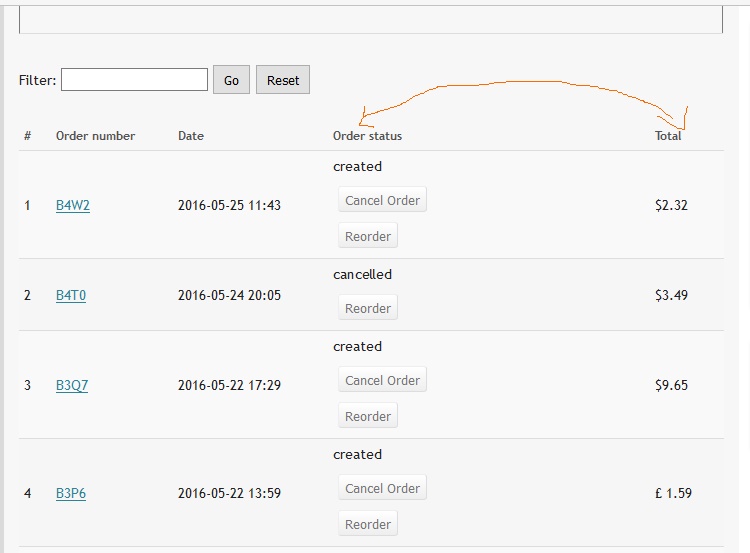
Hi, attached a screenshot. I would just like to swap positions in the user control panel , hence the buttons for reorder and cancel at the end. Thanks for your quick help. Shop is going live soon now.
Regards
Please Log in or Create an account to join the conversation.

Less
More
- Posts: 12953
- Thank you received: 1778
10 years 4 months ago #241174
by Mohamed Thelji
Replied by Mohamed Thelji on topic Rearrange order list user control panel
Hello,
To do it you'll have to directly edit the code of the file "Listing" of the "Order" view of your front-end template via "Hikashop->Display->Views".
To do it you'll have to directly edit the code of the file "Listing" of the "Order" view of your front-end template via "Hikashop->Display->Views".
Please Log in or Create an account to join the conversation.
10 years 4 months ago #241194
by thomasf
Replied by thomasf on topic Rearrange order list user control panel
Hi and thank you. I tried that too, but it just swaps the title, the buttons and the amount still remain in the same position. Can you please point out what line or code I must swap in the php file?
Thanks a lot
Thomas
Thanks a lot
Thomas
Please Log in or Create an account to join the conversation.

10 years 4 months ago - 10 years 4 months ago #241196
by Philip
Replied by Philip on topic Rearrange order list user control panel
Hello,
The two elements you looking for start in line 168 and end line 178 for the "Order status" column AND in line 179 and end line 181 for "Total" column.
And so you have to switch them, more precisely put the "Total" column first, and after "Order status" column.
Hope this will fit your needs.
Regards.
The two elements you looking for start in line 168 and end line 178 for the "Order status" column AND in line 179 and end line 181 for "Total" column.
And so you have to switch them, more precisely put the "Total" column first, and after "Order status" column.
Hope this will fit your needs.
Regards.
Last edit: 10 years 4 months ago by Philip.
Please Log in or Create an account to join the conversation.
10 years 4 months ago #241266
by thomasf
Replied by thomasf on topic Rearrange order list user control panel
I will try that later. Thank you very much for your reply 
Please Log in or Create an account to join the conversation.
Time to create page: 0.328 seconds