
- Posts: 220
- Thank you received: 0
Order confirmation Mobile page error
- clairewang
-
 Topic Author
- Offline
Less
More
10 years 1 month ago - 10 years 1 month ago #247958
by clairewang
Order confirmation Mobile page error was created by clairewang
-- HikaShop version -- : 2.5
-- Joomla version -- : 3.5
-- PHP version -- : 5.6.24
-- Browser(s) name and version -- : Chrome 49
-- Error-message(debug-mod must be tuned on) -- : Mobile version page error
Hi,
Thank you for the help all the time.
I have mobile version all pages look good except the final order confirmation, background doesn't get enlarge with the the order. Do you have solutions?
Please see the attachment.
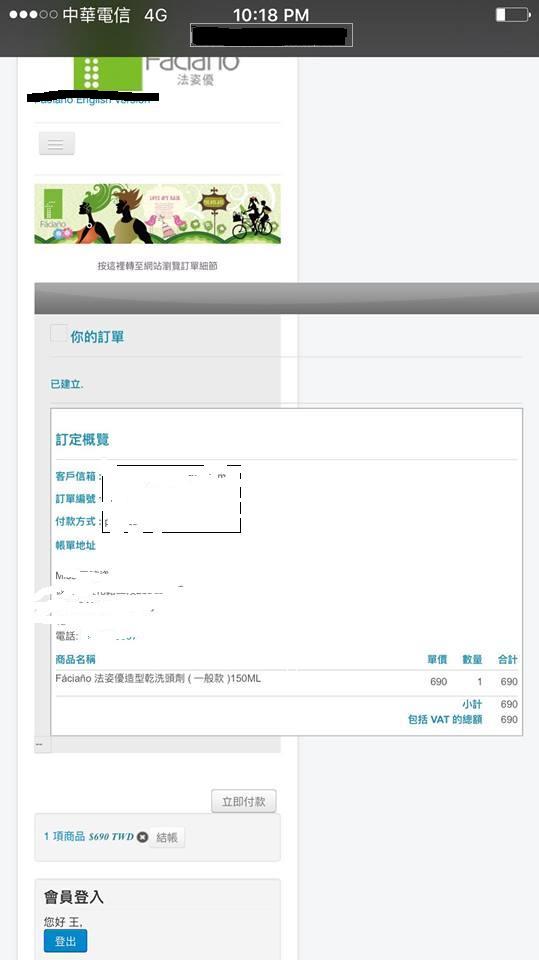
-- Joomla version -- : 3.5
-- PHP version -- : 5.6.24
-- Browser(s) name and version -- : Chrome 49
-- Error-message(debug-mod must be tuned on) -- : Mobile version page error
Hi,
Thank you for the help all the time.
I have mobile version all pages look good except the final order confirmation, background doesn't get enlarge with the the order. Do you have solutions?
Please see the attachment.
Last edit: 10 years 1 month ago by clairewang.
Please Log in or Create an account to join the conversation.

Less
More
- Posts: 12953
- Thank you received: 1778
10 years 1 month ago #247962
by Mohamed Thelji
Replied by Mohamed Thelji on topic Order confirmation Mobile page error
Hello,
In your case the solution will probably be to directly use some CSS code like media queries :
In your case the solution will probably be to directly use some CSS code like media queries :
You can do the modifications in the frontend css file via the menu Configuration > Display > CSS
Use the @media tags to change the width of the columns when the width of the page is less than xx.
ex:
@media (max-width: 767px) {
.hikashop_products .row-fluid .span4 { width: 49% !important;}
}
Here is some documentation about the layout customization:
www.hikashop.com/support/documentation/1...ize-the-display.html
Please Log in or Create an account to join the conversation.
- clairewang
-
Topic Author
- Offline
Less
More
- Posts: 220
- Thank you received: 0
10 years 1 month ago #248160
by clairewang
Replied by clairewang on topic Order confirmation Mobile page error
Thank you, Mohamed, but the width of the columns with problem is the background Joomla, not the order itself. The background Joomla has no problem with all of the order pages except this one. What codes should I edit on?
Please Log in or Create an account to join the conversation.

10 years 1 month ago #248167
by nicolas
Replied by nicolas on topic Order confirmation Mobile page error
Hi,
What you have on your screenshot is not a page of your website. It's the order confirmation email. There shouldn't be any button and a Joomla template is not adapted to be inserted in an email.
So it's normal that it doesn't work if that's what you're trying to do. And the problem is not with HikaShop but with the fact that a Joomla template isn't meant to be used in an email.
What you have on your screenshot is not a page of your website. It's the order confirmation email. There shouldn't be any button and a Joomla template is not adapted to be inserted in an email.
So it's normal that it doesn't work if that's what you're trying to do. And the problem is not with HikaShop but with the fact that a Joomla template isn't meant to be used in an email.
Please Log in or Create an account to join the conversation.
- clairewang
-
Topic Author
- Offline
Less
More
- Posts: 220
- Thank you received: 0
10 years 1 month ago #248239
by clairewang
Replied by clairewang on topic Order confirmation Mobile page error
Hi Nicolas,
Thanks a lot for your reply. It is definitly a page, not an email. I blacked out the link. It's the last step of the order process to have order confirmation. In your hikashop email, there is definitly no webpage background. Do you have idea how to fix the background to be as big as the mobile screen like order confirmation? Appreciate your help.
Thanks a lot for your reply. It is definitly a page, not an email. I blacked out the link. It's the last step of the order process to have order confirmation. In your hikashop email, there is definitly no webpage background. Do you have idea how to fix the background to be as big as the mobile screen like order confirmation? Appreciate your help.
Please Log in or Create an account to join the conversation.

10 years 1 month ago - 10 years 1 month ago #248258
by Philip
Replied by Philip on topic Order confirmation Mobile page error
Hello,
Can you provide a link to your website and (if required) a customer access in order to process a order test and see this final page ?
You can use our Contact us to provide important references, AND don't forget to add an Url link to your message in order to keep the link with your issue.
Awaiting news from you.
Regards.
Can you provide a link to your website and (if required) a customer access in order to process a order test and see this final page ?
You can use our Contact us to provide important references, AND don't forget to add an Url link to your message in order to keep the link with your issue.
Awaiting news from you.
Regards.
Last edit: 10 years 1 month ago by Philip.
Please Log in or Create an account to join the conversation.
Time to create page: 0.226 seconds