

- Posts: 129
- Thank you received: 0
Custom Field in Admin notification email
9 years 9 months ago #258622
by nic7071
Custom Field in Admin notification email was created by nic7071
-- HikaShop version -- : 3.5.2
hello,
i need a field like WareHouse in my product Editing page but the problem of warehouse is that i can change it for product variables.
so i decided to create a custom field i need it to be selectable in product variable editing and to be shown in admin notification email next to each product and to be shown in my back-end order list row like customer note, order number or date !
i tried adding this code {VAR:product.warehouse} after {LINEVAR:CUSTOMFIELD_VALUE} but there was nothing in my email !
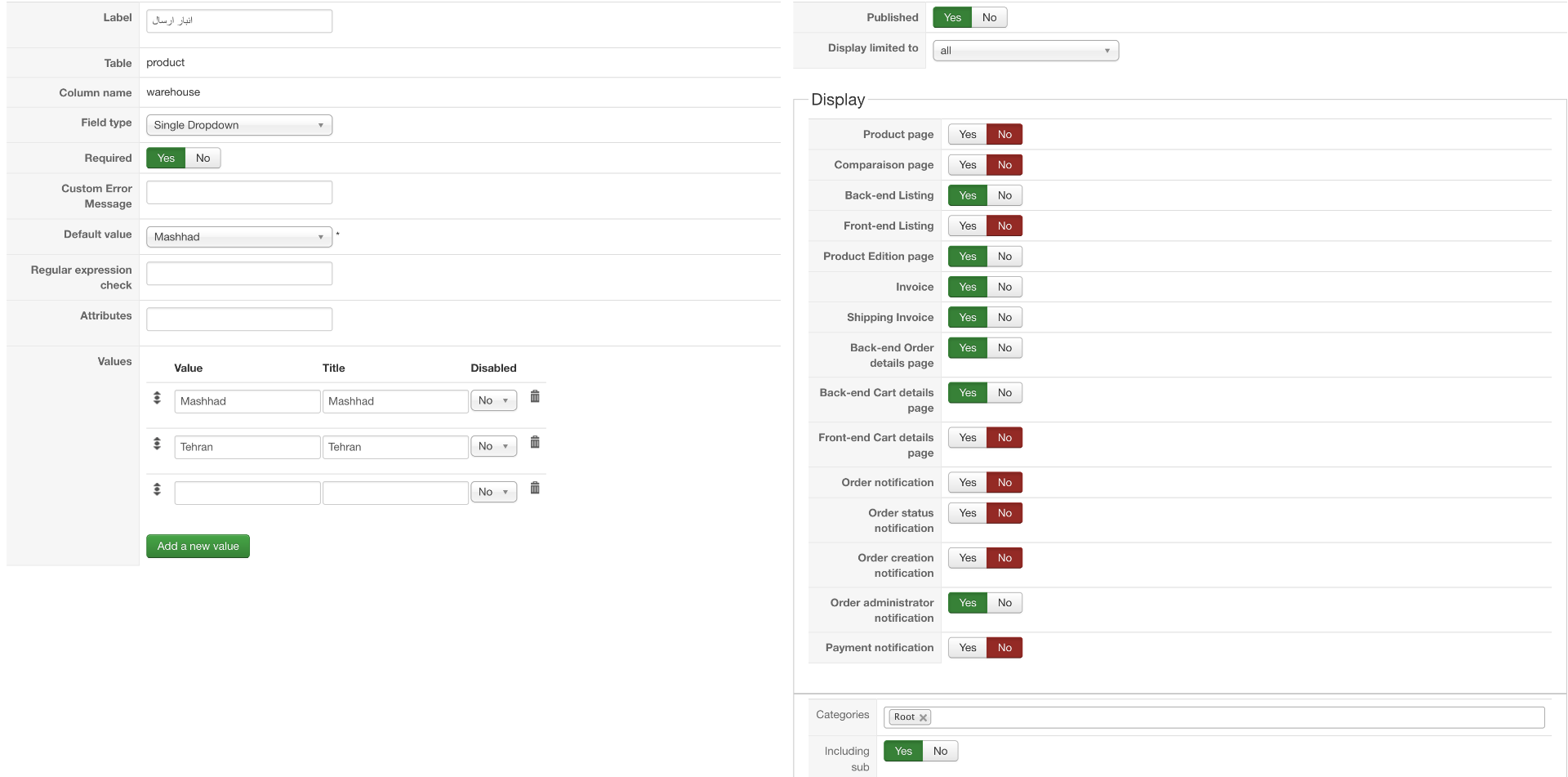
i inserted a screenshot of my custom field setting page
please tell me :
i really appreciate your help !
thank you
hello,
i need a field like WareHouse in my product Editing page but the problem of warehouse is that i can change it for product variables.
so i decided to create a custom field i need it to be selectable in product variable editing and to be shown in admin notification email next to each product and to be shown in my back-end order list row like customer note, order number or date !
i tried adding this code {VAR:product.warehouse} after {LINEVAR:CUSTOMFIELD_VALUE} but there was nothing in my email !
i inserted a screenshot of my custom field setting page
please tell me :
- if my custom field setting page is correct according to my needs
- how to show the value of custom field in admin notification email for each product
- how to add the customfield value in backend order listing row next to customer note or date
i really appreciate your help !
thank you
Please Log in or Create an account to join the conversation.

9 years 9 months ago #258632
by Jerome
Jerome - Obsidev.com
HikaMarket & HikaSerial developer / HikaShop core dev team.
Replied by Jerome on topic Custom Field in Admin notification email
Hi,
Please provide your real HikaShop version number.
HikaShop 3.5.2 do not exist.
Regards,
Please provide your real HikaShop version number.
HikaShop 3.5.2 do not exist.
Regards,
Jerome - Obsidev.com
HikaMarket & HikaSerial developer / HikaShop core dev team.
Please Log in or Create an account to join the conversation.
9 years 9 months ago - 9 years 9 months ago #258647
by nic7071
Replied by nic7071 on topic Custom Field in Admin notification email
sorry it's 2.6.3
Last edit: 9 years 9 months ago by nic7071.
Please Log in or Create an account to join the conversation.

9 years 9 months ago #258673
by nicolas
Replied by nicolas on topic Custom Field in Admin notification email
Hi,
1. It looks correct
2. The tag you're using is correct. However, try placing it somewhere else, like just after the product_name tag.
3. I'm not following you.
This is a custom product field but you want to display it on the orders listing ?
Then what happens when you have several products on an order with different values for it ?
1. It looks correct
2. The tag you're using is correct. However, try placing it somewhere else, like just after the product_name tag.
3. I'm not following you.
This is a custom product field but you want to display it on the orders listing ?
Then what happens when you have several products on an order with different values for it ?
Please Log in or Create an account to join the conversation.
9 years 9 months ago - 9 years 9 months ago #258689
by nic7071
Replied by nic7071 on topic Custom Field in Admin notification email
Hi,
1. Thanks
2. i have this line of codes in email body :
but all i can see is a "x" after product name meaning that my mail template changes are applied correctly but the {VAR:product.warehouse} code is not returning any thing !
3. i also wanted to open a ticket to see if i can some how make products of an order be viewable in backend order listing.
if it's possible then i can see products of order in separated lines in an order row and warehouse custom field value next to product name in each line !
this action can save lots of time here for our order processing guys !
Thanks
1. Thanks
2. i have this line of codes in email body :
Code:
{LINEVAR:PRODUCT_NAME} {VAR:product.warehouse}x
3. i also wanted to open a ticket to see if i can some how make products of an order be viewable in backend order listing.
if it's possible then i can see products of order in separated lines in an order row and warehouse custom field value next to product name in each line !
this action can save lots of time here for our order processing guys !
Thanks
Last edit: 9 years 9 months ago by nic7071.
Please Log in or Create an account to join the conversation.
9 years 9 months ago #258690
by nicolas
Replied by nicolas on topic Custom Field in Admin notification email
Hi,
2. It has to be:
3. There is no way to easily do that with just one or two lines changes. But nothing is impossible. You can hire a developer to develop that if necessary. It will basically require rewriting the whole orders listing view.
2. It has to be:
Code:
{LINEVAR:PRODUCT_NAME} {LINEVAR:product.warehouse}x
3. There is no way to easily do that with just one or two lines changes. But nothing is impossible. You can hire a developer to develop that if necessary. It will basically require rewriting the whole orders listing view.
Please Log in or Create an account to join the conversation.
9 years 8 months ago #259040
by nic7071
Replied by nic7071 on topic Custom Field in Admin notification email
2. Thanks that fixed the problem!
3. how can i find a trustful developer with reasonable price to do that ?
3. how can i find a trustful developer with reasonable price to do that ?
Please Log in or Create an account to join the conversation.
9 years 8 months ago #259046
by Jerome
Jerome - Obsidev.com
HikaMarket & HikaSerial developer / HikaShop core dev team.
Replied by Jerome on topic Custom Field in Admin notification email
Hi,
You can find developers in a lot of dedicated websites.
And you can also contact some of our HikaShop partners (for the on specialized in development).
www.hikashop.com/home/our-partners.html
Regards,
You can find developers in a lot of dedicated websites.
And you can also contact some of our HikaShop partners (for the on specialized in development).
www.hikashop.com/home/our-partners.html
Regards,
Jerome - Obsidev.com
HikaMarket & HikaSerial developer / HikaShop core dev team.
Please Log in or Create an account to join the conversation.
Time to create page: 0.201 seconds