
- Posts: 162
- Thank you received: 0
Change emails text
- info@vesica.org
-
 Topic Author
- Offline
Less
More
9 years 8 months ago #259785
by info@vesica.org
Change emails text was created by info@vesica.org
-- HikaShop version -- : 2.6.4
Hi,
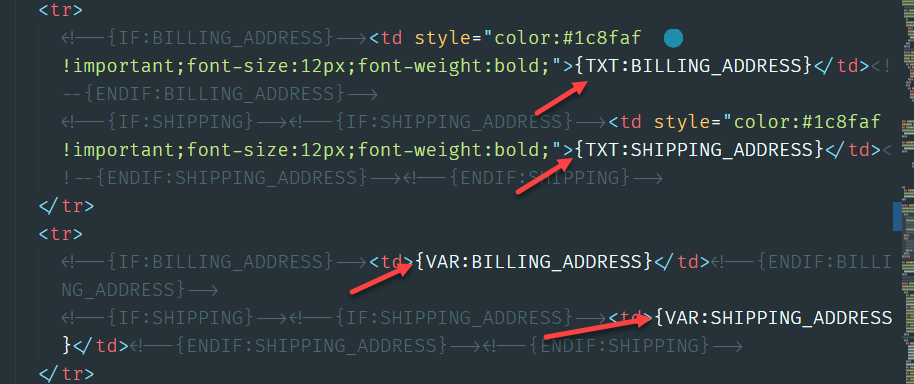
can you please tell me where can I change the emails text like:
.
Please see screenshot:
Thanks!
Hi,
can you please tell me where can I change the emails text like:
Code:
{TXT:MAIL_HEADER}, {TXT:ORDER_TITLE}, {TXT:ORDER_CHANGED} etc.
Please see screenshot:
Thanks!
Please Log in or Create an account to join the conversation.

9 years 8 months ago #259786
by Jerome
Jerome - Obsidev.com
HikaMarket & HikaSerial developer / HikaShop core dev team.
Replied by Jerome on topic Change emails text
Hi,
What you're pointing at are "tags" in the emails.
Tags starting with "TXT:" are translations, which mean that you can override them as classical translations in Joomla/HikaShop.
www.hikashop.com/download/languages.html#modify
Tags starting with "VAR:" are internal email variables.
If you want to change the variable content, you need to modify the "preload" part of the email.
www.hikashop.com/support/documentation/1...shop-email-form.html
Regards,
What you're pointing at are "tags" in the emails.
Tags starting with "TXT:" are translations, which mean that you can override them as classical translations in Joomla/HikaShop.
www.hikashop.com/download/languages.html#modify
Tags starting with "VAR:" are internal email variables.
If you want to change the variable content, you need to modify the "preload" part of the email.
www.hikashop.com/support/documentation/1...shop-email-form.html
Regards,
Jerome - Obsidev.com
HikaMarket & HikaSerial developer / HikaShop core dev team.
Please Log in or Create an account to join the conversation.
Less
More
- Posts: 92
- Thank you received: 3
9 years 3 months ago #272303
by ezomerdijk
Replied by ezomerdijk on topic Change emails text
May I ask an additional question.
I too want to change the text of the emails (who doesn't?). And it is going allright.
Jerome said:
But I cannot find all TXTtags. Sometimes they are named differently. How should I know what is what?
I too want to change the text of the emails (who doesn't?). And it is going allright.
Jerome said:
Tags starting with "TXT:" are translations, which mean that you can override them as classical translations in Joomla/HikaShop.
But I cannot find all TXTtags. Sometimes they are named differently. How should I know what is what?
Please Log in or Create an account to join the conversation.

9 years 3 months ago - 9 years 3 months ago #272324
by Philip
Replied by Philip on topic Change emails text
Hello,
First, you have to know that by default I mean for an HikaShop default email, if text tag is used In the Html version, it's initialized in the Preload.
I advice you to use a "notepad" to get the preload version and the Html version, and use the search tool of the notepad (Ctrl + F) to search translation key green border in my screenshot.
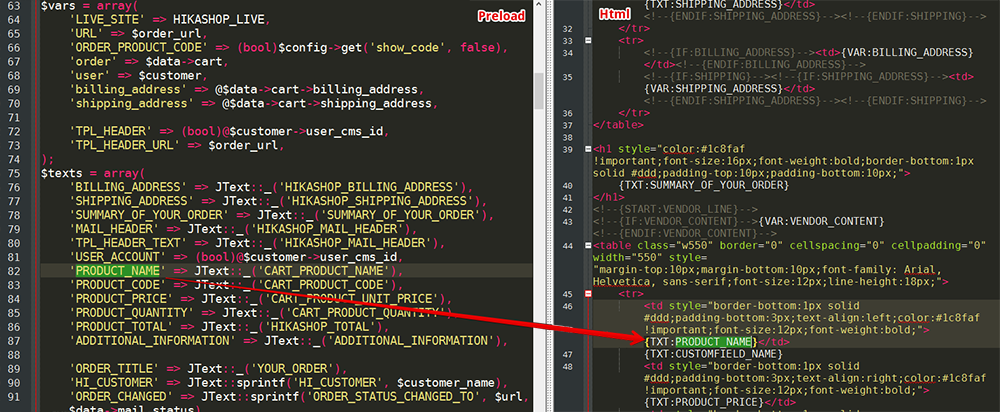
That will help you to find all useful key, if anyway you have translation key in Html and not in the preload that means that this element won't works, and maybe the question is do you have some customization ?...
My advice if you want custom yourself is to start from a default version.
Hope this will help you
Regards
First, you have to know that by default I mean for an HikaShop default email, if text tag is used In the Html version, it's initialized in the Preload.
I advice you to use a "notepad" to get the preload version and the Html version, and use the search tool of the notepad (Ctrl + F) to search translation key green border in my screenshot.
That will help you to find all useful key, if anyway you have translation key in Html and not in the preload that means that this element won't works, and maybe the question is do you have some customization ?...
My advice if you want custom yourself is to start from a default version.
Hope this will help you
Regards
Last edit: 9 years 3 months ago by Philip.
Please Log in or Create an account to join the conversation.
Time to create page: 0.176 seconds