
- Posts: 256
- Thank you received: 2
Add stock status to the customer's confirmation email
- dancingkazzaf
-
 Topic Author
- Offline
Less
More
9 years 3 months ago #272828
by dancingkazzaf
-- url of the page with the problem -- :
charnwood.net
-- HikaShop version -- : 3.1.1
-- Joomla version -- : 3.7.2
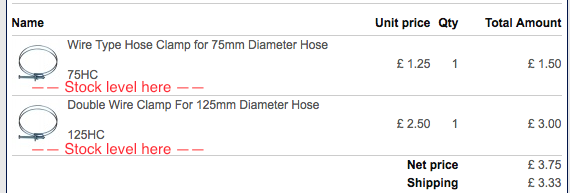
Hi, Our client wants the customer's confirmation email to also include the current stock (plus some custom PHP code that we've put in to give customer's a little information about the stock level).
Where would we need to put this code to make it appear under each product listing in the email? (I've attached a screenshot to help illustrate what it is we're trying to achieve)
-- HikaShop version -- : 3.1.1
-- Joomla version -- : 3.7.2
Hi, Our client wants the customer's confirmation email to also include the current stock (plus some custom PHP code that we've put in to give customer's a little information about the stock level).
Where would we need to put this code to make it appear under each product listing in the email? (I've attached a screenshot to help illustrate what it is we're trying to achieve)
Please Log in or Create an account to join the conversation.

9 years 3 months ago #272855
by nicolas
Replied by nicolas on topic Add stock status to the customer's confirmation email
Hi,
That's actually quite easy to do.
Edit the email via the menu Display>Emails.
There, if you just want to add text and the stock level, you can add such text in the HTML version:
after for example the tag:
{LINEVAR:PRODUCT_DETAILS}
If you want to add custom PHP there, you can write it there inside PHP tags.
For example:
Otherwise, for more complex modifications, you can also add custom code in the preload of the email.
That's actually quite easy to do.
Edit the email via the menu Display>Emails.
There, if you just want to add text and the stock level, you can add such text in the HTML version:
Code:
Stock for that product: {LINEVAR:product.product_quantity}
{LINEVAR:PRODUCT_DETAILS}
If you want to add custom PHP there, you can write it there inside PHP tags.
For example:
Code:
Stock for that product: {LINEVAR:product.product_quantity}<?php echo 'test'; ?>
The following user(s) said Thank You: dancingkazzaf
Please Log in or Create an account to join the conversation.
- dancingkazzaf
-
Topic Author
- Offline
Less
More
- Posts: 256
- Thank you received: 2
9 years 3 months ago - 9 years 3 months ago #272866
by dancingkazzaf
Replied by dancingkazzaf on topic Add stock status to the customer's confirmation email
Hi Nicolas,
Thanks for this, it's worked perfectly for adding the stock to the email. I'm struggling with the PHP code though.
The code we have calls in a custom field we've made called "product_back_in_stock". The code looks like this:
Is it possible to call in custom fields to the email? If so, how would we do this?
Thanks for this, it's worked perfectly for adding the stock to the email. I'm struggling with the PHP code though.
The code we have calls in a custom field we've made called "product_back_in_stock". The code looks like this:
Code:
<?php
if ($this->row->product_quantity == 0 && $this->element->product_back_in_stock) {
echo "<strong>Product currently out of stock, back in stock: </strong>";
echo $this->element->product_back_in_stock;
}
?>
Last edit: 9 years 3 months ago by dancingkazzaf.
Please Log in or Create an account to join the conversation.
9 years 3 months ago #272875
by nicolas
Replied by nicolas on topic Add stock status to the customer's confirmation email
Hi,
The order data is stored in the variable $data in the emails.
You can look in the preload on how the data is used to fill the tags that are used in the HTML version.
Here is a snippet:
you can see that the data of the product (and the custom product fields) are available there in $product so you can add your HTML to an entry in $cartProduct to create your own tag.
The order data is stored in the variable $data in the emails.
You can look in the preload on how the data is used to fill the tags that are used in the HTML version.
Here is a snippet:
Code:
foreach($data->cart->products as $item) {
if($group && $item->order_product_option_parent_id)
continue;
$product = @$productClass->all_products[$item->product_id];
$cartProduct = array(
'PRODUCT_CODE' => $item->order_product_code,
'PRODUCT_QUANTITY' => $item->order_product_quantity,
'PRODUCT_IMG' => '',
'item' => $item,
'product' => $product,
);
The following user(s) said Thank You: dancingkazzaf
Please Log in or Create an account to join the conversation.
- dancingkazzaf
-
Topic Author
- Offline
Less
More
- Posts: 256
- Thank you received: 2
9 years 3 months ago #273065
by dancingkazzaf
Replied by dancingkazzaf on topic Add stock status to the customer's confirmation email
Thank you for your help Nicolas, i've got it working now 
Please Log in or Create an account to join the conversation.
Time to create page: 0.160 seconds