
- Posts: 5
- Thank you received: 0
Order listing - row color
- freshtomato
-
 Topic Author
- Offline
Less
More
8 years 8 months ago #285567
by freshtomato
Order listing - row color was created by freshtomato
-- HikaShop version -- : HikaShop Business: 3.2.1
-- Joomla version -- : Joomla! 3.8.3
Hello,
I'd like to have different row color on order listing, on "created" status. (default status).
Shop is used for handling take aways in restaurant, and I want it to be visible from the distance (everything is set up on tablet).
Thanks to this Waitress will notice new order, when just passing next to it)..perfect one would be if it could pulsate in any way (big green dot, or while row, etc, but color (lts say green) will be sufficient in the beginning ). After status change, color would be "normal" as it is now.
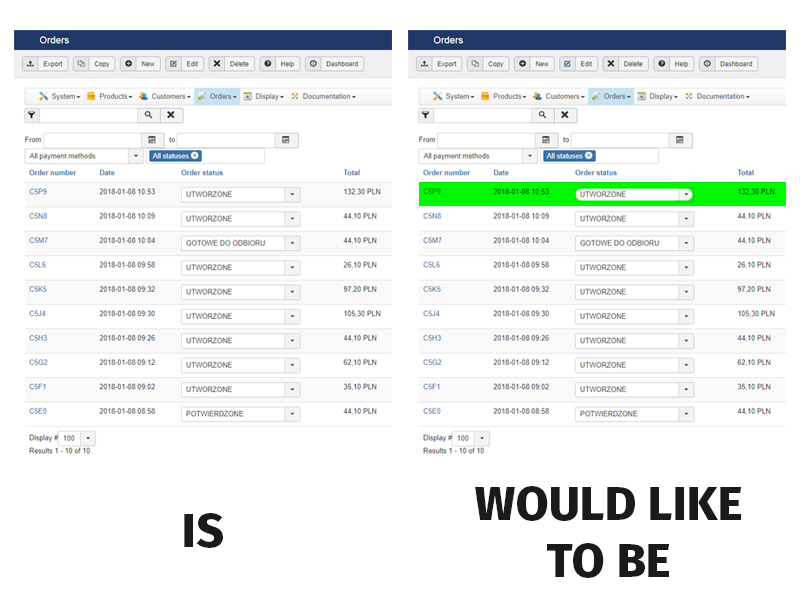
regards
Wojtek
-- Joomla version -- : Joomla! 3.8.3
Hello,
I'd like to have different row color on order listing, on "created" status. (default status).
Shop is used for handling take aways in restaurant, and I want it to be visible from the distance (everything is set up on tablet).
Thanks to this Waitress will notice new order, when just passing next to it)..perfect one would be if it could pulsate in any way (big green dot, or while row, etc, but color (lts say green) will be sufficient in the beginning ). After status change, color would be "normal" as it is now.
regards
Wojtek
Please Log in or Create an account to join the conversation.

8 years 8 months ago #285569
by Jerome
Jerome - Obsidev.com
HikaMarket & HikaSerial developer / HikaShop core dev team.
Replied by Jerome on topic Order listing - row color
Hello,
It would require some view override (backend / order / listing) and a bit of CSS override.
The idea is to add a classname of the "tr" depending the order status namekey and then with the CSS, change the content background color (depending the classname, only for the targeted values).
For more details about customization :
www.hikashop.com/support/documentation/1...ize-the-display.html
Regards,
It would require some view override (backend / order / listing) and a bit of CSS override.
The idea is to add a classname of the "tr" depending the order status namekey and then with the CSS, change the content background color (depending the classname, only for the targeted values).
For more details about customization :
www.hikashop.com/support/documentation/1...ize-the-display.html
Regards,
Jerome - Obsidev.com
HikaMarket & HikaSerial developer / HikaShop core dev team.
Please Log in or Create an account to join the conversation.
- freshtomato
-
Topic Author
- Offline
Less
More
- Posts: 5
- Thank you received: 0
8 years 8 months ago #285582
by freshtomato
Replied by freshtomato on topic Order listing - row color
Yeap, i figured it will propably go to change this frome mentioned listing viev.
And adding class to
and adding class to line 123 on default status <tr class="row<?php echo $k; ?>">
But since i'm not much of a javascript specialist, would you be able to provide mi with such a code, that wont interfere with the one above (line 177)
And adding class to
Code:
<td class="hikashop_order_status_value">
<?php
if($this->manage && !$this->popup){
$doc = JFactory::getDocument();
$doc->addScriptDeclaration(' var '."default_filter_status_".$row->order_id.'=\''.$row->order_status.'\'; ');
echo $this->category->display("filter_status_".$row->order_id,$row->order_status,'onchange="if(this.value==default_filter_status_'.$row->order_id.'){return;} hikashop.openBox(\'status_change_link\',\''.hikashop_completeLink('order&task=changestatus&order_id='.$row->order_id,true).'&status=\'+this.value);this.value=default_filter_status_'.$row->order_id.';if(typeof(jQuery)!=\'undefined\'){jQuery(this).trigger(\'liszt:updated\');}"');
} else {
echo $row->order_status;
}
?>
</td>
and adding class to line 123 on default status <tr class="row<?php echo $k; ?>">
But since i'm not much of a javascript specialist, would you be able to provide mi with such a code, that wont interfere with the one above (line 177)
Please Log in or Create an account to join the conversation.

Less
More
- Posts: 12953
- Thank you received: 1778
8 years 8 months ago #285589
by Mohamed Thelji
Replied by Mohamed Thelji on topic Order listing - row color
Hello,
As Jerome said, you'll just have to use some PHP code through the file " backend / order / listing " to properly add an HTML class to the "tr" depending on the order status namekey, and then apply some CSS code :
www.hikashop.com/support/documentation/1...the-display.html#css
So you won't have to use any JavaScipt code.
As Jerome said, you'll just have to use some PHP code through the file " backend / order / listing " to properly add an HTML class to the "tr" depending on the order status namekey, and then apply some CSS code :
www.hikashop.com/support/documentation/1...the-display.html#css
So you won't have to use any JavaScipt code.
Please Log in or Create an account to join the conversation.
- freshtomato
-
Topic Author
- Offline
Less
More
- Posts: 5
- Thank you received: 0
8 years 8 months ago #285651
by freshtomato
Replied by freshtomato on topic Order listing - row color
Yes, but to do that i need "name" attribute of <select>, and that is generetad depending on orders ID which makes it too difiicult for me at least.
If there is another way, please provide a solution with the code, not just statment, that i need to change something in it (that one is obvious)
Regards
Wojtek
If there is another way, please provide a solution with the code, not just statment, that i need to change something in it (that one is obvious)
Regards
Wojtek
Please Log in or Create an account to join the conversation.

8 years 8 months ago #285654
by nicolas
Replied by nicolas on topic Order listing - row color
Hi,
It's nothing complex, it doesn't require any javascript and only basic PHP. You could just change the code:
<tr class="row<?php echo $k; ?>">
to:
<tr class="row<?php echo $k; ?>" <?php if($row->order_status == 'created') echo 'style="background-color: green !important;"'; ?>>
in the order / listing.php
Please understand that customization is not included in the "user support" we provide with HikaShop which is there to help you use it not customizing it.
It's nothing complex, it doesn't require any javascript and only basic PHP. You could just change the code:
<tr class="row<?php echo $k; ?>">
to:
<tr class="row<?php echo $k; ?>" <?php if($row->order_status == 'created') echo 'style="background-color: green !important;"'; ?>>
in the order / listing.php
Please understand that customization is not included in the "user support" we provide with HikaShop which is there to help you use it not customizing it.
Please Log in or Create an account to join the conversation.
Time to create page: 0.226 seconds