
- Posts: 90
- Thank you received: 2
Sales Tax Change
- BounceHouseOwner
-
 Topic Author
- Offline
Less
More
8 years 5 months ago #292054
by BounceHouseOwner
Sales Tax Change was created by BounceHouseOwner
-- HikaShop version -- : 3.4.0
-- Joomla version -- : 3.8.7
-- PHP version -- : 7.0
Sales tax rate has changed. I added a new rate because I didn't want to change the current rate. The current items are not reflecting the new rate. When I add a new item it shows the new rate. Please advise what I am doing wrong.
-- Joomla version -- : 3.8.7
-- PHP version -- : 7.0
Sales tax rate has changed. I added a new rate because I didn't want to change the current rate. The current items are not reflecting the new rate. When I add a new item it shows the new rate. Please advise what I am doing wrong.
Please Log in or Create an account to join the conversation.
- BounceHouseOwner
-
Topic Author
- Offline
Less
More
- Posts: 90
- Thank you received: 2
8 years 5 months ago #292057
by BounceHouseOwner
Replied by BounceHouseOwner on topic Sales Tax Change
Tax is not showing up at all now...
Please Log in or Create an account to join the conversation.

8 years 5 months ago #292073
by nicolas
Replied by nicolas on topic Sales Tax Change
Hi,
You should select the same tax category in your tax rule.
HikaShop will match the tax rule with the products based on the "tax category". So if the "tax category" in the product is different than the "tax category" in your tax rule, then the tax rule won't apply its tax rate.
You should select the same tax category in your tax rule.
HikaShop will match the tax rule with the products based on the "tax category". So if the "tax category" in the product is different than the "tax category" in your tax rule, then the tax rule won't apply its tax rate.
Please Log in or Create an account to join the conversation.
- BounceHouseOwner
-
Topic Author
- Offline
Less
More
- Posts: 90
- Thank you received: 2
8 years 5 months ago #292109
by BounceHouseOwner
Replied by BounceHouseOwner on topic Sales Tax Change
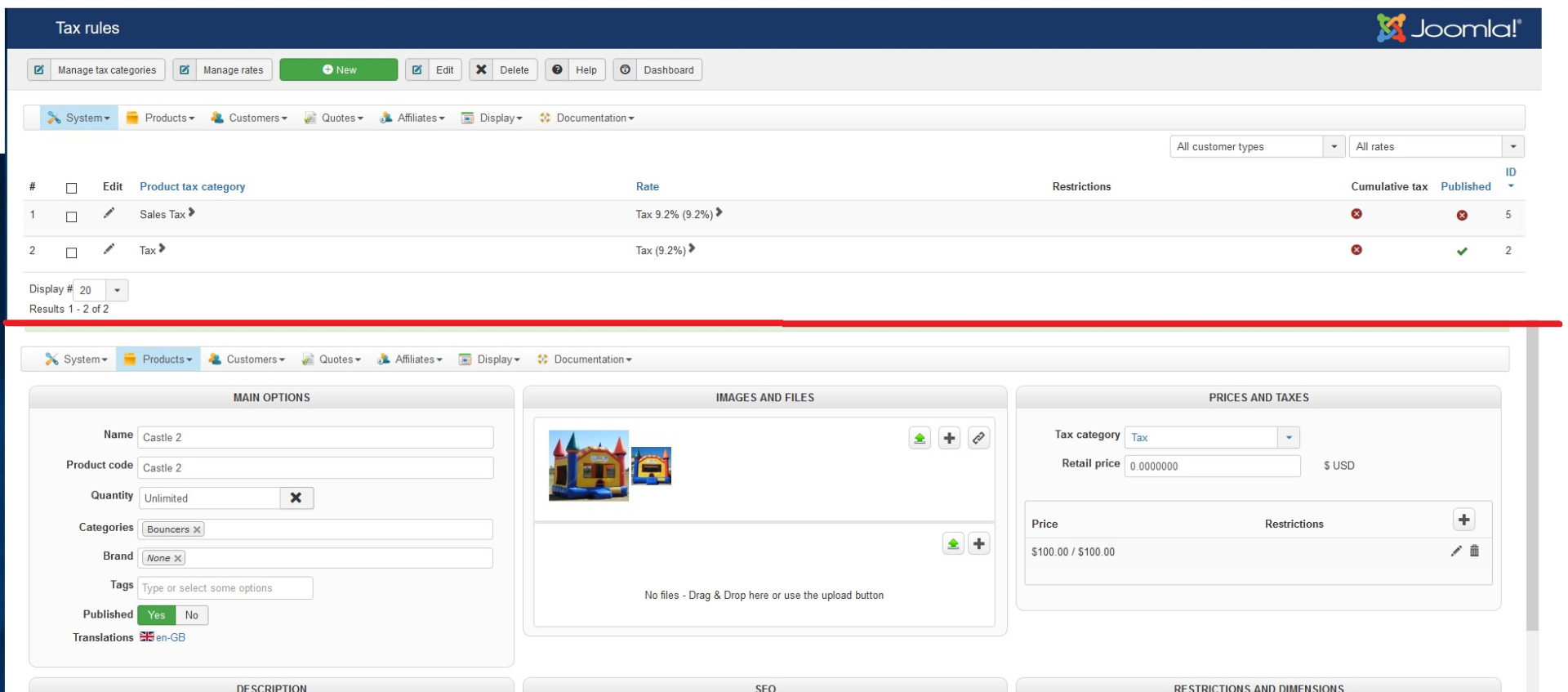
Right, so as you can see in the 3rd image, there are 2 Tax Rules set up:
Tax (Published)
Sales Tax (not published)
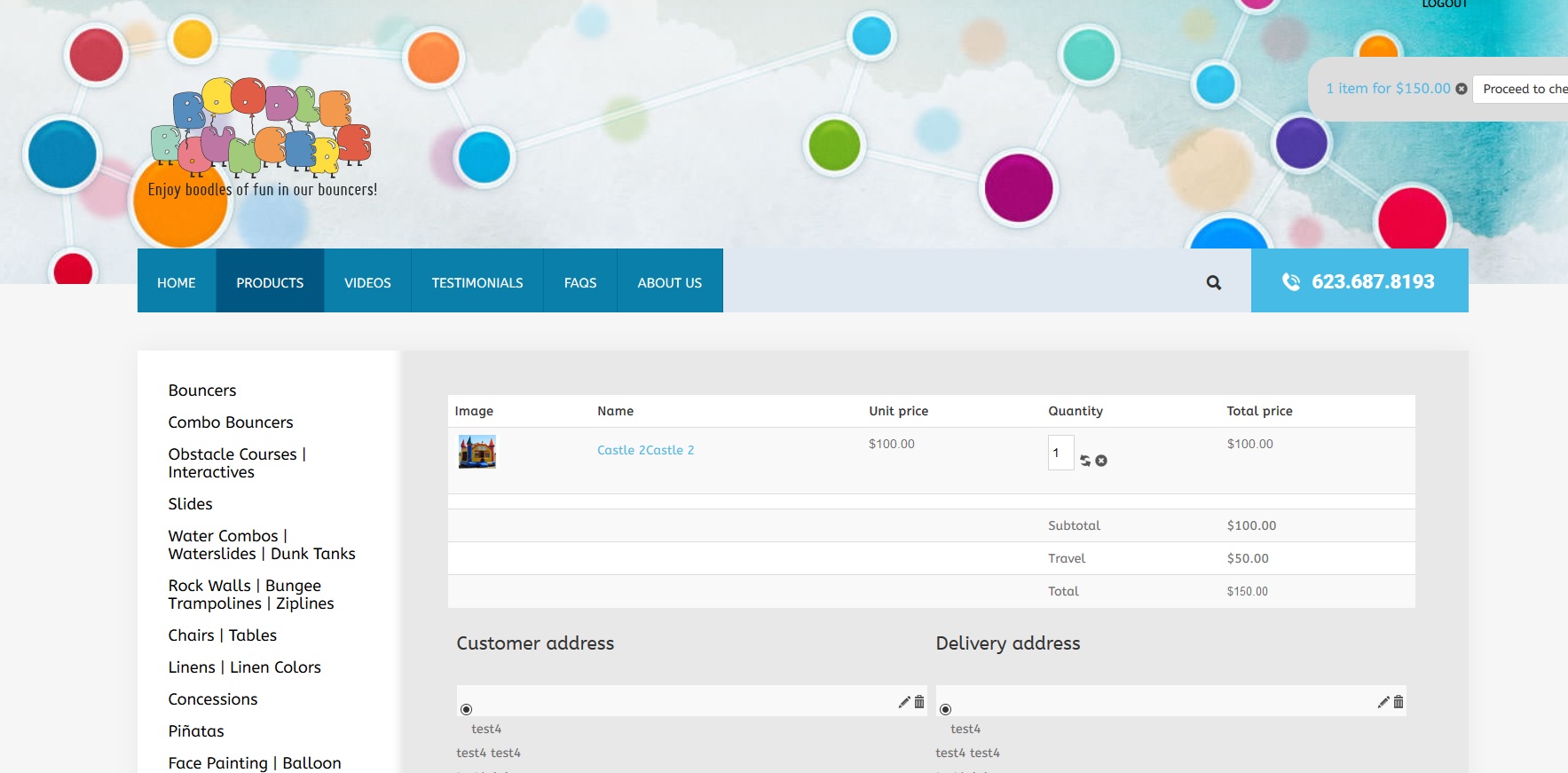
And the Tax Category selected for the item is Tax (published) and yet in the 1st image (the shopping cart for that item), the tax is not showing up.
If I Switch to Sales Tax (for the category) and publish Sales Tax, it shows up.
Tax (Published)
Sales Tax (not published)
And the Tax Category selected for the item is Tax (published) and yet in the 1st image (the shopping cart for that item), the tax is not showing up.
If I Switch to Sales Tax (for the category) and publish Sales Tax, it shows up.
Please Log in or Create an account to join the conversation.
- BounceHouseOwner
-
Topic Author
- Offline
Less
More
- Posts: 90
- Thank you received: 2
8 years 5 months ago #292122
by BounceHouseOwner
Replied by BounceHouseOwner on topic Sales Tax Change
I reinstalled the program and it's working now.
Please Log in or Create an account to join the conversation.

Less
More
- Posts: 12953
- Thank you received: 1778
8 years 5 months ago #292136
by Mohamed Thelji
Replied by Mohamed Thelji on topic Sales Tax Change
Hello,
Thank you for your feedback !
Thank you for your feedback !
Please Log in or Create an account to join the conversation.
Time to create page: 0.201 seconds