

- Posts: 89
- Thank you received: 2
Order Email Text when Shipping Amount is added
5 years 7 months ago - 5 years 7 months ago #329931
by Uriel
Order Email Text when Shipping Amount is added was created by Uriel
-- HikaShop version -- : 4.4.0
-- Joomla version -- : 3.9.22
-- Error-message(debug-mod must be tuned on) -- : N/A
Good Day Hikashop! I hope you are all doing very well!
I have a store where I can't automatically include the Shipping Ammount.
I then add this afterwards on the Order and I click : Save & Notify...
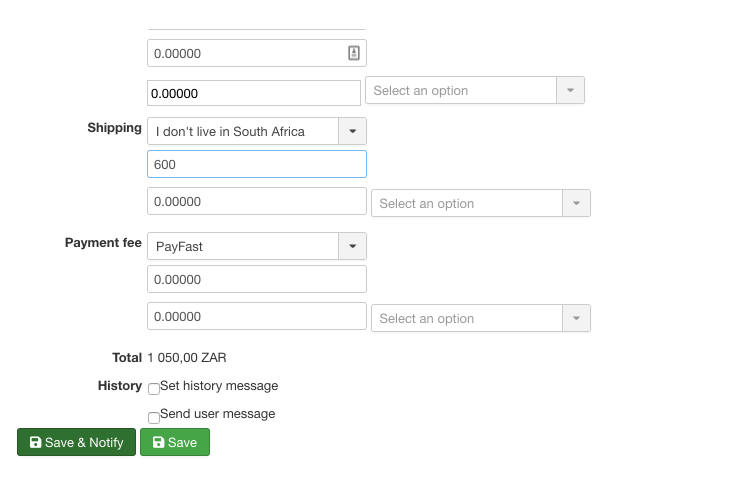
This is all good except the email that the user gets, states nothing about the fact that the Shipping Ammount has now been added...

This doesn't make any sense and I need a way to let that person know what has gone down on his Order?
Please point me in the right direction to solve this?
-- Joomla version -- : 3.9.22
-- Error-message(debug-mod must be tuned on) -- : N/A
Good Day Hikashop! I hope you are all doing very well!
I have a store where I can't automatically include the Shipping Ammount.
I then add this afterwards on the Order and I click : Save & Notify...
This is all good except the email that the user gets, states nothing about the fact that the Shipping Ammount has now been added...
This doesn't make any sense and I need a way to let that person know what has gone down on his Order?
Please point me in the right direction to solve this?
Last edit: 5 years 7 months ago by Uriel.
Please Log in or Create an account to join the conversation.

5 years 7 months ago #329938
by nicolas
Replied by nicolas on topic Order Email Text when Shipping Amount is added
Hi,
If you want to add some text to the email to explain to the user what's going on I would recommend using the "save" button and not the "save & notify" button.
Then, you can use the "email" button at the top of the order details page and in the preview popup, you can add your text to the customer.
Best regards,
Nicolas
If you want to add some text to the email to explain to the user what's going on I would recommend using the "save" button and not the "save & notify" button.
Then, you can use the "email" button at the top of the order details page and in the preview popup, you can add your text to the customer.
Best regards,
Nicolas
Please Log in or Create an account to join the conversation.
Time to create page: 0.165 seconds