
- Posts: 220
- Thank you received: 12
Move address information to customer information
- joshualdouglas
-
 Topic Author
- Offline
Less
More
5 years 3 months ago #333924
by joshualdouglas
Move address information to customer information was created by joshualdouglas
-- HikaShop version -- : 4.4.2
-- Joomla version -- : 3.9.26
-- PHP version -- : 5.6.40
Continued from here - www.hikashop.com/forum/17-serial-how-to/...riptions.html#333892
Hello,
I am trying to move this - See screenshot A1 -
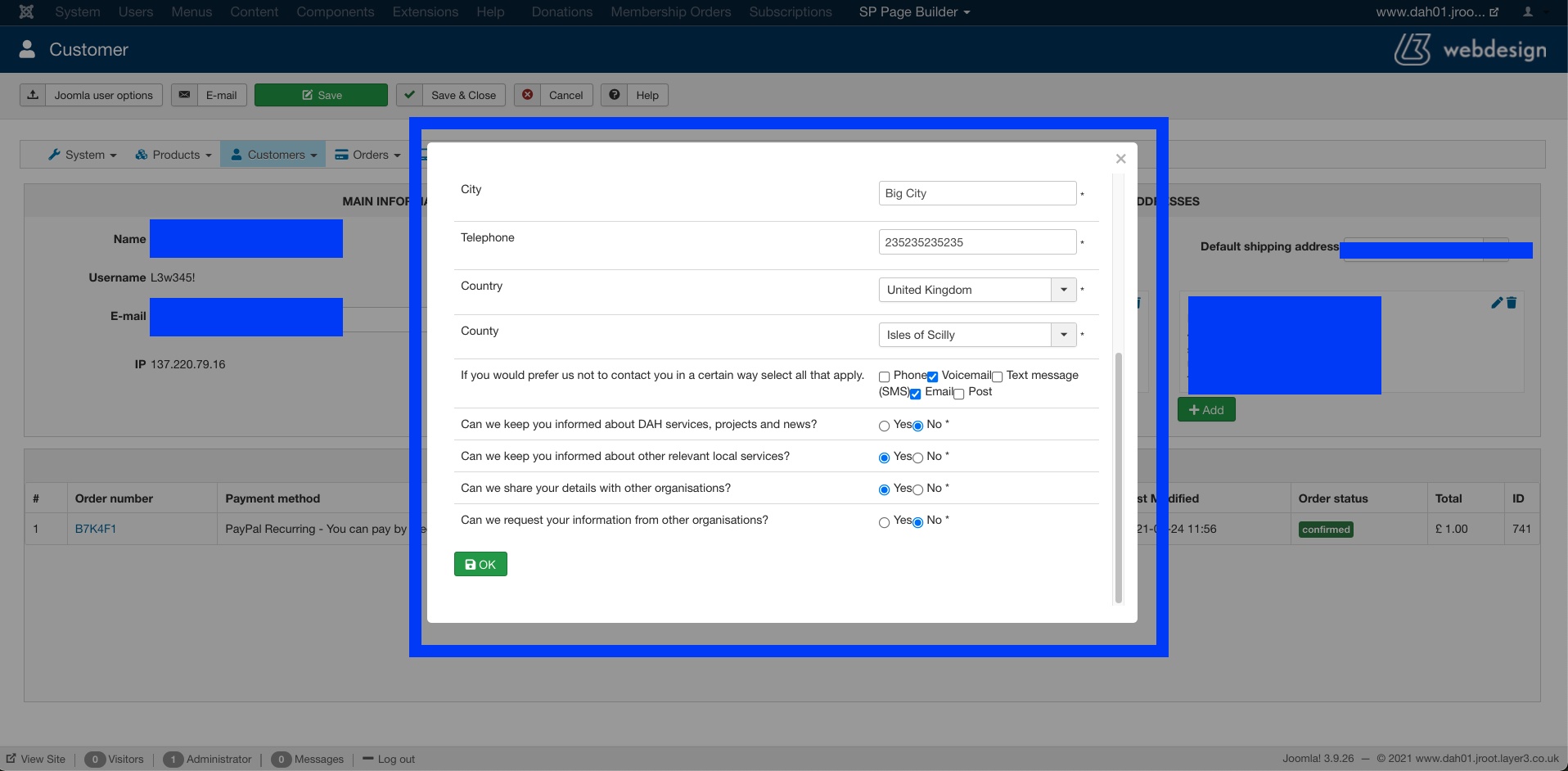
to
Here - See screenshot B1 -
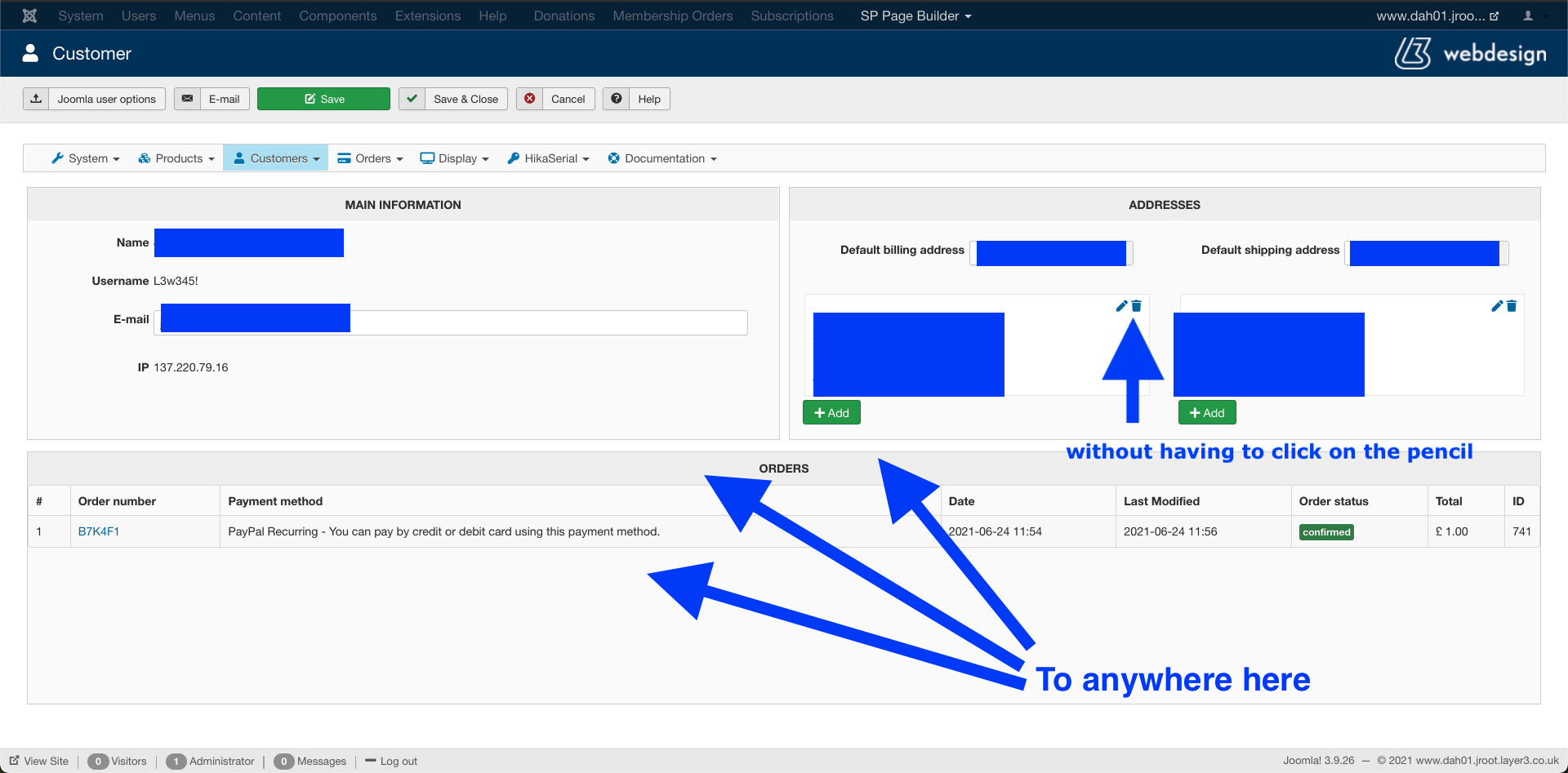
Is this possible?
Thanks
-- Joomla version -- : 3.9.26
-- PHP version -- : 5.6.40
Continued from here - www.hikashop.com/forum/17-serial-how-to/...riptions.html#333892
Hello,
I am trying to move this - See screenshot A1 -
to
Here - See screenshot B1 -
Is this possible?
Thanks
Please Log in or Create an account to join the conversation.

5 years 3 months ago - 5 years 3 months ago #333929
by nicolas
Replied by nicolas on topic Move address information to customer information
Hi,
Nothing is impossible. Supposing you're a skilled PHP developer with one or two days of free time ahead of you, it's possible to create a view override of that page to display directly the billing/shipping address fields on the use form page and develop a custom plugin to process the address data when you save the user form page.
If you're not a developer, and don't want to spend several hundred euros for a developer to work on that for you, then it's not possible.
Nothing is impossible. Supposing you're a skilled PHP developer with one or two days of free time ahead of you, it's possible to create a view override of that page to display directly the billing/shipping address fields on the use form page and develop a custom plugin to process the address data when you save the user form page.
If you're not a developer, and don't want to spend several hundred euros for a developer to work on that for you, then it's not possible.
Last edit: 5 years 3 months ago by nicolas.
Please Log in or Create an account to join the conversation.
- joshualdouglas
-
Topic Author
- Offline
Less
More
- Posts: 220
- Thank you received: 12
5 years 3 months ago #333947
by joshualdouglas
Replied by joshualdouglas on topic Move address information to customer information
:'C
Please Log in or Create an account to join the conversation.
- joshualdouglas
-
Topic Author
- Offline
Less
More
- Posts: 220
- Thank you received: 12
5 years 3 months ago #334040
by joshualdouglas
Replied by joshualdouglas on topic Move address information to customer information
Is it also a difficult task to include this in the order of confirmation email to the site owner? Or do I need 1000s or Euros (or Pounds in my case)?
Please Log in or Create an account to join the conversation.
5 years 3 months ago #334047
by nicolas
Replied by nicolas on topic Move address information to customer information
Hi,
I'm not sure what you mean ? The address information linked to the order is already included by default in the email sent to the site owner when an order is created or confirmed.
Could you explain what you mean ?
Or maybe you're talking about custom address fields you've created and for which you didn't add the tags in the "address format" setting of the HikaShop configuration ? In that case, you could simply add the tags in that setting.
Or you could also edit the email notification in the menu System>Emails (Business edition) to add the corresponding tag in the HTML of the email. For example : {VAR:billing_address.xxx}
I'm not sure what you mean ? The address information linked to the order is already included by default in the email sent to the site owner when an order is created or confirmed.
Could you explain what you mean ?
Or maybe you're talking about custom address fields you've created and for which you didn't add the tags in the "address format" setting of the HikaShop configuration ? In that case, you could simply add the tags in that setting.
Or you could also edit the email notification in the menu System>Emails (Business edition) to add the corresponding tag in the HTML of the email. For example : {VAR:billing_address.xxx}
The following user(s) said Thank You: joshualdouglas
Please Log in or Create an account to join the conversation.
- joshualdouglas
-
Topic Author
- Offline
Less
More
- Posts: 220
- Thank you received: 12
5 years 3 months ago #334071
by joshualdouglas
Replied by joshualdouglas on topic Move address information to customer information
Perfect! This has completely fixed my issue. I put my tags into the address format. Thanks a lot!
Please Log in or Create an account to join the conversation.
- joshualdouglas
-
Topic Author
- Offline
Less
More
- Posts: 220
- Thank you received: 12
5 years 3 months ago #334089
by joshualdouglas
Replied by joshualdouglas on topic Move address information to customer information
This technique works great for what I am trying to achieve. My site owner gets the custom fields in an email 
However, I noticed a slight issue. The confirmation email doesn't include the buying customer's email address. I've put in an additional "contact email address" field which solved that issue, but is there another way to display the buying customers email address? No worries if not. It is just a bit clunky for users to have to type their email address twice.
Thanks,
Josh.
However, I noticed a slight issue. The confirmation email doesn't include the buying customer's email address. I've put in an additional "contact email address" field which solved that issue, but is there another way to display the buying customers email address? No worries if not. It is just a bit clunky for users to have to type their email address twice.
Thanks,
Josh.
Please Log in or Create an account to join the conversation.
5 years 3 months ago #334095
by nicolas
Replied by nicolas on topic Move address information to customer information
Hi,
The email address should be in the "reply to" field so if the shop owner hit the reply button of the email, he should see the email address of the customer in the "to".
Otherwise, you can also add it to the email with the tag {VAR:customer.user_email} that you can place in the HTML version of the email. As I said in my previous message, this requires the Business edition.
The email address should be in the "reply to" field so if the shop owner hit the reply button of the email, he should see the email address of the customer in the "to".
Otherwise, you can also add it to the email with the tag {VAR:customer.user_email} that you can place in the HTML version of the email. As I said in my previous message, this requires the Business edition.
The following user(s) said Thank You: joshualdouglas
Please Log in or Create an account to join the conversation.
- joshualdouglas
-
Topic Author
- Offline
Less
More
- Posts: 220
- Thank you received: 12
5 years 3 months ago #334112
by joshualdouglas
Replied by joshualdouglas on topic Move address information to customer information
Hi,
There is no "reply to" in my confirmation emails. I'm pretty sure I remember this being a feature in an older version of Hikashop. Do I need to turn something on?
I don't think I will upgrade to business for the project unless I have to.
Thanks,
Josh.
There is no "reply to" in my confirmation emails. I'm pretty sure I remember this being a feature in an older version of Hikashop. Do I need to turn something on?
I don't think I will upgrade to business for the project unless I have to.
Thanks,
Josh.
Please Log in or Create an account to join the conversation.
5 years 3 months ago #334122
by nicolas
Replied by nicolas on topic Move address information to customer information
Hi,
Well, maybe we aren't talking about the same "confirmation email" since that exact terminology doesn't in HikaShop.
I'm talking about the "order admin notification" email which is sent to the shop owner after an order is created.
If you're talking about the "payment notification" email, sent to the shop owner after the payment plugin receives a payment notification from the payment gateway (and usually confirms the order), then indeed, the reply to is not set there. In fact, that's a good idea of improvement to add that to this email. I'll mark that down for the next version of HikaShop.
Well, maybe we aren't talking about the same "confirmation email" since that exact terminology doesn't in HikaShop.
I'm talking about the "order admin notification" email which is sent to the shop owner after an order is created.
If you're talking about the "payment notification" email, sent to the shop owner after the payment plugin receives a payment notification from the payment gateway (and usually confirms the order), then indeed, the reply to is not set there. In fact, that's a good idea of improvement to add that to this email. I'll mark that down for the next version of HikaShop.
The following user(s) said Thank You: joshualdouglas
Please Log in or Create an account to join the conversation.
- joshualdouglas
-
Topic Author
- Offline
Less
More
- Posts: 220
- Thank you received: 12
5 years 3 months ago #334136
by joshualdouglas
Replied by joshualdouglas on topic Move address information to customer information
Ok thank you 
Please Log in or Create an account to join the conversation.
Time to create page: 0.255 seconds