

- Posts: 86233
- Thank you received: 14225
Add to cart puts nothing in cart
14 years 10 months ago #28565
by nicolas
Re: Add to cart puts nothing in cart was created by nicolas
It could come from a caching problem so you should make sure that the cache of joomla ( in the configuration and the cache plugin ) are deactivated.
Then, you should activate the debug mode option in the configuration of joomla and turn off the option "Use AJAX when possible for add to cart buttons" in the hikashop configuration and try again. Please report if you get an error and what error it is when adding a product in that case.
Then, you should activate the debug mode option in the configuration of joomla and turn off the option "Use AJAX when possible for add to cart buttons" in the hikashop configuration and try again. Please report if you get an error and what error it is when adding a product in that case.
Please Log in or Create an account to join the conversation.

14 years 10 months ago #28551
by scottb50
Replied by scottb50 on topic Add to cart puts nothing in cart
I am having a problem with vibratingIron.com.
If you add an item to cart, the message returned is not the cart page, but a message saying that the cart is empty. Example video: screencast.com/t/FUMrFfDyxbM
Thanks in advance for your help!
If you add an item to cart, the message returned is not the cart page, but a message saying that the cart is empty. Example video: screencast.com/t/FUMrFfDyxbM
Thanks in advance for your help!
Please Log in or Create an account to join the conversation.
14 years 10 months ago #28592
by scottb50
Replied by scottb50 on topic Re: Add to cart puts nothing in cart
Thanks for responding!
I tried clearing all the cache and ran this through debug mode. I still had the problem.
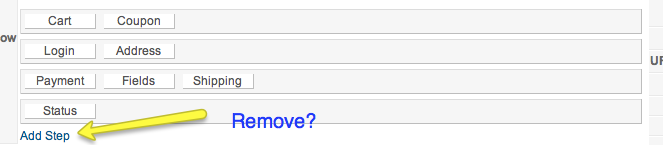
After playing around for a bit, I noticed I had an empty step in my Checkout Workflow. I added a new step ans some processes and it worked fine. The problem was an empty step, but now have a new problem: How do I remove steps? There is an " add step", but no "remove step" How do I do this?
Thanks as always for your help.
I tried clearing all the cache and ran this through debug mode. I still had the problem.
After playing around for a bit, I noticed I had an empty step in my Checkout Workflow. I added a new step ans some processes and it worked fine. The problem was an empty step, but now have a new problem: How do I remove steps? There is an " add step", but no "remove step" How do I do this?
Thanks as always for your help.
Please Log in or Create an account to join the conversation.
14 years 10 months ago #28607
by nicolas
Replied by nicolas on topic Re: Add to cart puts nothing in cart
The checkout workflow does not have any influence on the cart.
If you leave a step empty it will be removed automatically. That's why there is no 'remove step'.
If that's not the case, maybe you downloaded one of the first build of the 1.5.4 which had such problem. So you would have to redownload the package from our website and install it over your current version to have it working.
The option just after the checkout workflow enables you to deactivate the interface so that you can directly interact with the workflow as saved in the database so you can also use that to change the workflow and remove an empty step.
If you leave a step empty it will be removed automatically. That's why there is no 'remove step'.
If that's not the case, maybe you downloaded one of the first build of the 1.5.4 which had such problem. So you would have to redownload the package from our website and install it over your current version to have it working.
The option just after the checkout workflow enables you to deactivate the interface so that you can directly interact with the workflow as saved in the database so you can also use that to change the workflow and remove an empty step.
Please Log in or Create an account to join the conversation.

14 years 10 months ago #30933
by ecovation
Replied by ecovation on topic Re: Add to cart puts nothing in cart
i have the same problem, i have followed the steps above and the error message i get is:
Limit reached. You can't add the product: 2.5kW
The cart is empty
What is the solution?
Limit reached. You can't add the product: 2.5kW
The cart is empty
What is the solution?
Please Log in or Create an account to join the conversation.
14 years 10 months ago #30934
by ecovation
Replied by ecovation on topic Re: Add to cart puts nothing in cart
i have added a step and it worked.... i checked the version andi get the message: You have the latest stable version : 1.5.4
So where do i get the version that works?
So where do i get the version that works?
Please Log in or Create an account to join the conversation.
14 years 10 months ago #30942
by nicolas
Replied by nicolas on topic Re: Add to cart puts nothing in cart
Your problem is different.
That error message means that either there is no quantity for your product or that you set some limits via the limits feature in order to restrict purchases and that your reach these limits. Limits can be set via the limit button on the products listing.
So first please check on that.
That error message means that either there is no quantity for your product or that you set some limits via the limits feature in order to restrict purchases and that your reach these limits. Limits can be set via the limit button on the products listing.
So first please check on that.
Please Log in or Create an account to join the conversation.
14 years 9 months ago #32451
by ecovation
Replied by ecovation on topic Re: Add to cart puts nothing in cart
i have checked and there is no limits set at all... and the quantity for products are all unlimited...
Please Log in or Create an account to join the conversation.
14 years 9 months ago #32469
by nicolas
Replied by nicolas on topic Re: Add to cart puts nothing in cart
Did you change the option "Maximum number of items in the cart" in the Checkout tab of the configuration ?
Normally, it should be unlimited.
Or maybe you set the options "Maximum quantity per order" or "Minimum quantity per order" of your products to something else than the default values ?
Or maybe you have characteristics in your products and the variants of these products have a quantity of 0.
These could potentially bring the same problem.
If that still doesn't work please provide a back end access to your website so that we can check on that.
Normally, it should be unlimited.
Or maybe you set the options "Maximum quantity per order" or "Minimum quantity per order" of your products to something else than the default values ?
Or maybe you have characteristics in your products and the variants of these products have a quantity of 0.
These could potentially bring the same problem.
If that still doesn't work please provide a back end access to your website so that we can check on that.
Please Log in or Create an account to join the conversation.

14 years 9 months ago #32861
by imogenus
Replied by imogenus on topic Re: Add to cart puts nothing in cart
I am also having this problem. I checked version, shut off joomla cach, all products are unlimited, no limit to number of products in cart.
I get the message:
Limit reached. You can't add the product:
The cart is empty
But the behaviour is variable, sometimes I can go to checkout, others I get the message, and sometimes I get the message and it actually removes the objects from the cart. Hope we find a solution.
Thanks for a great cart!
I get the message:
Limit reached. You can't add the product:
The cart is empty
But the behaviour is variable, sometimes I can go to checkout, others I get the message, and sometimes I get the message and it actually removes the objects from the cart. Hope we find a solution.
Thanks for a great cart!
Please Log in or Create an account to join the conversation.
14 years 9 months ago #32876
by nicolas
Replied by nicolas on topic Re: Add to cart puts nothing in cart
Could you give a link to your website so that we can see that ?
Please Log in or Create an account to join the conversation.

14 years 6 months ago #43002
by Crazyhorse
Old and mostly in the way
Replied by Crazyhorse on topic Re: Add to cart puts nothing in cart
I am having the same problem and tearing my hair out... I have to go out for some fresh air before a break something. I have searched all over this and followed the instructions but it doesnt matter what I do I cant get anything with variants (essential) into the cart.
development site is at www.j15.mickturns.com/index.php/micks-products-hika
choose options has stopped working and just tries to add stuff to the cart and fails.
help...
development site is at www.j15.mickturns.com/index.php/micks-products-hika
choose options has stopped working and just tries to add stuff to the cart and fails.
help...
Old and mostly in the way
Please Log in or Create an account to join the conversation.
14 years 6 months ago #43166
by nicolas
Replied by nicolas on topic Re: Add to cart puts nothing in cart
Hi,
Did you change the option "Maximum number of items in the cart" in the Checkout tab of the configuration ?
Normally, it should be unlimited.
Or maybe you set the options "Maximum quantity per order" or "Minimum quantity per order" of your products to something else than the default values ?
Or maybe you have characteristics in your products and the variants of these products have a quantity of 0.
These could potentially bring the same problem.
If that still doesn't work please provide a back end access to your website so that we can check on that.
Did you change the option "Maximum number of items in the cart" in the Checkout tab of the configuration ?
Normally, it should be unlimited.
Or maybe you set the options "Maximum quantity per order" or "Minimum quantity per order" of your products to something else than the default values ?
Or maybe you have characteristics in your products and the variants of these products have a quantity of 0.
These could potentially bring the same problem.
If that still doesn't work please provide a back end access to your website so that we can check on that.
Please Log in or Create an account to join the conversation.
14 years 6 months ago #43547
by Crazyhorse
Old and mostly in the way
Replied by Crazyhorse on topic Re: Add to cart puts nothing in cart
Hmmm.. well in the "Maximum number of items in the cart" it says.. "Only in commercial versions of HikaShop " so I assume that I could not have screwed that up!
Ensured that the products have the default quantities (Unlimited, 0, unlimited) and I click on "Choose option" - it adds the product to the cart with no options (characteristics). That is no good ... The only products for sale are those with options.
Perhaps I screwed it up trying to do postage by weight -- removed all weights (worry about postage later) tedious to do with lots of similar products.. isn't there an easier way to bulk update? Still "Choose option" adds product to cart with no ability to choose an option.
Ok, I unpublished everything and added a two test products making no changes whatsoever to the defaults -- just a title -- button is just "add to cart" as one would expect. So I added a characteristic with two values only adding titles making no other changes. Now buttons have changed to "choose options" clicking on which just adds an item to the cart with no ability to choose options... help.
j15.mickturns.com/index.php/micks-products-hika
Happy to give you back end access if you set up an account I will elevate your privileges (do you need to be superuser or just admin?)...
Ensured that the products have the default quantities (Unlimited, 0, unlimited) and I click on "Choose option" - it adds the product to the cart with no options (characteristics). That is no good ... The only products for sale are those with options.
Perhaps I screwed it up trying to do postage by weight -- removed all weights (worry about postage later) tedious to do with lots of similar products.. isn't there an easier way to bulk update? Still "Choose option" adds product to cart with no ability to choose an option.
Ok, I unpublished everything and added a two test products making no changes whatsoever to the defaults -- just a title -- button is just "add to cart" as one would expect. So I added a characteristic with two values only adding titles making no other changes. Now buttons have changed to "choose options" clicking on which just adds an item to the cart with no ability to choose options... help.
j15.mickturns.com/index.php/micks-products-hika
Happy to give you back end access if you set up an account I will elevate your privileges (do you need to be superuser or just admin?)...
Old and mostly in the way
Please Log in or Create an account to join the conversation.
14 years 6 months ago #43734
by nicolas
Replied by nicolas on topic Re: Add to cart puts nothing in cart
There is a problem in the javascript of the buttons caused by the name of the menu. If you remove the quote from the menu alias, it should then work ok.
Please Log in or Create an account to join the conversation.
14 years 6 months ago #43831
by Crazyhorse
Old and mostly in the way
Replied by Crazyhorse on topic Re: Add to cart puts nothing in cart
Thanks but the apostrophy (Mick's) was not in the alias and I have removed it from the title (see attached screen shot) -- still exhibiting the same behavour. Philip
Old and mostly in the way
Please Log in or Create an account to join the conversation.
14 years 6 months ago #44018
by nicolas
Replied by nicolas on topic Re: Add to cart puts nothing in cart
Could you check that the "Product SEF name" and "Category SEF name" of the configuration of HikaShop don't have a quote ?
Please Log in or Create an account to join the conversation.
14 years 6 months ago #44339
by Crazyhorse

was: Product SEF name -- Mick's products
Apostrophy removed even though it is correct use of an apostrophy!
Magic... thank you so much. Pleased that it wasn't entirly my stupidity.. now seems to work and I can continue experimenting with Hika Shop and try to understand the postage stuff (pity you dont have a UK royal Mail option!).
Kind Regards
Philip
Old and mostly in the way
Replied by Crazyhorse on topic Re: Add to cart puts nothing in cart
was: Product SEF name -- Mick's products
Apostrophy removed even though it is correct use of an apostrophy!
Magic... thank you so much. Pleased that it wasn't entirly my stupidity.. now seems to work and I can continue experimenting with Hika Shop and try to understand the postage stuff (pity you dont have a UK royal Mail option!).
Kind Regards
Philip
Old and mostly in the way
Please Log in or Create an account to join the conversation.
Time to create page: 0.243 seconds