

- Posts: 21
- Thank you received: 0
Coupons
14 years 10 months ago - 14 years 10 months ago #29419
by Andreas
Hi, I'm not sure if this is a bug or my configuration but nether-the-less frustrating.
Please see attached screen dump. When adding a coupon the screen attached shows, basically it shows a Tax total and a grand total but does not reflect the discount ( don't want the tax total to appear at all). Also if you delete the items in a Cart it still shows the coupon as 1 item at Zero cost.
Is this just a workflow issue? or is there a problem? can you please advise how I get around this.
Also is it possible to change the word Coupon to Voucher?
Thank you
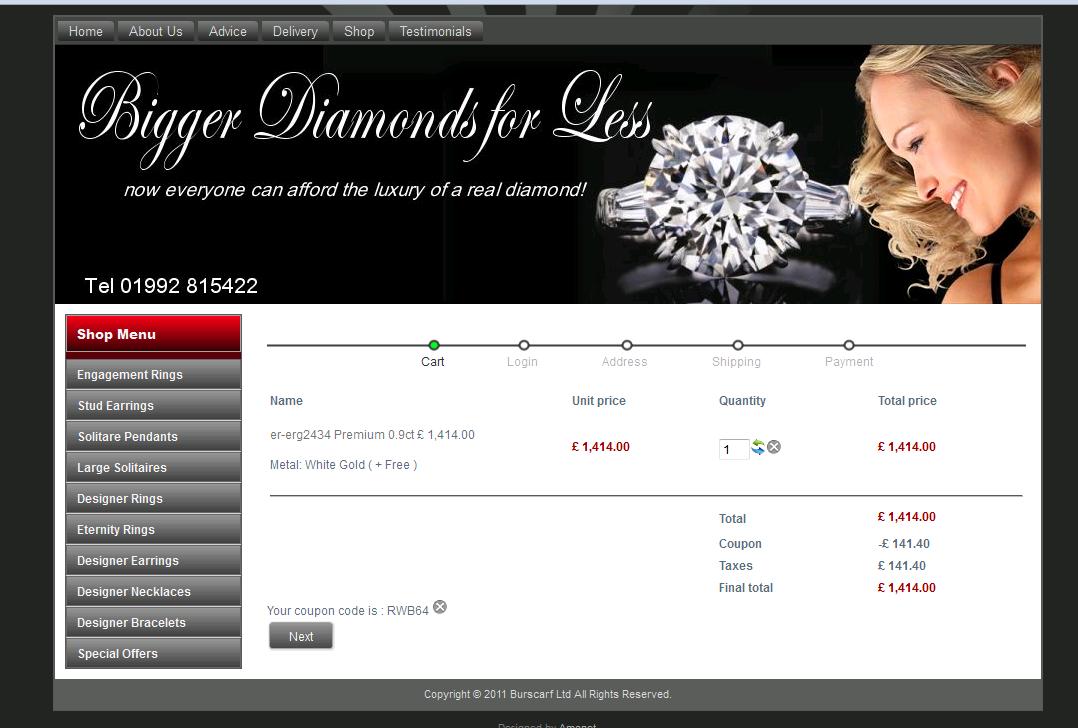
Please see attached screen dump. When adding a coupon the screen attached shows, basically it shows a Tax total and a grand total but does not reflect the discount ( don't want the tax total to appear at all). Also if you delete the items in a Cart it still shows the coupon as 1 item at Zero cost.
Is this just a workflow issue? or is there a problem? can you please advise how I get around this.
Also is it possible to change the word Coupon to Voucher?
Thank you
Last edit: 14 years 10 months ago by Andreas. Reason: coupon spelt incorrectly
Please Log in or Create an account to join the conversation.

14 years 10 months ago #29440
by nicolas
Replied by nicolas on topic Re: Coupons
Hi,
It sounds like you have the same problem as on that thread:
www.hikashop.com/en/support/forum/3-bug-...to-taxes-.html#28622
Please download again HikaShop from our website and update your current version. That should fix that problem.
If you want to change coupon to voucher, you can do so by overriding the translations like any other text in HikaShop as explained there:
www.hikashop.com/en/download/languages.html#modify
It sounds like you have the same problem as on that thread:
www.hikashop.com/en/support/forum/3-bug-...to-taxes-.html#28622
Please download again HikaShop from our website and update your current version. That should fix that problem.
If you want to change coupon to voucher, you can do so by overriding the translations like any other text in HikaShop as explained there:
www.hikashop.com/en/download/languages.html#modify
Please Log in or Create an account to join the conversation.
Time to create page: 0.127 seconds