

- Posts: 41
- Thank you received: 0
Custom Fields Not Showing up in Front-End
14 years 9 months ago - 14 years 9 months ago #32499
by gteigland
Custom Fields Not Showing up in Front-End was created by gteigland
I created a custom field to show up for my products after purchasing the business edition. And yes I did select radio button to show on Front-end as yes. The preview also shows what it should look like but when I go to my product it only says "Specifications" and does not show the field in which my shoppers can enter the info.
Any ideas here.
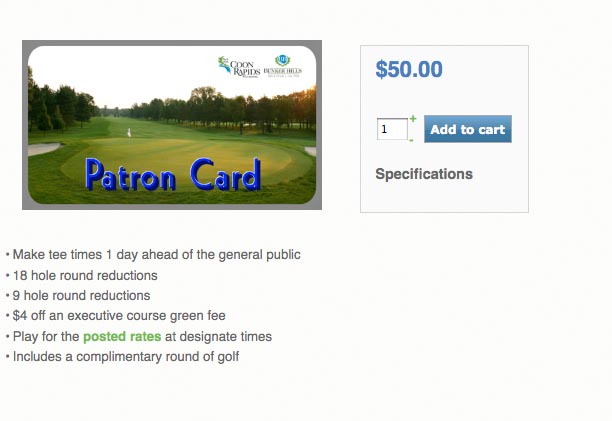
Any ideas here.
Last edit: 14 years 9 months ago by gteigland. Reason: spelling
Please Log in or Create an account to join the conversation.
14 years 9 months ago #32500
by gteigland
Replied by gteigland on topic Re: Custom Fields Not Showing up in Front-End
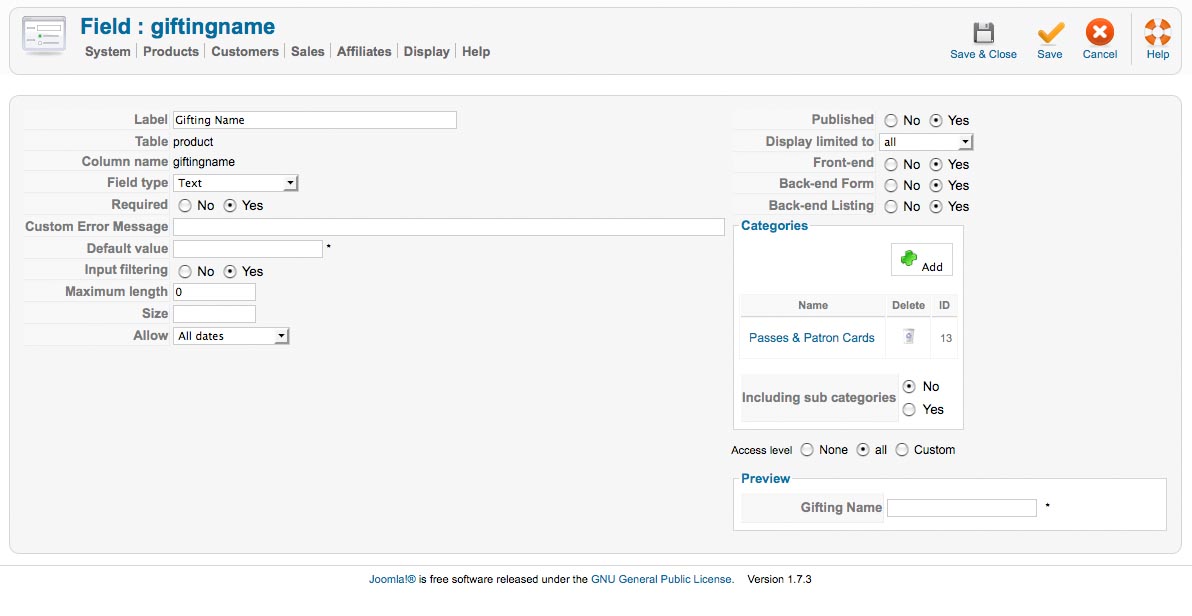
Here's what the backend looks like.
Please Log in or Create an account to join the conversation.
14 years 9 months ago - 14 years 9 months ago #32501
by gteigland
Replied by gteigland on topic Re: Custom Fields Not Showing up in Front-End
Never mind . I realized I had to put it under "Item" and not "Product" for the table.
What's the difference? Does it have to do with options?
1. Also can you specify the field for a certain product within a category or is it only for categories?
2. Is there a way to create a text heading above all the custon text fields. For example "Fill out Form"
3. Can I move the custom text fields for the product display below the "add to cart" function?
Thanks!
I suppose you can move this out of "Bug Report" since I'm the bug I don't know how to do that.
What's the difference? Does it have to do with options?
1. Also can you specify the field for a certain product within a category or is it only for categories?
2. Is there a way to create a text heading above all the custon text fields. For example "Fill out Form"
3. Can I move the custom text fields for the product display below the "add to cart" function?
Thanks!
I suppose you can move this out of "Bug Report" since I'm the bug
I don't know how to do that.
Last edit: 14 years 9 months ago by gteigland. Reason: spelling and adding
Please Log in or Create an account to join the conversation.

14 years 9 months ago #32526
by nicolas
Replied by nicolas on topic Re: Custom Fields Not Showing up in Front-End
With "product" custom fields, you can add information to your products. So the fields appear in the product edition page, not the product page.
With "item" custom fields , it's your customers who can add information to the products they buy.
1. You can only restrict custom fields to categories. However, since one product can have several categories, you can always create a new category, leave it unpbulished, add it to your product and use it in your custom field so that the custom field will only display for that product.
2. You mean like a custom field of the type "custom text" ?
3. Yes. you need to edit the file "show" of the view "product" via the menu Display->Views and move the code:
<div id="hikashop_product_quantity_main" class="hikashop_product_quantity_main"><?php
$this->row =& $this->element;
$this->ajax = 'if(hikashopCheckChangeForm(\'item\',\'hikashop_product_form\')){ return hikashopModifyQuantity(\''.$this->row->product_id.'\',field,1'.$form.'); } else { return false; }';
$this->setLayout('quantity');
echo $this->loadTemplate();
?>
</div>
<?php
before the code:
if(!$this->params->get('catalogue') && ($this->config->get('display_add_to_cart_for_free_products') || !empty($this->element->prices))){
if(!empty($this->itemFields)){
and change the line:
$form = '';
to:
$form = ',\'hikashop_product_form\'';
With "item" custom fields , it's your customers who can add information to the products they buy.
1. You can only restrict custom fields to categories. However, since one product can have several categories, you can always create a new category, leave it unpbulished, add it to your product and use it in your custom field so that the custom field will only display for that product.
2. You mean like a custom field of the type "custom text" ?
3. Yes. you need to edit the file "show" of the view "product" via the menu Display->Views and move the code:
<div id="hikashop_product_quantity_main" class="hikashop_product_quantity_main"><?php
$this->row =& $this->element;
$this->ajax = 'if(hikashopCheckChangeForm(\'item\',\'hikashop_product_form\')){ return hikashopModifyQuantity(\''.$this->row->product_id.'\',field,1'.$form.'); } else { return false; }';
$this->setLayout('quantity');
echo $this->loadTemplate();
?>
</div>
<?php
before the code:
if(!$this->params->get('catalogue') && ($this->config->get('display_add_to_cart_for_free_products') || !empty($this->element->prices))){
if(!empty($this->itemFields)){
and change the line:
$form = '';
to:
$form = ',\'hikashop_product_form\'';
Please Log in or Create an account to join the conversation.
14 years 9 months ago #32847
by gteigland
Replied by gteigland on topic Re: Custom Fields Not Showing up in Front-End
Thanks that all worked great! Your product and service are unbelievable. Thanks!
Please Log in or Create an account to join the conversation.
9 years 2 weeks ago #278085
by dvddvd
Replied by dvddvd on topic Re: Custom Fields Not Showing up in Front-End
Hello,
the same thing happens in the HikaShop Business version: 3.2.0, I can not find the specified code,
Thank you
the same thing happens in the HikaShop Business version: 3.2.0, I can not find the specified code,
Thank you
Please Log in or Create an account to join the conversation.

9 years 2 weeks ago #278091
by Jerome
Jerome - Obsidev.com
HikaMarket & HikaSerial developer / HikaShop core dev team.
Also helping the HikaShop support team when having some time or couldn't sleep.
By the way, do not send me private message, use the "contact us" form instead.
Replied by Jerome on topic Re: Custom Fields Not Showing up in Front-End
Hello,
That topic is 5 years old.
So it's sure that you do not have the same issue.
But you do have some misconfiguration problem.
Please check the custom field configuration and open a new thread if needed.
Regards,
That topic is 5 years old.
So it's sure that you do not have the same issue.
But you do have some misconfiguration problem.
Please check the custom field configuration and open a new thread if needed.
Regards,
Jerome - Obsidev.com
HikaMarket & HikaSerial developer / HikaShop core dev team.
Also helping the HikaShop support team when having some time or couldn't sleep.
By the way, do not send me private message, use the "contact us" form instead.
The following user(s) said Thank You: dvddvd
Please Log in or Create an account to join the conversation.
Time to create page: 0.204 seconds