
- Posts: 9
- Thank you received: 0
"File not found" error !!
- degritscio
-
 Topic Author
- Offline
Less
More
14 years 3 months ago #54324
by degritscio
"File not found" error !! was created by degritscio
I have a site for donwloadable media and files, i have 2 categories , one for sale video, the second for free video; the firt categories of product have no problem, the second report an error when u try to download the files for free...instead to download files...open another window in the same page with the reporting error "File not found", but the files is there with the right directory and all the right configurations like the other files, someone can help me?
Please Log in or Create an account to join the conversation.

14 years 3 months ago #54331
by nicolas
Replied by nicolas on topic Re: "File not found" error !!
If the system says that the file is not found and that it works for other files, all I can think of that the file is not there anymore.
Could you check that the files are in the media/com_hikashop/upload/safe folder ?
Could you check that the files are in the media/com_hikashop/upload/safe folder ?
Please Log in or Create an account to join the conversation.
- degritscio
-
Topic Author
- Offline
Less
More
- Posts: 9
- Thank you received: 0
14 years 3 months ago #54348
by degritscio
Replied by degritscio on topic Re: "File not found" error !!
My free files to download are in this directory /public_html/freedownload , the other files to sell with no problems are here /public_html/downloads, in the folder u say me media/com_hikashop/upload/safe there is no files, just htaccess file; i try to put here a files to donwload while changing the directory in the property of the free file, but nothing......
Please Log in or Create an account to join the conversation.
14 years 3 months ago #54356
by nicolas
Replied by nicolas on topic Re: "File not found" error !!
All the files should be in the same folder. That's why it's not working...
Please Log in or Create an account to join the conversation.
- degritscio
-
Topic Author
- Offline
Less
More
- Posts: 9
- Thank you received: 0
14 years 3 months ago - 14 years 3 months ago #54367
by degritscio
Replied by degritscio on topic Re: "File not found" error !!
Sorry same problems... originally all the files , free and to sell, was in public_html/downloads.....then i have try to separate folder...but the problem persist...what can i try to do now?
mmh i dont know if this can be hopeful...i have two category...files "to sell" and files "free" ... i have made 2 menus in joomla in the main menu one called "video" and the other called "free preview".. i have made the same category and put free and to sell files in the same category too?
mmh i dont know if this can be hopeful...i have two category...files "to sell" and files "free" ... i have made 2 menus in joomla in the main menu one called "video" and the other called "free preview".. i have made the same category and put free and to sell files in the same category too?
Last edit: 14 years 3 months ago by degritscio.
Please Log in or Create an account to join the conversation.
14 years 3 months ago #54407
by nicolas
Replied by nicolas on topic Re: "File not found" error !!
Can you give a screenshot of the configuration you have in the Files tab of the configuration and a link to a product page with free downloads ?
Please Log in or Create an account to join the conversation.
- degritscio
-
Topic Author
- Offline
Less
More
- Posts: 9
- Thank you received: 0
14 years 3 months ago #54431
by degritscio
Replied by degritscio on topic Re: "File not found" error !!
i sent u a pm with the info... thx
Please Log in or Create an account to join the conversation.
14 years 3 months ago #54460
by nicolas
Replied by nicolas on topic Re: "File not found" error !!
Your filename is NOT correct. It should only be Andrea2.wmv, the rest being added automatically by HikaShop based on your upload secure folder option of the configuration.
Please Log in or Create an account to join the conversation.
- degritscio
-
Topic Author
- Offline
Less
More
- Posts: 9
- Thank you received: 0
14 years 3 months ago #54480
by degritscio
Replied by degritscio on topic Re: "File not found" error !!
I found the problem..is not the file name or other is just the directory...the dirctory was correct but seems that for free download don't need the public_html at the start...so all is ok for media/com_hikashop/upload/safe/video.wmv but if i change in public_html/media/com_hikashop/upload/safe/video.wmv HS no found the file....
no filename or other is the problem, thanks!
no filename or other is the problem, thanks!
Please Log in or Create an account to join the conversation.
13 years 4 weeks ago #121200
by aijosh
Replied by aijosh on topic "File not found" error !!
Hi.
I am having the "File not found" error on my downloadable products.
The links work fine on the offline localhost but when I tried them online, I keep getting "File not found".
I tried troubleshooting and noticed the download links only worked when I re-created them online (no editing or change of config. Just add new file > use the same path as the files returning "File not found" > change the file name) and voila! it works.
Also if I used the same file name as the old one to create the new download links, I get the same "File not found" error on such links.
Is there anything that can be done to fix this. The products are over 100 and variants too, so manually recreating each download link is going to be a very daunting task. I also tried checking the database for clues but no luck.
Thanks
I am having the "File not found" error on my downloadable products.
The links work fine on the offline localhost but when I tried them online, I keep getting "File not found".
I tried troubleshooting and noticed the download links only worked when I re-created them online (no editing or change of config. Just add new file > use the same path as the files returning "File not found" > change the file name) and voila! it works.
Also if I used the same file name as the old one to create the new download links, I get the same "File not found" error on such links.
Is there anything that can be done to fix this. The products are over 100 and variants too, so manually recreating each download link is going to be a very daunting task. I also tried checking the database for clues but no luck.
Thanks
Please Log in or Create an account to join the conversation.

13 years 4 weeks ago #121218
by Xavier
Replied by Xavier on topic "File not found" error !!
Hi,
The files are in the table "#__hikashop_file", and the link to the image is generally a relative url.
There is only the file name.
Thanks to check that your files are in the folder "media\com_hikashop\upload" on your online site.
And in the database, check if the url is a relative one. Else remove "media\com_hikashop\upload" in the path.
Another issue could be a file permissions, thanks to check that the files are readable. (664 rights, and 775 for the folder)
The files are in the table "#__hikashop_file", and the link to the image is generally a relative url.
There is only the file name.
Thanks to check that your files are in the folder "media\com_hikashop\upload" on your online site.
And in the database, check if the url is a relative one. Else remove "media\com_hikashop\upload" in the path.
Another issue could be a file permissions, thanks to check that the files are readable. (664 rights, and 775 for the folder)
Please Log in or Create an account to join the conversation.
13 years 3 weeks ago #121328
by aijosh
Replied by aijosh on topic "File not found" error !!
Hi. Thanks for your response.
Before I begin, there is a part I forgot to add in my initial post.
.1) The download links work fine for products that have their files attached directly to them. (i.e. Products with no variant)
.2) The download links return "File not found" on products that have their files attached on their variant. (Some products have two variants: Shipped and Online Download)
That being said I am 100% sure I already have the configurations and file locations correct.
The only different thing was the file permissions you suggested. I have (604 on files and 705 on folders). But the download links work fine with these configuration for products without variants.
Nevertheless, I still modified the file permissions to 664 and folders to 775 but the error still persists.
So I think the issue is from how the variant is configured BUT still, every new file I added to a variant downloaded fine.
Its the old links (which have the same configuration and file locations as the new ones) I am having issues with
Before I begin, there is a part I forgot to add in my initial post.
.1) The download links work fine for products that have their files attached directly to them. (i.e. Products with no variant)
.2) The download links return "File not found" on products that have their files attached on their variant. (Some products have two variants: Shipped and Online Download)
That being said I am 100% sure I already have the configurations and file locations correct.
The only different thing was the file permissions you suggested. I have (604 on files and 705 on folders). But the download links work fine with these configuration for products without variants.
Nevertheless, I still modified the file permissions to 664 and folders to 775 but the error still persists.
So I think the issue is from how the variant is configured BUT still, every new file I added to a variant downloaded fine.
Its the old links (which have the same configuration and file locations as the new ones) I am having issues with
Please Log in or Create an account to join the conversation.
13 years 3 weeks ago #121366
by nicolas
Replied by nicolas on topic "File not found" error !!
Hi,
So are you saying that if a file is attached to a product, if you buy the variant, the download link doesn't find the file ?
And if a file is attached to a variant of a product and that you buy the variant, the download link work, as well as when a file is attached to a product without variants ?
In that case, it might be an issue with the link between the variants and the products. However, we don't have the problem on our end and you say that you only have the issue on your online website right ?
In that case, we'll need a backend access and a FTP access to your website as well as a test user account with an order with the file download with the issue in order to debug the problem.
So are you saying that if a file is attached to a product, if you buy the variant, the download link doesn't find the file ?
And if a file is attached to a variant of a product and that you buy the variant, the download link work, as well as when a file is attached to a product without variants ?
In that case, it might be an issue with the link between the variants and the products. However, we don't have the problem on our end and you say that you only have the issue on your online website right ?
In that case, we'll need a backend access and a FTP access to your website as well as a test user account with an order with the file download with the issue in order to debug the problem.
Please Log in or Create an account to join the conversation.
13 years 1 week ago #124412
by aijosh
Replied by aijosh on topic "File not found" error !!
Sorry I took so long to reply.
Its not exactly as you stated but you have an idea already.
Where do I send the login details to.
Its not exactly as you stated but you have an idea already.
Where do I send the login details to.
Please Log in or Create an account to join the conversation.
13 years 6 days ago #124576
by nicolas
Replied by nicolas on topic "File not found" error !!
You can use our contact form:
www.hikashop.com/contact-us.html
Please provide a link to this thread in your message.
Please provide a link to this thread in your message.
Please Log in or Create an account to join the conversation.

13 years 3 days ago #124853
by Jerome
Jerome - Obsidev.com
HikaMarket & HikaSerial developer / HikaShop core dev team.
Also helping the HikaShop support team when having some time or couldn't sleep.
By the way, do not send me private message, use the "contact us" form instead.
Replied by Jerome on topic "File not found" error !!
Hi,
Thanks for the access.
We have a little problem with the backend access, he does not have any right so we can't access anything (and see anything) in the backend.
Regards;
Thanks for the access.
We have a little problem with the backend access, he does not have any right so we can't access anything (and see anything) in the backend.
Regards;
Jerome - Obsidev.com
HikaMarket & HikaSerial developer / HikaShop core dev team.
Also helping the HikaShop support team when having some time or couldn't sleep.
By the way, do not send me private message, use the "contact us" form instead.
Please Log in or Create an account to join the conversation.
13 years 3 days ago #124869
by aijosh
Replied by aijosh on topic "File not found" error !!
Hi, Sorry for the inconvenience.
I actually tested all the credentials and made sure they behaved as expected before I sent them.
But I also just tried logging in again and noticed the issue you had :oops: . I can't really figure out what went wrong.
In any case, I've modified the access levels and he should now be able to access the component.
Please revisit the backend.
Thanks
I actually tested all the credentials and made sure they behaved as expected before I sent them.
But I also just tried logging in again and noticed the issue you had :oops: . I can't really figure out what went wrong.
In any case, I've modified the access levels and he should now be able to access the component.
Please revisit the backend.
Thanks
Please Log in or Create an account to join the conversation.
13 years 3 days ago #124871
by aijosh
To clarify what exactly is wrong.
So are you saying that if a file is attached to a product, if you buy the variant, the download link doesn't find the file ?
No. I don't have products in this category.
And if a file is attached to a variant of a product and that you buy the variant, the download link work, as well as when a file is attached to a product without variants ?
No. if a file is attached to a variant of a product and you buy the variant, the download link doesn't work
... the download link work, .. when a file is attached to a product without variants ?
Yes
and you say that you only have the issue on your online website right ?
Yes
Note:
.1) The new files added to the variant on the live site finds the product when used online
.2) The old files that were added to the variant from the local production site before uploading to the live site don't find the product when used online but worked fine when used offline
Replied by aijosh on topic "File not found" error !!
nicolas wrote: Hi,
So are you saying that if a file is attached to a product, if you buy the variant, the download link doesn't find the file ?
And if a file is attached to a variant of a product and that you buy the variant, the download link work, as well as when a file is attached to a product without variants ?
In that case, it might be an issue with the link between the variants and the products. However, we don't have the problem on our end and you say that you only have the issue on your online website right ?
In that case, we'll need a backend access and a FTP access to your website as well as a test user account with an order with the file download with the issue in order to debug the problem.
To clarify what exactly is wrong.
So are you saying that if a file is attached to a product, if you buy the variant, the download link doesn't find the file ?
No. I don't have products in this category.
And if a file is attached to a variant of a product and that you buy the variant, the download link work, as well as when a file is attached to a product without variants ?
No. if a file is attached to a variant of a product and you buy the variant, the download link doesn't work
... the download link work, .. when a file is attached to a product without variants ?
Yes
and you say that you only have the issue on your online website right ?
Yes
Note:
.1) The new files added to the variant on the live site finds the product when used online
.2) The old files that were added to the variant from the local production site before uploading to the live site don't find the product when used online but worked fine when used offline
Please Log in or Create an account to join the conversation.
13 years 1 day ago #125142
by nicolas
Replied by nicolas on topic "File not found" error !!
Hi,
This looks like more an issue that you didn't move the old files on your online website than an issue in the code since it works for new files.
Can you confirm that you still have the old files in the upload secure folder (look in the configuration for the path of the folder) ?
Can you make sure that they are referenced with the exact same filename and extension (no case difference) on the product and in the folder ?
This looks like more an issue that you didn't move the old files on your online website than an issue in the code since it works for new files.
Can you confirm that you still have the old files in the upload secure folder (look in the configuration for the path of the folder) ?
Can you make sure that they are referenced with the exact same filename and extension (no case difference) on the product and in the folder ?
Please Log in or Create an account to join the conversation.
13 years 1 day ago #125151
by aijosh
Replied by aijosh on topic "File not found" error !!
Hi. Were you able to view the code.
I am sure I have done everything properly.
Please view the snapshots below.
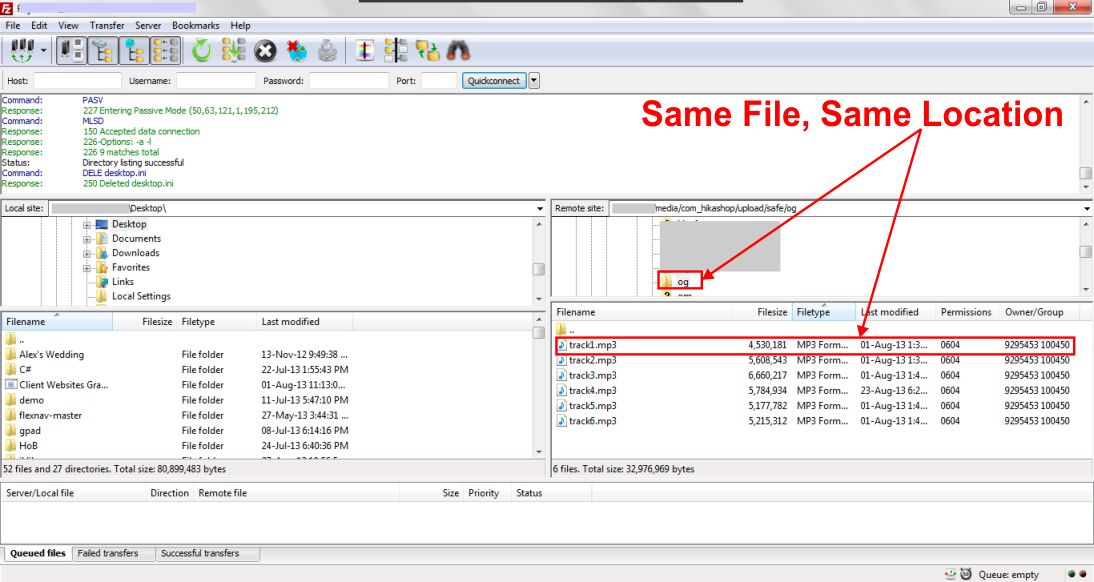
.1) The same file in the same location as at when it was uploaded
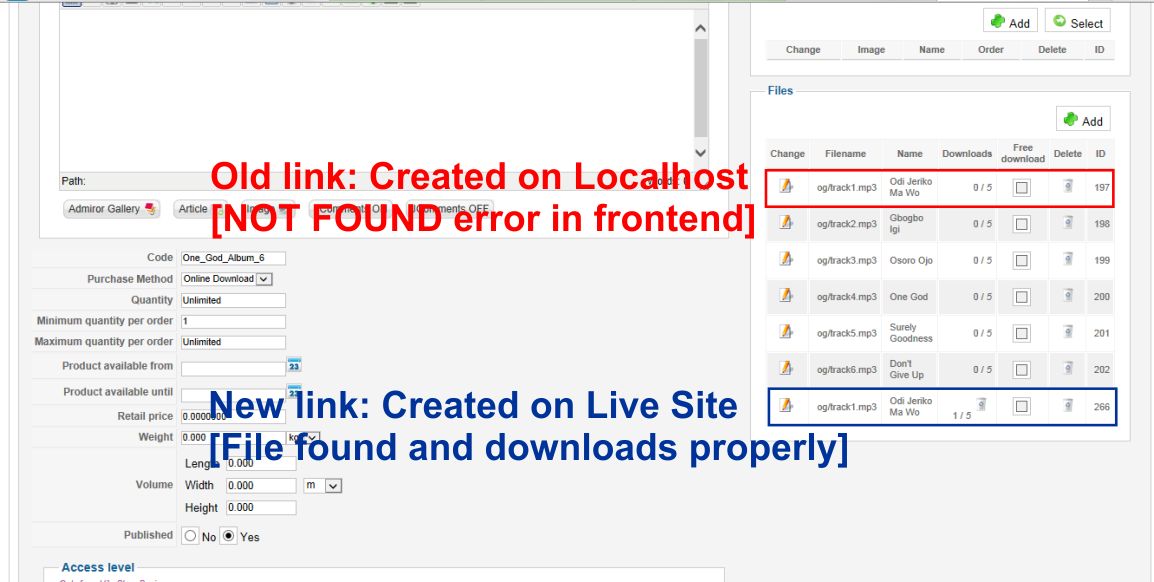
.2) The links and filenames are the same, only that the links created on the localhost don't work.
I believe the bug should be fixable rather than having to recreate all the links all over again.
Thanks for your time.
I am sure I have done everything properly.
Please view the snapshots below.
.1) The same file in the same location as at when it was uploaded
.2) The links and filenames are the same, only that the links created on the localhost don't work.
I believe the bug should be fixable rather than having to recreate all the links all over again.
Thanks for your time.
Please Log in or Create an account to join the conversation.
Time to create page: 0.343 seconds