

- Posts: 187
- Thank you received: 10
PayPal payments not set to completed
13 years 10 months ago #76182
by zebrafilm
PayPal payments not set to completed was created by zebrafilm
Hikashop 2.0 and J 2.5..8:
When some one uses the PayPal plugin, the order gets through all the way to PayPal, inc. the confirmation from PayPal but the the client is not set to confirmed on the site.
Here are out settings:
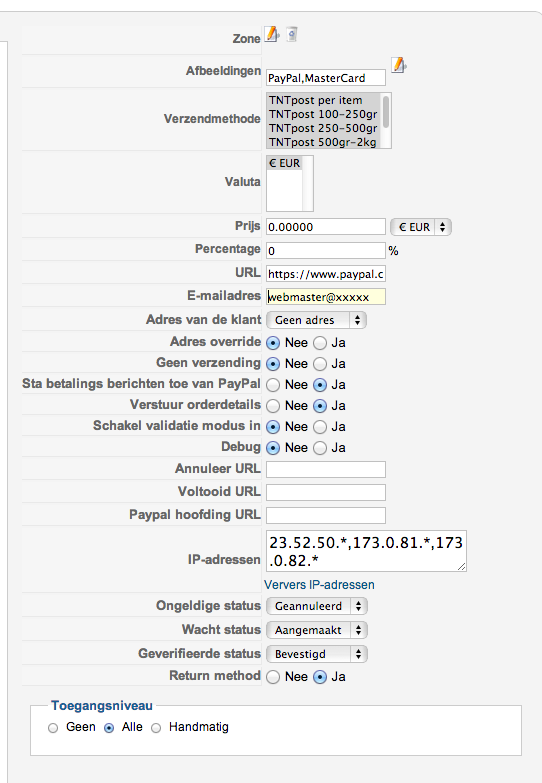
When some one uses the PayPal plugin, the order gets through all the way to PayPal, inc. the confirmation from PayPal but the the client is not set to confirmed on the site.
Here are out settings:
Please Log in or Create an account to join the conversation.

13 years 10 months ago #76365
by Xavier
Replied by Xavier on topic PayPal payments not set to completed
Hi,
Can you try to disable the "Return method" option.
Can you try to disable the "Return method" option.
Return method : In some cases, like when you have troubles receiving payment notifications from PayPal, you might need to disable that option. However, most of the time, you should leave that option turned on.
Please Log in or Create an account to join the conversation.
13 years 10 months ago #77965
by zebrafilm
Replied by zebrafilm on topic PayPal payments not set to completed
OK we have been testing with both settings and keep getting the same results: Status is not set to completed. Any further testing / logging we can do?
Guess I will need to setup a sandbox to do further testing?
Bastiaan
Guess I will need to setup a sandbox to do further testing?
Bastiaan
Please Log in or Create an account to join the conversation.

13 years 10 months ago #77979
by Jerome
Jerome - Obsidev.com
HikaMarket & HikaSerial developer / HikaShop core dev team.
Also helping the HikaShop support team when having some time or couldn't sleep.
By the way, do not send me private message, use the "contact us" form instead.
Replied by Jerome on topic PayPal payments not set to completed
Hi,
Please activate the debug mode in order to have a better report.
After that, you should find in the order history, a modification line with a PayPal IP.
If not, it means that Paypal can't contact your server to validate the order.
If so, the history data could contains a lot of useful information.
It is possible that paypal add some taxes in the final price, at this moment, the hikashop order price and the paypal paid price would be different so HikaShop would not validate the order.
Thanks to the debug history data, we would be able to see it.
Regards,
Please activate the debug mode in order to have a better report.
After that, you should find in the order history, a modification line with a PayPal IP.
If not, it means that Paypal can't contact your server to validate the order.
If so, the history data could contains a lot of useful information.
It is possible that paypal add some taxes in the final price, at this moment, the hikashop order price and the paypal paid price would be different so HikaShop would not validate the order.
Thanks to the debug history data, we would be able to see it.
Regards,
Jerome - Obsidev.com
HikaMarket & HikaSerial developer / HikaShop core dev team.
Also helping the HikaShop support team when having some time or couldn't sleep.
By the way, do not send me private message, use the "contact us" form instead.
Please Log in or Create an account to join the conversation.
13 years 10 months ago #77982
by zebrafilm
Replied by zebrafilm on topic PayPal payments not set to completed
Sounds good and will test it but this is a very active live site. Will customers see debug messages or is this logging in the backend?
Please Log in or Create an account to join the conversation.
13 years 10 months ago #77987
by Jerome
Jerome - Obsidev.com
HikaMarket & HikaSerial developer / HikaShop core dev team.
Also helping the HikaShop support team when having some time or couldn't sleep.
By the way, do not send me private message, use the "contact us" form instead.
Replied by Jerome on topic PayPal payments not set to completed
Hi,
Private data would not accessible to customers.
The debug mode allow to print more debug information which are accessible thanks to the "payment log report" or in the "backend orders".
The front end is not impacted with paypal plugin.
Regards,
Private data would not accessible to customers.
The debug mode allow to print more debug information which are accessible thanks to the "payment log report" or in the "backend orders".
The front end is not impacted with paypal plugin.
Regards,
Jerome - Obsidev.com
HikaMarket & HikaSerial developer / HikaShop core dev team.
Also helping the HikaShop support team when having some time or couldn't sleep.
By the way, do not send me private message, use the "contact us" form instead.
Please Log in or Create an account to join the conversation.
13 years 9 months ago - 13 years 9 months ago #80492
by zebrafilm
Replied by zebrafilm on topic PayPal payments not set to completed
OK we have been running PayPal with debug mode and just had a customer paying and not getting 'confirmed'.
How / where do I find the debug logs?
(in the order history I see a line with the customers username and IP )
Thanks,
Bastiaan
How / where do I find the debug logs?
(in the order history I see a line with the customers username and IP )
Thanks,
Bastiaan
Last edit: 13 years 9 months ago by zebrafilm.
Please Log in or Create an account to join the conversation.

13 years 9 months ago #80560
by nicolas
Replied by nicolas on topic PayPal payments not set to completed
you should open the payment log report file in the Files tab of the configuration.
If the file is empty, it means that HikaShop was not triggered by PayPal. Something must have stopped the notification before HikaShop.
Otherwise, you should have a lot of text in there tracing the notification and which would help us tell you what to do next.
If the file is empty, it means that HikaShop was not triggered by PayPal. Something must have stopped the notification before HikaShop.
Otherwise, you should have a lot of text in there tracing the notification and which would help us tell you what to do next.
Please Log in or Create an account to join the conversation.
13 years 9 months ago #80563
by zebrafilm
Replied by zebrafilm on topic PayPal payments not set to completed
Hi Nicolas,
The log file is empty. What could be the next step?
Bastiaan
The log file is empty. What could be the next step?
Bastiaan
Please Log in or Create an account to join the conversation.
13 years 9 months ago #80922
by nicolas
Replied by nicolas on topic PayPal payments not set to completed
Would it be possible for you to open your website access log and search for the text "notify_payment=paypal" for the time and date corresponding to when you made the payment ?
Then, please copy/paste here the line itself and a few lines before and a few lines after.
That will give some information on what is happening to the payment notification sent by PayPal.
If you don't find any lines for the notification, it means that PayPal didn't send any notification. That can sometimes happen with sandbox accounts so in that case you should try with a real account.
Then, please copy/paste here the line itself and a few lines before and a few lines after.
That will give some information on what is happening to the payment notification sent by PayPal.
If you don't find any lines for the notification, it means that PayPal didn't send any notification. That can sometimes happen with sandbox accounts so in that case you should try with a real account.
Please Log in or Create an account to join the conversation.
13 years 9 months ago #80949
by zebrafilm
Replied by zebrafilm on topic PayPal payments not set to completed
Well that took a little searching because the search string did not show up. Seems you made a typo?
Your "notify_payment=paypal" turns up in the logs as "notif_payment=paypal" (no Y) or is this an issue?
2012-12-05 13:00:18 W3SVC74 10.0.1.55 POST /index.php option=com_hikashop&ctrl=checkout&task=notify¬if_payment=paypal&tmpl=component&lang=nl&Itemid=633 80 - 173.0.81.1 - - 200 0 0 1985 1460 1859
What I can see is that it sends out out internal IP. (We have a serious firewall + routing active).
I will send you the log by email (bit to sensitive to post it here).
Your "notify_payment=paypal" turns up in the logs as "notif_payment=paypal" (no Y) or is this an issue?
2012-12-05 13:00:18 W3SVC74 10.0.1.55 POST /index.php option=com_hikashop&ctrl=checkout&task=notify¬if_payment=paypal&tmpl=component&lang=nl&Itemid=633 80 - 173.0.81.1 - - 200 0 0 1985 1460 1859
What I can see is that it sends out out internal IP. (We have a serious firewall + routing active).
I will send you the log by email (bit to sensitive to post it here).
Please Log in or Create an account to join the conversation.
13 years 9 months ago #80952
by nicolas
Replied by nicolas on topic PayPal payments not set to completed
I see no redirect and I tried to access the URL directly with my browser and it worked too. So the payment log should definitely not be empty.
Especially because I called the url via the browser. There should be an error because the parameters are missing and it can't load the order.
Can you check again that payment log file ? If it's still empty, can you check that the web server has the right to write in it ?
Especially because I called the url via the browser. There should be an error because the parameters are missing and it can't load the order.
Can you check again that payment log file ? If it's still empty, can you check that the web server has the right to write in it ?
Please Log in or Create an account to join the conversation.
13 years 9 months ago - 13 years 9 months ago #80953
by zebrafilm
Replied by zebrafilm on topic PayPal payments not set to completed
According to the filemanager the log should be:
C:\xxxxxxxxx\wwwroot\media\com_hikashop\upload\safe\logs\report_226776123.log
But in the dir there is only one:

containing items about updates.
And yes the dir is writable but clearly no logs written.
C:\xxxxxxxxx\wwwroot\media\com_hikashop\upload\safe\logs\report_226776123.log
But in the dir there is only one:
containing items about updates.
And yes the dir is writable but clearly no logs written.
Last edit: 13 years 9 months ago by zebrafilm.
Please Log in or Create an account to join the conversation.
13 years 9 months ago #81085
by nicolas
Replied by nicolas on topic PayPal payments not set to completed
I see that the file is not empty. It says that the file is 800 Bits long. Could you open the file and tell us what's inside ?
Please Log in or Create an account to join the conversation.
13 years 9 months ago #81139
by zebrafilm
Replied by zebrafilm on topic PayPal payments not set to completed
Please look at the date it has been created before I switched on DEBUG.
I also wrote: "containing items about updates."
log file attached.
It seems simpeler to give access to the (test) site?
I also wrote: "containing items about updates."
log file attached.
It seems simpeler to give access to the (test) site?
Please Log in or Create an account to join the conversation.
13 years 9 months ago #81512
by Jerome
Jerome - Obsidev.com
HikaMarket & HikaSerial developer / HikaShop core dev team.
Also helping the HikaShop support team when having some time or couldn't sleep.
By the way, do not send me private message, use the "contact us" form instead.
Replied by Jerome on topic PayPal payments not set to completed
Hi,
Your report is empty so yes, a access to your test site would be easier for us to give you the solution.
Regards,
Your report is empty so yes, a access to your test site would be easier for us to give you the solution.
Regards,
Jerome - Obsidev.com
HikaMarket & HikaSerial developer / HikaShop core dev team.
Also helping the HikaShop support team when having some time or couldn't sleep.
By the way, do not send me private message, use the "contact us" form instead.
Please Log in or Create an account to join the conversation.
13 years 9 months ago #81753
by Jerome
Jerome - Obsidev.com
HikaMarket & HikaSerial developer / HikaShop core dev team.
Also helping the HikaShop support team when having some time or couldn't sleep.
By the way, do not send me private message, use the "contact us" form instead.
Replied by Jerome on topic PayPal payments not set to completed
Hi,
I tried another time the login and password you sent, it did not work.
Could you send me a working couple of website/login/password by private message ?
Thanks
I tried another time the login and password you sent, it did not work.
Could you send me a working couple of website/login/password by private message ?
Thanks
Jerome - Obsidev.com
HikaMarket & HikaSerial developer / HikaShop core dev team.
Also helping the HikaShop support team when having some time or couldn't sleep.
By the way, do not send me private message, use the "contact us" form instead.
Please Log in or Create an account to join the conversation.
13 years 9 months ago #81859
by zebrafilm
Replied by zebrafilm on topic PayPal payments not set to completed
Hi Jerome, guess you found your private message?
Please Log in or Create an account to join the conversation.
13 years 9 months ago #81864
by Jerome
Jerome - Obsidev.com
HikaMarket & HikaSerial developer / HikaShop core dev team.
Also helping the HikaShop support team when having some time or couldn't sleep.
By the way, do not send me private message, use the "contact us" form instead.
Replied by Jerome on topic PayPal payments not set to completed
Hi,
I have found your problem and I don't know how you did it. Maybe it's "idealcheckout".
Well, in your hikashop_payment table, you have two "paypal" configuration. Once with "idealcheckoutpaypal" and the other with the real paypal plugin.
The problem is that, the "idealcheckoutpaypal" use the payment_type "PayPal" (and not "paypal")... Because it have a lower id than the real paypal configuration, during the notification, the configuration of the wrong paypal is loaded.
So, the plugin could not work without his configuration. Notification is not processed, etc.
So, I don't know why you have this wrong "PayPal" line but, if you want that the paypal plugin works, you have to delete the wrong entry.
Regards,
I have found your problem and I don't know how you did it. Maybe it's "idealcheckout".
Well, in your hikashop_payment table, you have two "paypal" configuration. Once with "idealcheckoutpaypal" and the other with the real paypal plugin.
The problem is that, the "idealcheckoutpaypal" use the payment_type "PayPal" (and not "paypal")... Because it have a lower id than the real paypal configuration, during the notification, the configuration of the wrong paypal is loaded.
So, the plugin could not work without his configuration. Notification is not processed, etc.
So, I don't know why you have this wrong "PayPal" line but, if you want that the paypal plugin works, you have to delete the wrong entry.
Regards,
Jerome - Obsidev.com
HikaMarket & HikaSerial developer / HikaShop core dev team.
Also helping the HikaShop support team when having some time or couldn't sleep.
By the way, do not send me private message, use the "contact us" form instead.
The following user(s) said Thank You: zebrafilm
Please Log in or Create an account to join the conversation.
13 years 9 months ago #81865
by zebrafilm
Replied by zebrafilm on topic PayPal payments not set to completed
Nice find Jerome, that site has a lot of little issues since updating from earlier versions. Not sure this one came in that list or is caused bij our IDEAL plugin which also had some problems.
Anyway we only need the Hika plugin so I will deleten the DB entry.
Thanks for the help. (and one of the main reasons I switch all sites to Hika)
Anyway we only need the Hika plugin so I will deleten the DB entry.
Thanks for the help. (and one of the main reasons I switch all sites to Hika)
Please Log in or Create an account to join the conversation.
Time to create page: 0.356 seconds