

- Posts: 35
- Thank you received: 0
Adding a new view
13 years 8 months ago #83687
by jackbat
Adding a new view was created by jackbat
I know I can modify one of your product page views, but is there a way to add a new one. I tried to add another PHP with a new name and that failed. Is the software not set up for adding custom views without destroying the ones you supply.
I have different kinds of products which require different layouts.
Any suggestions.
Tried to find something on the boards and docs but could only find view manipulation, not creation.
Thanks, Happy new year.
I have different kinds of products which require different layouts.
Any suggestions.
Tried to find something on the boards and docs but could only find view manipulation, not creation.
Thanks, Happy new year.
Please Log in or Create an account to join the conversation.

13 years 8 months ago #83949
by nicolas
Replied by nicolas on topic Adding a new view
Hi,
The product page layout is customizable per product/category by changing the option "product page layout" in the product/category. These layouts can be edited via the menu Display->Views.
When you edit the show_default view file there (it's the one used by default), you have the possibility to change its name and thus create a copy of the layout and then modify that copy. Then, on the products/categories you will be able to select that new layout on top of the three default ones.
Happy new year too !
The product page layout is customizable per product/category by changing the option "product page layout" in the product/category. These layouts can be edited via the menu Display->Views.
When you edit the show_default view file there (it's the one used by default), you have the possibility to change its name and thus create a copy of the layout and then modify that copy. Then, on the products/categories you will be able to select that new layout on top of the three default ones.
Happy new year too !
Please Log in or Create an account to join the conversation.

13 years 8 months ago #83962
by djundi
Replied by djundi on topic Hi Nikolas
Happy new year 2013
I have question, it's possible to make such layout in category /see picture for example/
I mean to add a couple buttons in the bottom part to container ?
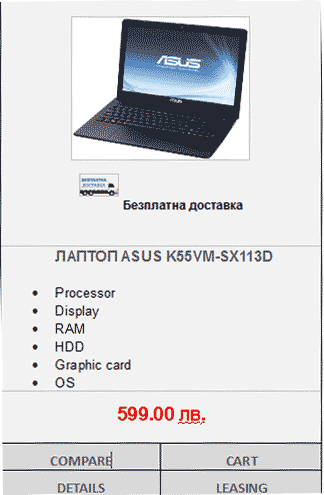
Regards, Djuni
I have question, it's possible to make such layout in category /see picture for example/
I mean to add a couple buttons in the bottom part to container ?
Regards, Djuni
Please Log in or Create an account to join the conversation.
13 years 8 months ago #84058
by nicolas
Replied by nicolas on topic Hi Nikolas
Everything is possible if you code it... You can add your buttons in the file "listing_img_title" via the menu Display->Views.
The following user(s) said Thank You: djundi
Please Log in or Create an account to join the conversation.
13 years 8 months ago #84072
by djundi
Replied by djundi on topic Hi Nikolas
Thanks, Nikolas 
Мy knowledge is not so great :blush: , can you give me some more help to do it Until now you have always been responsive to thank you from the heart
Мy knowledge is not so great :blush: , can you give me some more help to do it
Until now you have always been responsive to thank you from the heart Please Log in or Create an account to join the conversation.
13 years 8 months ago #84156
by jackbat
Replied by jackbat on topic Adding a new view
Thanks Nikolas, we have a couple of conversations going on here but you seem to have answered my question. I originally tried copying and renaming the file and that threw off an error. When I used your interface it seems to work.
Thanks again.
Jack
Thanks again.
Jack
Please Log in or Create an account to join the conversation.

13 years 8 months ago #84357
by Eliot
Replied by Eliot on topic Adding a new view
Hi Djundi,
Since we have a lot of support we cannot really spend time to make customization for our client.
If you really want something special, just ask on the Commercial Jobs forum and try to find someone good enough to help you.
However, I can give you this tip:
The different elements of the layout have been tagged so you can know immediately which part of the code is doing what. Try to move these blocks to see how it affects the layout.
The rest is just about some css customizations and rules added to the front end css file
Since we have a lot of support we cannot really spend time to make customization for our client.
If you really want something special, just ask on the Commercial Jobs forum and try to find someone good enough to help you.
However, I can give you this tip:
The different elements of the layout have been tagged so you can know immediately which part of the code is doing what. Try to move these blocks to see how it affects the layout.
The rest is just about some css customizations and rules added to the front end css file
The following user(s) said Thank You: djundi
Please Log in or Create an account to join the conversation.
13 years 8 months ago #84465
by jackbat
Replied by jackbat on topic Adding a new view
I may have spoke too soon.
I tried making the product page layout the way you said and ended up with the same results as I received when I did it may way. I selected show_default and saved it as a different name.
It showed up in the drop down for the product. At this point, it should have been an exact copy of your show_default. when you go to the product on the front end, you get a 500 error.
Here is the error
500 - Layout show_Sandypoint not found
You may not be able to visit this page because of:
an out-of-date bookmark/favourite
a search engine that has an out-of-date listing for this site
a mistyped address
you have no access to this page
The requested resource was not found.
An error has occurred while processing your request.
Please try one of the following pages:
Home Page
If difficulties persist, please contact the System Administrator of this site and report the error below..
Layout show_Sandypoint not found
I used FTP to see if in fact the hikashop interface was saving the new layout and it does show up in the tmpl folder.
Also, I see no way in your interface to delete this layout once it is made.
Any Ideas???
Jack
I tried making the product page layout the way you said and ended up with the same results as I received when I did it may way. I selected show_default and saved it as a different name.
It showed up in the drop down for the product. At this point, it should have been an exact copy of your show_default. when you go to the product on the front end, you get a 500 error.
Here is the error
500 - Layout show_Sandypoint not found
You may not be able to visit this page because of:
an out-of-date bookmark/favourite
a search engine that has an out-of-date listing for this site
a mistyped address
you have no access to this page
The requested resource was not found.
An error has occurred while processing your request.
Please try one of the following pages:
Home Page
If difficulties persist, please contact the System Administrator of this site and report the error below..
Layout show_Sandypoint not found
I used FTP to see if in fact the hikashop interface was saving the new layout and it does show up in the tmpl folder.
Also, I see no way in your interface to delete this layout once it is made.
Any Ideas???
Jack
Please Log in or Create an account to join the conversation.
13 years 8 months ago #84535
by Eliot
Replied by Eliot on topic Adding a new view
Hi,
You should simply use an already existing layout without renaming it.
Try to delete some part of the code (part between tags like "add to cart button") and you should be able to see the changes on your front page.
You should simply use an already existing layout without renaming it.
Try to delete some part of the code (part between tags like "add to cart button") and you should be able to see the changes on your front page.
Please Log in or Create an account to join the conversation.
13 years 8 months ago #84538
by jackbat
Replied by jackbat on topic Adding a new view
I am sure that would work fine, however, I have different types of products which require different layouts. Are you saying that the three options you supply can only be modified, and you can't create custom layouts?
Please Log in or Create an account to join the conversation.
13 years 8 months ago #84554
by Eliot
Replied by Eliot on topic Adding a new view
Actually you can create other layout by copying like you did.
The one you did probably doesn't work because it have to be named only with lowercase caracters.
Try this and tell me if it works
The one you did probably doesn't work because it have to be named only with lowercase caracters.
Try this and tell me if it works
Please Log in or Create an account to join the conversation.
13 years 8 months ago #84568
by jackbat
Replied by jackbat on topic Adding a new view
Well you figured it out but I think i have stumbled upon a conflict between the database and the file system and don't know how to clean it up.
I renamed the file using FTP and it started working but it still showed up as a uppercase on the dropdown. So I went to the Hikashop interface and renamed it that way, but instead of renaming it, it created another copy with the lower case showing two in the dropdown, one with lower and one with upper. I logged back in with the FTP and it only shows one file with the uppercase so apparently the copy is only in the interface and it didn't actually rename it. I assume this is a conflict between the database and the actual file system.
Before I go any further, I would rather hear from you how to clean this mess up. As far as I can see, there is no way to delete a layout through the Hikashop interface.
So it appears that if you use all lowercase, this will work fine, but how do I clean this up.
Jack
I renamed the file using FTP and it started working but it still showed up as a uppercase on the dropdown. So I went to the Hikashop interface and renamed it that way, but instead of renaming it, it created another copy with the lower case showing two in the dropdown, one with lower and one with upper. I logged back in with the FTP and it only shows one file with the uppercase so apparently the copy is only in the interface and it didn't actually rename it. I assume this is a conflict between the database and the actual file system.
Before I go any further, I would rather hear from you how to clean this mess up. As far as I can see, there is no way to delete a layout through the Hikashop interface.
So it appears that if you use all lowercase, this will work fine, but how do I clean this up.
Jack
Please Log in or Create an account to join the conversation.

13 years 8 months ago #84677
by Xavier
Replied by Xavier on topic Adding a new view
When adding a product layout, you should add the name in the types: administrator/components/com_hikashop/types/productdisplay.php
See if the name is present here.
Besides, when you edit a view, it's copied in your template folder, try to see if the views are present in this folder and remove the one with the uppercase.
See if the name is present here.
Besides, when you edit a view, it's copied in your template folder, try to see if the views are present in this folder and remove the one with the uppercase.
Please Log in or Create an account to join the conversation.
13 years 8 months ago #86279
by jackbat
Replied by jackbat on topic Adding a new view
Hello Xavier,
Actually the page did not show up there. So I deleted everything I did and made a new page just using your interface and it appears to be working now. I am used to using my own editors and seeing PHP files. I am assuming that you are keeping custom stuff in the database and I simply have no direct access to it. I just need to get used to working strictly in the interface. Just makes it a little difficult to archive stuff.
Thanks.
Actually the page did not show up there. So I deleted everything I did and made a new page just using your interface and it appears to be working now. I am used to using my own editors and seeing PHP files. I am assuming that you are keeping custom stuff in the database and I simply have no direct access to it. I just need to get used to working strictly in the interface. Just makes it a little difficult to archive stuff.
Thanks.
Please Log in or Create an account to join the conversation.
Time to create page: 0.397 seconds