

- Posts: 69
- Thank you received: 1
Manage Variant Error
13 years 8 months ago #86284
by BasketBox
Manage Variant Error was created by BasketBox
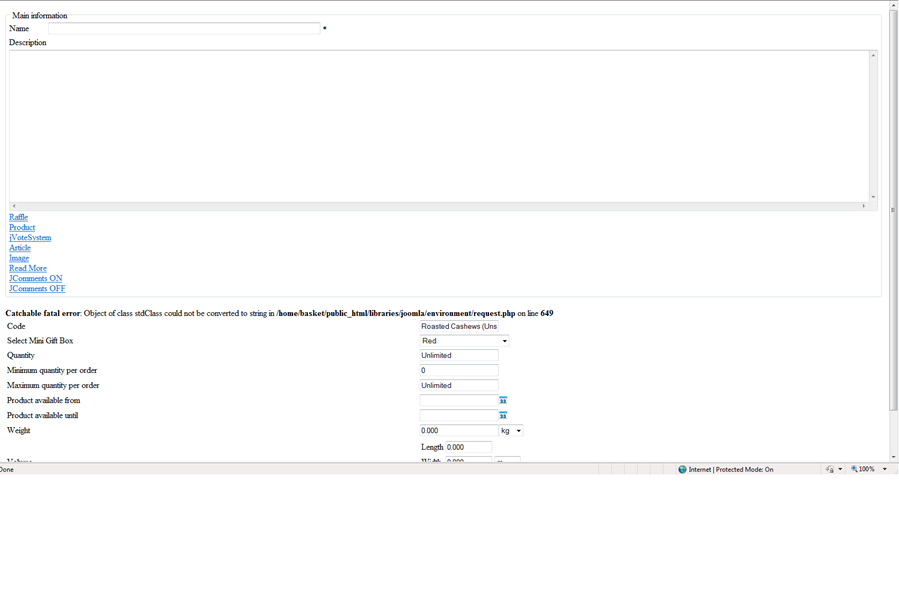
When I save in manage variant I get this error when I change the code field: Catchable fatal error: Object of class stdClass could not be converted to string in /home/basket/public_html/libraries/joomla/environment/request.php on line 649
Plus when I copy a product to use for a new one, the variants that were also copied will include a price that was not in the original copied product. In fact there was no price for the original copied variant.
Plus when I copy a product to use for a new one, the variants that were also copied will include a price that was not in the original copied product. In fact there was no price for the original copied variant.
Please Log in or Create an account to join the conversation.

Less
More
- Posts: 12953
- Thank you received: 1778
13 years 8 months ago #86321
by Mohamed Thelji
Replied by Mohamed Thelji on topic Manage Variant Error
Hi,
I think that you'll maybe find some solutions there :
I think that you'll maybe find some solutions there :
Hope this will help you.I would say that this comes from the fact that you have the register globals option of your php turned on, which you shouldn't. Because of that, the option variable we use in our view overwrites the option variable that joomla uses on it end and thus you can that error.
Three solutions:
1. you change that line by:
$option = preg_replace('/[^A-Z0-9_\.-]/i', '', JRequest::getString('option'));
2. You edit the file option of the view product via the menu Display->Views and you change the variable $option by $optionElement to avoid the conflict.
3. You deactivate that php option, supposing that you have access to your php.ini
Please Log in or Create an account to join the conversation.
13 years 8 months ago #86425
by BasketBox
Replied by BasketBox on topic Manage Variant Error
Our register global is off. See screenshot. Any other solution?
Please Log in or Create an account to join the conversation.

13 years 8 months ago #86485
by Xavier
Replied by Xavier on topic Manage Variant Error
Can you enable the debug mode of Joomla and give us all the error given ?
Please Log in or Create an account to join the conversation.
13 years 8 months ago - 13 years 8 months ago #87137
by BasketBox
Replied by BasketBox on topic Manage Variant Error
Have not tried debug yet, but attached is a screenshot of what I get when I:
Go to a product
Click manage variants
Select variant
Remove code field old data and add new data
Select save and close
Then I get the error attached.
Go to a product
Click manage variants
Select variant
Remove code field old data and add new data
Select save and close
Then I get the error attached.
Last edit: 13 years 8 months ago by BasketBox.
Please Log in or Create an account to join the conversation.

13 years 8 months ago #87311
by nicolas
Replied by nicolas on topic Manage Variant Error
Hi,
We cannot reproduce the problem.
If you can add the line:
if(is_object($value)) return $value;
before:
$value = is_array($value) ? array_map(array('JRequest', '_stripSlashesRecursive'), $value) : stripslashes($value);
in the file:
/home/basket/public_html/libraries/joomla/environment/request.php
that will remove the error.
It would be great if you could use the line:
if(is_object($value)) var_dump(debug_backtrace());
instead at the same place before the fix and give us the debug trace that you get on the screen when you do that.
That would help us understand what's going on.
We cannot reproduce the problem.
If you can add the line:
if(is_object($value)) return $value;
before:
$value = is_array($value) ? array_map(array('JRequest', '_stripSlashesRecursive'), $value) : stripslashes($value);
in the file:
/home/basket/public_html/libraries/joomla/environment/request.php
that will remove the error.
It would be great if you could use the line:
if(is_object($value)) var_dump(debug_backtrace());
instead at the same place before the fix and give us the debug trace that you get on the screen when you do that.
That would help us understand what's going on.
Please Log in or Create an account to join the conversation.
13 years 8 months ago #87321
by BasketBox
Replied by BasketBox on topic Manage Variant Error
Let me ask first - can products have the same variant code name? If not, that might be the problem. I'm trying to use the same variant code name for several different products that share the same variant. Also, I noticed that I'm able to save a variant without entering anything in the name field. I thought asterisk field is required?
You can see this at my account. I will send login. Go to Gifts > Mini Box > Roasted California Almonds (Unsalted) - Mini > Manage Variants > Roasted California Almonds (Unsalted) - Mini_5 and change the code to GW2RE then save and error comes. This code was used on the previous product.
You can see this at my account. I will send login. Go to Gifts > Mini Box > Roasted California Almonds (Unsalted) - Mini > Manage Variants > Roasted California Almonds (Unsalted) - Mini_5 and change the code to GW2RE then save and error comes. This code was used on the previous product.
Please Log in or Create an account to join the conversation.
13 years 7 months ago #87690
by nicolas
Replied by nicolas on topic Manage Variant Error
A variant is stored as a product in the database. And the code has to be unique. So yes, that's probably the issue.
You can indeed have variants without a name as the name is then the concatenation of the main product and the characteristics values.
We've added some checks to avoid that and display an error message instead for next release of HikaShop.
Thank you for your feedback.
You can indeed have variants without a name as the name is then the concatenation of the main product and the characteristics values.
We've added some checks to avoid that and display an error message instead for next release of HikaShop.
Thank you for your feedback.
Please Log in or Create an account to join the conversation.
Time to create page: 0.208 seconds