

- Posts: 178
- Thank you received: 5
Annoying movement of all <Body>
13 years 5 months ago - 13 years 5 months ago #101421
by alikon1
Annoying movement of all <Body> was created by alikon1
When click "Add to cart" with Popup, all content move to the right for some pixels. And then, when press Continue Shoppping, all site content move to the left again (back).
How to fix this?
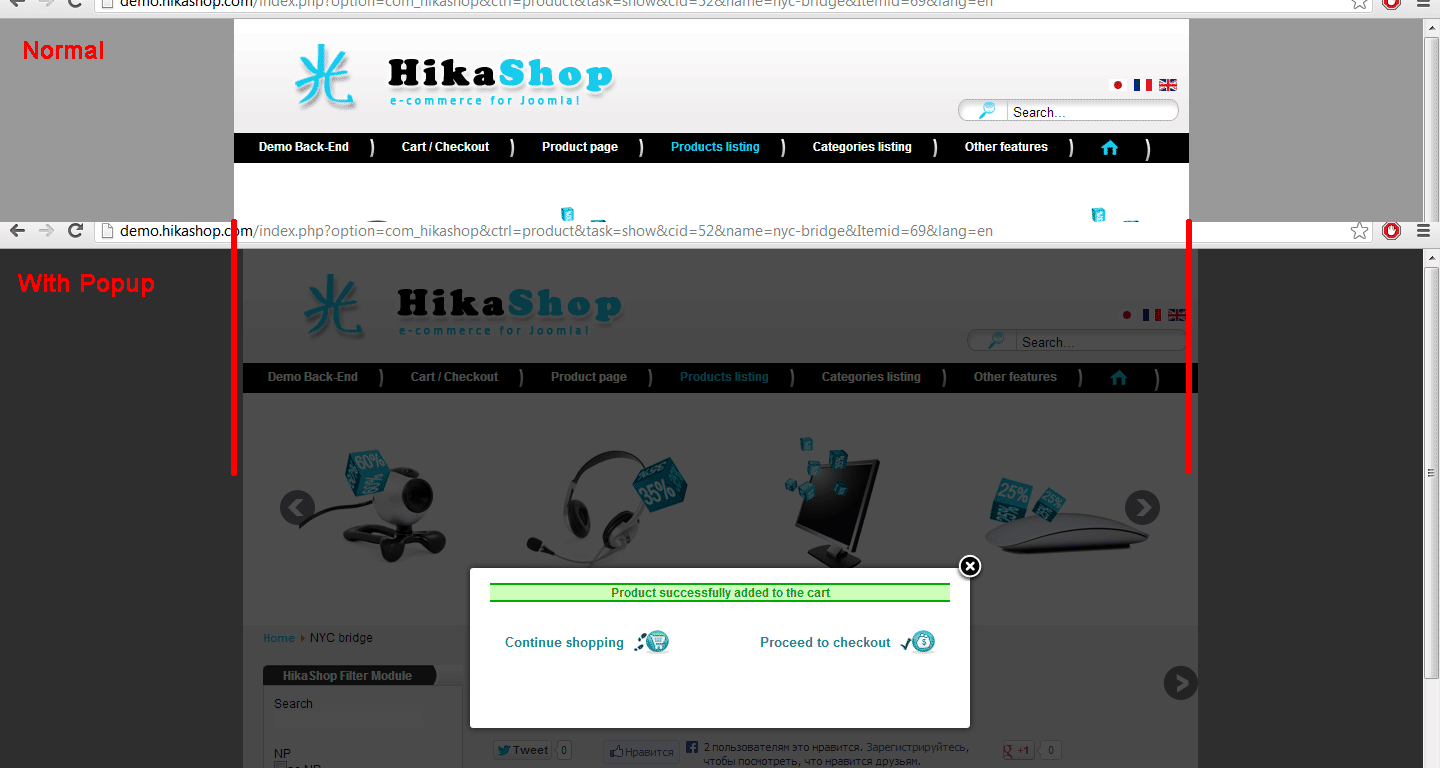
How to fix this?
Last edit: 13 years 5 months ago by alikon1.
Please Log in or Create an account to join the conversation.

13 years 4 months ago #101579
by Xavier
Replied by Xavier on topic Annoying movement of all <Body>
Hi,
As I can see, it's doing that on Chrome, on Firefox it's working fine.
I don't really know why the popup make the body move on Chrome, I will search the reason.
As I can see, it's doing that on Chrome, on Firefox it's working fine.
I don't really know why the popup make the body move on Chrome, I will search the reason.
Please Log in or Create an account to join the conversation.
13 years 4 months ago - 13 years 4 months ago #101838
by alikon1

I think it's because in all browsers, except Firefox, something with scrollbar when popup appears. Scrollbar disappeared and body width 100% became wider.
Maybe this fix? style="overflow-y: scroll;" to <body> tag.
Replied by alikon1 on topic Annoying movement of all <Body>
Works correct only in Firefox. In Explorer, Chrome and Opera the popup makes the body moveXavier wrote: Hi,
As I can see, it's doing that on Chrome, on Firefox it's working fine.
I don't really know why the popup make the body move on Chrome, I will search the reason.
I think it's because in all browsers, except Firefox, something with scrollbar when popup appears. Scrollbar disappeared and body width 100% became wider.
Maybe this fix? style="overflow-y: scroll;" to <body> tag.
Last edit: 13 years 4 months ago by alikon1.
Please Log in or Create an account to join the conversation.

13 years 4 months ago #101913
by Charlotte
Replied by Charlotte on topic Annoying movement of all <Body>
Hi,
You can try this on your website .body-overlayed{overflow:scroll} instead of .body-overlayed{overflow:hidden} in the folder : modal.css
It should work. We will change this on our side for the demo website. Thank you for the report !
Charlotte.
You can try this on your website .body-overlayed{overflow:scroll} instead of .body-overlayed{overflow:hidden} in the folder : modal.css
It should work. We will change this on our side for the demo website. Thank you for the report !
Charlotte.
Please Log in or Create an account to join the conversation.
Time to create page: 0.179 seconds