

- Posts: 73
- Thank you received: 1
Pages cannot be found after import
13 years 1 month ago #120557
by julian56
Pages cannot be found after import was created by julian56
Hi,
I export my catalog from a Joomla 2.5 and import it in my new website Joomla 3.1.5
I recover everything, categories and products.
I installed the photos and they show up very well.
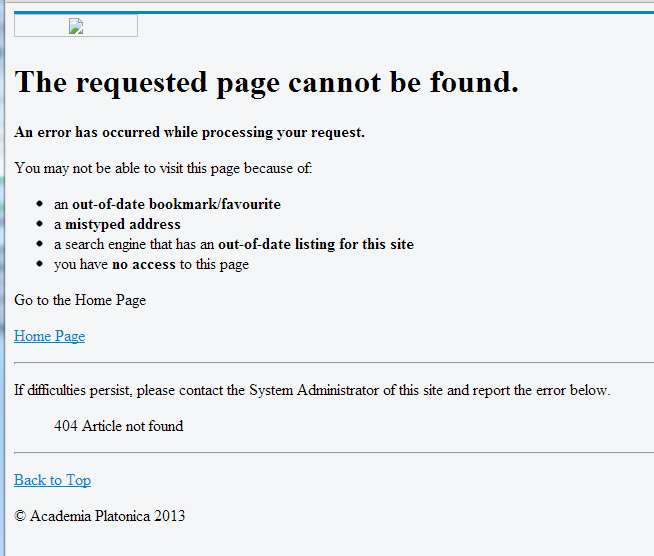
BUT when I try to use the menus from the categories or from the products I always obtain the same result: Pages cannot be found...
Everything is on the website but this is not working. What can I do?
I give you the screenshots below. The third one is the error.
Thank you for your help!
Categories showing well

Products showing well

ERROR when you click
I export my catalog from a Joomla 2.5 and import it in my new website Joomla 3.1.5
I recover everything, categories and products.
I installed the photos and they show up very well.
BUT when I try to use the menus from the categories or from the products I always obtain the same result: Pages cannot be found...
Everything is on the website but this is not working. What can I do?
I give you the screenshots below. The third one is the error.
Thank you for your help!
Categories showing well
Products showing well
ERROR when you click
Please Log in or Create an account to join the conversation.

13 years 1 month ago #120567
by nicolas
Replied by nicolas on topic Pages cannot be found after import
Can you provide a link to that page so that we can see the issue ?
Please Log in or Create an account to join the conversation.
13 years 1 month ago #120580
by julian56
Replied by julian56 on topic Pages cannot be found after import
Please Log in or Create an account to join the conversation.
13 years 1 month ago #120585
by nicolas
Replied by nicolas on topic Pages cannot be found after import
It sounds like a SEF issue.
Did you configure properly the SEF on your 3.1.5 website ? If you try to access a joomla page on your website (a joomla article for example), does it work ?
I suppose that if you turn off SEF it works, right ?
Did you configure properly the SEF on your 3.1.5 website ? If you try to access a joomla page on your website (a joomla article for example), does it work ?
I suppose that if you turn off SEF it works, right ?
Please Log in or Create an account to join the conversation.
13 years 1 month ago #120589
by julian56
Replied by julian56 on topic Pages cannot be found after import
In fact I have just Hikashop on this website for now.
I will create a menu to see that.
I don't know what is SEF?
I will create a menu to see that.
I don't know what is SEF?
Please Log in or Create an account to join the conversation.
13 years 1 month ago #120591
by julian56
Replied by julian56 on topic Pages cannot be found after import
I just created a menu "Information" and an entry named "Western Union" connected to one page.
It works well.
So the problem is in Hikashop.
Any insight?
thank you for your help.
It works well.
So the problem is in Hikashop.
Any insight?
thank you for your help.
Please Log in or Create an account to join the conversation.
13 years 1 month ago #120593
by nicolas
Replied by nicolas on topic Pages cannot be found after import
I don't think that the problem is "in" hikashop.
I think it's really something to do with the SEF.
Go in the joomla configuration and turn off the SEF options and try again.
I think it's really something to do with the SEF.
Go in the joomla configuration and turn off the SEF options and try again.
Please Log in or Create an account to join the conversation.
13 years 1 month ago #120599
by julian56
Replied by julian56 on topic Pages cannot be found after import
I tried to disabled the SEF as seen here:
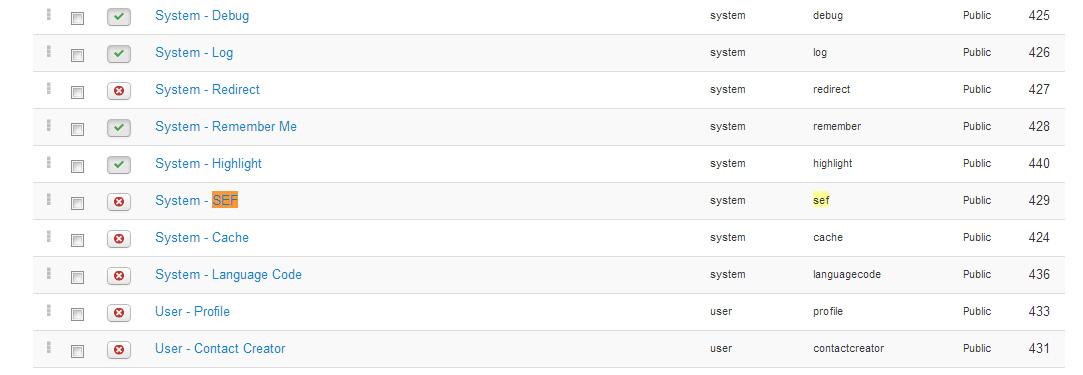
And the result is worse:

And the result is worse:
Please Log in or Create an account to join the conversation.
13 years 1 month ago #120672
by nicolas
Replied by nicolas on topic Pages cannot be found after import
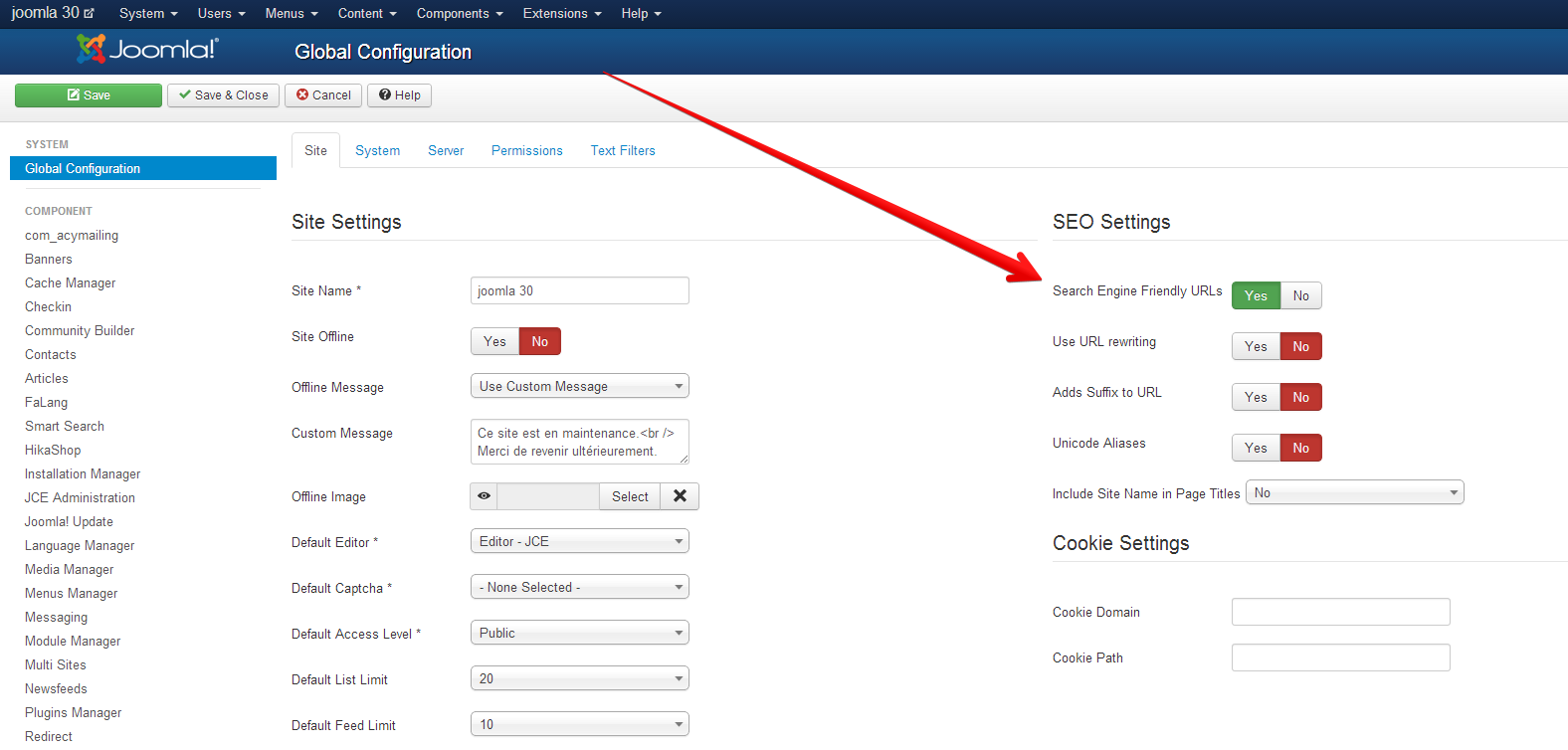
No, you should not turn off the joomla SEF plugin but the SEF option of the joomla configuration.
Please Log in or Create an account to join the conversation.
13 years 1 month ago #120708
by julian56
Replied by julian56 on topic Pages cannot be found after import
I did that and that doesn't change anything.
When I click on my page test it works.
When I want to reach a product, that doesn't work and I have still the same message of error I already posted: "The requested page cannot be found."
When I click on my page test it works.
When I want to reach a product, that doesn't work and I have still the same message of error I already posted: "The requested page cannot be found."
Please Log in or Create an account to join the conversation.
13 years 1 month ago #120710
by nicolas
Replied by nicolas on topic Pages cannot be found after import
I see that your URLs are still SEFed.
Can you please keep that option turned off so that we can look at your pages again ?
Can you please keep that option turned off so that we can look at your pages again ?
Please Log in or Create an account to join the conversation.
13 years 1 month ago - 13 years 1 month ago #120717
by julian56
Replied by julian56 on topic Pages cannot be found after import
Ok. I did what you said and it works now 
The only remaining problem for now is: when you click on a product the screen get darker but the photo of the product doesn't show up.
Example: www.academiaplatonica.com/index.php?opti...e-of-life&Itemid=103
The only remaining problem for now is: when you click on a product the screen get darker but the photo of the product doesn't show up.
Example: www.academiaplatonica.com/index.php?opti...e-of-life&Itemid=103
Last edit: 13 years 1 month ago by julian56. Reason: Update of the problem
Please Log in or Create an account to join the conversation.
13 years 1 month ago #120735
by nicolas
Replied by nicolas on topic Pages cannot be found after import
The photo works fine on my end.
I tried with different browsers and didn't have a problem on that page.
I tried with different browsers and didn't have a problem on that page.
Please Log in or Create an account to join the conversation.
13 years 1 month ago #120740
by julian56
Replied by julian56 on topic Pages cannot be found after import
OK. Thank you! I will test from different navigators and computers.
Please Log in or Create an account to join the conversation.
Time to create page: 0.222 seconds