

- Posts: 20
- Thank you received: 0
Export file choose fields
12 years 5 months ago #152183
by Margreet
Export file choose fields was created by Margreet
-- url of the page with the problem -- :
mywebsite.com/mypage
-- HikaShop version -- : [1403280123]
-- Joomla version -- : 2.5.19
-- PHP version -- :5.3.22
-- Browser(s) name and version -- : Firefox 28.0
-- Error-message(debug-mod must be tuned on) -- : Error_message
Hello to the reader(s),
Looked at the forum and the FAQ and the specifications of the different Hikashop versions but I can't find an answer to my question.
I have used virtuemart before and want tot try hikashop.
So I installed the starter version and created and filled the webshop.
Now I used the export function to create a csv file.
But there are only a very few article fields which I can export to a csv file.
Is this correct for the starter version? Or am I doing something wrong?
So if this is correct what are the possibilities for the paid versions?
I can't find the optons mentioned under compare versions.
Kind regards
Margareth
-- HikaShop version -- : [1403280123]
-- Joomla version -- : 2.5.19
-- PHP version -- :5.3.22
-- Browser(s) name and version -- : Firefox 28.0
-- Error-message(debug-mod must be tuned on) -- : Error_message
Hello to the reader(s),
Looked at the forum and the FAQ and the specifications of the different Hikashop versions but I can't find an answer to my question.
I have used virtuemart before and want tot try hikashop.
So I installed the starter version and created and filled the webshop.
Now I used the export function to create a csv file.
But there are only a very few article fields which I can export to a csv file.
Is this correct for the starter version? Or am I doing something wrong?
So if this is correct what are the possibilities for the paid versions?
I can't find the optons mentioned under compare versions.
Kind regards
Margareth
Please Log in or Create an account to join the conversation.

12 years 5 months ago #152201
by nicolas
Replied by nicolas on topic Export file choose fields
Hi,
I'm not sure what you mean ? When you click on the "export" button of the products listing, it's going to give you a CSV of the products data with all the fields in it (tens of them, all of them), even in the Starter edition.
I'm not sure what you mean ? When you click on the "export" button of the products listing, it's going to give you a CSV of the products data with all the fields in it (tens of them, all of them), even in the Starter edition.
The following user(s) said Thank You: Margreet
Please Log in or Create an account to join the conversation.
12 years 5 months ago #152254
by Margreet
Replied by Margreet on topic Export file choose fields
Hi Nicolas,
I'm sorry. I didn't look at the right place. :blush:
You are right in the csv I have all the fields of a product.
Can I put another question?
Is it posibble to choose which fields I want in the export when I use the starter edition?
Kind regards
Margareth
I'm sorry. I didn't look at the right place. :blush:
You are right in the csv I have all the fields of a product.
Can I put another question?
Is it posibble to choose which fields I want in the export when I use the starter edition?
Kind regards
Margareth
Please Log in or Create an account to join the conversation.

12 years 5 months ago #152271
by Jerome
Jerome - Obsidev.com
HikaMarket & HikaSerial developer / HikaShop core dev team.
Also helping the HikaShop support team when having some time or couldn't sleep.
By the way, do not send me private message, use the "contact us" form instead.
Replied by Jerome on topic Export file choose fields
Hi,
You can do it by overriding the view "backend | your_backend_template | product | export" or using a custom plugin for the trigger onBeforeProductExport.
www.hikashop.com/support/support/documen...nBeforeProductExport
Regards,
You can do it by overriding the view "backend | your_backend_template | product | export" or using a custom plugin for the trigger onBeforeProductExport.
www.hikashop.com/support/support/documen...nBeforeProductExport
Regards,
Jerome - Obsidev.com
HikaMarket & HikaSerial developer / HikaShop core dev team.
Also helping the HikaShop support team when having some time or couldn't sleep.
By the way, do not send me private message, use the "contact us" form instead.
The following user(s) said Thank You: Margreet
Please Log in or Create an account to join the conversation.
12 years 5 months ago #152409
by Margreet
Replied by Margreet on topic Export file choose fields
Hi Jerome,
Thanks for the answer.
I am going to try to implement it in the shop.
! am new too Hikashop and I have to find my way in the support section.
Super that you woulld give me the anwer.
Thanks.
Kind regards
Margareth
Thanks for the answer.
I am going to try to implement it in the shop.
! am new too Hikashop and I have to find my way in the support section.
Super that you woulld give me the anwer.
Thanks.
Kind regards
Margareth
Please Log in or Create an account to join the conversation.
12 years 5 months ago - 12 years 5 months ago #154019
by Margreet
Replied by Margreet on topic Export file choose fields
Hello,
Is it possible to put another question about the export of products?
If I use the Export button for the products I get a csv file and when I open it I can't see a relation between the parent category and the subcategory.
I have created two parent categories 1. Games nieuw en 2. Games gebruikt. In each parent category I have created subcategories as you can see (PS3games and Wii games). But after the export I can't see any relation anymore.
How is this possible.
Am I doing something wrong?
See below the image.
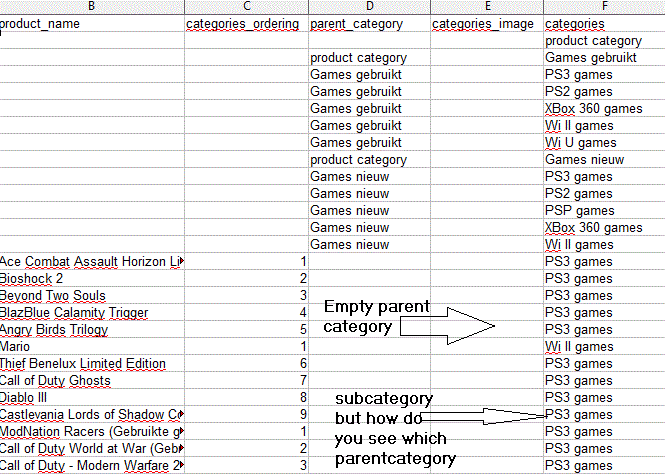
Before I want to try to choose which columns I want to export I need to have this problem fixed.
Kind regards
Margareth
Is it possible to put another question about the export of products?
If I use the Export button for the products I get a csv file and when I open it I can't see a relation between the parent category and the subcategory.
I have created two parent categories 1. Games nieuw en 2. Games gebruikt. In each parent category I have created subcategories as you can see (PS3games and Wii games). But after the export I can't see any relation anymore.
How is this possible.
Am I doing something wrong?
See below the image.
Before I want to try to choose which columns I want to export I need to have this problem fixed.
Kind regards
Margareth
Last edit: 12 years 5 months ago by Margreet. Reason: writing errrors
Please Log in or Create an account to join the conversation.
12 years 4 months ago #154043
by nicolas
Replied by nicolas on topic Export file choose fields
Hi,
The export only add the category name in the categories column. The system doesn't need to have the parent category mentioned there usually and it would even be a problem when the product is assigned to different categories from different parent categories.
That's why the parent_category column is blank.
Change the code:
to:
in the "export" file of the view "product" and it will set the parent_category of the products.
The export only add the category name in the categories column. The system doesn't need to have the parent category mentioned there usually and it would even be a problem when the product is assigned to different categories from different parent categories.
That's why the parent_category column is blank.
Change the code:
Code:
$data[] = '';
if(!empty($categories))
$data[] = implode($separator,$categories);
else
$data[] = '';
Code:
if(!empty($categories)){
if(count($categories)>1){
$data[] = '';
}else{
$parent_id = $categories[0]->category_parent_id;
$data[] = str_replace(array('"',',',';'), array('""','\\,','\\;'), $this->categories[$parent_id]->category_name);
}
$data[] = implode($separator,$categories);
}else{
$data[] = '';
$data[] = '';
}
The following user(s) said Thank You: Margreet
Please Log in or Create an account to join the conversation.
12 years 3 months ago #158544
by sebur
Replied by sebur on topic Export file choose fields
Hello
I can not add a column with pictures in the export file when the mass action.
Export file in this category is limited to the number of rows - 500.
Help Board.
Thank you.
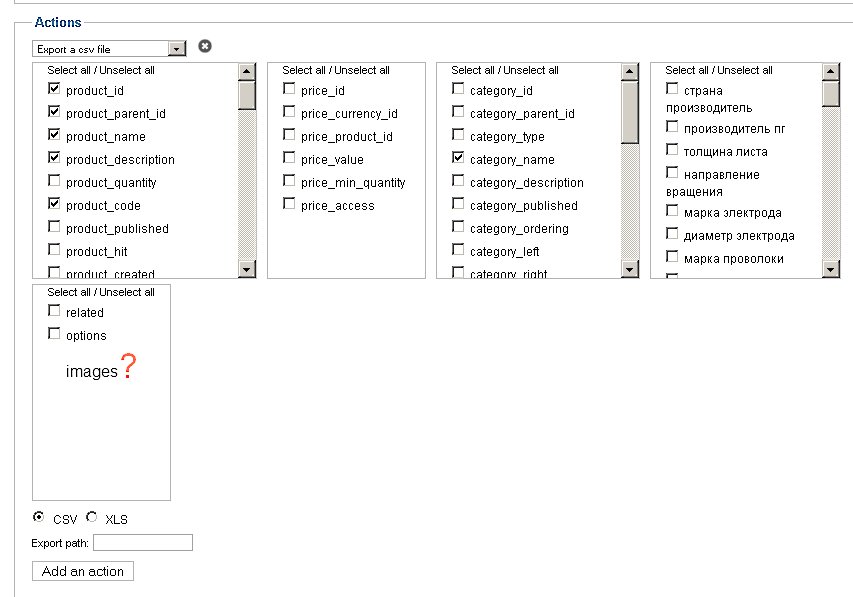
I can not add a column with pictures in the export file when the mass action.
Export file in this category is limited to the number of rows - 500.
Help Board.
Thank you.
Please Log in or Create an account to join the conversation.
12 years 3 months ago #158583
by Margreet
Replied by Margreet on topic Export file choose fields
Hello Sebur,
Interesting question.
I don't know if it is possible to choose which colums you want to use in the mass action.
The answer to this question can be told by Jerome or Nichloas I think.
I am curious what the answer will be.
Kind regards
Margareth
Interesting question.
I don't know if it is possible to choose which colums you want to use in the mass action.
The answer to this question can be told by Jerome or Nichloas I think.
I am curious what the answer will be.
Kind regards
Margareth
Please Log in or Create an account to join the conversation.

12 years 3 months ago #158568
by Xavier
Replied by Xavier on topic Export file choose fields
Hi,
Indeed the images are not managed in the mass actions at this time, I add it in the TODO list.
Indeed the images are not managed in the mass actions at this time, I add it in the TODO list.
Please Log in or Create an account to join the conversation.
12 years 2 months ago #164843
by maujbigo
Replied by maujbigo on topic Export file choose fields
Hi, I created an override (as suggested above) for the export as I also want to remove fields that I am not using.
on the export.php I am checking if if the column
if(!empty($product->$column) && is_array($product->$column))
$product->$column = implode($separator,$product->$column);
if( $column != 'product_last_seen_date'){
$data[] = @$product->$column;
}
}
This works to some degree, the values were removed but the column heading still there.
How could I remove a column from the export?
Thanks.
on the export.php I am checking if if the column
if(!empty($product->$column) && is_array($product->$column))
$product->$column = implode($separator,$product->$column);
if( $column != 'product_last_seen_date'){
$data[] = @$product->$column;
}
}
This works to some degree, the values were removed but the column heading still there.
How could I remove a column from the export?
Thanks.
Please Log in or Create an account to join the conversation.
12 years 2 months ago #164845
by Xavier
Replied by Xavier on topic Export file choose fields
Hi,
To remove a column from the export, you have to edit the content of the $columns PHP array.
stackoverflow.com/questions/2448964/php-...lement-from-an-array
To remove a column from the export, you have to edit the content of the $columns PHP array.
stackoverflow.com/questions/2448964/php-...lement-from-an-array
The following user(s) said Thank You: maujbigo
Please Log in or Create an account to join the conversation.
12 years 2 months ago - 12 years 2 months ago #164925
by maujbigo
Replied by maujbigo on topic Export file choose fields
Perfect, it removes the column title and in combination with what I previously did (which removes the column data) work like a charm.
Ps.: thanks a lot for the link.

Ps.: thanks a lot for the link.
Last edit: 12 years 2 months ago by maujbigo.
Please Log in or Create an account to join the conversation.
12 years 2 months ago #164976
by maujbigo
Replied by maujbigo on topic Export file choose fields
Actually I found a better and easier way to do that, it may help someone else
Add this to line 52
// Create an Array of columns to be removed
$dontExport = array(
'product_tax_id',
'product_last_seen_date',
'product_waitlist',
'product_sales',
'product_total_vote',
'product_average_score',
'product_created'
);
//Return $columns that don't exist on the 'Dont Export' array
$columns = array_diff($columns, $dontExport);
This will remove the columns header then in line 95 add the following
$products_columns = array_diff($products_columns, $dontExport);
If anyone have a better way, please share.
Cheers
Add this to line 52
// Create an Array of columns to be removed
$dontExport = array(
'product_tax_id',
'product_last_seen_date',
'product_waitlist',
'product_sales',
'product_total_vote',
'product_average_score',
'product_created'
);
//Return $columns that don't exist on the 'Dont Export' array
$columns = array_diff($columns, $dontExport);
This will remove the columns header then in line 95 add the following
$products_columns = array_diff($products_columns, $dontExport);
If anyone have a better way, please share.
Cheers
The following user(s) said Thank You: Xavier
Please Log in or Create an account to join the conversation.
Time to create page: 0.363 seconds