
Export, Edit and Import
- condorazul
-
 Topic Author
- Offline
Less
More
12 years 4 months ago - 12 years 4 months ago #154596
by condorazul
Export, Edit and Import was created by condorazul
I have a small problem, i forgot to set the warehouse in 580 products and i dont want to do it manually, so i exported the products in csv, open it in excel and changed the wharehouse to 1 in all the products, save and upload, it seems that all in correct but for the prices wich added 4 ceros so a product worth 15 now worths 1.500.00, i downloaded the file again and each time i open the file in excel the prices are displayed that way
Last edit: 12 years 4 months ago by condorazul.
Please Log in or Create an account to join the conversation.

12 years 4 months ago #154623
by nicolas
Replied by nicolas on topic Export, Edit and Import
Hi,
It's probably an issue with the formatting of the prices in Excel.
The best though in such cases in not to do an export/edit/import process but to directly modify the products using the mass actions of HikaShop:
www.hikashop.com/support/support/documen...massaction-form.html
That way, modifying the warehouse of all the products at once is really easy and fast. Modifying prices in batch is also possible so you would be able to revert the price issue with a mass action.
It's probably an issue with the formatting of the prices in Excel.
The best though in such cases in not to do an export/edit/import process but to directly modify the products using the mass actions of HikaShop:
www.hikashop.com/support/support/documen...massaction-form.html
That way, modifying the warehouse of all the products at once is really easy and fast. Modifying prices in batch is also possible so you would be able to revert the price issue with a mass action.
Please Log in or Create an account to join the conversation.
- condorazul
-
Topic Author
- Offline
12 years 4 months ago #154706
by condorazul
Replied by condorazul on topic Export, Edit and Import
I´m really lost with mass actions don´t know even where to start to do the changes
Please Log in or Create an account to join the conversation.

12 years 4 months ago #154713
by Xavier
Replied by Xavier on topic Export, Edit and Import
Hi,
Have you read that documentation about the mass actions ?
hikashop.com/support/documentation/167-massaction-form.html
Have you read that documentation about the mass actions ?
hikashop.com/support/documentation/167-massaction-form.html
Please Log in or Create an account to join the conversation.
- condorazul
-
Topic Author
- Offline
12 years 4 months ago #154824
by condorazul
Replied by condorazul on topic Export, Edit and Import
Yes but at least for me its not easy to understand, can you give me the example to change in all products the warehaouse to 1?
Please Log in or Create an account to join the conversation.
12 years 4 months ago #154832
by Xavier
Replied by Xavier on topic Export, Edit and Import
You just have to select the value "Update the values" in the "Actions" part.
Then select "product_warehouse_id" = INT and fill the input by the desired warehouse id.
And click on "Process" in the toolbar.
Then select "product_warehouse_id" = INT and fill the input by the desired warehouse id.
And click on "Process" in the toolbar.
Please Log in or Create an account to join the conversation.
- condorazul
-
Topic Author
- Offline
12 years 4 months ago #154918
by condorazul
Replied by condorazul on topic Export, Edit and Import
Thanks it worked, in custom field wich i have three options, text, if i want to set the the products wich has none of the three options choosed in one of them, how should i do?
i selected products widthout 24 horas
and products widthout 3-5 dias
the list is 75 products
those i want to set the option 1 sin stock
i selected products widthout 24 horas
and products widthout 3-5 dias
the list is 75 products
those i want to set the option 1 sin stock
Please Log in or Create an account to join the conversation.
12 years 4 months ago #155018
by nicolas
Replied by nicolas on topic Export, Edit and Import
I'm sorry but I'm not following.
Could you provide a screenshot of the options of the custom field and of the product field value and what you want to change in the product ?
Could you provide a screenshot of the options of the custom field and of the product field value and what you want to change in the product ?
Please Log in or Create an account to join the conversation.
- condorazul
-
Topic Author
- Offline
12 years 4 months ago #155050
by condorazul
Replied by condorazul on topic Export, Edit and Import
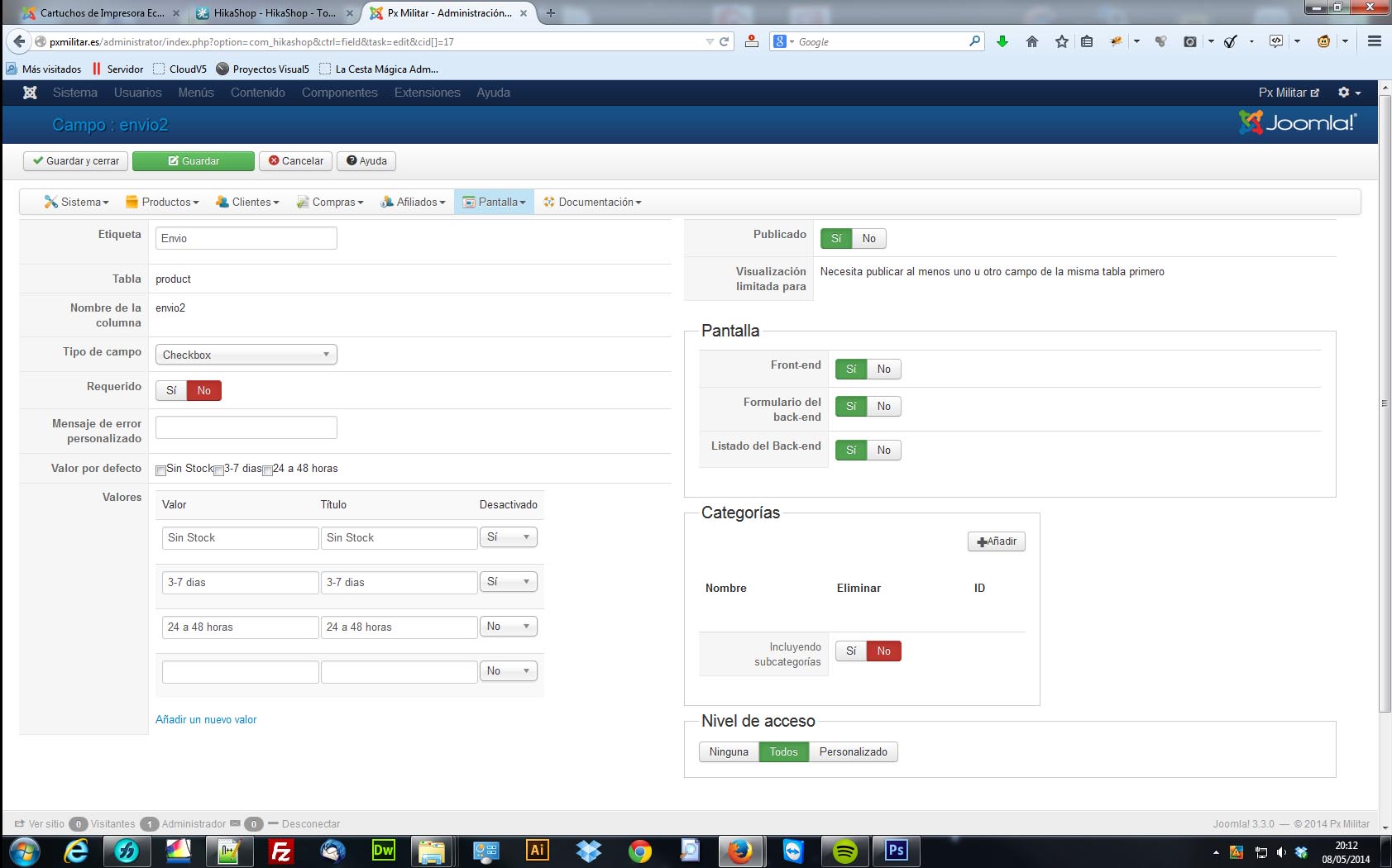
Ok i have thes three options, waht i want to do is that the products wich does not have option 2 or option 3 set, get option 1
Please Log in or Create an account to join the conversation.
12 years 4 months ago #155392
by Xavier
Replied by Xavier on topic Export, Edit and Import
Hi,
You have to configure the mass action like on the following screenshot.
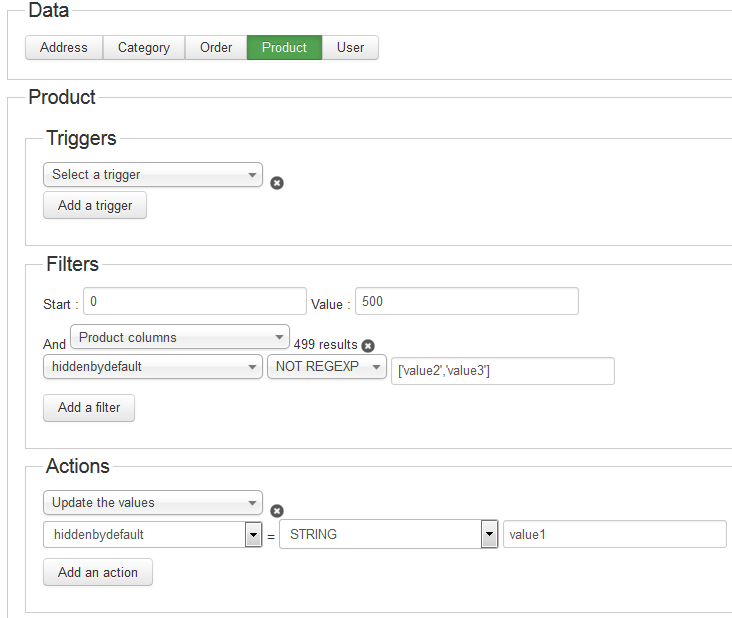
Just replace "value1", "value2" and "value3" by your own values.
You have to configure the mass action like on the following screenshot.
Just replace "value1", "value2" and "value3" by your own values.
Please Log in or Create an account to join the conversation.
Time to create page: 0.282 seconds