
Import not working
- abstractimagegroup
-
 Topic Author
- Offline
Less
More
12 years 4 months ago #154920
by abstractimagegroup
Abstract Image Group | Fulfilling all of your large format printing needs!
Import not working was created by abstractimagegroup
When I import the CSV file, the import is only importing one product, but merging the data from the other 9 products into the one. Can someone tell me what I am doing wrong please?
Abstract Image Group | Fulfilling all of your large format printing needs!
Please Log in or Create an account to join the conversation.

12 years 4 months ago #154932
by Jerome
Jerome - Obsidev.com
HikaMarket & HikaSerial developer / HikaShop core dev team.
Also helping the HikaShop support team when having some time or couldn't sleep.
By the way, do not send me private message, use the "contact us" form instead.
Replied by Jerome on topic Import not working
Hi,
There are several solution but the first one is : your CSV is malformed.
When you post a message, please provide the information that we asked for, we put these questions for a really good reason, like knowing the version you are using. If you have an old version, it is possible that you have a bug which has been fixed.
Regards,
There are several solution but the first one is : your CSV is malformed.
When you post a message, please provide the information that we asked for, we put these questions for a really good reason, like knowing the version you are using. If you have an old version, it is possible that you have a bug which has been fixed.
Regards,
Jerome - Obsidev.com
HikaMarket & HikaSerial developer / HikaShop core dev team.
Also helping the HikaShop support team when having some time or couldn't sleep.
By the way, do not send me private message, use the "contact us" form instead.
Please Log in or Create an account to join the conversation.
- abstractimagegroup
-
Topic Author
- Offline
12 years 4 months ago #155000
by abstractimagegroup
Abstract Image Group | Fulfilling all of your large format printing needs!
Replied by abstractimagegroup on topic Import not working
-- url of the page with the problem -- : N/A
-- HikaShop version -- : 2.3.0
-- Joomla version -- : 2.5.20
-- PHP version -- : 5.3.28
-- Browser(s) name and version -- : Firefox 28.0
-- Error-message(debug-mod must be tuned on) -- : The column " is not in the list of possible columns.
-- HikaShop version -- : 2.3.0
-- Joomla version -- : 2.5.20
-- PHP version -- : 5.3.28
-- Browser(s) name and version -- : Firefox 28.0
-- Error-message(debug-mod must be tuned on) -- : The column " is not in the list of possible columns.
Abstract Image Group | Fulfilling all of your large format printing needs!
Please Log in or Create an account to join the conversation.

12 years 4 months ago #155403
by Xavier
Replied by Xavier on topic Import not working
Hi,
As Jérome said, it seems that your CSV file is malformed.
On the following screenshot you can see that some informations are in the same column, and some have their own column.
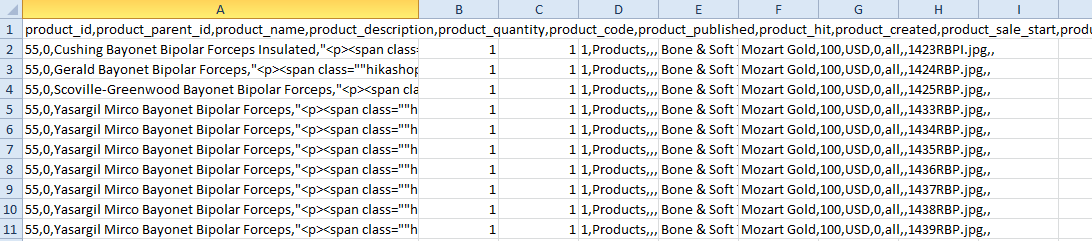
More than that, double quotes are missing, for the span, they are two times double quote so it's not a correct format.
ex:
As Jérome said, it seems that your CSV file is malformed.
On the following screenshot you can see that some informations are in the same column, and some have their own column.
More than that, double quotes are missing, for the span, they are two times double quote so it's not a correct format.
ex:
"<p><span class=""hikashop_product_name"">Insulated, Irrigating 19cm, 7 1/2 in.,
Please Log in or Create an account to join the conversation.
- abstractimagegroup
-
Topic Author
- Offline
12 years 4 months ago #155422
by abstractimagegroup
Abstract Image Group | Fulfilling all of your large format printing needs!
Replied by abstractimagegroup on topic Import not working
Is there perhaps a .csv template for importing products? I added about 10 fake products, exported them and I cant seem to make light of or even begin to understand how the .csv file even works. It seems quite confusing or even "malformed" if you will right from the export. I have 4,500+ products that need to be imported.
Abstract Image Group | Fulfilling all of your large format printing needs!
Please Log in or Create an account to join the conversation.
- abstractimagegroup
-
Topic Author
- Offline
12 years 4 months ago - 12 years 4 months ago #155424
by abstractimagegroup
Abstract Image Group | Fulfilling all of your large format printing needs!
Replied by abstractimagegroup on topic Import not working
I actually just created 10 "dummy" products, assigned categories, images, prices, etc... did an export, deleted the products, and then imported the original file, and it did not work properly.
It seems to be importing products to sub-categories at random. I am not sure why this is happening. In other words if I have categories:
A
--B
--C
--D
E
--B
--F
--G
H
--B
--C
--I
J
--K
--L
--M
You can see that I have a sub category ( , that exists in 3 main categories, it won't put the products that belong in B, in all instances, it will import them into only one, but at random.
It seems to be importing products to sub-categories at random. I am not sure why this is happening. In other words if I have categories:
A
--B
--C
--D
E
--B
--F
--G
H
--B
--C
--I
J
--K
--L
--M
You can see that I have a sub category (
, that exists in 3 main categories, it won't put the products that belong in B, in all instances, it will import them into only one, but at random. Abstract Image Group | Fulfilling all of your large format printing needs!
Last edit: 12 years 4 months ago by abstractimagegroup.
Please Log in or Create an account to join the conversation.

12 years 4 months ago #155504
by nicolas
Replied by nicolas on topic Import not working
The issue seems to come from the description of the products. Remove it in your products and just enter a simple description without complex HTML and then do an export again and base yourself on that.
It should be better after that.
If you have several categories with the same name, the system won't know which one should be used for the products and will just use the first one it finds.
If you want to put a product in several categories with the same name, you need to enter the id of the categories separated by a comma in the categories column of your products in the CSV. Then it will do what you want.
It should be better after that.
If you have several categories with the same name, the system won't know which one should be used for the products and will just use the first one it finds.
If you want to put a product in several categories with the same name, you need to enter the id of the categories separated by a comma in the categories column of your products in the CSV. Then it will do what you want.
Please Log in or Create an account to join the conversation.
Time to create page: 0.173 seconds