

- Posts: 17
- Thank you received: 0
Products Not Displaying in Back End
11 years 10 months ago #177569
by colleen22
Replied by colleen22 on topic Products Not Displaying in Back End
HI there,
Good news - the categories worked this time- bad news - products didn't work
I followed your instructions - uninstalled and dropped tableds - Backed up and reinstalled - installation went fine -
Then went to the import - and after it got to 4238 products - it said it was still processing for over 20 minutes - so so I stopped and then had some trouble connecting to the server - but it cleared up and I see the categories but the products aren't showing at all in the backend or on the front end. The categories are showing up on the front and backend now though -
I will keep trying, tweaking - THANK YOU
Good news - the categories worked this time- bad news - products didn't work
I followed your instructions - uninstalled and dropped tableds - Backed up and reinstalled - installation went fine -
Then went to the import - and after it got to 4238 products - it said it was still processing for over 20 minutes - so so I stopped and then had some trouble connecting to the server - but it cleared up and I see the categories but the products aren't showing at all in the backend or on the front end. The categories are showing up on the front and backend now though -
I will keep trying, tweaking - THANK YOU
Please Log in or Create an account to join the conversation.

11 years 10 months ago #177577
by Jerome
Jerome - Obsidev.com
HikaMarket & HikaSerial developer / HikaShop core dev team.
Also helping the HikaShop support team when having some time or couldn't sleep.
By the way, do not send me private message, use the "contact us" form instead.
Replied by Jerome on topic Products Not Displaying in Back End
Hi,
If you stopped the import (I don't know which one...) I guess that it did not imported all products and for sure, it did not imported the links between the products and the category.
If the import is not finished, you don't have to stop it
Regards,
If you stopped the import (I don't know which one...) I guess that it did not imported all products and for sure, it did not imported the links between the products and the category.
If the import is not finished, you don't have to stop it
Regards,
Jerome - Obsidev.com
HikaMarket & HikaSerial developer / HikaShop core dev team.
Also helping the HikaShop support team when having some time or couldn't sleep.
By the way, do not send me private message, use the "contact us" form instead.
Please Log in or Create an account to join the conversation.
11 years 10 months ago #177788
by colleen22
Replied by colleen22 on topic Products Not Displaying in Back End
Well -
I didn't think I was interuppting the importing since it was on the last step and there was no more steps to complete and and more products to complete.
So thinking I was hasty - I uninstalled, dropped tables and did it all over again.
This time I got the import and let it get to step five - and left the house for several hours only to come back and it was still in the same place.
Is 5 hours not long enough? This time I screen grabbed the page before I stopped it - see attached. The categories worked again - but no products in the back end or front end - However - I just checked the tables and they are indeed in the tables? hmmm
I think I should start a fresh build of the site with Hika Shop and do an import with CSVI Export or something like that.
Where can i find the HikaShop column names for importing to match the Virtuemart columns (or vice versa) I can't seem to find it.
I appreciate your help - Other than a fresh build I don't know what else to try - Will poke around and try things...
I didn't think I was interuppting the importing since it was on the last step and there was no more steps to complete and and more products to complete.
So thinking I was hasty - I uninstalled, dropped tables and did it all over again.
This time I got the import and let it get to step five - and left the house for several hours only to come back and it was still in the same place.
Is 5 hours not long enough? This time I screen grabbed the page before I stopped it - see attached. The categories worked again - but no products in the back end or front end - However - I just checked the tables and they are indeed in the tables? hmmm
I think I should start a fresh build of the site with Hika Shop and do an import with CSVI Export or something like that.
Where can i find the HikaShop column names for importing to match the Virtuemart columns (or vice versa) I can't seem to find it.
I appreciate your help - Other than a fresh build I don't know what else to try - Will poke around and try things...
Please Log in or Create an account to join the conversation.
11 years 10 months ago #177838
by Jerome
Jerome - Obsidev.com
HikaMarket & HikaSerial developer / HikaShop core dev team.
Also helping the HikaShop support team when having some time or couldn't sleep.
By the way, do not send me private message, use the "contact us" form instead.
Replied by Jerome on topic Products Not Displaying in Back End
Hi,
First at all ; at any place you explain which kind of import you are doing.
It is impossible to help you if you do not give us the right information about your issue.
So, if you're using a "classical" import like Virtuemart : When the import is finish, you have a message telling you the import is finish.
And sometimes you have to click on "next" in order to go in the next step ; all is not fully automatic, you have to validate some important step (so you can check the number of product imported, if you got errors with image import, etc).
Just explain your situation if you want help for us.
Regards,
First at all ; at any place you explain which kind of import you are doing.
It is impossible to help you if you do not give us the right information about your issue.
So, if you're using a "classical" import like Virtuemart : When the import is finish, you have a message telling you the import is finish.
And sometimes you have to click on "next" in order to go in the next step ; all is not fully automatic, you have to validate some important step (so you can check the number of product imported, if you got errors with image import, etc).
Just explain your situation if you want help for us.
Regards,
Jerome - Obsidev.com
HikaMarket & HikaSerial developer / HikaShop core dev team.
Also helping the HikaShop support team when having some time or couldn't sleep.
By the way, do not send me private message, use the "contact us" form instead.
Please Log in or Create an account to join the conversation.
11 years 10 months ago #177890
by colleen22
Replied by colleen22 on topic Products Not Displaying in Back End
Hi there,
I had described my set up in the first post on this thread - this thread has been bumped though - so here it is again -
-- HikaShop version -- : 2.3.3
-- Joomla version -- : 2.5.9
-- PHP version -- : 5.3.24
-- Browser(s) name and version -- : Firefox 32.0.3
I was using the Viruemart import option after installation / clean install
I am aware of the Next during the import process - and as indicated in the attached image on the previous post - it was just stuck in some loop - you can tell by the amount of seconds (5 hours or more) see attached image. You will see that the images also says that 4k+ products had been imported - so it should have been completed - but the system never completed it's cycle of import.
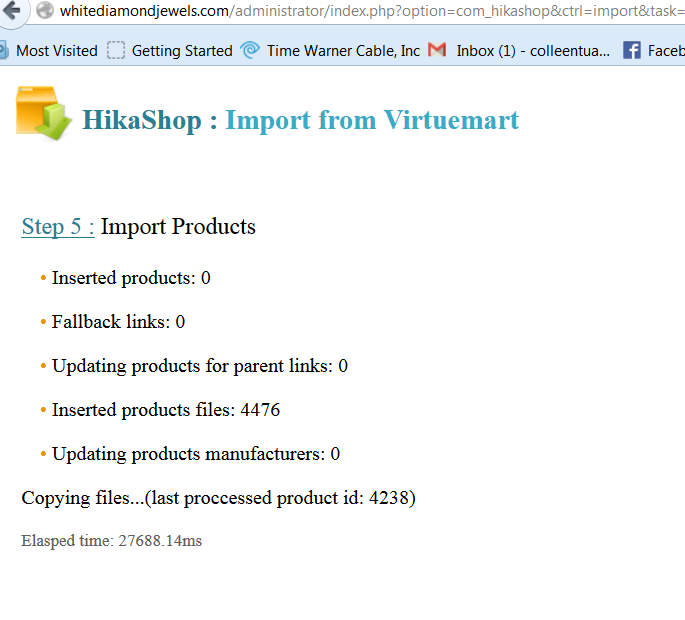
The categories were imported and can be seen in the Admin - and on the front of the site. The Products can not be seen on the Admin or in the front of the site.
I looked in the tables and the tables have the products.inside the tables. I also noticed that Description has an unexpected html in the product description (I don't know if this could be causing some conflict)
I have tried multiple settings and I still can't get the products to appear in the Admin - it's just blank.
I hope that's all the info you need.
Thank you,
Colleen
I had described my set up in the first post on this thread - this thread has been bumped though - so here it is again -
-- HikaShop version -- : 2.3.3
-- Joomla version -- : 2.5.9
-- PHP version -- : 5.3.24
-- Browser(s) name and version -- : Firefox 32.0.3
I was using the Viruemart import option after installation / clean install
I am aware of the Next during the import process - and as indicated in the attached image on the previous post - it was just stuck in some loop - you can tell by the amount of seconds (5 hours or more) see attached image. You will see that the images also says that 4k+ products had been imported - so it should have been completed - but the system never completed it's cycle of import.
The categories were imported and can be seen in the Admin - and on the front of the site. The Products can not be seen on the Admin or in the front of the site.
I looked in the tables and the tables have the products.inside the tables. I also noticed that Description has an unexpected html in the product description (I don't know if this could be causing some conflict)
I have tried multiple settings and I still can't get the products to appear in the Admin - it's just blank.
I hope that's all the info you need.
Thank you,
Colleen
Please Log in or Create an account to join the conversation.
11 years 10 months ago #178147
by Frank S.
Replied by Frank S. on topic Products Not Displaying in Back End
Hello,
I have exactly the same problem.
Step 5 and endless loop.
Backend/Frontend no Products
Do you already have a solution ??
from:
Joomla 1.5.24
Virtuemart 1.1.9
to:
Joomla 3.3.6
HikaShop 2.3.4
I have exactly the same problem.
Step 5 and endless loop.
Backend/Frontend no Products
Do you already have a solution ??
from:
Joomla 1.5.24
Virtuemart 1.1.9
to:
Joomla 3.3.6
HikaShop 2.3.4
Please Log in or Create an account to join the conversation.
11 years 10 months ago #178170
by Jerome
Jerome - Obsidev.com
HikaMarket & HikaSerial developer / HikaShop core dev team.
Also helping the HikaShop support team when having some time or couldn't sleep.
By the way, do not send me private message, use the "contact us" form instead.
Replied by Jerome on topic Products Not Displaying in Back End
Hi,
Please edit the file "administrator/components/com_hikashop/helper/importvm.php" and replace
By
It should avoid the infinite loop and got in the step 6 (which will make the product prices and then the product category associations)
Regards,
Please edit the file "administrator/components/com_hikashop/helper/importvm.php" and replace
Code:
if( $max > 0) {
echo '<p>Copying files...(last proccessed product id: ' . $max . ')</p>';
Code:
if( $max > 0 && $max > $offset) {
echo '<p>Copying files...(last proccessed product id: ' . $max . ')</p>';
Regards,
Jerome - Obsidev.com
HikaMarket & HikaSerial developer / HikaShop core dev team.
Also helping the HikaShop support team when having some time or couldn't sleep.
By the way, do not send me private message, use the "contact us" form instead.
Please Log in or Create an account to join the conversation.
11 years 10 months ago #178269
by colleen22
Replied by colleen22 on topic Products Not Displaying in Back End
I swapped the correction per your instructions...
Then I tried to reimport - I didn't know if I needed to delete all the products and try again?
Anyway - in trying to reimport - I get to the Step 0 - make a back up and click next - and then I will see it start to list the details and then jumps back to the "There is no table with the prefix 'yjdp__' in your Joomla database" error - I can't get passed this right now.
I tried no underscores, 1 underscore - and the same would happen.
I will try to dump all products and start a fresh import tomorrow.
Thanks for your help on this. I will let you know what happens.
Then I tried to reimport - I didn't know if I needed to delete all the products and try again?
Anyway - in trying to reimport - I get to the Step 0 - make a back up and click next - and then I will see it start to list the details and then jumps back to the "There is no table with the prefix 'yjdp__' in your Joomla database" error - I can't get passed this right now.
I tried no underscores, 1 underscore - and the same would happen.
I will try to dump all products and start a fresh import tomorrow.
Thanks for your help on this. I will let you know what happens.
Please Log in or Create an account to join the conversation.
11 years 10 months ago #178270
by Frank S.
Replied by Frank S. on topic Products Not Displaying in Back End
Thank you very much !
Import is done without Errors.
Maybe you have a solution for import the Virtuemart/Joomfish Products as native HikaShop Product translation ?
The default Virtuemart German Products are ready.
Now i have the english translated Products in the old Virtuemart/Joomfish version.
Import is done without Errors.
Maybe you have a solution for import the Virtuemart/Joomfish Products as native HikaShop Product translation ?
The default Virtuemart German Products are ready.
Now i have the english translated Products in the old Virtuemart/Joomfish version.
Please Log in or Create an account to join the conversation.
11 years 10 months ago #178271
by Frank S.
Replied by Frank S. on topic Products Not Displaying in Back End
Hi,
-take fresh Virtuemart Data.
-Change your vm table prefix to your default prefix.
-Fix the helper vm file
-start new import without enter the prefix
good luck
-take fresh Virtuemart Data.
-Change your vm table prefix to your default prefix.
-Fix the helper vm file
-start new import without enter the prefix
good luck
The following user(s) said Thank You: colleen22
Please Log in or Create an account to join the conversation.
11 years 10 months ago #178272
by davec
Replied by davec on topic Products Not Displaying in Back End
I had the same issue as well and applied the change suggested and all products etc are now imported as they should be.
I did notice that the code was in 2 places firstly around line 2177 - 2179 and then 2751 - 2753. Now just have to move it all to my new J3.0 site.
Dave
I did notice that the code was in 2 places firstly around line 2177 - 2179 and then 2751 - 2753. Now just have to move it all to my new J3.0 site.
Dave
Please Log in or Create an account to join the conversation.
11 years 10 months ago #178275
by Frank S.
Replied by Frank S. on topic Products Not Displaying in Back End
Hi Dave,
in my version is it on line 1377, function importProducts
Frank
in my version is it on line 1377, function importProducts
Frank
Please Log in or Create an account to join the conversation.
11 years 10 months ago #178297
by davec
Replied by davec on topic Products Not Displaying in Back End
Ok
Now I have one other little query. The orders imported from VM have very long random invoice/order numbers. Is there a simple way to convert these to the format I set in the configuration. {id size="6"} for order numbers and {order_id} for the invoice numbers?
Dave
Now I have one other little query. The orders imported from VM have very long random invoice/order numbers. Is there a simple way to convert these to the format I set in the configuration. {id size="6"} for order numbers and {order_id} for the invoice numbers?
Dave
Please Log in or Create an account to join the conversation.
11 years 10 months ago #178273
by Jerome
Jerome - Obsidev.com
HikaMarket & HikaSerial developer / HikaShop core dev team.
Also helping the HikaShop support team when having some time or couldn't sleep.
By the way, do not send me private message, use the "contact us" form instead.
Replied by Jerome on topic Products Not Displaying in Back End
Hi,
Please edit the file "administrator/components/com_hikashop/helper/importvm.php" and replace
By
If you still have an error, please replace
By
Regards,
Please edit the file "administrator/components/com_hikashop/helper/importvm.php" and replace
Code:
elseif(substr($this->vmprefix, 0, 1) != '_')
Code:
elseif(substr($this->vmprefix, -1, 1) != '_')
If you still have an error, please replace
Code:
$app->setUserState($this->sessionParams.'vmPrefix',$this->vmprefix);
Code:
if(strpos($this->vmprefix, '__') !== false && $this->vmprefix != '#__')
$this->vmprefix = str_replace('__', '_', $this->vmprefix);
$app->setUserState($this->sessionParams.'vmPrefix',$this->vmprefix);
Regards,
Jerome - Obsidev.com
HikaMarket & HikaSerial developer / HikaShop core dev team.
Also helping the HikaShop support team when having some time or couldn't sleep.
By the way, do not send me private message, use the "contact us" form instead.
Please Log in or Create an account to join the conversation.
11 years 10 months ago #178455
by colleen22
Replied by colleen22 on topic Products Not Displaying in Back End
I got IT WHEW!
Thank you Frank S. - I did a fresh install - and I went looking for the code to swap out and actually found 3 locations -
Lines 1089, 1376 and 2015
And then did the import and everything has appeared nice and clean! Woot Woot! I am THRILLED!
Thank you for jumping in and Thank you to Jerome and Hika Shop for their patience with me on getting this working. So happy to be able to get away from VM - If this was service and support for the free version - I can't wait to see the service for the paid version we are getting!
Thank you guys....now I just have to make each category appear as menu option - in the main menu. Off to read manuals....
Thank you!!
Thank you Frank S. - I did a fresh install - and I went looking for the code to swap out and actually found 3 locations -
Lines 1089, 1376 and 2015
And then did the import and everything has appeared nice and clean! Woot Woot! I am THRILLED!
Thank you for jumping in and Thank you to Jerome and Hika Shop for their patience with me on getting this working. So happy to be able to get away from VM - If this was service and support for the free version - I can't wait to see the service for the paid version we are getting!
Thank you guys....now I just have to make each category appear as menu option - in the main menu. Off to read manuals....
Thank you!!
Please Log in or Create an account to join the conversation.
11 years 10 months ago - 11 years 10 months ago #178456
by davec
Replied by davec on topic Products Not Displaying in Back End
Hi Jerome
does this mean I will need to carry out the import again with the changes made?
Dave
does this mean I will need to carry out the import again with the changes made?
Dave
Last edit: 11 years 10 months ago by davec.
Please Log in or Create an account to join the conversation.
11 years 10 months ago #178457
by Frank S.
Replied by Frank S. on topic Products Not Displaying in Back End
Hi colleen22,
your welcome.
>>So happy to be able to get away from VM
me too ...
Frank
your welcome.
>>So happy to be able to get away from VM
me too ...
Frank
Please Log in or Create an account to join the conversation.
11 years 10 months ago #178499
by Jerome
Jerome - Obsidev.com
HikaMarket & HikaSerial developer / HikaShop core dev team.
Also helping the HikaShop support team when having some time or couldn't sleep.
By the way, do not send me private message, use the "contact us" form instead.
Replied by Jerome on topic Products Not Displaying in Back End
Hi,
@colleen22
Good to know that the import has succeeded
@davec
If you had troubles with your previous import, you can reprocess it.
But if the import worked in your case (because there is WM1 and WM2 which have different code) ; you do not need to.
Regards,
@colleen22
Good to know that the import has succeeded
@davec
If you had troubles with your previous import, you can reprocess it.
But if the import worked in your case (because there is WM1 and WM2 which have different code) ; you do not need to.
Regards,
Jerome - Obsidev.com
HikaMarket & HikaSerial developer / HikaShop core dev team.
Also helping the HikaShop support team when having some time or couldn't sleep.
By the way, do not send me private message, use the "contact us" form instead.
Please Log in or Create an account to join the conversation.
11 years 10 months ago #178638
by davec
Replied by davec on topic Products Not Displaying in Back End
Hi Jerome
I am using VM1.19. the products imported but the order numbers are purely random.
VM order number is 00000060 but the order number after import into Hikashop is 406_68dcae3b149b02db43854c03f1d1
I would like to keep the original order numbers. I just wondered if there is a quick way to achieve this? I can change them manually in the database itself of course.
Dave
I am using VM1.19. the products imported but the order numbers are purely random.
VM order number is 00000060 but the order number after import into Hikashop is 406_68dcae3b149b02db43854c03f1d1
I would like to keep the original order numbers. I just wondered if there is a quick way to achieve this? I can change them manually in the database itself of course.
Dave
Please Log in or Create an account to join the conversation.

Less
More
- Posts: 12953
- Thank you received: 1778
11 years 10 months ago #178702
by Mohamed Thelji
Replied by Mohamed Thelji on topic Products Not Displaying in Back End
Hello dave,
Sure you can do it manually by editing the order_number column of the "hikashop_order" table.I just wondered if there is a quick way to achieve this? I can change them manually in the database itself of course.
Please Log in or Create an account to join the conversation.
Time to create page: 0.671 seconds