

- Posts: 75
- Thank you received: 1
Ordernumber als CSV filename
11 years 8 months ago - 11 years 8 months ago #186678
by wilfried
Ordernumber als CSV filename was created by wilfried
-- HikaShop version -- : 2.3.5.
-- Joomla version -- : 3.3.6
-- Error-message(debug-mod must be tuned on) -- : IE,FF,Chrome latest version.
Hello,
I want to use an unique filename for the export csv filename in massaction. Is it possible to user, for example, the ordernumber as the filename?
This is because I want to create a csv file every time an order has been confirmed and I want to ftp that file to the packaging company for grabbing and sending the order.
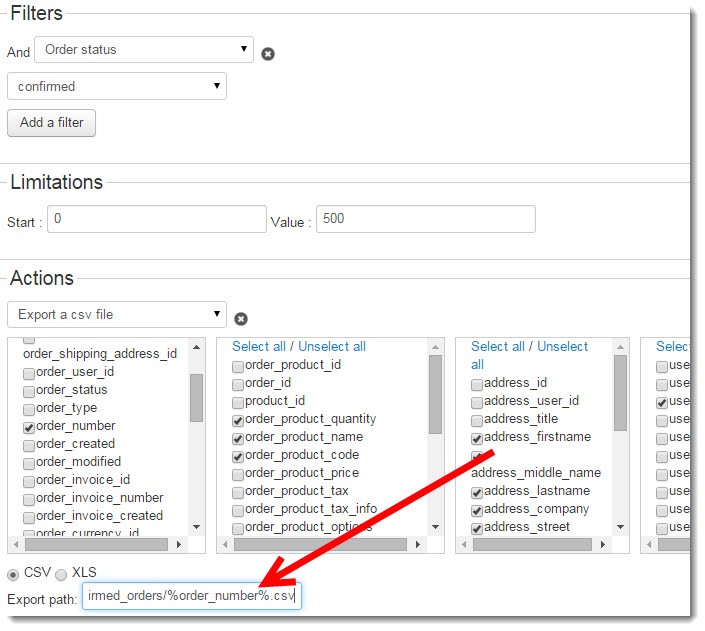
Hope someone can help me.
Kind regards,
Wilfried
-- Joomla version -- : 3.3.6
-- Error-message(debug-mod must be tuned on) -- : IE,FF,Chrome latest version.
Hello,
I want to use an unique filename for the export csv filename in massaction. Is it possible to user, for example, the ordernumber as the filename?
This is because I want to create a csv file every time an order has been confirmed and I want to ftp that file to the packaging company for grabbing and sending the order.
Hope someone can help me.
Kind regards,
Wilfried
Last edit: 11 years 8 months ago by wilfried. Reason: SOLVED
Please Log in or Create an account to join the conversation.

11 years 8 months ago #186704
by Xavier
Replied by Xavier on topic Ordernumber als CSV filename
Hi,
This is not possible this way, but I add this idea on our TODO list
At this time, you can do as suggested in this post:
www.hikashop.com/forum/import-export-csv...th-order.html#186637
This is not possible this way, but I add this idea on our TODO list
At this time, you can do as suggested in this post:
www.hikashop.com/forum/import-export-csv...th-order.html#186637
Please Log in or Create an account to join the conversation.
11 years 8 months ago #186797
by wilfried
Replied by wilfried on topic Ordernumber als CSV filename
Hello Xavier,
Thanks for the quick answer!
If I did this what shoudl I fill in into the path field on the frontend?
I now have the whole path included the csv filename
/var/www/vhosts/domainname/httpdocs/media/com_hikashop/upload/confirmed_orders/filename.csv
kind regards, WIlfried
Thanks for the quick answer!
If I did this what shoudl I fill in into the path field on the frontend?
I now have the whole path included the csv filename
/var/www/vhosts/domainname/httpdocs/media/com_hikashop/upload/confirmed_orders/filename.csv
kind regards, WIlfried
Please Log in or Create an account to join the conversation.
11 years 8 months ago #186802
by Xavier
Replied by Xavier on topic Ordernumber als CSV filename
Hi,
You can use that code:
You can use that code:
Code:
$params->path = str_replace('filename',$elements[0]->order_number,$path);
The following user(s) said Thank You: wilfried
Please Log in or Create an account to join the conversation.
11 years 8 months ago #186923
by wilfried
Replied by wilfried on topic Ordernumber als CSV filename
Thanks it is working now.
Wilfried
Wilfried
Please Log in or Create an account to join the conversation.
Time to create page: 0.238 seconds