
- Posts: 171
- Thank you received: 9
Import from VM2 - Missing user addresses
- pepecortez
-
 Topic Author
- Offline
Less
More
10 years 7 months ago #230387
by pepecortez
Import from VM2 - Missing user addresses was created by pepecortez
-- HikaShop version -- : 2.6.1
-- Joomla version -- : 3.4.8
Hi!
We have a VirtueMart2 webshop that we want to change to Hikashop. Import is worked almost perfectly the only problem I see currently that user address are not imported. Can anybody give me some advice how to solve that somehow?
Thanks in advance,
PePe
-- Joomla version -- : 3.4.8
Hi!
We have a VirtueMart2 webshop that we want to change to Hikashop. Import is worked almost perfectly the only problem I see currently that user address are not imported. Can anybody give me some advice how to solve that somehow?
Thanks in advance,
PePe
Please Log in or Create an account to join the conversation.

10 years 7 months ago #230516
by nicolas
Replied by nicolas on topic Import from VM2 - Missing user addresses
Hi,
Do you have something in the hikashop_address table after the import ?
What is the value of the address_published column for the entries there ?
Do you have the tables virtuemart_states and virtuemart_countries with all the data filled there ?
Do you have something in the hikashop_address table after the import ?
What is the value of the address_published column for the entries there ?
Do you have the tables virtuemart_states and virtuemart_countries with all the data filled there ?
Please Log in or Create an account to join the conversation.
- pepecortez
-
Topic Author
- Offline
Less
More
- Posts: 171
- Thank you received: 9
10 years 7 months ago - 10 years 7 months ago #230518
by pepecortez
No, it's totally empty.
No, as it's empty.
Yes, I have both.
PS.: The VirtueMart version is: 2.6.6.
Replied by pepecortez on topic Import from VM2 - Missing user addresses
nicolas wrote: Hi,
Do you have something in the hikashop_address table after the import ?
No, it's totally empty.
nicolas wrote: What is the value of the address_published column for the entries there ?
No, as it's empty.
nicolas wrote: Do you have the tables virtuemart_states and virtuemart_countries with all the data filled there ?
Yes, I have both.
PS.: The VirtueMart version is: 2.6.6.
Last edit: 10 years 7 months ago by pepecortez.
Please Log in or Create an account to join the conversation.
10 years 7 months ago #230548
by naizak
Replied by naizak on topic Import from VM2 - Missing user addresses
Hi all,
Sorry for my intrusion…
i think i have actually the same issue, i have all product imported as well the clients and commands but no details inside command, no address, nothing...just names and prices
J3 + Vm3
address_published : all
hikashop_address table : Empty
address_published value : 1
tables virtuemart_states and virtuemart_countries : YES
Thanks in advance
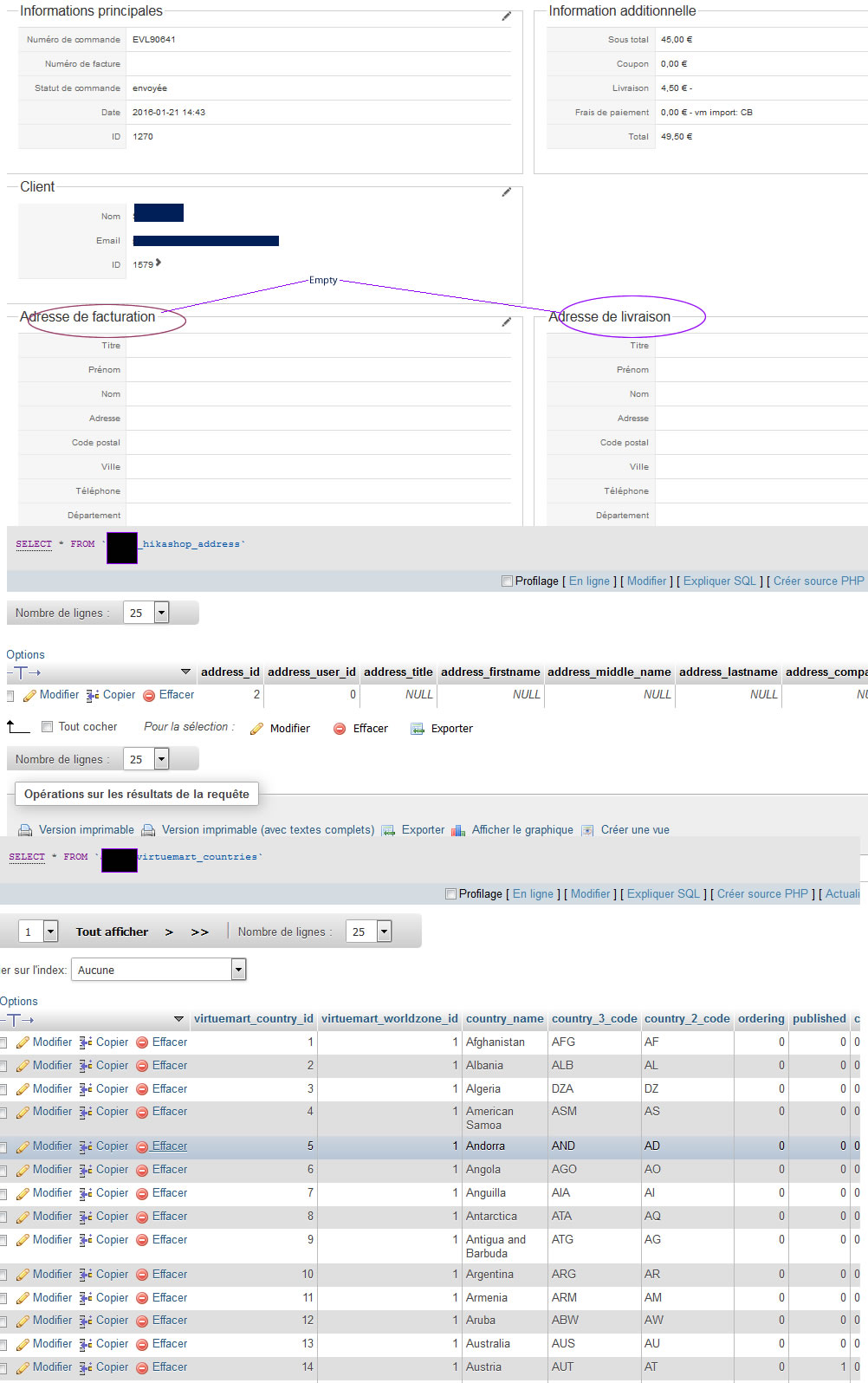
Sorry for my intrusion…
i think i have actually the same issue, i have all product imported as well the clients and commands but no details inside command, no address, nothing...just names and prices
J3 + Vm3
address_published : all
hikashop_address table : Empty
address_published value : 1
tables virtuemart_states and virtuemart_countries : YES
Thanks in advance
Please Log in or Create an account to join the conversation.
10 years 7 months ago #230550
by nicolas
Replied by nicolas on topic Import from VM2 - Missing user addresses
Hi,
After the line:
'WHERE vmui.virtuemart_user_id > '.$this->options->last_vm_user.' ORDER BY vmui.virtuemart_user_id ASC;';
in the file administrator/components/com_hikashop/helpers/import/vm2.php, add the line:
echo $sql1; exit;
Then, run the import again. That should display at one point the MySQL query that is run by the import system to import the addresses from VM to HikaShop.
Then, run the query in your database which PHPMyAdmin after replacing the #__ by the actual table prefix of your website.
That should provide an error message explaining why it didn't work.
After the line:
'WHERE vmui.virtuemart_user_id > '.$this->options->last_vm_user.' ORDER BY vmui.virtuemart_user_id ASC;';
in the file administrator/components/com_hikashop/helpers/import/vm2.php, add the line:
echo $sql1; exit;
Then, run the import again. That should display at one point the MySQL query that is run by the import system to import the addresses from VM to HikaShop.
Then, run the query in your database which PHPMyAdmin after replacing the #__ by the actual table prefix of your website.
That should provide an error message explaining why it didn't work.
The following user(s) said Thank You: naizak
Please Log in or Create an account to join the conversation.
- pepecortez
-
Topic Author
- Offline
Less
More
- Posts: 171
- Thank you received: 9
10 years 7 months ago #230596
by pepecortez
I've tried it out.
I've got this SQL command:
I've changed #__ to my table prefix, and then run the SQL in phpMyAdmin, but it's runned ok, saying 0 rows successfully added.
Prtscreen attached.
Replied by pepecortez on topic Import from VM2 - Missing user addresses
nicolas wrote: Hi,
After the line:
'WHERE vmui.virtuemart_user_id > '.$this->options->last_vm_user.' ORDER BY vmui.virtuemart_user_id ASC;';
in the file administrator/components/com_hikashop/helpers/import/vm2.php, add the line:
echo $sql1; exit;
Then, run the import again. That should display at one point the MySQL query that is run by the import system to import the addresses from VM to HikaShop.
Then, run the query in your database which PHPMyAdmin after replacing the #__ by the actual table prefix of your website.
That should provide an error message explaining why it didn't work.
I've tried it out.
I've got this SQL command:
Code:
INSERT IGNORE INTO `#__hikashop_address` (`address_user_id`,`address_firstname`,`address_middle_name`,`address_lastname`,`address_company`,`address_street`,`address_post_code`,`address_city`,`address_telephone`,`address_telephone2`,`address_fax`,`address_state`,`address_country`,`address_published`) SELECT hku.user_id,vmui.first_name,vmui.middle_name,vmui.last_name,vmui.company,CONCAT(vmui.address_1,' ',vmui.address_2),vmui.zip,vmui.city,vmui.phone_1,vmui.phone_2,vmui.fax,vms.state_3_code,vmc.country_3_code,4 FROM `gomb_virtuemart_userinfos` AS vmui INNER JOIN `gomb_virtuemart_states` vms ON vmui.virtuemart_state_id = vms.virtuemart_state_id INNER JOIN `gomb_virtuemart_countries` vmc ON vmui.virtuemart_country_id = vmc.virtuemart_country_id INNER JOIN `#__hikashop_user` AS hku ON vmui.virtuemart_user_id = hku.user_cms_id WHERE vmui.virtuemart_user_id > 0 ORDER BY vmui.virtuemart_user_id ASC;
I've changed #__ to my table prefix, and then run the SQL in phpMyAdmin, but it's runned ok, saying 0 rows successfully added.
Prtscreen attached.
Please Log in or Create an account to join the conversation.
10 years 7 months ago - 10 years 7 months ago #230629
by naizak
Replied by naizak on topic Import from VM2 - Missing user addresses
Hi,
i did it and it works on j3 + vm3 , but i have nothing add in my command adress.
So i restart import , i had the insert message ....
So i deleted all and i imported back still no adresse in command at all ...
Thanks
i did it and it works on j3 + vm3 , but i have nothing add in my command adress.
So i restart import , i had the insert message ....
So i deleted all and i imported back still no adresse in command at all ...
Thanks
Last edit: 10 years 7 months ago by naizak.
Please Log in or Create an account to join the conversation.
10 years 7 months ago #230630
by nicolas
Replied by nicolas on topic Import from VM2 - Missing user addresses
Hi,
Interesting. So at least the database structure didn't change but there is a problem with the VM data or the HikaShop user synchronization.
The import of addresses supposes that the users have already been synched.
Can you check the hikashop_user table. Do you see all your Joomla users in there ?
Also, could you do some screenshots of the table virtuemart_userinfos so that we could see all the columns for a few rows ?
Interesting. So at least the database structure didn't change but there is a problem with the VM data or the HikaShop user synchronization.
The import of addresses supposes that the users have already been synched.
Can you check the hikashop_user table. Do you see all your Joomla users in there ?
Also, could you do some screenshots of the table virtuemart_userinfos so that we could see all the columns for a few rows ?
Please Log in or Create an account to join the conversation.
- pepecortez
-
Topic Author
- Offline
Less
More
- Posts: 171
- Thank you received: 9
10 years 7 months ago #230683
by pepecortez
I think yes, all my users are there.
Attached screenshots. If u need, I can PM access if you need. As I'm checkin' the vm_userinfo table, maybe could that be the problem that virtuemart_state_id and virtuemart_country_id are both 0 (empty)?
Replied by pepecortez on topic Import from VM2 - Missing user addresses
nicolas wrote: Hi,
Interesting. So at least the database structure didn't change but there is a problem with the VM data or the HikaShop user synchronization.
The import of addresses supposes that the users have already been synched.
Can you check the hikashop_user table. Do you see all your Joomla users in there ?
I think yes, all my users are there.
nicolas wrote: Also, could you do some screenshots of the table virtuemart_userinfos so that we could see all the columns for a few rows ?
Attached screenshots. If u need, I can PM access if you need. As I'm checkin' the vm_userinfo table, maybe could that be the problem that virtuemart_state_id and virtuemart_country_id are both 0 (empty)?
Please Log in or Create an account to join the conversation.
10 years 7 months ago - 10 years 7 months ago #230684
by naizak
Replied by naizak on topic Import from VM2 - Missing user addresses
Hi,
hikashop_user table /_users have them all almost 600 user on both table

Thanks in advance
hikashop_user table /_users have them all almost 600 user on both table
Thanks in advance
Last edit: 10 years 7 months ago by naizak.
Please Log in or Create an account to join the conversation.
10 years 7 months ago #231363
by nicolas
Replied by nicolas on topic Import from VM2 - Missing user addresses
Hi,
I think that the problem is that the virtuemart_state_id and/or the virtuemart_country_id are empty in your virtuemart_userinfos tables.
Change the code:
"INNER JOIN `".$this->vmprefix."virtuemart_states` vms ON vmui.virtuemart_state_id = vms.virtuemart_state_id ".
"INNER JOIN `".$this->vmprefix."virtuemart_countries` vmc ON vmui.virtuemart_country_id = vmc.virtuemart_country_id ".
to:
"LEFT JOIN `".$this->vmprefix."virtuemart_states` vms ON vmui.virtuemart_state_id = vms.virtuemart_state_id ".
"LEFT JOIN `".$this->vmprefix."virtuemart_countries` vmc ON vmui.virtuemart_country_id = vmc.virtuemart_country_id ".
in the file administrator/components/com_hikashop/helpers/import/vm2.php and that should allow the import of addresses even without these columns filled in.
I think that the problem is that the virtuemart_state_id and/or the virtuemart_country_id are empty in your virtuemart_userinfos tables.
Change the code:
"INNER JOIN `".$this->vmprefix."virtuemart_states` vms ON vmui.virtuemart_state_id = vms.virtuemart_state_id ".
"INNER JOIN `".$this->vmprefix."virtuemart_countries` vmc ON vmui.virtuemart_country_id = vmc.virtuemart_country_id ".
to:
"LEFT JOIN `".$this->vmprefix."virtuemart_states` vms ON vmui.virtuemart_state_id = vms.virtuemart_state_id ".
"LEFT JOIN `".$this->vmprefix."virtuemart_countries` vmc ON vmui.virtuemart_country_id = vmc.virtuemart_country_id ".
in the file administrator/components/com_hikashop/helpers/import/vm2.php and that should allow the import of addresses even without these columns filled in.
The following user(s) said Thank You: naizak, pepecortez
Please Log in or Create an account to join the conversation.
10 years 7 months ago - 10 years 7 months ago #231374
by naizak
Replied by naizak on topic Import from VM2 - Missing user addresses
Hi,
thank you very much for help ,
i tryed both method
modifcation :
So seems nothing new inside orders ,
So i tryed the first change :
INSERT IGNORE INTO `#__hikashop_address` (`address_user_id`,`address_firstname`,`address_middle_name`,`address_lastname`,`address_company`,`address_street`,`address_post_code`,`address_city`,`address_telephone`,`address_telephone2`,`address_fax`,`address_state`,`address_country`,`address_published`) SELECT hku.user_id,vmui.first_name,vmui.middle_name,vmui.last_name,vmui.company,CONCAT(vmui.address_1,’ ‘,vmui.address_2),vmui.zip,vmui.city,vmui.phone_1,vmui.phone_2,vmui.fax,vms.state_3_code,vmc.country_3_code,4 FROM `agcqf_virtuemart_userinfos` AS vmui LEFT JOIN `agcqf_virtuemart_states` vms ON vmui.virtuemart_state_id = vms.virtuemart_state_id LEFT JOIN `agcqf_virtuemart_countries` vmc ON vmui.virtuemart_country_id = vmc.virtuemart_country_id INNER JOIN `#__hikashop_user` AS hku ON vmui.virtuemart_user_id = hku.user_cms_id WHERE vmui.virtuemart_user_id > 917 ORDER BY vmui.virtuemart_user_id ASC;
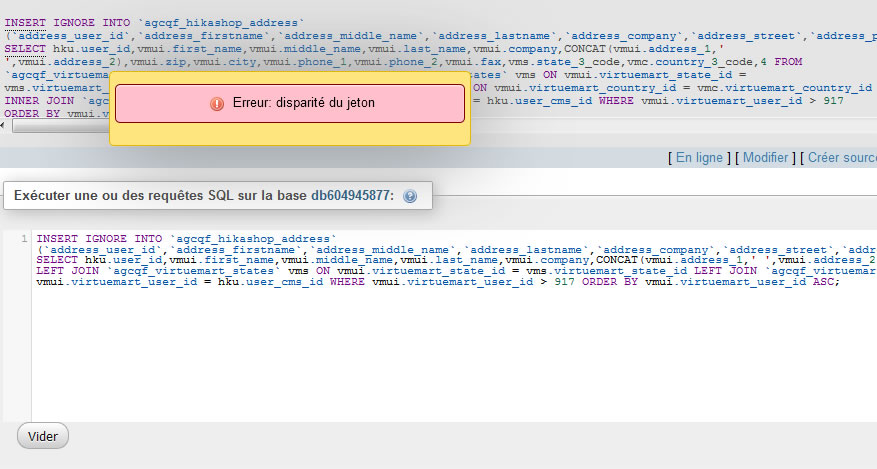
i execute it so give me a sql error : see image*...
Finaly the _hikashop_address table seems full.....
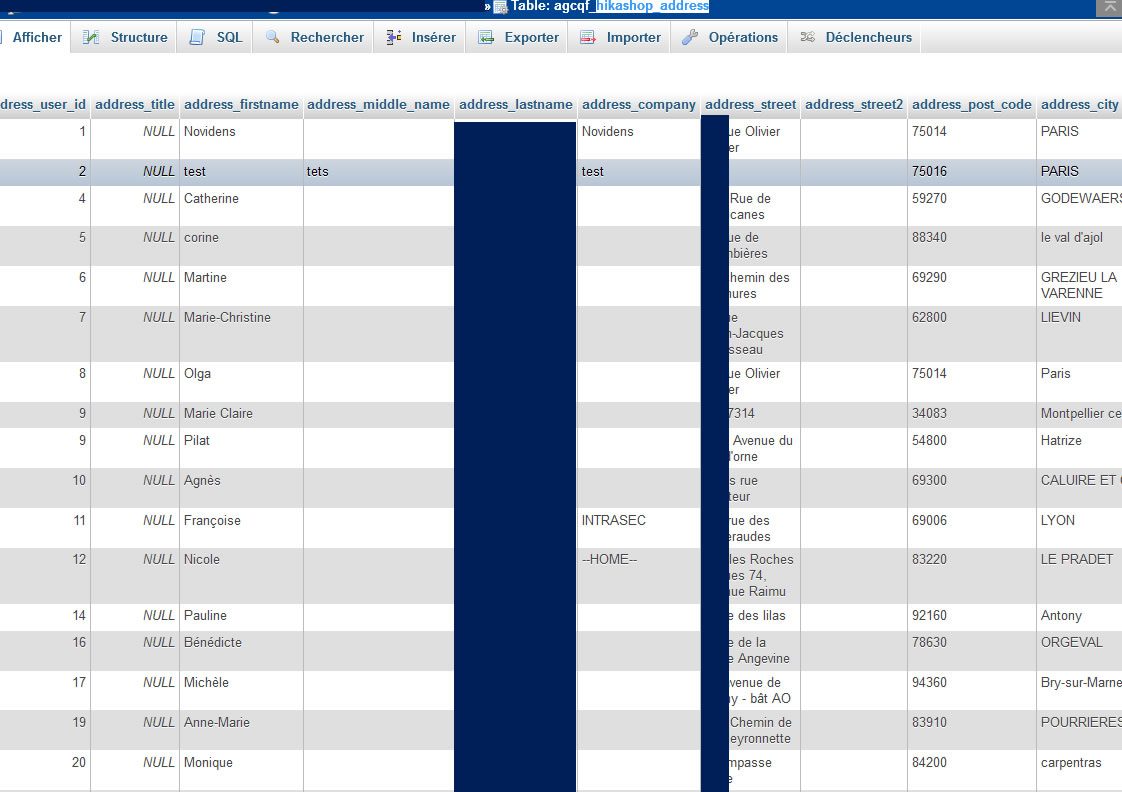
but nothing in back End * :blink:
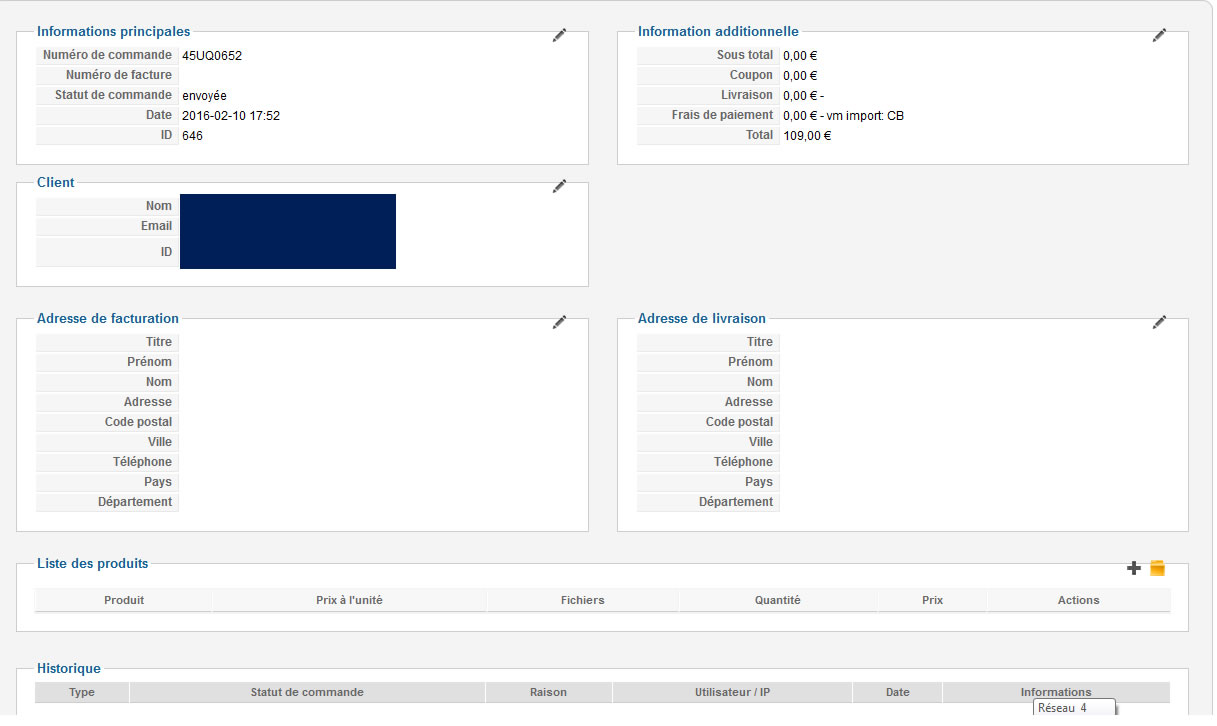
Finaly and i didn't check this part before i find adress but not on main page off the clients that's normal ?
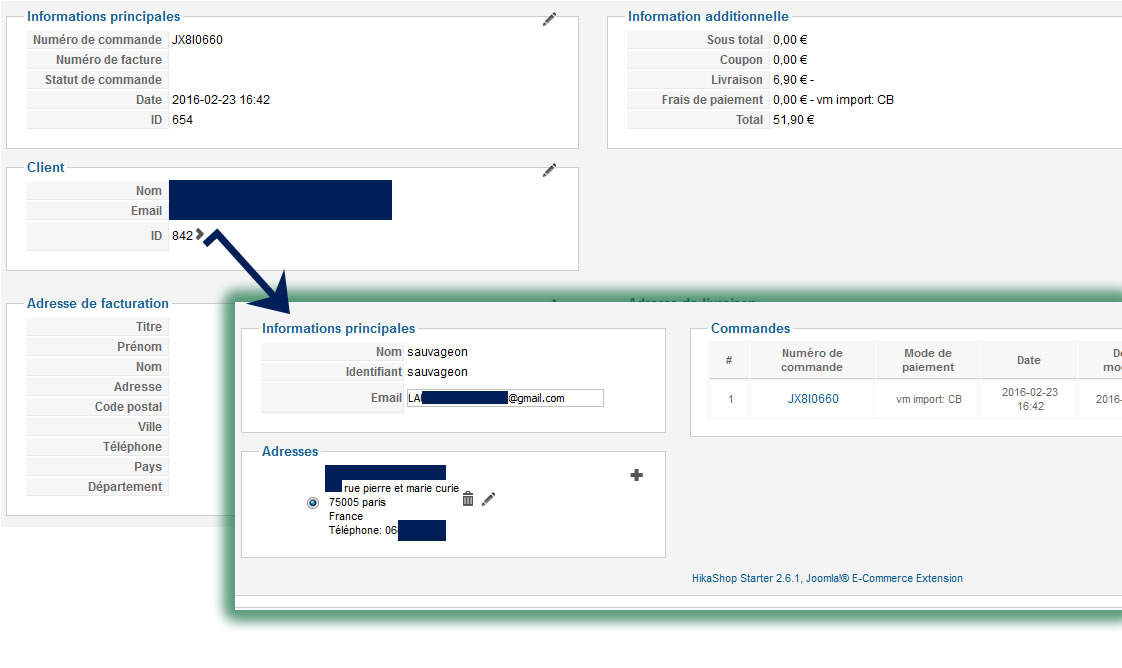
thank you very much for help ,
i tryed both method
modifcation :
"LEFT JOIN `".$this->vmprefix."virtuemart_states` vms ON vmui.virtuemart_state_id = vms.virtuemart_state_id ".
"LEFT JOIN `".$this->vmprefix."virtuemart_countries` vmc ON vmui.virtuemart_country_id = vmc.virtuemart_country_id ".
So seems nothing new inside orders ,
So i tryed the first change :
i got :echo $sql1; exit;
INSERT IGNORE INTO `#__hikashop_address` (`address_user_id`,`address_firstname`,`address_middle_name`,`address_lastname`,`address_company`,`address_street`,`address_post_code`,`address_city`,`address_telephone`,`address_telephone2`,`address_fax`,`address_state`,`address_country`,`address_published`) SELECT hku.user_id,vmui.first_name,vmui.middle_name,vmui.last_name,vmui.company,CONCAT(vmui.address_1,’ ‘,vmui.address_2),vmui.zip,vmui.city,vmui.phone_1,vmui.phone_2,vmui.fax,vms.state_3_code,vmc.country_3_code,4 FROM `agcqf_virtuemart_userinfos` AS vmui LEFT JOIN `agcqf_virtuemart_states` vms ON vmui.virtuemart_state_id = vms.virtuemart_state_id LEFT JOIN `agcqf_virtuemart_countries` vmc ON vmui.virtuemart_country_id = vmc.virtuemart_country_id INNER JOIN `#__hikashop_user` AS hku ON vmui.virtuemart_user_id = hku.user_cms_id WHERE vmui.virtuemart_user_id > 917 ORDER BY vmui.virtuemart_user_id ASC;
i execute it so give me a sql error : see image*...
Finaly the _hikashop_address table seems full.....
but nothing in back End * :blink:
Finaly and i didn't check this part before i find adress but not on main page off the clients that's normal ?
Last edit: 10 years 7 months ago by naizak. Reason: new element
Please Log in or Create an account to join the conversation.
10 years 7 months ago #231375
by nicolas
Replied by nicolas on topic Import from VM2 - Missing user addresses
Hi,
The "disparité du jeton" error is an error of phpmyadmin. It's not linked to the MySQL query:
sourceforge.net/p/phpmyadmin/bugs/4387/
The issue you have now is probably because of that in the query:
virtuemart_user_id > 917
Since you already did an import before in that database, the import system is only importing new elements.
So you don't a change in the old orders you already had but it should be ok for the recent orders (that's the data you get in the hikashop_address table).
So it looks like it is indeed the solution.
The best might be to remove all the HikaShop tables from your database, run an install again, do the code modification, and then run the import.
That way, it will process all the data.
The "disparité du jeton" error is an error of phpmyadmin. It's not linked to the MySQL query:
sourceforge.net/p/phpmyadmin/bugs/4387/
The issue you have now is probably because of that in the query:
virtuemart_user_id > 917
Since you already did an import before in that database, the import system is only importing new elements.
So you don't a change in the old orders you already had but it should be ok for the recent orders (that's the data you get in the hikashop_address table).
So it looks like it is indeed the solution.
The best might be to remove all the HikaShop tables from your database, run an install again, do the code modification, and then run the import.
That way, it will process all the data.
The following user(s) said Thank You: naizak
Please Log in or Create an account to join the conversation.
10 years 7 months ago #231454
by naizak
Replied by naizak on topic "solved "Import from VM2 - Missing user addresses
Hi,
Thanks you very much Monsieur Nicolas for help and final solution
Best Regards
Thanks you very much Monsieur Nicolas for help and final solution
Best Regards
Please Log in or Create an account to join the conversation.
- pepecortez
-
Topic Author
- Offline
Less
More
- Posts: 171
- Thank you received: 9
10 years 6 months ago #232173
by pepecortez
Replied by pepecortez on topic "solved "Import from VM2 - Missing user addresses
Yeah, there are 2 parts in the code where it has to be changed.
I've removed the earlier hikashop tables from the database and then reinstalled the component, also then imported from VM, and now it seems totally OK.
Thanks for your help!
I've removed the earlier hikashop tables from the database and then reinstalled the component, also then imported from VM, and now it seems totally OK.
Thanks for your help!
Please Log in or Create an account to join the conversation.
Time to create page: 0.274 seconds