
- Posts: 61
- Thank you received: 5
Bug at massaction.php
- web4studio
-
 Topic Author
- Offline
Less
More
5 years 2 months ago #334400
by web4studio
Bug at massaction.php was created by web4studio
-- url of the page with the problem -- :
weinpalais.de/csv2xml.php
Hi
After updating HikaShop our cron job is not working properly. And we have to adjust the massaction.php
And the export is working again.
See our modified code
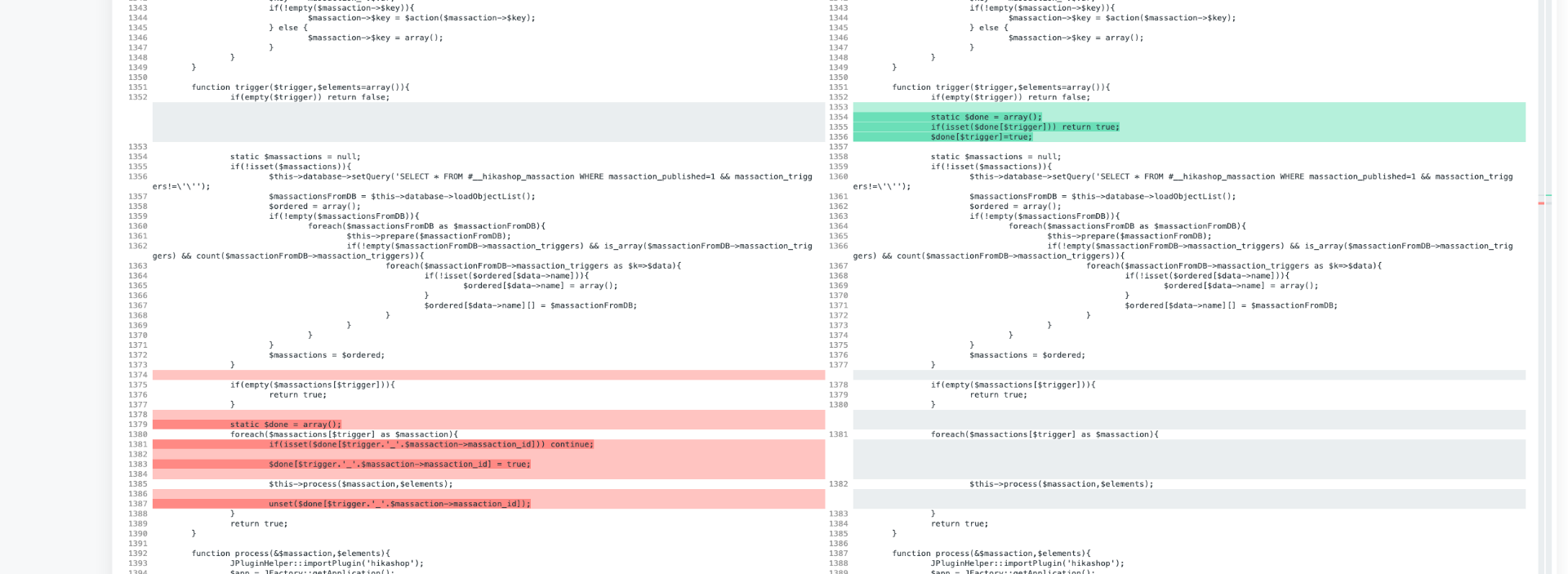 attached.
Many thx
Nadine
Hi
After updating HikaShop our cron job is not working properly. And we have to adjust the massaction.php
And the export is working again.
See our modified code
Many thx
Nadine
Please Log in or Create an account to join the conversation.

5 years 2 months ago #334402
by nicolas
Replied by nicolas on topic Bug at massaction.php
Hi,
This modification was made on purpose to fix this situation:
www.hikashop.com/support/forum/mass-acti...-orders-to-copy.html
So we would need to know more about your situation to understand why the modification we made impact you as we can't just revert the code. Otherwise, the problem mentioned in that other thread would be back.
This modification was made on purpose to fix this situation:
www.hikashop.com/support/forum/mass-acti...-orders-to-copy.html
So we would need to know more about your situation to understand why the modification we made impact you as we can't just revert the code. Otherwise, the problem mentioned in that other thread would be back.
Please Log in or Create an account to join the conversation.
- web4studio
-
Topic Author
- Offline
Less
More
- Posts: 61
- Thank you received: 5
5 years 2 months ago #334610
by web4studio
Replied by web4studio on topic Bug at massaction.php
Hi
This is the reply from my developer. Maybe it helps?
If I remember correctly, the changes were made on line 2640 or around it. But it seems that had more to do with the fact that the constant HIKASHOP_J30 is set incorrectly, which can happen, for example, due to a misdirected update process. So the problem only occurs in this shop and is not a case for Hika support. For permanent fix you would have to look at how this constant is set by Hika, but that requires some training.
Is it possible, there is a backend override somewhere? So the scripts are still the old ones?
This is the reply from my developer. Maybe it helps?
If I remember correctly, the changes were made on line 2640 or around it. But it seems that had more to do with the fact that the constant HIKASHOP_J30 is set incorrectly, which can happen, for example, due to a misdirected update process. So the problem only occurs in this shop and is not a case for Hika support. For permanent fix you would have to look at how this constant is set by Hika, but that requires some training.
Is it possible, there is a backend override somewhere? So the scripts are still the old ones?
Please Log in or Create an account to join the conversation.
5 years 2 months ago #334612
by nicolas
Replied by nicolas on topic Bug at massaction.php
Hi,
It seems that your developer is talking about some other code "on line 2640". Now, I don't know which modification he is talking about ? One we made or one he made ? Or even if he is talking about the massaction.php file or the csv2xml.php file or another file.
So I can't say much more. I don't know which error you had nor what code triggered the error, for what reason ? So I'm in the dark here and thus can't say much.
Regarding his question on the HIKASHOP_J30 constant, it is set by HikaShop at the beginning of the file administrator/components/com_hikashop/helpers/helper.php based on your current version of Joomla:
As you can see, it bases itself on the JVERSION constant which is set by Joomla based on the current version of Joomla on its end (
joomla.stackexchange.com/questions/26682...oomla-version-in-php
)
It seems that your developer is talking about some other code "on line 2640". Now, I don't know which modification he is talking about ? One we made or one he made ? Or even if he is talking about the massaction.php file or the csv2xml.php file or another file.
So I can't say much more. I don't know which error you had nor what code triggered the error, for what reason ? So I'm in the dark here and thus can't say much.
Regarding his question on the HIKASHOP_J30 constant, it is set by HikaShop at the beginning of the file administrator/components/com_hikashop/helpers/helper.php based on your current version of Joomla:
Code:
$jversion = preg_replace('#[^0-9\.]#i','',JVERSION);
define('HIKASHOP_J16', true); define('HIKASHOP_J17', true); define('HIKASHOP_J25',true);
define('HIKASHOP_J30',version_compare($jversion,'3.0.0','>=') ? true : false);
Please Log in or Create an account to join the conversation.
Time to create page: 0.179 seconds