

- Posts: 23
- Thank you received: 0
Cron job

15 years 6 months ago #11771
by nicolas
Replied by nicolas on topic Re: Cron job
If you want to do so, you will have to set the cron task on your server directly:
www.hikashop.com/support/documentation/5...ron-task.html#server
Please Log in or Create an account to join the conversation.
15 years 6 months ago #11820
by TanyaPro
Replied by TanyaPro on topic Re: Cron job
Hi,
I tried to set up the cron job with the php file into the root. This is the message I get every 5 minutes and in side the Hikashop I do not see a triggered last cron job. Do you have a clue what this means?
The message I get from my server:
Status: 302 Moved Temporarily
Location: my-website.com/index2.php?option=com_hikashop>ask=cron
Content-type: text/html
I tried to set up the cron job with the php file into the root. This is the message I get every 5 minutes and in side the Hikashop I do not see a triggered last cron job. Do you have a clue what this means?
The message I get from my server:
Status: 302 Moved Temporarily
Location: my-website.com/index2.php?option=com_hikashop>ask=cron
Content-type: text/html
Please Log in or Create an account to join the conversation.
15 years 6 months ago #11821
by TanyaPro
Replied by TanyaPro on topic Re: Cron job
The Command field is the script or executable that runs at a specified frequency. Click Browse to locate a file in your hosting account. The full file name of your selection is placed into this editable field.
Cron commands are typically script files that have executable permission and specify their interpreter as the first line of the file. For example, a first line of "#!/usr/bin/perl" directs the system to run the perl language interpreter for the file.
Your Shared Hosting account supports the following languages and associated interpreter lines:
* Perl: #!/usr/bin/perl
* Python 2.2: #!/usr/bin/python2.2
* Python 2.3: #!/usr/bin/python2.3
* Python 2.4: #!/usr/bin/python2.4
* Ruby: #!/usr/local/bin/ruby
* Bash: #!/bin/bash
The installed versions of PHP 4 and PHP 5 do not support the interpreter specification in a PHP file. In order to run a PHP script via Cron, you must specify the interpreter manually. For example:
* PHP 4: /web/cgi-bin/php "$HOME/html/test.php"
* PHP 5: /web/cgi-bin/php5 "$HOME/html/test.php5"
Note: In this example script, "$HOME" represents the full path to your Shared Hosting account. The actual path to your account will be provided if you select the script from your account using the Browse button.
Cron commands are typically script files that have executable permission and specify their interpreter as the first line of the file. For example, a first line of "#!/usr/bin/perl" directs the system to run the perl language interpreter for the file.
Your Shared Hosting account supports the following languages and associated interpreter lines:
* Perl: #!/usr/bin/perl
* Python 2.2: #!/usr/bin/python2.2
* Python 2.3: #!/usr/bin/python2.3
* Python 2.4: #!/usr/bin/python2.4
* Ruby: #!/usr/local/bin/ruby
* Bash: #!/bin/bash
The installed versions of PHP 4 and PHP 5 do not support the interpreter specification in a PHP file. In order to run a PHP script via Cron, you must specify the interpreter manually. For example:
* PHP 4: /web/cgi-bin/php "$HOME/html/test.php"
* PHP 5: /web/cgi-bin/php5 "$HOME/html/test.php5"
Note: In this example script, "$HOME" represents the full path to your Shared Hosting account. The actual path to your account will be provided if you select the script from your account using the Browse button.
Please Log in or Create an account to join the conversation.
15 years 6 months ago #11823
by nicolas
Replied by nicolas on topic Re: Cron job
When you have a 302 status, that's because something tries to redirect the page to another URL. As you can see, the new URL is the same as the one in the documentationbut instead of http, you have https. That means that there is something which redirect the http requests to https on your website. So in your cron, instead of using the URL with http, you should use it with https.
Please Log in or Create an account to join the conversation.
15 years 6 months ago #11828
by TanyaPro
Replied by TanyaPro on topic Re: Cron job
I use it with https, I tried both (http) also, what else can be the problem? I contacted Godaddy also about this maybe they can help...
Thank you,
Peter
Thank you,
Peter
Please Log in or Create an account to join the conversation.
15 years 6 months ago #11829
by nicolas
Replied by nicolas on topic Re: Cron job
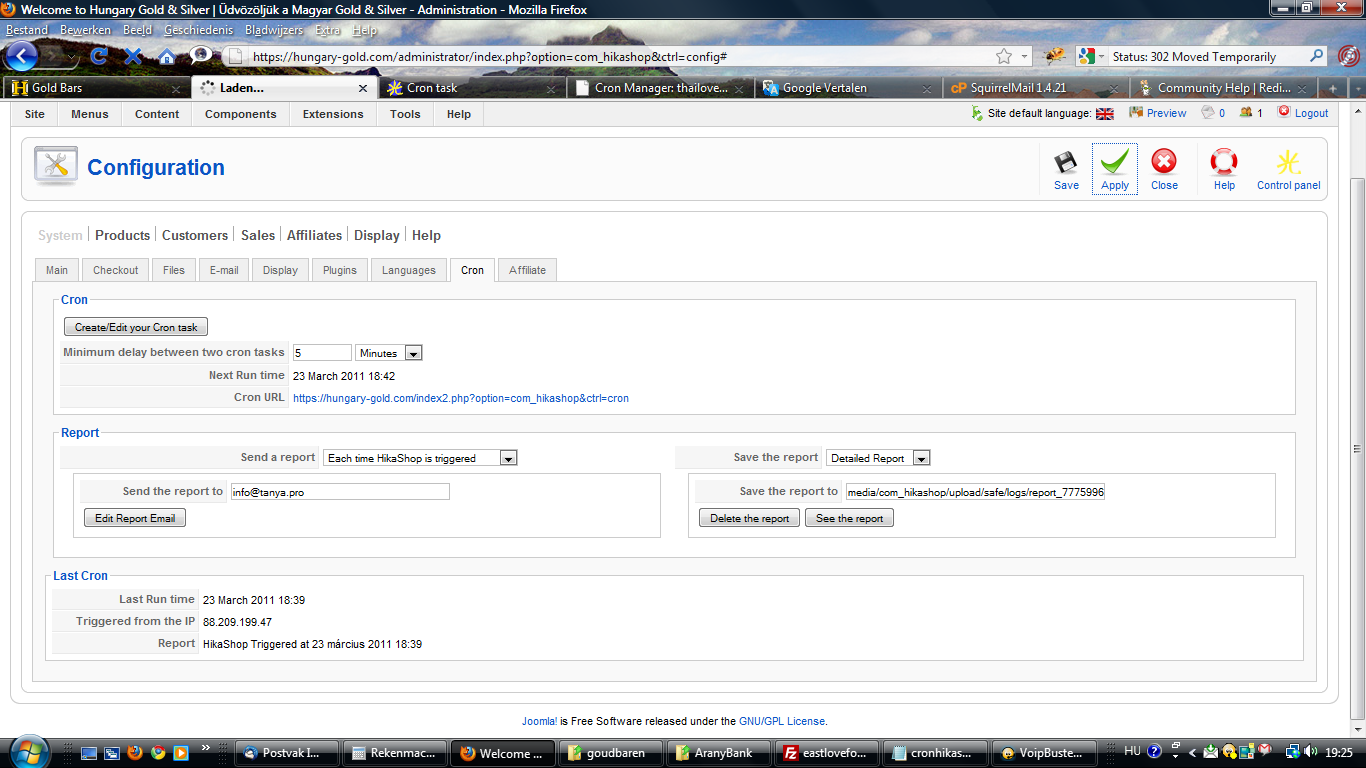
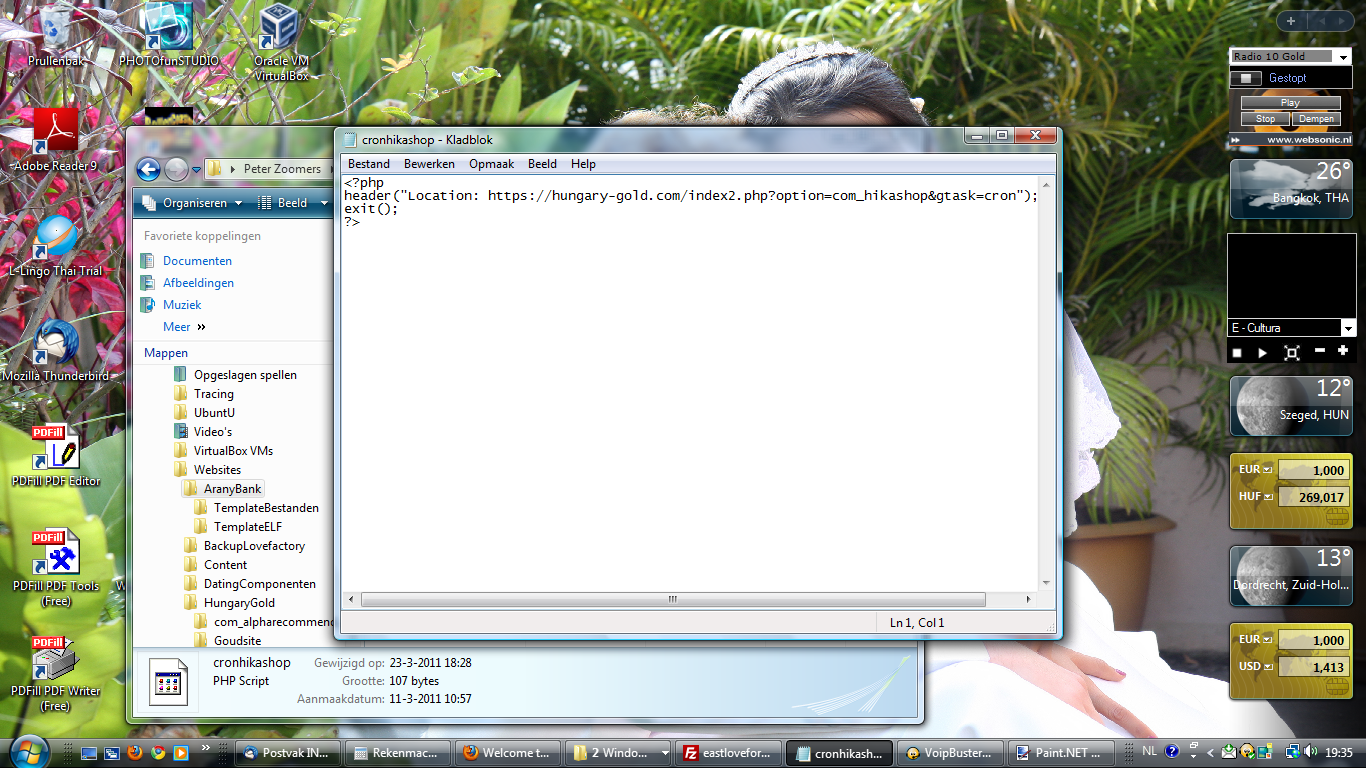
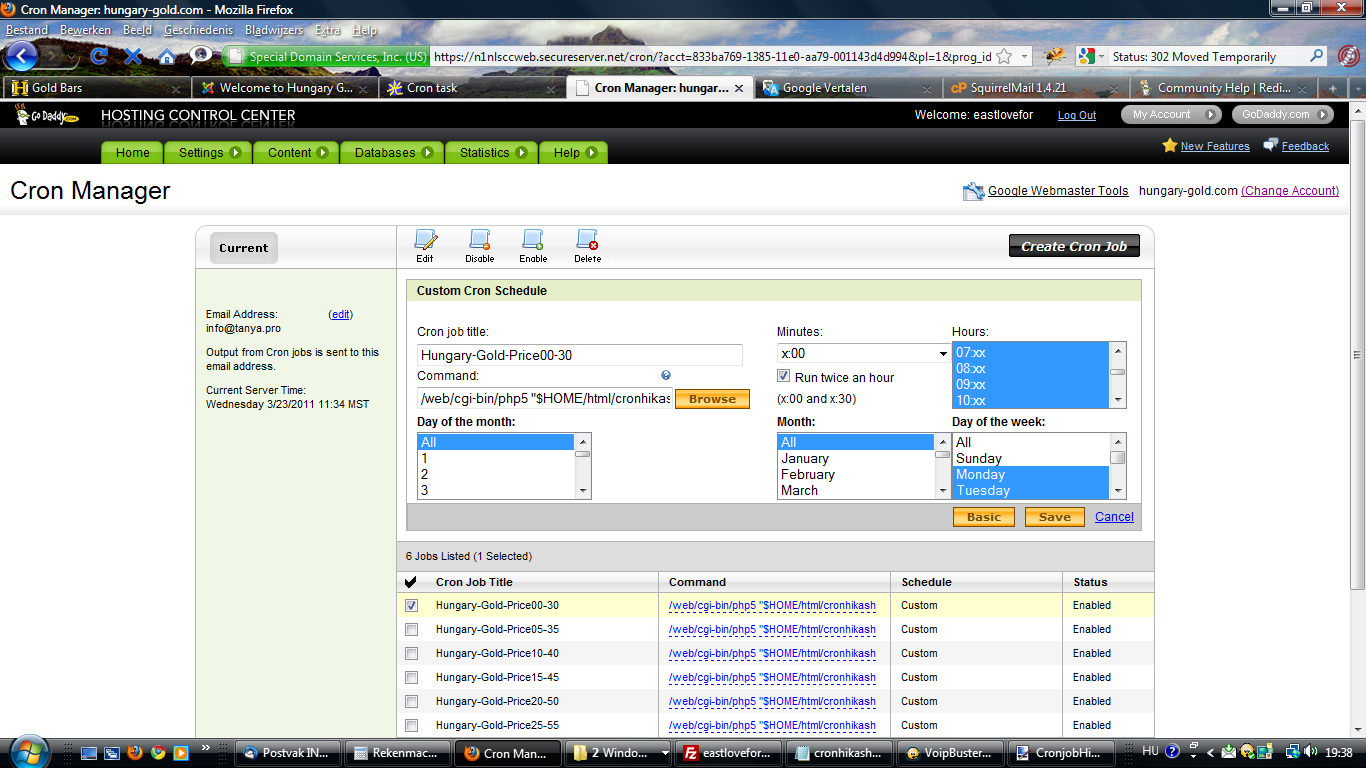
Could you do a screenshot of your cron task configuration ?
Please Log in or Create an account to join the conversation.
15 years 6 months ago #11834
by TanyaPro
Replied by TanyaPro on topic Re: Cron job
Screenshot
Please Log in or Create an account to join the conversation.
15 years 6 months ago #11835
by TanyaPro
Replied by TanyaPro on topic Re: Cron job
Screenshot
Please Log in or Create an account to join the conversation.
15 years 6 months ago #11837
by TanyaPro
Replied by TanyaPro on topic Re: Cron job
Screenshot
Please Log in or Create an account to join the conversation.
15 years 6 months ago #11841
by nicolas
Replied by nicolas on topic Re: Cron job
From what I understand, you're using a command shell like this /web/cgi-bin/php5 "$HOME/html/cronhikashop.php"
in your cron manager.
The problem is that the shell is not able to understand the location commande you set in the headers and is not able to call your page.
In your php file you should write this (supposing that your file is in the root folder of your website):
$_GET='com_hikashop';
$_GET='cron';
include('index.php');
exit;
That way, instead of sending back to the shell a header, you're triggering directly the cron of hikashop without any redirect.
in your cron manager.
The problem is that the shell is not able to understand the location commande you set in the headers and is not able to call your page.
In your php file you should write this (supposing that your file is in the root folder of your website):
$_GET='com_hikashop';
$_GET='cron';
include('index.php');
exit;
That way, instead of sending back to the shell a header, you're triggering directly the cron of hikashop without any redirect.
Please Log in or Create an account to join the conversation.
15 years 6 months ago #11848
by TanyaPro
Replied by TanyaPro on topic Re: Cron job
I did like this inside the PHP file:
<?php
$_GET='com_hikashop';
$_GET='cron';
include('index.php');
exit;
?>
Then I get this message:
Status: 301 Moved Permanently
Set-Cookie: 57f1a4f98644ae2ce73256948e5b2c57=fcskeuroltv5vbnnp9kjutc0l2; path=/
P3P: CP="NOI ADM DEV PSAi COM NAV OUR OTRo STP IND DEM"
Set-Cookie: lang=deleted; expires=Tue, 23-Mar-2010 19:25:05 GMT; path=/
Set-Cookie: jfcookie=deleted; expires=Tue, 23-Mar-2010 19:25:05 GMT; path=/
Set-Cookie: jfcookie[lang]=deleted; expires=Tue, 23-Mar-2010 19:25:05 GMT; path=/
Location: hungary-gold.com
Content-type: text/html
<?php
$_GET='com_hikashop';
$_GET='cron';
include('index.php');
exit;
?>
Then I get this message:
Status: 301 Moved Permanently
Set-Cookie: 57f1a4f98644ae2ce73256948e5b2c57=fcskeuroltv5vbnnp9kjutc0l2; path=/
P3P: CP="NOI ADM DEV PSAi COM NAV OUR OTRo STP IND DEM"
Set-Cookie: lang=deleted; expires=Tue, 23-Mar-2010 19:25:05 GMT; path=/
Set-Cookie: jfcookie=deleted; expires=Tue, 23-Mar-2010 19:25:05 GMT; path=/
Set-Cookie: jfcookie[lang]=deleted; expires=Tue, 23-Mar-2010 19:25:05 GMT; path=/
Location: hungary-gold.com
Content-type: text/html
Please Log in or Create an account to join the conversation.
15 years 6 months ago #11857
by nicolas
Replied by nicolas on topic Re: Cron job
Did you try to just use the command :
wget -O /dev/null " www.yourwebsite.com/index.php?option=com_hikashop&ctrl=cron " > /dev/null
as explained in our documentation ?
Looking on that link www.thefactory.ro/joomla-forum/rss-facto...-godaddy-1396.0.html it seems that a simple wget will do the job...
wget -O /dev/null " www.yourwebsite.com/index.php?option=com_hikashop&ctrl=cron " > /dev/null
as explained in our documentation ?
Looking on that link www.thefactory.ro/joomla-forum/rss-facto...-godaddy-1396.0.html it seems that a simple wget will do the job...
Please Log in or Create an account to join the conversation.
15 years 6 months ago #11914
by TanyaPro
Replied by TanyaPro on topic Re: Cron job
I tried really a lot of different things...
Subject: Cron <eastlovefor@n1nlftpg005> wget -O /dev ull " hungary-gold.com/index2.php?option=com_hikashop&ctrl=cron " >
Message:
/dev ull
/bin/sh: /dev: Is a directory
Subject: Cron <eastlovefor@n1nlftpg005> wget -O /dev ull " hungary-gold.com/cronhikashop.php " > /dev ull
Message:
/bin/sh: /dev: Is a directory
Subject: Cron <eastlovefor@n1nlftpg005> wget " hungary-gold.com/index.php?option=com_hikashop&ctrl=cron "
Message:
Resolving hungary-gold.com... 188.121.55.105
Connecting to hungary-gold.com|188.121.55.105|:80... connected.
HTTP request sent, awaiting response... 403 Forbidden
2011-03-24 02:10:03 ERROR 403: Forbidden.
Subject: Cron <eastlovefor@n1nlftpg005> wget " hungary-gold.com/cronhikashop.php "
Message:
--2011-03-24 03:10:05-- hungary-gold.com/cronhikashop.php
Resolving hungary-gold.com... 188.121.55.105
Connecting to hungary-gold.com|188.121.55.105|:443... failed: Connection refused.
Subject:Cron <eastlovefor@n1nlftpg005> /web/cgi-bin/php5 "$HOME/html/components/com_hikashop/controllers/cron.php"
Message:
Content-type: text/html
Restricted access
What is the problem? When will I get a triggered hikashop?
Peter
Subject: Cron <eastlovefor@n1nlftpg005> wget -O /dev ull " hungary-gold.com/index2.php?option=com_hikashop&ctrl=cron " >
Message:
/dev ull
/bin/sh: /dev: Is a directory
Subject: Cron <eastlovefor@n1nlftpg005> wget -O /dev ull " hungary-gold.com/cronhikashop.php " > /dev ull
Message:
/bin/sh: /dev: Is a directory
Subject: Cron <eastlovefor@n1nlftpg005> wget " hungary-gold.com/index.php?option=com_hikashop&ctrl=cron "
Message:
Resolving hungary-gold.com... 188.121.55.105
Connecting to hungary-gold.com|188.121.55.105|:80... connected.
HTTP request sent, awaiting response... 403 Forbidden
2011-03-24 02:10:03 ERROR 403: Forbidden.
Subject: Cron <eastlovefor@n1nlftpg005> wget " hungary-gold.com/cronhikashop.php "
Message:
--2011-03-24 03:10:05-- hungary-gold.com/cronhikashop.php
Resolving hungary-gold.com... 188.121.55.105
Connecting to hungary-gold.com|188.121.55.105|:443... failed: Connection refused.
Subject:Cron <eastlovefor@n1nlftpg005> /web/cgi-bin/php5 "$HOME/html/components/com_hikashop/controllers/cron.php"
Message:
Content-type: text/html
Restricted access
What is the problem? When will I get a triggered hikashop?
Peter
Please Log in or Create an account to join the conversation.
15 years 6 months ago #11918
by nicolas
Replied by nicolas on topic Re: Cron job
Well, I'm not sure. Did you get any reply form your hosting company ? We have a cron system in place for our customers so that you don't have to mess with your hosting cron and just set it up in two clicks in the config...
By the way, why do you need more that a 15 minutes frequency ? In HikaShop, there is nothing which requires such frequency...
By the way, why do you need more that a 15 minutes frequency ? In HikaShop, there is nothing which requires such frequency...
Please Log in or Create an account to join the conversation.
15 years 6 months ago #12063
by TanyaPro
Replied by TanyaPro on topic Re: Cron job
Hello Nicolas,
I got this message from Godaddy, they say it must be a problem into the script....
At this time we were not able to duplicate any issues access the page located at hungary-gold.com/index2.php?option=com_hikashop&ctrl=cron . If you are having trouble with executing this Cron Job, we recommend that you review the scripting of the Cron Job itself.
You think it should work with your script?
Peter
Please let us know if we can help you in any other way.
I got this message from Godaddy, they say it must be a problem into the script....
At this time we were not able to duplicate any issues access the page located at hungary-gold.com/index2.php?option=com_hikashop&ctrl=cron . If you are having trouble with executing this Cron Job, we recommend that you review the scripting of the Cron Job itself.
You think it should work with your script?
Peter
Please let us know if we can help you in any other way.
Please Log in or Create an account to join the conversation.
15 years 6 months ago #12071
by nicolas
Replied by nicolas on topic Re: Cron job
They are saying that the problem comes from either the code you wrote in the cron job or the code in the php file you're using to trigger that URL and that the URL itself is working. Basically, nothing that we already knew.
In a previous message, you posted different versions of your cron job, but you didn't post one with the code that I told you:
wget -O /dev/null " hungary-gold.com/index.php?option=com_hikashop&ctrl=cron " > /dev/null
You posted:
wget -O /dev ull " hungary-gold.com/index.php?option=com_hikashop&ctrl=cron%22 " >
wget " hungary-gold.com/index.php?option=com_hikashop&ctrl=cron%22 "
Did you try with the exact code I gave you ?
In a previous message, you posted different versions of your cron job, but you didn't post one with the code that I told you:
wget -O /dev/null " hungary-gold.com/index.php?option=com_hikashop&ctrl=cron " > /dev/null
You posted:
wget -O /dev ull " hungary-gold.com/index.php?option=com_hikashop&ctrl=cron%22 " >
wget " hungary-gold.com/index.php?option=com_hikashop&ctrl=cron%22 "
Did you try with the exact code I gave you ?
Please Log in or Create an account to join the conversation.
15 years 6 months ago #12086
by TanyaPro
Replied by TanyaPro on topic Re: Cron job
I get everytime something else: gtask=cron, ctrl=cron, with http, with https, with root file, without root file, with wget-O /dev/null, with wget, sure I did try and used everything, but I did not try the domain without http or https...
I just tried with this command line:
wget -O /dev/null "hungary-gold.com/index.php?option=com_hikashop&ctrl=cron" > /dev/null
and get this message everytime:
--2011-03-24 21:25:02--
hungary-gold.com/index.php?option=com_hikashop&ctrl=cron
Resolving hungary-gold.com... 188.121.55.105
Connecting to hungary-gold.com|188.121.55.105|:443... failed: Connection refused.
You think it is a server problem?
Peter
I just tried with this command line:
wget -O /dev/null "hungary-gold.com/index.php?option=com_hikashop&ctrl=cron" > /dev/null
and get this message everytime:
--2011-03-24 21:25:02--
hungary-gold.com/index.php?option=com_hikashop&ctrl=cron
Resolving hungary-gold.com... 188.121.55.105
Connecting to hungary-gold.com|188.121.55.105|:443... failed: Connection refused.
You think it is a server problem?
Peter
Please Log in or Create an account to join the conversation.
15 years 6 months ago #12090
by nicolas
Replied by nicolas on topic Re: Cron job
Maybe your godaddy is not allowing externale connections from their servers ? That's something which can happen sometimes...
You didn't answer my previous question : why do you need more that a 15 minutes frequency ?
Maybe there is another easier method for you to do what you want...
You didn't answer my previous question : why do you need more that a 15 minutes frequency ?
Maybe there is another easier method for you to do what you want...
Please Log in or Create an account to join the conversation.
15 years 6 months ago #12092
by TanyaPro
Replied by TanyaPro on topic Re: Cron job
Because I want to change the prices several times every hour. I have to upload new prices when it is needed. I do this by hand, so I can trigger this cron by hand also...
Do you have suggestions?
Peter
Do you have suggestions?
Peter
Please Log in or Create an account to join the conversation.
Time to create page: 0.249 seconds