

- Posts: 29
- Thank you received: 0
Menu link to a specific sub-category.
15 years 6 months ago #12632
by juliet
Menu link to a specific sub-category. was created by juliet
Under products I have 5 categories. Currently I am only able to create a menu link to Category Listing. I would like to create a menu link to show a specific category only, not all 5 categories. Is this possible?
Please advise, and or give direction.
Thanks in advance,
Please advise, and or give direction.
Thanks in advance,
Please Log in or Create an account to join the conversation.

15 years 6 months ago #12640
by nicolas
Replied by nicolas on topic Re: Menu link to a specific sub-category.
Yes. Once you created your category listing menu, you can click on the link "hikashop options" on the right of the menu edition screen to access the hikashop options of your menu. There, you will be able to change the "parent category" in order to link to a sub category. It's the same for products listing menus. You can create a products listing menu and then change the parent category option to display a listing of the products under that parent category.
Please Log in or Create an account to join the conversation.
Less
More
- Posts: 190
- Thank you received: 0
14 years 9 months ago #34094
by codewarrior
Replied by codewarrior on topic Re: Menu link to a specific sub-category.
Hi,
I don't understand the trick !!!
I created my menu item, linked with an Hikashop Content Menu
In this content menu, I've set "Associated category" to my sub-category. When I edit, this sub-categorz is kept.
But when I click on my menu in frontend, I always display my Root category and sub-categories !
Any ideas ??
Best regards
I don't understand the trick !!!
I created my menu item, linked with an Hikashop Content Menu
In this content menu, I've set "Associated category" to my sub-category. When I edit, this sub-categorz is kept.
But when I click on my menu in frontend, I always display my Root category and sub-categories !
Any ideas ??
Best regards
Please Log in or Create an account to join the conversation.
14 years 9 months ago #34133
by nicolas
Replied by nicolas on topic Re: Menu link to a specific sub-category.
Hi,
Could you do a screenshot of your menu's hikashop options screen and give a link to that page so that we can see what you did ?
Could you do a screenshot of your menu's hikashop options screen and give a link to that page so that we can see what you did ?
Please Log in or Create an account to join the conversation.
Less
More
- Posts: 190
- Thank you received: 0
14 years 9 months ago - 14 years 8 months ago #34152
by codewarrior
Replied by codewarrior on topic Re: Menu link to a specific sub-category.
You can see the result on
dev.patrickguedj-paris.com/ventes-flash
(menu link Ventes flash)
Hikashop menu is set with :
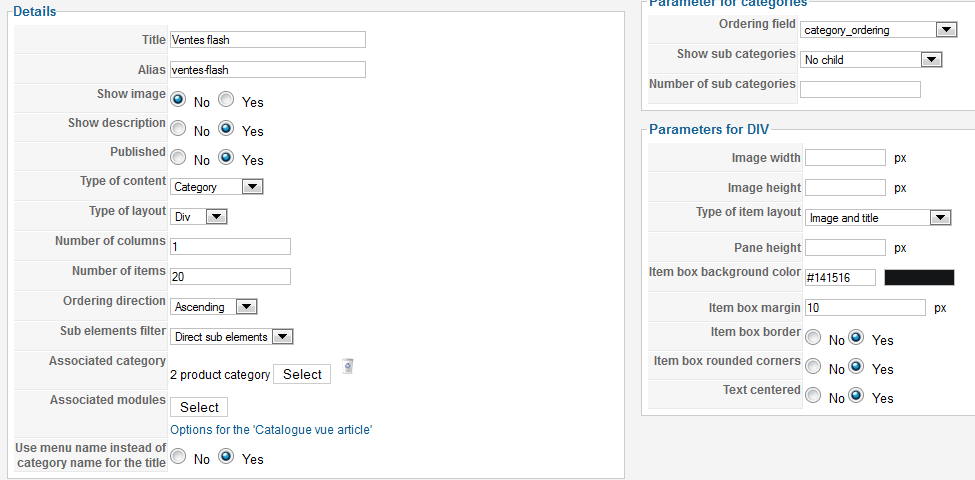
Popup is set with :
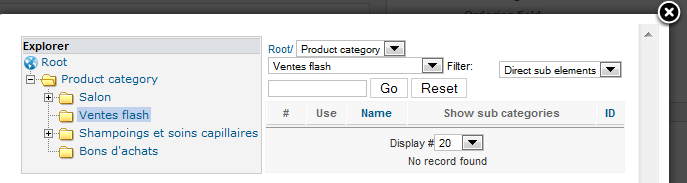
but I don't see a save button in the popup and noticed the day after, that the Explorer was set on Root and not on the right category.
Of course I saved my content menu.
What could be wrong ?
Regards
Hikashop menu is set with :
Popup is set with :
but I don't see a save button in the popup and noticed the day after, that the Explorer was set on Root and not on the right category.
Of course I saved my content menu.
What could be wrong ?
Regards
Last edit: 14 years 8 months ago by codewarrior.
Please Log in or Create an account to join the conversation.
14 years 9 months ago #34177
by nicolas
Replied by nicolas on topic Re: Menu link to a specific sub-category.
You didn't set the "parent category" option to your category. That's why it's not working.
What you did in your popup is that you displayed the sub categories of your category, and since you don't have any sub category in that category, you don't see anything. In the selection popup, you should click on the root category, select your category and click on the use icon.
What you did in your popup is that you displayed the sub categories of your category, and since you don't have any sub category in that category, you don't see anything. In the selection popup, you should click on the root category, select your category and click on the use icon.
Please Log in or Create an account to join the conversation.
Less
More
- Posts: 190
- Thank you received: 0
14 years 9 months ago - 14 years 9 months ago #34279
by codewarrior
Replied by codewarrior on topic Re: Menu link to a specific sub-category.
Thanks, it works.
Sorry to be stupid, but the GUI was not intuitive for me.
I was expecting to select the category in the explorer, and record it with a (missing) button in the top of the popup.
I have now another problem : I have only one product in this category and I can't see it.
I tried to select an Associated module, but now can't change it since there is no trash icon.
1) How could I change the associated module ?
2) How could I display products when there are no sub-categories (for the moment in my site) ?
3) I have a catalog displaying correctly, but don't understand why it don't with a link to a sub-category. Should I design other modules ?
Regards
Sorry to be stupid, but the GUI was not intuitive for me.
I was expecting to select the category in the explorer, and record it with a (missing) button in the top of the popup.
I have now another problem : I have only one product in this category and I can't see it.
I tried to select an Associated module, but now can't change it since there is no trash icon.
1) How could I change the associated module ?
2) How could I display products when there are no sub-categories (for the moment in my site) ?
3) I have a catalog displaying correctly, but don't understand why it don't with a link to a sub-category. Should I design other modules ?
Regards
Last edit: 14 years 9 months ago by codewarrior.
Please Log in or Create an account to join the conversation.
14 years 9 months ago #34309
by nicolas
Replied by nicolas on topic Re: Menu link to a specific sub-category.
If you have a problem with the associated module, the easiest is just to recreate your menu, select your parent category and then HikaShop should recreate the associated module automatically if needed.
Please Log in or Create an account to join the conversation.
Less
More
- Posts: 190
- Thank you received: 0
14 years 8 months ago #34649
by codewarrior
Replied by codewarrior on topic Re: Menu link to a specific sub-category.
I deleted the menu item, recreated it and selected the correct sub-category,
but I don't understand how to select an associated module !
An existing one is selected by default and I can't change it in the popup (just a Save icon)
but I don't understand how to select an associated module !
An existing one is selected by default and I can't change it in the popup (just a Save icon)
Please Log in or Create an account to join the conversation.
14 years 8 months ago #34686
by nicolas
Replied by nicolas on topic Re: Menu link to a specific sub-category.
In the selection popup, there is are published yes/no radio buttons for each module. Just set the no the one you don't want and to yes the one you want and save.
Please Log in or Create an account to join the conversation.
Less
More
- Posts: 190
- Thank you received: 0
14 years 8 months ago #34723
by codewarrior
Replied by codewarrior on topic Re: Menu link to a specific sub-category.
Thanks for the trick, it works.
I have now a sub-category and products visible, setting type of content = category & associated product = product
Regards
I have now a sub-category and products visible, setting type of content = category & associated product = product
Regards
Please Log in or Create an account to join the conversation.
Time to create page: 0.194 seconds