
- Posts: 34
- Thank you received: 0
Custom Page Titles?
- davcraiguk
-
 Topic Author
- Offline
Less
More
15 years 5 months ago #14722
by davcraiguk
David Craig
Hikashop 1.5.0 Business edition
www.charitycanvasprints.com
Custom Page Titles? was created by davcraiguk
The current page title (title tag) for a product is 'product_name'. I would like to change this to have a fuller more menaingful page title in the browser and for SEO.
I thought of:
1. creating a custom field on the products page in the back-end and calling it say... 'custom_title'.
2. Hide it from the front-end
3. Alter the code in the custom view of show.php...but what?
Can I use here...
But first it needs called from the table. I am not a PHP'er but can tweek - at little.
Can you help with the bit to retrieve it from the Db?
Will it be overwritten by the default code in view.html.php? ' $document->setTitle( $page_title );'
I thought of:
1. creating a custom field on the products page in the back-end and calling it say... 'custom_title'.
2. Hide it from the front-end
3. Alter the code in the custom view of show.php...but what?
Can I use here...
Code:
$document->setTitle( $custon_title );
Can you help with the bit to retrieve it from the Db?
Will it be overwritten by the default code in view.html.php? ' $document->setTitle( $page_title );'
David Craig
Hikashop 1.5.0 Business edition
www.charitycanvasprints.com
Please Log in or Create an account to join the conversation.

15 years 5 months ago #14737
by nicolas
Replied by nicolas on topic Re: Custom Page Titles?
You can do like this:
$doc =& JFactory::getDocument();
$doc->setTitle($this->element->custom_title);
in the show file of the view product that you can edit via the menu Display->Views. No need to load the data from the database. As a custom product field, the data is already loaded.
$doc =& JFactory::getDocument();
$doc->setTitle($this->element->custom_title);
in the show file of the view product that you can edit via the menu Display->Views. No need to load the data from the database. As a custom product field, the data is already loaded.
Please Log in or Create an account to join the conversation.
- davcraiguk
-
Topic Author
- Offline
Less
More
- Posts: 34
- Thank you received: 0
15 years 4 months ago #15556
by davcraiguk
David Craig
Hikashop 1.5.0 Business edition
www.charitycanvasprints.com
Replied by davcraiguk on topic Re: Custom Page Titles?
This is working a treat! Google is now showing the custom made longer descriptive page titles for products rather than a short product name. This as a real testimony to the authors of Hikashop and the flexability of its architecture.
Just while I'm on a few tips for SEO that might help others.
Hope these tips help someone.
Just while I'm on a few tips for SEO that might help others.
- Make your actual image file names descriptive with dashes (not underscores) between words e.g. a-really-good-description-with-keywords.jpg
- Use the field labeled 'Name' ('file-name' in the hikashop_file table in the db) in the product images page to put a good description of the image. This is used to provide the text for ALT image tags in the code. Google loves these descriptive tags.
- Use a sitemap. Xmap works and the guys here have witten a beta hikashop exentsion for it. Search the forum
- Move your keyword rich product description to the top of the product page just under the product name and above the product image. The characteristic/variants should be below this. This means Google sees the important product info first. Do this in the Hikashop Display/views and choose the product view and the 'show' link. Search the forums, there are examples there of moving bits around on the products page.
- Joomla SEF urls works OK. In my experience using thrid party extensions SEF url extensions make little difference to the quality of Google returned actual results and is a pain to maintain.
- If you also have Joomla articles, use good descriptive article titles. Also descriptive alias with dashes between. These are used by Joomla SEF to build the URLs
Hope these tips help someone.
David Craig
Hikashop 1.5.0 Business edition
www.charitycanvasprints.com
Please Log in or Create an account to join the conversation.
15 years 4 months ago #15572
by nicolas
Replied by nicolas on topic Re: Custom Page Titles?
Thank you for your feedback on SEO. I'm sure it will help others.
Please Log in or Create an account to join the conversation.
15 years 2 months ago #21765
by Webguy
Replied by Webguy on topic Re: Custom Page Titles?
Thanks for the info above, quite interesting.
Using similar code, can I make my page titles look something like...
Site name - Category name - Product Name
How would I accomplish that please?
Cheers
Using similar code, can I make my page titles look something like...
Site name - Category name - Product Name
How would I accomplish that please?
Cheers
Please Log in or Create an account to join the conversation.
15 years 2 months ago #21776
by nicolas
Replied by nicolas on topic Re: Custom Page Titles?
You could use something like that in the same view :
$doc =& JFactory::getDocument();
$class = hikashop::get('class.category');
$cat = $class->get($this->element->category_id);
$doc->setTitle('My website name '.$cat->category_name.' '.$this->element->product_name);
$doc =& JFactory::getDocument();
$class = hikashop::get('class.category');
$cat = $class->get($this->element->category_id);
$doc->setTitle('My website name '.$cat->category_name.' '.$this->element->product_name);
Please Log in or Create an account to join the conversation.
Less
More
- Posts: 4
- Thank you received: 0
14 years 4 months ago #48666
by harleylever
Replied by harleylever on topic Re: Custom Page Titles?
Hi,
I have the custom field created. But I cannot seem to get the custom title to show up in the browser.
Where exactly to I put the code in the show file of the product page? I placed this
right after the $apps code, but cannot make the titles appear. Any guidance would be greatly appreciated.
Thank you for your time.
I have the custom field created. But I cannot seem to get the custom title to show up in the browser.
Where exactly to I put the code in the show file of the product page? I placed this
Code:
<?php
$doc =& JFactory::getDocument();
$doc->setTitle($this->element->custom_title); ?>
Thank you for your time.
Please Log in or Create an account to join the conversation.
14 years 4 months ago #48692
by nicolas
Replied by nicolas on topic Re: Custom Page Titles?
Are you sure that you're editing the correct file for the correct template ?
If you're editing the file for another template than the one you're using, you won't see the change.
If you're editing the file for another template than the one you're using, you won't see the change.
Please Log in or Create an account to join the conversation.
Less
More
- Posts: 4
- Thank you received: 0
14 years 4 months ago #48694
by harleylever
Replied by harleylever on topic Re: Custom Page Titles?
Thanks for the fast response Nicolas!
I believe so. I selected Displays > Views > show file (under frontend procuct show).
Is this correct?
I believe so. I selected Displays > Views > show file (under frontend procuct show).
Is this correct?
Please Log in or Create an account to join the conversation.
14 years 4 months ago #48697
by nicolas
Replied by nicolas on topic Re: Custom Page Titles?
Yes, but check that it is the correct template as you will have one show file (under frontend procuct show) per template on your website.
Please Log in or Create an account to join the conversation.
14 years 3 months ago #54847
by Sue
Replied by Sue on topic Re: Custom Page Titles?
Hello Nicolas,
I asked this question and you directed me to this post.
Since then I have been trying to do what is explained here but it's nit working.
Either I don't understand it or I don't do it correct.
To get custom page titles and override the default from Hikashop,
What file do I have to edit?
Is it the file "listing" of the view 'product'/'category' or the show file of the view product
And does it matter where i put this code: $doc =& JFactory::getDocument();
$doc->setTitle($this->element->custom_title); ?
I asked this question and you directed me to this post.
Since then I have been trying to do what is explained here but it's nit working.
Either I don't understand it or I don't do it correct.
To get custom page titles and override the default from Hikashop,
What file do I have to edit?
Is it the file "listing" of the view 'product'/'category' or the show file of the view product
And does it matter where i put this code: $doc =& JFactory::getDocument();
$doc->setTitle($this->element->custom_title); ?
Please Log in or Create an account to join the conversation.
14 years 3 months ago #54941
by nicolas
Replied by nicolas on topic Re: Custom Page Titles?
It depends...
If you want to change the title on the product pages, it's in the show file of the view product.
If you want to change the title on the products listing pages, it's in the listing file of the view product.
If you want to change the title on the categories listing pages, it's in the listing file of the view category.
You should add the code at the top, just after the first <?php tag
Finally, for categories and products listing pages, you will have to use a custom category field since the title will have to be entered in the current category of the elements displayed on the page.
If you want to change the title on the product pages, it's in the show file of the view product.
If you want to change the title on the products listing pages, it's in the listing file of the view product.
If you want to change the title on the categories listing pages, it's in the listing file of the view category.
You should add the code at the top, just after the first <?php tag
Finally, for categories and products listing pages, you will have to use a custom category field since the title will have to be entered in the current category of the elements displayed on the page.
Please Log in or Create an account to join the conversation.
14 years 3 months ago #55006
by Sue
Replied by Sue on topic Re: Custom Page Titles?
SO i tried editing the files but something happened. :S
When i edited the listing file of the view product and saved it I couldn't
see any of the views.
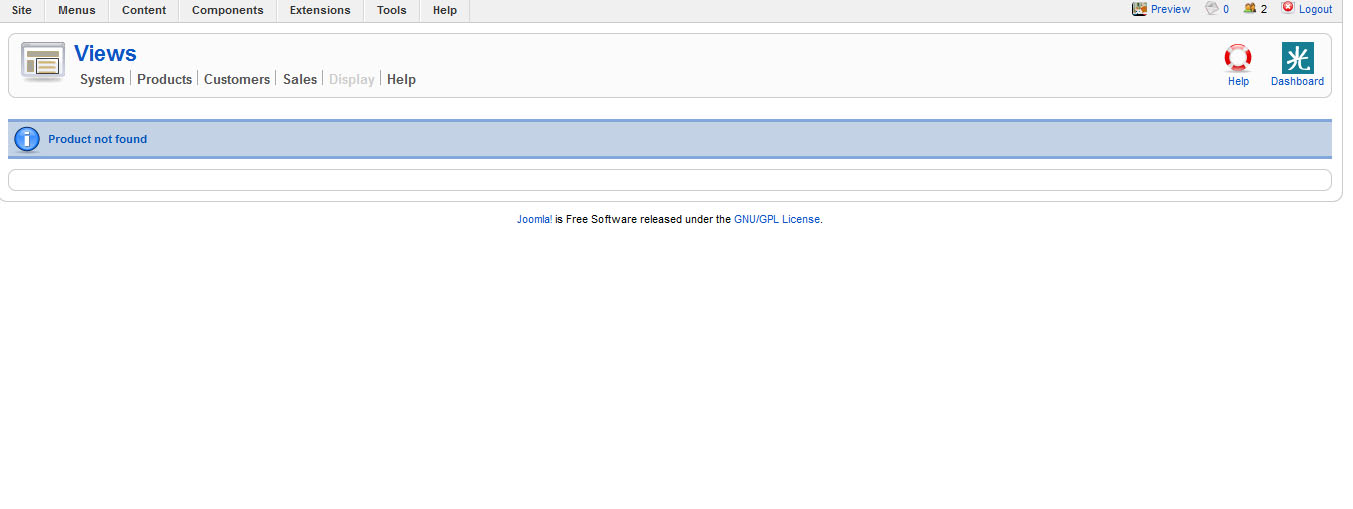
I end up getting the message that the product could not be found.
How can I change that or what do I have to do now?
When i edited the listing file of the view product and saved it I couldn't
see any of the views.
I end up getting the message that the product could not be found.
How can I change that or what do I have to do now?
Please Log in or Create an account to join the conversation.
14 years 3 months ago #55007
by Sue
Replied by Sue on topic Re: Custom Page Titles?
See message below
Please Log in or Create an account to join the conversation.
14 years 3 months ago #55057
by nicolas
Replied by nicolas on topic Re: Custom Page Titles?
Which file did you edit ? Did you edit the file of the front end ? Not one of the back end ?
Please Log in or Create an account to join the conversation.
14 years 2 months ago #56483
by Sue
Replied by Sue on topic Re: Custom Page Titles?
I think I edited the file of the back-end because on the front-end everything works fine.
It was the file for the categories
It was the file for the categories
Please Log in or Create an account to join the conversation.
14 years 2 months ago #56528
by nicolas
Replied by nicolas on topic Re: Custom Page Titles?
Do you still have the problem ?
We cannot reproduce it on our end.
We cannot reproduce it on our end.
Please Log in or Create an account to join the conversation.
14 years 2 months ago #56546
by Sue
Replied by Sue on topic Re: Custom Page Titles?
Yes I do.
Can I give you the login details so you can check it?
Can I give you the login details so you can check it?
Please Log in or Create an account to join the conversation.
14 years 2 months ago #56594
by nicolas
Replied by nicolas on topic Re: Custom Page Titles?
PLease provide an access via our contact form with a link to this thread.
www.hikashop.com/en/contact-us.html
www.hikashop.com/en/contact-us.html
Please Log in or Create an account to join the conversation.
14 years 2 months ago #56620
by Sue
Replied by Sue on topic Re: Custom Page Titles?
ok
Please Log in or Create an account to join the conversation.
Time to create page: 0.389 seconds