
- Posts: 10
- Thank you received: 0
how to test purchase from begin to end
- podjigateli
-
 Topic Author
- Offline
Less
More
15 years 5 months ago #15187
by podjigateli
how to test purchase from begin to end was created by podjigateli
Hello. I want to test my shop without spending real money. Virtue mart has this option. Does HikaShop has that option?
Please Log in or Create an account to join the conversation.

15 years 5 months ago #15199
by nicolas
Replied by nicolas on topic Re: how to test purchase from begin to end
Sure.
There are several possibilities.
You can can for example activate the bank transfer payment plugin and use it to complete the order.
Otherwise, if you want to test an online payment method like paypal, you would have to configure it so that it runs on test mode.
For paypal, you need to change the URL so that you use the sandbox. You also need a sandbox account in order to be able to test it.
There are several possibilities.
You can can for example activate the bank transfer payment plugin and use it to complete the order.
Otherwise, if you want to test an online payment method like paypal, you would have to configure it so that it runs on test mode.
For paypal, you need to change the URL so that you use the sandbox. You also need a sandbox account in order to be able to test it.
Please Log in or Create an account to join the conversation.
- podjigateli
-
Topic Author
- Offline
Less
More
- Posts: 10
- Thank you received: 0
15 years 5 months ago - 15 years 5 months ago #15260
by podjigateli
Replied by podjigateli on topic Re: how to test purchase from begin to end
Thanks. What that means? This invoice has already been paid. For more information, please contact the merchant.
At this time, we are unable to process your request. Please return to @yahoo.com and try another option.
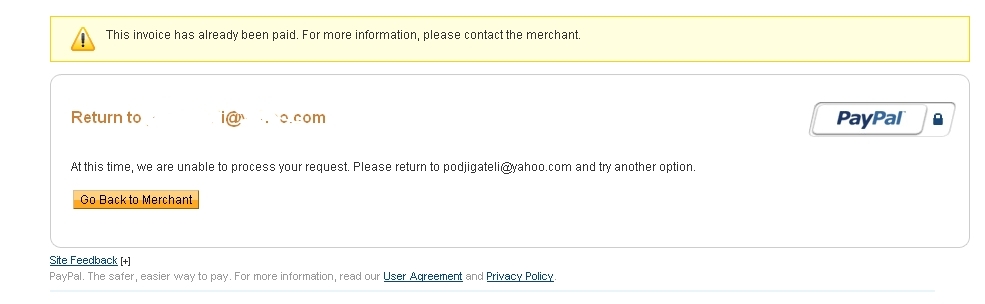
when I returned to my site there was a blank(nothing).
At this time, we are unable to process your request. Please return to @yahoo.com and try another option.
when I returned to my site there was a blank(nothing).
Last edit: 15 years 5 months ago by podjigateli.
Please Log in or Create an account to join the conversation.
15 years 5 months ago #15263
by nicolas
Replied by nicolas on topic Re: how to test purchase from begin to end
It is possible for Paypal to report an order as already being paid if they have received an identical invoice number in the past. There are a couple ways to resolve this issue:
In Your Paypal Account:
Login to your Paypal account by going to www.paypal.com .
Click "Profile" on the top menu bar.
Under "Selling Preferences", click "Payment Receiving Preferences".
Under "Block Accidental Payments", choose "No, allow multiple payments per invoice ID".
On the HikaShop side:
Open your phpmyadmin and select your database.
There increase the auto_increment value of the hikashop_order table by running a query: www.cxliv.org/2005/01/06/updating_auto-increment_in_mysql.php
In Your Paypal Account:
Login to your Paypal account by going to www.paypal.com .
Click "Profile" on the top menu bar.
Under "Selling Preferences", click "Payment Receiving Preferences".
Under "Block Accidental Payments", choose "No, allow multiple payments per invoice ID".
On the HikaShop side:
Open your phpmyadmin and select your database.
There increase the auto_increment value of the hikashop_order table by running a query: www.cxliv.org/2005/01/06/updating_auto-increment_in_mysql.php
Please Log in or Create an account to join the conversation.
- podjigateli
-
Topic Author
- Offline
Less
More
- Posts: 10
- Thank you received: 0
15 years 4 months ago #15350
by podjigateli
Replied by podjigateli on topic Re: how to test purchase from begin to end
So I did it all that you said. The transaction was completed but when I returned to store again there was nothing, no links to download file. I trying to sell file a image.
Please Log in or Create an account to join the conversation.
15 years 4 months ago #15354
by nicolas
Replied by nicolas on topic Re: how to test purchase from begin to end
The links to the downloadable files are on the order details page. What you could do is set the orders listing page as return URL in the options of your paypal plugin... You can also edit the thank you message to tell the user that he needs to go to his order page to download the files. You can do that in the config under the tab languages.
Please Log in or Create an account to join the conversation.
- podjigateli
-
Topic Author
- Offline
Less
More
- Posts: 10
- Thank you received: 0
15 years 4 months ago #15374
by podjigateli
Replied by podjigateli on topic Re: how to test purchase from begin to end
Thanks. So inconspicuous link. Had to do bigger, attractive. Need to add label "Download"->. One more question how to automatecly confirm purchase when buyer paid in paypal? I can set Pending status to "confirm" but is it not will be a hole for cheaters...
Please Log in or Create an account to join the conversation.
15 years 4 months ago #15377
by nicolas
Replied by nicolas on topic Re: how to test purchase from begin to end
You need to activate the option "allow payment notifications from paypal".
Please Log in or Create an account to join the conversation.
- podjigateli
-
Topic Author
- Offline
Less
More
- Posts: 10
- Thank you received: 0
15 years 4 months ago - 15 years 4 months ago #15462
by podjigateli
Replied by podjigateli on topic Re: how to test purchase from begin to end
I have not found where is to activate this option. Only "Instant Payment Notification (IPN)" method on paypal site which need to setup. Is it this?
Last edit: 15 years 4 months ago by podjigateli.
Please Log in or Create an account to join the conversation.
15 years 4 months ago #15483
by nicolas
Replied by nicolas on topic Re: how to test purchase from begin to end
It's in the options of the paypal plugin in HikaShop. You can access the options of the plugin via the menu System->Payment methods and then click on its name to open its options.
Please Log in or Create an account to join the conversation.
- podjigateli
-
Topic Author
- Offline
Less
More
- Posts: 10
- Thank you received: 0
15 years 4 months ago #15494
by podjigateli
Replied by podjigateli on topic Re: how to test purchase from begin to end
Thanks. It was activated. Still money "unclaimed" I need to login to my paypal account and "accept" payments. I did it, even after that on my site order status just "created". I need instant(automat.) accepting all payments without any delay so customer could immediately after payment download his file.
Please Log in or Create an account to join the conversation.
15 years 4 months ago #15495
by nicolas
Replied by nicolas on topic Re: how to test purchase from begin to end
Then, you must have a problem on your server/website as that should work as you're describing.
Which version of Joomla and HikaShop are you using ? Could you give the URL of your shop so that we can try a purchase ?
Could you activate the debug mode of the paypal plugin, try again an order and look at the payment log file generated by HikaShop when a notification is received ? (the path of that file can be found in the tab files of the config). If you don't have that log file after that, it's either because HikaShop doesn't have the permission to write in that file so please make sure that it exists and that its permissions are 777; or because paypal couldn't trigger hikashop. In the second case, it could be because of a security component/application on you server.
Once the log file is generated, you should open it to see what it contains. There should be valuable information as to why the notification couldn't be accepted, if that's the case.
Which version of Joomla and HikaShop are you using ? Could you give the URL of your shop so that we can try a purchase ?
Could you activate the debug mode of the paypal plugin, try again an order and look at the payment log file generated by HikaShop when a notification is received ? (the path of that file can be found in the tab files of the config). If you don't have that log file after that, it's either because HikaShop doesn't have the permission to write in that file so please make sure that it exists and that its permissions are 777; or because paypal couldn't trigger hikashop. In the second case, it could be because of a security component/application on you server.
Once the log file is generated, you should open it to see what it contains. There should be valuable information as to why the notification couldn't be accepted, if that's the case.
Please Log in or Create an account to join the conversation.
- podjigateli
-
Topic Author
- Offline
Less
More
- Posts: 10
- Thank you received: 0
15 years 4 months ago #15537
by podjigateli
Replied by podjigateli on topic Re: how to test purchase from begin to end
Joomla 1.6.1
HikaShop 1.4.9
No it's a localhost.
No I don't have log file
HikaShop 1.4.9
No it's a localhost.
No I don't have log file
Please Log in or Create an account to join the conversation.
15 years 4 months ago #15544
by nicolas
Replied by nicolas on topic Re: how to test purchase from begin to end
It's normal then. PayPal cannot technically notify a website which is in local since it's not accessible from the outside world.
You need to have it online if you want PayPal to notify it.
You need to have it online if you want PayPal to notify it.
Please Log in or Create an account to join the conversation.

15 years 4 months ago #15705
by ClickWebDesign
Replied by ClickWebDesign on topic Re: how to test purchase from begin to end
Hi,
I keep getting the "This invoice has already been paid. For more information, please contact the merchant." I'm testing using the paypal sandbox. I have tried the suggestions repeated below:
In Your Paypal Account:
Login to your Paypal account by going to www.paypal.com .
Click "Profile" on the top menu bar.
Under "Selling Preferences", click "Payment Receiving Preferences".
Under "Block Accidental Payments", choose "No, allow multiple payments per invoice ID".
On the HikaShop side:
Open your phpmyadmin and select your database.
There increase the auto_increment value of the hikashop_order table by running a query: www.cxliv.org/2005/01/06/updating_auto-increment_in_mysql.php
Any further thoughts or info I can provide to help?
Thanks
Chris
I keep getting the "This invoice has already been paid. For more information, please contact the merchant." I'm testing using the paypal sandbox. I have tried the suggestions repeated below:
In Your Paypal Account:
Login to your Paypal account by going to www.paypal.com .
Click "Profile" on the top menu bar.
Under "Selling Preferences", click "Payment Receiving Preferences".
Under "Block Accidental Payments", choose "No, allow multiple payments per invoice ID".
On the HikaShop side:
Open your phpmyadmin and select your database.
There increase the auto_increment value of the hikashop_order table by running a query: www.cxliv.org/2005/01/06/updating_auto-increment_in_mysql.php
Any further thoughts or info I can provide to help?
Thanks
Chris
Please Log in or Create an account to join the conversation.
15 years 4 months ago #15710
by ClickWebDesign
Replied by ClickWebDesign on topic Re: how to test purchase from begin to end
ClickWebDesign wrote:
I should add the site is not local, live at a test domain
Hi,
I keep getting the "This invoice has already been paid. For more information, please contact the merchant." I'm testing using the paypal sandbox. I have tried the suggestions repeated below:
In Your Paypal Account:
Login to your Paypal account by going to www.paypal.com .
Click "Profile" on the top menu bar.
Under "Selling Preferences", click "Payment Receiving Preferences".
Under "Block Accidental Payments", choose "No, allow multiple payments per invoice ID".
On the HikaShop side:
Open your phpmyadmin and select your database.
There increase the auto_increment value of the hikashop_order table by running a query: www.cxliv.org/2005/01/06/updating_auto-increment_in_mysql.php
Any further thoughts or info I can provide to help?
Thanks
Chris
I should add the site is not local, live at a test domain
Please Log in or Create an account to join the conversation.
15 years 4 months ago #15731
by nicolas
Replied by nicolas on topic Re: how to test purchase from begin to end
What is the query you run on your phpmyadmin?
Please Log in or Create an account to join the conversation.
15 years 4 months ago #15734
by ClickWebDesign
Replied by ClickWebDesign on topic Re: how to test purchase from begin to end
ALTER TABLE jos_hikashop_order AUTO_INCREMENT = 2023
Thanks:)
Thanks:)
Please Log in or Create an account to join the conversation.
15 years 4 months ago #15750
by nicolas
Replied by nicolas on topic Re: how to test purchase from begin to end
Maybe the auto_increment is not high enough ?
Also, that will only work for NEW orders, not for existing ones.
Also, that will only work for NEW orders, not for existing ones.
Please Log in or Create an account to join the conversation.
- podjigateli
-
Topic Author
- Offline
Less
More
- Posts: 10
- Thank you received: 0
15 years 4 months ago #15923
by podjigateli
Replied by podjigateli on topic Re: how to test purchase from begin to end
Hello. Its me again. So I uploaded my localhost on host. Still order status "created" and no logs on "media/com_hikashop/upload/safe/logs/report_246948242.log". Permission 777.
Please Log in or Create an account to join the conversation.
Time to create page: 0.319 seconds