

- Posts: 44
- Thank you received: 0
"Articles" word on my terms of use title...
15 years 4 months ago #18604
by gerard_pp
"Articles" word on my terms of use title... was created by gerard_pp
Hello
Why is the word "articles" displayed on my terms of use title?
Why is the word "articles" displayed on my terms of use title?
Please Log in or Create an account to join the conversation.

15 years 4 months ago #18612
by nicolas
Replied by nicolas on topic Re: "Articles" word on my terms of use title...
Isn't that the title of your article ? Or its category/section ?
Please Log in or Create an account to join the conversation.
15 years 4 months ago #18618
by gerard_pp
Replied by gerard_pp on topic Re: "Articles" word on my terms of use title...
None of those. It's nor the name of the article or the name of the category.
I don't know where it came from...
I don't know where it came from...
Please Log in or Create an account to join the conversation.
15 years 4 months ago #18620
by gerard_pp
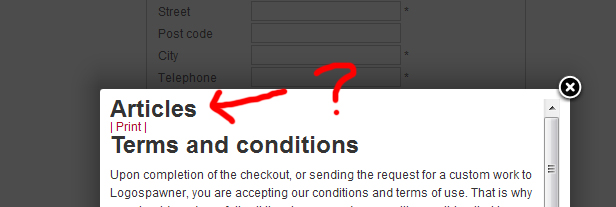
Replied by gerard_pp on topic Re: "Articles" word on my terms of use title...
Please Log in or Create an account to join the conversation.
15 years 4 months ago #18623
by nicolas
Replied by nicolas on topic Re: "Articles" word on my terms of use title...
I don't know either. Could you give a link to your shop so that we can see that ?
Please Log in or Create an account to join the conversation.
15 years 4 months ago #18626
by gerard_pp
Replied by gerard_pp on topic Re: "Articles" word on my terms of use title...
www.logospawner.com
There is a module on the top left colunm with a sample of a product you can add to cart. Jusk click checkout on the cart module, and at the bottom of the checkout page you will see the terms and conditions.
Thanks.
There is a module on the top left colunm with a sample of a product you can add to cart. Jusk click checkout on the cart module, and at the bottom of the checkout page you will see the terms and conditions.
Thanks.
Please Log in or Create an account to join the conversation.
15 years 4 months ago #18645
by nicolas
Replied by nicolas on topic Re: "Articles" word on my terms of use title...
It's because joomla 1.6 suppose that the heading is deactivated by default.
You need to edit the file terms of the view checkout via the menu Display->Views and change the line:
$text = '<a href="'.JRoute::_('index.php?option=com_content&view=article&id='.$terms_article.'&tmpl=component').'" class="modal" rel="{handler: \'iframe\', size: {x: 450, y: 480}}" target="_blank">'.$text.'</a>';
to include an Itemid of one of your article menu there. So for example, if you had a menu 48 with an article, you would have:
$text = '<a href="'.JRoute::_('index.php?option=com_content&view=article&id='.$terms_article.'&Itemid=48&tmpl=component').'" class="modal" rel="{handler: \'iframe\', size: {x: 450, y: 480}}" target="_blank">'.$text.'</a>';
Then, the options of that menu would apply to your T&C article.
You need to edit the file terms of the view checkout via the menu Display->Views and change the line:
$text = '<a href="'.JRoute::_('index.php?option=com_content&view=article&id='.$terms_article.'&tmpl=component').'" class="modal" rel="{handler: \'iframe\', size: {x: 450, y: 480}}" target="_blank">'.$text.'</a>';
to include an Itemid of one of your article menu there. So for example, if you had a menu 48 with an article, you would have:
$text = '<a href="'.JRoute::_('index.php?option=com_content&view=article&id='.$terms_article.'&Itemid=48&tmpl=component').'" class="modal" rel="{handler: \'iframe\', size: {x: 450, y: 480}}" target="_blank">'.$text.'</a>';
Then, the options of that menu would apply to your T&C article.
Please Log in or Create an account to join the conversation.
15 years 4 months ago #18652
by gerard_pp
Replied by gerard_pp on topic Re: "Articles" word on my terms of use title...
There is an error when i put that line of code. Seems that the browser cannot find the article.
Please Log in or Create an account to join the conversation.
15 years 4 months ago #18653
by nicolas
Replied by nicolas on topic Re: "Articles" word on my terms of use title...
As I explained, you need to change 48 by a valid id of menu of the type article.
Please Log in or Create an account to join the conversation.
15 years 4 months ago #18654
by gerard_pp
Replied by gerard_pp on topic Re: "Articles" word on my terms of use title...
I did. In my case 74. But no page to show.
Please Log in or Create an account to join the conversation.
15 years 4 months ago #18655
by gerard_pp
Replied by gerard_pp on topic Re: "Articles" word on my terms of use title...
There was an error on the "Itemid" sintax. Looks like the correct sentence was: "itemid". Even so, the "Articles" word is still appearing on the title. I don't know what to do...
Please Log in or Create an account to join the conversation.
15 years 4 months ago #18657
by nicolas
Replied by nicolas on topic Re: "Articles" word on my terms of use title...
No no, the correct syntax IS Itemid. If you put a small i the parameter is just ignored so it's normal that you have the same behavior as previously. Then, you can just turn of the "show heading" option of your menu 74 and that sould not display the "Articles" heading.
Please Log in or Create an account to join the conversation.
Less
More
- Posts: 32
- Thank you received: 0
15 years 3 months ago #21836
by waveforcemedia
Replied by waveforcemedia on topic Re: "Articles" word on my terms of use title...
Has this been solved at all?
I tried adding the line and articles also shows up on mines. I did use the "menuid" as well.
I tried adding the line and articles also shows up on mines. I did use the "menuid" as well.
Please Log in or Create an account to join the conversation.
15 years 3 months ago #21846
by nicolas
Replied by nicolas on topic Re: "Articles" word on my terms of use title...
Unfortunately no. We would have to add an option just for that... We'll have to change the way it's done and have hikashop display himself the article instead of letting joomla do it in order to properly solve the problem.
In the mean time, you have to do like explained there to solve the problem:
www.hikashop.com/support/forum/4-how-to/...e.html?lang=en#18645
In the mean time, you have to do like explained there to solve the problem:
www.hikashop.com/support/forum/4-how-to/...e.html?lang=en#18645
Please Log in or Create an account to join the conversation.

14 years 3 months ago #58359
by lanzanet
Replied by lanzanet on topic Re: "Articles" word on my terms of use title...
Hi. I have the same problem with joomla 2.5 and the code don't solve it.
Any suggestions? Thanks.
Any suggestions? Thanks.
Please Log in or Create an account to join the conversation.
14 years 3 months ago #58417
by nicolas
Replied by nicolas on topic Re: "Articles" word on my terms of use title...
You need to set the id of a joomla menu item of the type "article layout" with the options set to not display the "articles" text and it will do what you want:
www.hikashop.com/en/forum/4-how-to/57121...s-and-condition.html
www.hikashop.com/en/forum/4-how-to/57121...s-and-condition.html
Please Log in or Create an account to join the conversation.
14 years 3 months ago - 14 years 3 months ago #58469
by lanzanet
Replied by lanzanet on topic Re: "Articles" word on my terms of use title...
Well, it worked for me, but the info I found was a little confused, so I'm going to detail the steps I did.
1. Create the article for Terms and Conditions.
2. Create a Menu Item of type 'Simple Article' and link it to the article Terms and Conditions.
3. Now you can configure the parameters for the menu item for not showing the word 'Articles' (if this config is not the same as Global)
4. Edit the file ‘terms’ of your front end template (access from Hikashop->Display->Views) and replace the line:
$text = '<a href="'.JRoute::_('index.php?option=com_content&view=article&id='.$terms_article.'&tmpl=component').'" class="modal" rel="{handler: \'iframe\', size: {x: 450, y: 480}}" target="_blank">'.$text.'</a>';
by:
$text = '<a href="'.JRoute::_('index.php?option=com_content&view=article&id='.$terms_article.'&Itemid=8&tmpl=component').'" class="modal" rel="{handler: \'iframe\', size: {x: 450, y: 480}}" target="_blank">'.$text.'</a>';
(Add &Itemid=8 before &tmpl=component), where 8 is the ID of the menu item that you have just created.
With these steps it may work. My error was that I created a menu item but I didn't link it to the article Terms and Conditions, and browser couldn't show anything, only a 404 error.
I hope these steps will help somebody.
Thanks.
1. Create the article for Terms and Conditions.
2. Create a Menu Item of type 'Simple Article' and link it to the article Terms and Conditions.
3. Now you can configure the parameters for the menu item for not showing the word 'Articles' (if this config is not the same as Global)
4. Edit the file ‘terms’ of your front end template (access from Hikashop->Display->Views) and replace the line:
$text = '<a href="'.JRoute::_('index.php?option=com_content&view=article&id='.$terms_article.'&tmpl=component').'" class="modal" rel="{handler: \'iframe\', size: {x: 450, y: 480}}" target="_blank">'.$text.'</a>';
by:
$text = '<a href="'.JRoute::_('index.php?option=com_content&view=article&id='.$terms_article.'&Itemid=8&tmpl=component').'" class="modal" rel="{handler: \'iframe\', size: {x: 450, y: 480}}" target="_blank">'.$text.'</a>';
(Add &Itemid=8 before &tmpl=component), where 8 is the ID of the menu item that you have just created.
With these steps it may work. My error was that I created a menu item but I didn't link it to the article Terms and Conditions, and browser couldn't show anything, only a 404 error.
I hope these steps will help somebody.
Thanks.
Last edit: 14 years 3 months ago by lanzanet.
The following user(s) said Thank You: nicolas
Please Log in or Create an account to join the conversation.
Time to create page: 0.481 seconds