
- Posts: 137
- Thank you received: 2
Change position of "proceed to checkout" button
- emergentec
-
 Topic Author
- Offline
Less
More
15 years 2 months ago #20872
by emergentec
Change position of "proceed to checkout" button was created by emergentec
Hi!
How can I change the position of the "proceed to checkout" button to the right (see screenshot)
Best regards
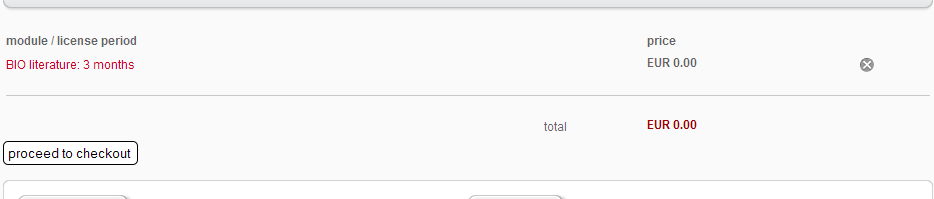
How can I change the position of the "proceed to checkout" button to the right (see screenshot)
Best regards
Please Log in or Create an account to join the conversation.

15 years 2 months ago #20879
by nicolas
Replied by nicolas on topic Re: Change position of "proceed to checkout" button
It's on the right by default.
If you don't see it on the right, it means that your template's CSS overrides the CSS in HikaShop. So you should edit the hikashop CSS and change the code:
#hikashop_checkout_next_button{
float:right;
}
to:
#hikashop_checkout_next_button{
float:right !important;
}
If you don't see it on the right, it means that your template's CSS overrides the CSS in HikaShop. So you should edit the hikashop CSS and change the code:
#hikashop_checkout_next_button{
float:right;
}
to:
#hikashop_checkout_next_button{
float:right !important;
}
Please Log in or Create an account to join the conversation.
- emergentec
-
Topic Author
- Offline
Less
More
- Posts: 137
- Thank you received: 2
15 years 2 months ago #21897
by emergentec
Replied by emergentec on topic Re: Change position of "proceed to checkout" button
But this button has class "input .button hikashop_cart_input_button"
Please Log in or Create an account to join the conversation.
15 years 2 months ago #21901
by nicolas
Replied by nicolas on topic Re: Change position of "proceed to checkout" button
Yes. The button as the class hikashop_cart_input_button and the id hikashop_checkout_next_button
Please Log in or Create an account to join the conversation.
- emergentec
-
Topic Author
- Offline
Less
More
- Posts: 137
- Thank you received: 2
15 years 2 months ago #21963
by emergentec
Replied by emergentec on topic Re: Change position of "proceed to checkout" button
Here is what I found in the source code
Code:
<input type="submit" class="button hikashop_cart_input_button" name="checkout" value="proceed to checkout" />
Please Log in or Create an account to join the conversation.
15 years 2 months ago #21979
by nicolas
Replied by nicolas on topic Re: Change position of "proceed to checkout" button
You should have the id after the value. If you don't, maybe it's because you edited the file step of the view checkout where the id parameter is given to the next button:
echo $this->cart->displayButton(JText::_('HIKA_NEXT'),'next',$this->params,hikashop_completeLink('checkout&task=step&step='.($this->step+1)),'if(hikashopCheckChangeForm(\'order\',\'hikashop_checkout_form\')){document.getElementById(\'hikashop_validate\').value=1; document.forms[\'hikashop_checkout_form\'].submit();} return false;','id="hikashop_checkout_next_button"');
echo $this->cart->displayButton(JText::_('HIKA_NEXT'),'next',$this->params,hikashop_completeLink('checkout&task=step&step='.($this->step+1)),'if(hikashopCheckChangeForm(\'order\',\'hikashop_checkout_form\')){document.getElementById(\'hikashop_validate\').value=1; document.forms[\'hikashop_checkout_form\'].submit();} return false;','id="hikashop_checkout_next_button"');
Please Log in or Create an account to join the conversation.
- emergentec
-
Topic Author
- Offline
Less
More
- Posts: 137
- Thank you received: 2
15 years 2 months ago #22095
by emergentec
Replied by emergentec on topic Re: Change position of "proceed to checkout" button
In the file "step" of the view "checkout" there is no "proceed to checkout" button! I'm talking of the cart which is displayed above the product listing, when you added a product to the cart.
Please Log in or Create an account to join the conversation.
15 years 2 months ago #22106
by nicolas
Replied by nicolas on topic Re: Change position of "proceed to checkout" button
Wow sorry. I was thinking about the cart view of the checkout.
Indeed, that's not the good thing to do for what you want
You should try to add the CSS:
#hikashop_cart_module .button hikashop_cart_input_button{
float: right !important;
}
Indeed, that's not the good thing to do for what you want
You should try to add the CSS:
#hikashop_cart_module .button hikashop_cart_input_button{
float: right !important;
}
Please Log in or Create an account to join the conversation.
- emergentec
-
Topic Author
- Offline
Less
More
- Posts: 137
- Thank you received: 2
15 years 2 months ago #22122
by emergentec
Replied by emergentec on topic Re: Change position of "proceed to checkout" button
It worked with this CSS:
.hikashop_cart_input_button{
float:right;
}
.hikashop_cart_input_button{
float:right;
}
Please Log in or Create an account to join the conversation.
Time to create page: 0.229 seconds