

- Posts: 117
- Thank you received: 0
make products fill the whole width of the body
15 years 2 months ago #21697
by sarsells
make products fill the whole width of the body was created by sarsells
Hi
I have now almost finished the recod shop.
A couple of things I still need to sort out.
Firstly, I have the products set to 3 columns. This leaves a space on the right hand side. I cannot see how to change this so that they fill the whole width?
secondly, I have not managed to create an active state for my list menu on the left hand side. So, I have decided that I should have the category title showing on each of the category pages. Somewhere, I turned this option off. I have looked and looked and cannot see where to turn these titles on again?
www.acrossthetracksrecords.com
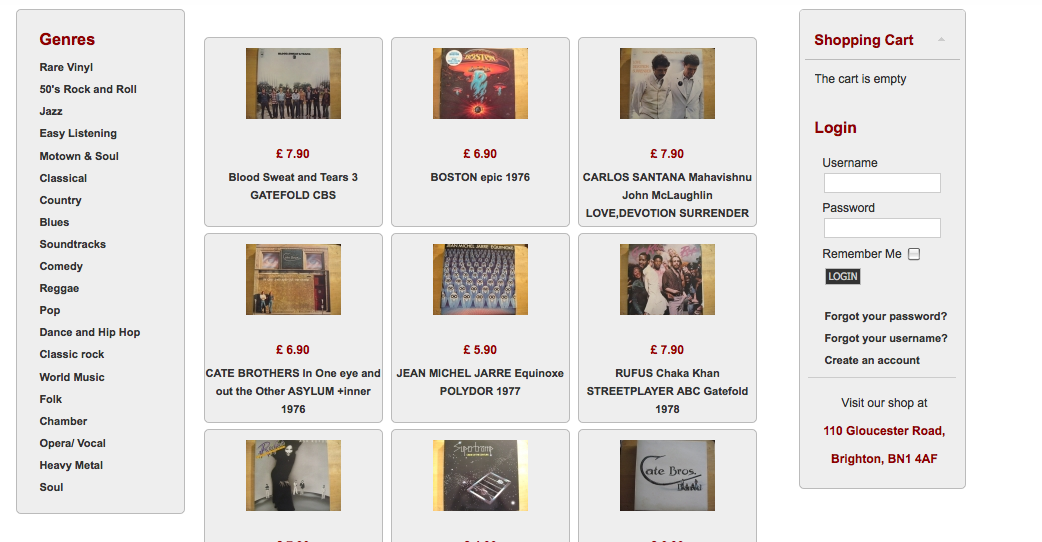
I have now almost finished the recod shop.
A couple of things I still need to sort out.
Firstly, I have the products set to 3 columns. This leaves a space on the right hand side. I cannot see how to change this so that they fill the whole width?
secondly, I have not managed to create an active state for my list menu on the left hand side. So, I have decided that I should have the category title showing on each of the category pages. Somewhere, I turned this option off. I have looked and looked and cannot see where to turn these titles on again?
www.acrossthetracksrecords.com
Please Log in or Create an account to join the conversation.
15 years 2 months ago #21705
by sarsells
Replied by sarsells on topic Re: make products fill the whole width of the body
I have managed to fix the width problem by giving a width of 33% instead of 32% . I think I am getting the hang of things! However, I would still appriciate help with the category page headings.
Many thanks
Sarah
Many thanks
Sarah
Please Log in or Create an account to join the conversation.

15 years 2 months ago #21708
by nicolas
Replied by nicolas on topic Re: make products fill the whole width of the body
In the joomla options of your menu, you should have the option "Display page title" on Joomla 1.5 for that.
Please Log in or Create an account to join the conversation.
15 years 2 months ago #21713
by sarsells
Replied by sarsells on topic Re: make products fill the whole width of the body
but it is not a menu, just a list of categories. somewhere I need to turn the category names on?
Please Log in or Create an account to join the conversation.
15 years 2 months ago #21729
by nicolas
Replied by nicolas on topic Re: make products fill the whole width of the body
It's the menu with the id on your website. When you edit it via the menu Display->Content menus, you have a button "joomla menu options" at the top in order to go to joomla's options.
Please Log in or Create an account to join the conversation.
15 years 2 months ago #21736
by sarsells
Replied by sarsells on topic Re: make products fill the whole width of the body
Thank you, that sorted it
Please Log in or Create an account to join the conversation.
Time to create page: 0.176 seconds