

- Posts: 117
- Thank you received: 0
Error- can no longer upload images to products.
15 years 1 month ago #22752
by sarsells
Error- can no longer upload images to products. was created by sarsells
Hi
I can no longer add images to my products. i have made sure I have a small file. I just keep getting the same error message. Please can you help.

I can no longer add images to my products. i have made sure I have a small file. I just keep getting the same error message. Please can you help.
Please Log in or Create an account to join the conversation.

15 years 1 month ago #22753
by nicolas
Replied by nicolas on topic Re: Error- can no longer upload images to products.
Hi,
That message means that Joomla (your apache server) does not have the right to write files in the folder media/com_hikashop/upload. You should fix the access rights of that folder via FTP (for example, you could try to set them to 777).
That message means that Joomla (your apache server) does not have the right to write files in the folder media/com_hikashop/upload. You should fix the access rights of that folder via FTP (for example, you could try to set them to 777).
Please Log in or Create an account to join the conversation.
15 years 1 month ago #22754
by sarsells
Replied by sarsells on topic Re: Error- can no longer upload images to products.
Oh, why would that have suddenly changed, we have lots already on? I will see if I can locate the folder on the server and find out how to change the permissions.
Thank you.
Thank you.
Please Log in or Create an account to join the conversation.
15 years 1 month ago #22755
by nicolas
Replied by nicolas on topic Re: Error- can no longer upload images to products.
That could have happened if you activated/deactivated the FTP layer of Joomla for example.
Please Log in or Create an account to join the conversation.
15 years 1 month ago #22757
by sarsells
Replied by sarsells on topic Re: Error- can no longer upload images to products.
OK, thanks you.
The permissions were wrong. I have now changed them to 777, however I am still getting an error
Warning: Failed to move file!
Could not upload the file /tmp/phpyyWkEf to /home/acrossth/public_html/media/com_hikashop/upload/cat.jpg
Please can you advise?
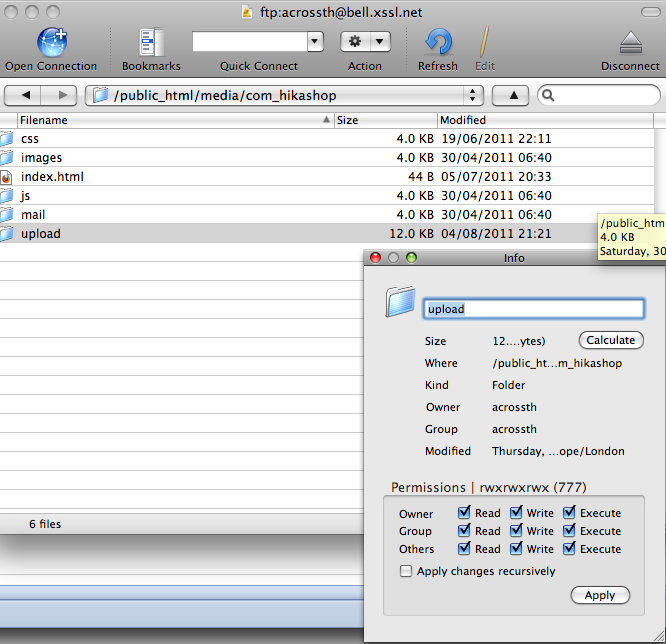
The permissions were wrong. I have now changed them to 777, however I am still getting an error
Warning: Failed to move file!
Could not upload the file /tmp/phpyyWkEf to /home/acrossth/public_html/media/com_hikashop/upload/cat.jpg
Please can you advise?
Please Log in or Create an account to join the conversation.
15 years 1 month ago #22758
by nicolas
Replied by nicolas on topic Re: Error- can no longer upload images to products.
Then maybe the problem is the owner. If your apache server's user is something else than acrossth, it can happen that it won't work on some hosting configurations. So you could try to change the owner of the folder to the apache user.
Also, you could try to change the FTP layer of joomla (eg if you have it deactivated, try to activate it and vice versa).
Also, you could try to change the FTP layer of joomla (eg if you have it deactivated, try to activate it and vice versa).
Please Log in or Create an account to join the conversation.
15 years 1 month ago #22759
by sarsells
Replied by sarsells on topic Re: Error- can no longer upload images to products.
I have been looking at other folders. Media was 755 so I have changed that. Public html is 750. Should I change that? Would that not make my site open to hacking?
Please Log in or Create an account to join the conversation.
15 years 1 month ago - 15 years 1 month ago #22760
by sarsells
Replied by sarsells on topic Re: Error- can no longer upload images to products.
Sorry, I do not understand how to do what you suggested. I do not know how to activate deactivate?
Is there a module in Joomla itself that I need to deactivate and activate?
Is there a module in Joomla itself that I need to deactivate and activate?
Last edit: 15 years 1 month ago by sarsells.
Please Log in or Create an account to join the conversation.
15 years 1 month ago #22761
by nicolas
Replied by nicolas on topic Re: Error- can no longer upload images to products.
You should not change all the folders access rights. For the upload folder, it's ok but for folders with php files directly in it, it could lessen your security.
Here is more information on access rights and the FTP layer:
docs.joomla.org/Why_can't_you_install_any_extensions%3F
docs.joomla.org/How_to_solve_Installatio...rs_Extension_Manager
www.youtube.com/watch?v=jzBNjCkViRU
Here is more information on access rights and the FTP layer:
docs.joomla.org/Why_can't_you_install_any_extensions%3F
docs.joomla.org/How_to_solve_Installatio...rs_Extension_Manager
www.youtube.com/watch?v=jzBNjCkViRU
Please Log in or Create an account to join the conversation.
15 years 1 month ago - 15 years 1 month ago #22768
by sarsells
Replied by sarsells on topic Re: Error- can no longer upload images to products.
Hi
I am tearing my hair out. I have not managed to sort it out.
I have changed permissions as per some of the links you sent.
The tutorial on youtube was easy enough to follow, however, I would not enable the FTP via Joomla.
I got the following messages
JFTP::login: Unable to login
JFTP::write: Unable to use passive mode
JFTP::delete: Bad response
JFTP::write: Unable to use passive mode
An Error has occurred! Unable to open configuration.php file to write!
i have changed the configuration.php to 777 via my c-panel and still no joy
I do not know what to so, as my client needs to be able to put images on, and is cross as he has spent a lot of time getting items ready to put on. It was working and now it has stopped. I feel I am out of my depth here. Is there someone I can pay to fix this for me?
Many thanks for all your help.
Edit
I have now managed to enable the ftp through the control panel, and no longer have the messages above. However, I am still not able to upload images to the products
I am tearing my hair out. I have not managed to sort it out.
I have changed permissions as per some of the links you sent.
The tutorial on youtube was easy enough to follow, however, I would not enable the FTP via Joomla.
I got the following messages
JFTP::login: Unable to login
JFTP::write: Unable to use passive mode
JFTP::delete: Bad response
JFTP::write: Unable to use passive mode
An Error has occurred! Unable to open configuration.php file to write!
i have changed the configuration.php to 777 via my c-panel and still no joy
I do not know what to so, as my client needs to be able to put images on, and is cross as he has spent a lot of time getting items ready to put on. It was working and now it has stopped. I feel I am out of my depth here. Is there someone I can pay to fix this for me?
Many thanks for all your help.
Edit
I have now managed to enable the ftp through the control panel, and no longer have the messages above. However, I am still not able to upload images to the products
Last edit: 15 years 1 month ago by sarsells.
Please Log in or Create an account to join the conversation.
15 years 1 month ago #22769
by nicolas
Replied by nicolas on topic Re: Error- can no longer upload images to products.
If you can't enable the FTP via the configuration screen of joomla, you should try by editing directly the configuration.php file via FTP.
Also, if you have troubles to write in folders with a 777 access, you should ask your hosting company to help you as that should not be happening.
Also, if you have troubles to write in folders with a 777 access, you should ask your hosting company to help you as that should not be happening.
Please Log in or Create an account to join the conversation.
15 years 1 month ago - 15 years 1 month ago #22772
by sarsells
Replied by sarsells on topic Re: Error- can no longer upload images to products.
configuration.php is now set to 777 and still no joy?
Last edit: 15 years 1 month ago by sarsells.
Please Log in or Create an account to join the conversation.
15 years 1 month ago - 15 years 1 month ago #22774
by sarsells
Replied by sarsells on topic Re: Error- can no longer upload images to products.
By The way, if I look in the media folder, I see the files I am trying to upload, but with a size of 0.
I have also uploaded manually via ftp and the same thing happens. the file uploads with a size of 0!
I have also uploaded manually via ftp and the same thing happens. the file uploads with a size of 0!
Last edit: 15 years 1 month ago by sarsells.
Please Log in or Create an account to join the conversation.
15 years 1 month ago #22775
by sarsells
Replied by sarsells on topic Re: Error- can no longer upload images to products.
Well after all that, I think I have figured it out. My client had uploaded some pictures with a 1 mb file size. I think he has used up the space on the server. I have emailed the hosts to check this out. I will let you know if it is sorted.
Please Log in or Create an account to join the conversation.
Time to create page: 0.280 seconds