

- Posts: 23
- Thank you received: 0
Change order of address fields in cart
15 years 1 month ago #22885
by benweb
Change order of address fields in cart was created by benweb
Can I Change the order of the address fields in the checkout?
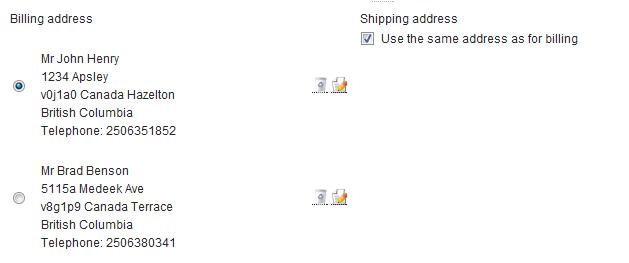
I would like it to be:
Mr Brad Benson
5115a Medeek Ave
Terrace British Columbia
Canada v8g1p9
Telephone: 2506380341
I would like it to be:
Mr Brad Benson
5115a Medeek Ave
Terrace British Columbia
Canada v8g1p9
Telephone: 2506380341
Please Log in or Create an account to join the conversation.
15 years 1 month ago #22886
by benweb
Replied by benweb on topic Re: Change order of address fields in cart
Also can the ship to address show under the shipping address header?
Please Log in or Create an account to join the conversation.

15 years 1 month ago #22888
by nicolas
Replied by nicolas on topic Re: Change order of address fields in cart
You can change the address by editing the files address_template via the menu Display->Views.
I don't understand your second question. That's already the case if you untick the checkbox "use the same address as for billing"...
I don't understand your second question. That's already the case if you untick the checkbox "use the same address as for billing"...
Please Log in or Create an account to join the conversation.
15 years 1 month ago #22909
by benweb
Replied by benweb on topic Re: Change order of address fields in cart
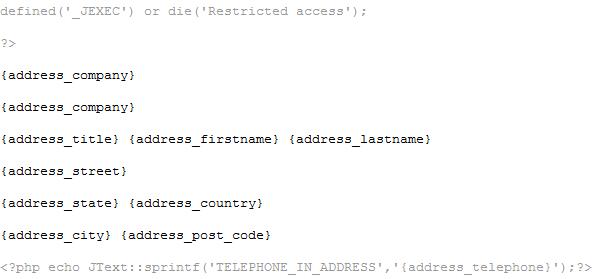
Tried to change by editing the files address_template via the menu Display->Views but it would not save. So I edited the actual php file on site. It now shows the correct order on the input form but not on the actual address display in cart. Here is What I Changed the code to.
Note:
The City shows in state fields , Country shows in city field, state shows in country field. As you remember this workaround was to make the shipping work without an actual city zone
Note:
The City shows in state fields , Country shows in city field, state shows in country field. As you remember this workaround was to make the shipping work without an actual city zone
Please Log in or Create an account to join the conversation.
15 years 1 month ago #22911
by nicolas
Replied by nicolas on topic Re: Change order of address fields in cart
The order of the input form is handled by the ordering of your custom fields, that you can change in Display->Custom fields, and not the address_template file.
The address_template files handle the display of the addresses on the checkout, the emails, the orders, the invoices, etc. There are several address_template files so make sure that you change all of them.
The address_template files handle the display of the addresses on the checkout, the emails, the orders, the invoices, etc. There are several address_template files so make sure that you change all of them.
Please Log in or Create an account to join the conversation.
Time to create page: 0.149 seconds