
Changing the nam of shippingmethode

15 years 1 month ago #22908
by adoewa
Changing the nam of shippingmethode was created by adoewa
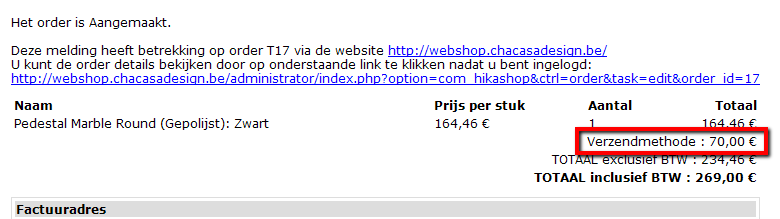
On the email wich is sended to the customer on the total price there's a field with shippingmethode.
Is it possible to change this to the value of "hikashop_checkout_shipping_name" and also on the email send to
the customer and the administrator.
How can i add the payment options to the mail for the customer?
Like : please pay the amount of xxx€ on accountnumber xxx-xxxxxx-xxxx with the remark of
the ordernumber xxx
Is it possible to change this to the value of "hikashop_checkout_shipping_name" and also on the email send to
the customer and the administrator.
How can i add the payment options to the mail for the customer?
Like : please pay the amount of xxx€ on accountnumber xxx-xxxxxx-xxxx with the remark of
the ordernumber xxx
Please Log in or Create an account to join the conversation.

15 years 1 month ago - 15 years 1 month ago #22916
by nicolas
Replied by nicolas on topic Re: Changing the nam of shippingmethode
The hikashop_checkout_shipping_name can be changed by editing the shipping method options in the back end.
To add the sentence, you should change the line:
echo JText::_('ORDER_VALID_AFTER_PAYMENT');
to:
echo JText::sptrinf('Please pay the amount of '.$currencyHelper->format($data->cart->full_total->prices[0]->price_value_with_tax,$data->order_currency_id).' on accountnumber xxx-xxxxxx-xxxx with the remark of the ordernumber '.$data->order_number);
in the email order creation notification that you can edit via the menu System->Emails in the business edition.
To add the sentence, you should change the line:
echo JText::_('ORDER_VALID_AFTER_PAYMENT');
to:
echo JText::sptrinf('Please pay the amount of '.$currencyHelper->format($data->cart->full_total->prices[0]->price_value_with_tax,$data->order_currency_id).' on accountnumber xxx-xxxxxx-xxxx with the remark of the ordernumber '.$data->order_number);
in the email order creation notification that you can edit via the menu System->Emails in the business edition.
Last edit: 15 years 1 month ago by nicolas.
Please Log in or Create an account to join the conversation.
15 years 1 month ago #22967
by adoewa
Replied by adoewa on topic Re: Changing the nam of shippingmethode
Hi Nicolas,
Thanks...
What i meant with the first question is following.
I want to print the methode on the invoice like "Delivery at your home" or "collect free at the store".
This methode are the names wich i gave to the different shippingmethods like zipcodes...etc...
Now it prints only Shippingmethode.
Sorry, but the eample is in dutch.
Koen
Thanks...
What i meant with the first question is following.
I want to print the methode on the invoice like "Delivery at your home" or "collect free at the store".
This methode are the names wich i gave to the different shippingmethods like zipcodes...etc...
Now it prints only Shippingmethode.
Sorry, but the eample is in dutch.
Koen
Please Log in or Create an account to join the conversation.
15 years 1 month ago #22970
by adoewa
Replied by adoewa on topic Re: Changing the nam of shippingmethode
Nicolas,
When i change the value echo JText::_('ORDER_VALID_AFTER_PAYMENT');
i get an
Parse error: syntax error, unexpected ')', expecting ',' or ';' in /var/www/vhosts/chacasadesign.be/subdomains/webshop/httpdocs/media/com_hikashop/mail/order_creation_notification.html.modified.php on line 156
When i change the value echo JText::_('ORDER_VALID_AFTER_PAYMENT');
i get an
Parse error: syntax error, unexpected ')', expecting ',' or ';' in /var/www/vhosts/chacasadesign.be/subdomains/webshop/httpdocs/media/com_hikashop/mail/order_creation_notification.html.modified.php on line 156
Please Log in or Create an account to join the conversation.
15 years 1 month ago #22982
by nicolas
Replied by nicolas on topic Re: Changing the nam of shippingmethode
So you want to change the text Verzendmethode to something else ? You can do that by overriding the translation string in the Languages tab of the configuration:
www.hikashop.com/download/languages.html#modify
For the modification, you should use that line of code instead:
echo JText::sptrinf('Please pay the amount of '.$currencyHelper->format($data->cart->full_total->prices[0]->price_value_with_tax,$data->order_currency_id).' on accountnumber xxx-xxxxxx-xxxx with the remark of the ordernumber '.$data->order_number);
www.hikashop.com/download/languages.html#modify
For the modification, you should use that line of code instead:
echo JText::sptrinf('Please pay the amount of '.$currencyHelper->format($data->cart->full_total->prices[0]->price_value_with_tax,$data->order_currency_id).' on accountnumber xxx-xxxxxx-xxxx with the remark of the ordernumber '.$data->order_number);
Please Log in or Create an account to join the conversation.
Time to create page: 0.199 seconds