
Placement of the characteristic options

15 years 1 month ago #23493
by Jims
Placement of the characteristic options was created by Jims
The characteristic options (radio buttons) are currently placed below the product image on the product page
(see attached image)
What setting do I change to have those options placed to the right of the image?
This happened a week or so ago while I was experimenting with some setting changes to learn how HikaShop works. But then the options reverted to being shown below the image and I cannot find the setting that I found before!!!
Thanks
Jim
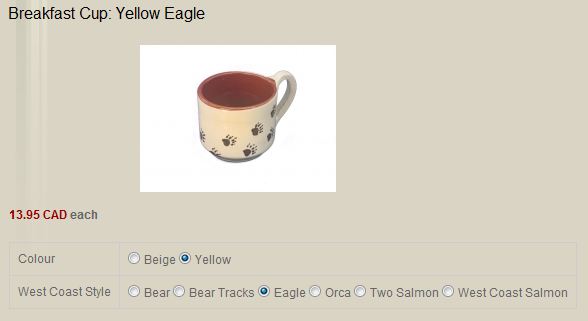
(see attached image)
What setting do I change to have those options placed to the right of the image?
This happened a week or so ago while I was experimenting with some setting changes to learn how HikaShop works. But then the options reverted to being shown below the image and I cannot find the setting that I found before!!!
Thanks
Jim
Please Log in or Create an account to join the conversation.

15 years 1 month ago #23496
by nicolas
Replied by nicolas on topic Re: Placement of the characteristic options
Isn't that happening because you were displaying the characteristics with a dropdown before ?
If you display them with a dropdown, you should have the characteristics on the right again as before. You can do that in the Display tab of the configuration with the option "Characteristics selection method".
If you display them with a dropdown, you should have the characteristics on the right again as before. You can do that in the Display tab of the configuration with the option "Characteristics selection method".
Please Log in or Create an account to join the conversation.
15 years 1 month ago #23500
by Jims
Replied by Jims on topic Re: Placement of the characteristic options
No, Nicolas, it happened with the radio buttons. I changed a setting somewhere  and the radio buttons moved to the right of the image!!
and the radio buttons moved to the right of the image!! Please Log in or Create an account to join the conversation.
15 years 1 month ago #23504
by nicolas
Replied by nicolas on topic Re: Placement of the characteristic options
I don't know about another setting. However, you should be able to do that with just a line of CSS.
If you give a link to that page, I could give you the CSS code to use.
If you give a link to that page, I could give you the CSS code to use.
Please Log in or Create an account to join the conversation.
15 years 1 month ago - 15 years 1 month ago #23511
by Jims
Replied by Jims on topic Re: Placement of the characteristic options
The setting was connected with adding things below the image I think???.
However if you cannot think of setting that would affect the positioning of the the characteristic display ....
The link to the page is
js-ca.net/potluckcms/index.php/catalogue...t/3584-breakfast-cup
Jim
ADDITION
I just changed the template back the one I used last week and the characteristics table is now on the right of the image !!!
I must have been using a table, not radio buttons!!!
However if you cannot think of setting that would affect the positioning of the the characteristic display ....
The link to the page is
js-ca.net/potluckcms/index.php/catalogue...t/3584-breakfast-cup
Jim
ADDITION
I just changed the template back the one I used last week and the characteristics table is now on the right of the image !!!
I must have been using a table, not radio buttons!!!
Last edit: 15 years 1 month ago by Jims.
Please Log in or Create an account to join the conversation.
15 years 1 month ago #23513
by nicolas
Replied by nicolas on topic Re: Placement of the characteristic options
That must be the case indeed.
Please Log in or Create an account to join the conversation.
Time to create page: 0.164 seconds