

- Posts: 49
- Thank you received: 0
Product names to show.
15 years 1 month ago #24467
by byesuzuki
Product names to show. was created by byesuzuki
I added a bunch of products, they have names/descriptions but the only thing showing on the view is the picture and price.
How do I add the name of the product? When I mouse over the alt text has the name, but I want the name above each product.
See pic attached.
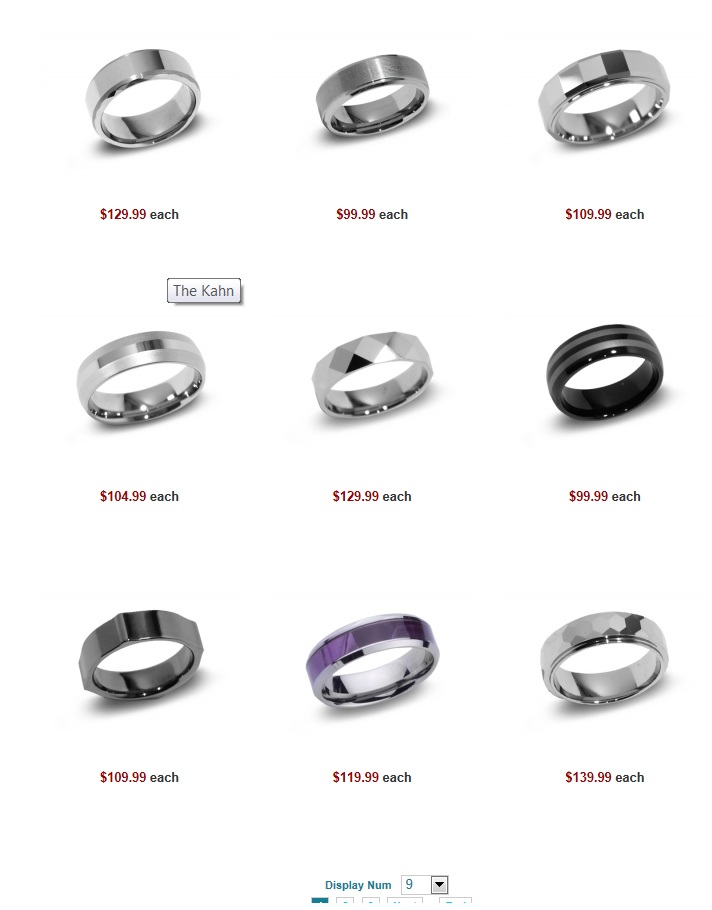
How do I add the name of the product? When I mouse over the alt text has the name, but I want the name above each product.
See pic attached.
Please Log in or Create an account to join the conversation.

15 years 1 month ago #24479
by nicolas
Replied by nicolas on topic Re: Product names to show.
You need to turn on the option "show product name" in the hikashop options of your menu/module.
Please Log in or Create an account to join the conversation.
15 years 1 month ago #24498
by byesuzuki
Replied by byesuzuki on topic Re: Product names to show.
Is that a joomla module or hikashop module.
I can't find it, I have 'show title' checked off everywhere already and it still doesn't work.
I can't find it, I have 'show title' checked off everywhere already and it still doesn't work.
Please Log in or Create an account to join the conversation.
15 years 1 month ago #24510
by nicolas
Replied by nicolas on topic Re: Product names to show.
Please go in the menus Display->Content menus and Display->Content modules and check that the item layout is "image and title" and not just "image".
Please Log in or Create an account to join the conversation.
15 years 1 month ago #24558
by byesuzuki
Replied by byesuzuki on topic Re: Product names to show.
Thanks for the fast answers.
I checked that area and they were already set to image and title, so it's still not changed.
See attached pic.
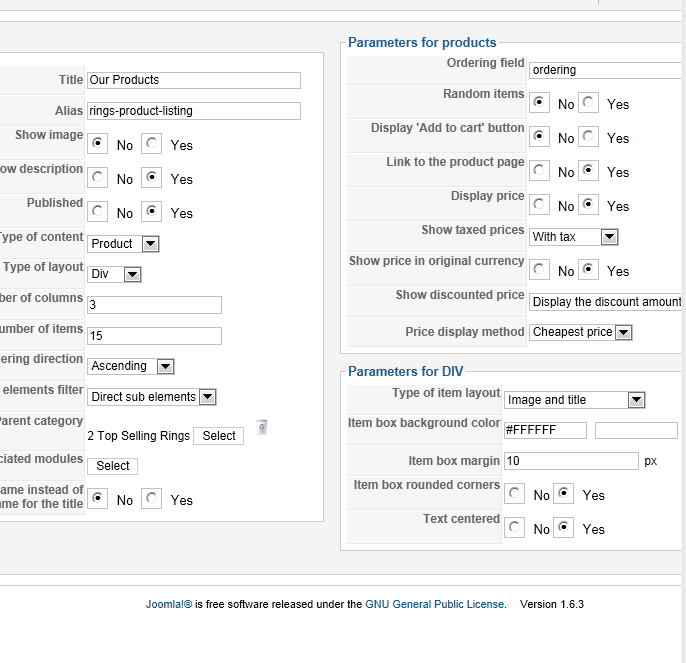
I checked that area and they were already set to image and title, so it's still not changed.
See attached pic.
Please Log in or Create an account to join the conversation.
15 years 1 month ago #24572
by nicolas
Replied by nicolas on topic Re: Product names to show.
Than it might be a CSS issue, or you edited the view file to remove the product name 
Could you give a link to that page, so that we can see what could be the problem ?
Could you give a link to that page, so that we can see what could be the problem ?
Please Log in or Create an account to join the conversation.
15 years 1 month ago #24627
by byesuzuki
Replied by byesuzuki on topic Re: Product names to show.
Please Log in or Create an account to join the conversation.
15 years 1 month ago #24629
by nicolas
Replied by nicolas on topic Re: Product names to show.
The problem comes from the CSS code:
a:link, a:visited {
color: white;
}
which is in the file www.bandsforhim.com/templates/beez5/css/beez5.css
That sets the color to white for all the links on your website so you need to change that.
a:link, a:visited {
color: white;
}
which is in the file www.bandsforhim.com/templates/beez5/css/beez5.css
That sets the color to white for all the links on your website so you need to change that.
Please Log in or Create an account to join the conversation.
15 years 1 month ago #24673
by byesuzuki
Replied by byesuzuki on topic Re: Product names to show.
Yay, thank you!
That worked.
That worked.
Please Log in or Create an account to join the conversation.
Time to create page: 0.202 seconds