

- Posts: 49
- Thank you received: 0
How to change the Green Colour in the left & top
15 years 1 month ago #24776
by byesuzuki
How to change the Green Colour in the left & top was created by byesuzuki
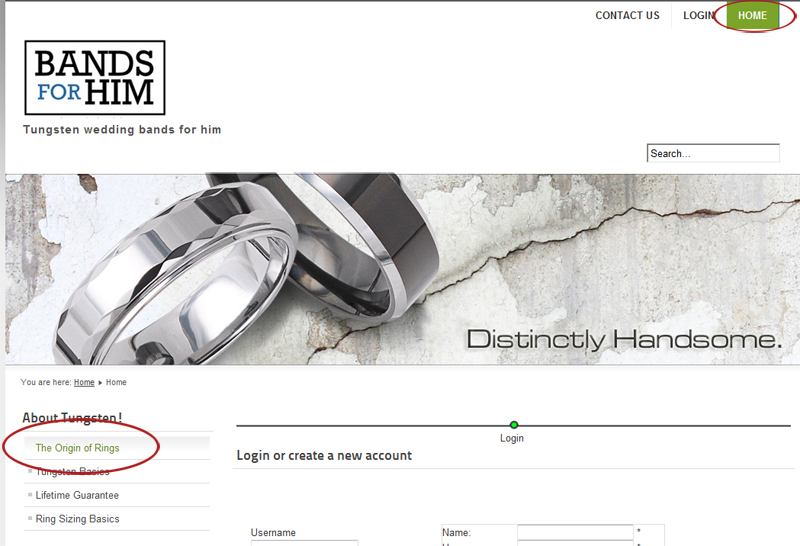
Hi I was wondering if you can tell me where in the CSS I can change the colour of the left nav text and top nav background colour from green to something else (please see image - highlighted in red)
Thanks
Thanks
Please Log in or Create an account to join the conversation.

15 years 1 month ago #24783
by nicolas
Replied by nicolas on topic Re: How to change the Green Colour in the left & top
That's not related to HikaShop but to your template. You should ask your template support such questions.
Anyway, we can't help you if you don't give the URL of your website. Each template defines CSS styles differently so we need to look at the CSS of your template to answer you.
Anyway, we can't help you if you don't give the URL of your website. Each template defines CSS styles differently so we need to look at the CSS of your template to answer you.
Please Log in or Create an account to join the conversation.
15 years 1 month ago #24785
by byesuzuki
Replied by byesuzuki on topic Re: How to change the Green Colour in the left & top
OK no problem - I will look into the template.
Just an fyi - the link is:
bandsforhim.com/index.php/homepage-top-link/checkout
Thanks,
Just an fyi - the link is:
bandsforhim.com/index.php/homepage-top-link/checkout
Thanks,
Please Log in or Create an account to join the conversation.
15 years 1 month ago #24787
by nicolas
Replied by nicolas on topic Re: How to change the Green Colour in the left & top
The green background at the top is defined by:
#header ul.menu li.active a:link, #header ul.menu li.active a:visited {
color: white;
border-right: solid 1px #237D85;
background: #7BA428 !important;
}
and the green color on the left menu by:
ul.menu li a:hover, ul.menu li a:active, ul.menu li a:focus, ul.menu li.active a:hover, ul.menu li.active a:active, ul.menu li.active a:focus {
background: white url(../images/nav_level_1.gif) repeat-x;
color: #638420;
}
in the CSS file:
bandsforhim.com/templates/beez5/css/beez5.css
#header ul.menu li.active a:link, #header ul.menu li.active a:visited {
color: white;
border-right: solid 1px #237D85;
background: #7BA428 !important;
}
and the green color on the left menu by:
ul.menu li a:hover, ul.menu li a:active, ul.menu li a:focus, ul.menu li.active a:hover, ul.menu li.active a:active, ul.menu li.active a:focus {
background: white url(../images/nav_level_1.gif) repeat-x;
color: #638420;
}
in the CSS file:
bandsforhim.com/templates/beez5/css/beez5.css
Please Log in or Create an account to join the conversation.
15 years 1 month ago #24788
by byesuzuki
Replied by byesuzuki on topic Re: How to change the Green Colour in the left & top
Thanks so much! - it worked!
You guys are the best.
You guys are the best.
Please Log in or Create an account to join the conversation.
Time to create page: 0.165 seconds