
- Posts: 152
- Thank you received: 0
Customer Account View
- plantpotphil
-
 Topic Author
- Offline
Less
More
15 years 3 weeks ago - 15 years 3 weeks ago #25115
by plantpotphil
Create your own style of luxury bespoke furniture online
Customer Account View was created by plantpotphil
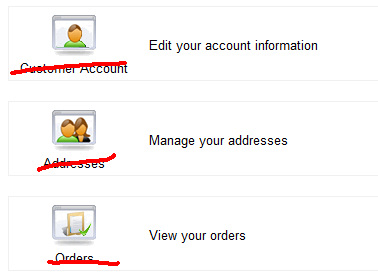
In the view com_hikashop&view=user&layout=cpanel how can I remove the text under each icon? As shown in the image below (want to remove red bits).
Is it ok to make each string simple "" in the language override? (e.g. CUSTOMER_ACCOUNT="") or are these strings used elsewhere?
Is it ok to make each string simple "" in the language override? (e.g. CUSTOMER_ACCOUNT="") or are these strings used elsewhere?
Create your own style of luxury bespoke furniture online
Last edit: 15 years 3 weeks ago by plantpotphil.
Please Log in or Create an account to join the conversation.

15 years 3 weeks ago #25116
by nicolas
Replied by nicolas on topic Re: Customer Account View
You can't do that as these strings are indeed used in lots of other places.
Instead, you need to replace the line:
$html .= '<span>'.$text.'</span></td><td>'.$description.'</td></tr></table></a>';
by:
$html .= '</td><td>'.$description.'</td></tr></table></a>';
in the file components/com_hikashop/views/user/view.html.php
Instead, you need to replace the line:
$html .= '<span>'.$text.'</span></td><td>'.$description.'</td></tr></table></a>';
by:
$html .= '</td><td>'.$description.'</td></tr></table></a>';
in the file components/com_hikashop/views/user/view.html.php
Please Log in or Create an account to join the conversation.
- plantpotphil
-
Topic Author
- Offline
Less
More
- Posts: 152
- Thank you received: 0
15 years 3 weeks ago #25117
by plantpotphil
Create your own style of luxury bespoke furniture online
Replied by plantpotphil on topic Re: Customer Account View
Thanks Nicolas, that's worked nicely.
I'm nearly finished our first site with Hikashop and will be purchasing the Business version soon.
I'm nearly finished our first site with Hikashop and will be purchasing the Business version soon.
Create your own style of luxury bespoke furniture online
Please Log in or Create an account to join the conversation.
Time to create page: 0.160 seconds