

- Posts: 22
- Thank you received: 0
Checkout Loop
15 years 1 week ago #27110
by Bob53207
Checkout Loop was created by Bob53207
I cannot figure out why the cart won't get past the first screen: rodgersthat.com/vm-test is the dev area. Checkout is set to no registration. The workflow is the default of Essential: login_address_shipping_payment_confirm_coupon_cart_status_fields,end
I've been banging my head against the wall all morning. Please help.
I've been banging my head against the wall all morning. Please help.
Please Log in or Create an account to join the conversation.

15 years 1 week ago #27115
by nicolas
Replied by nicolas on topic Re: Checkout Loop
The checkout is working fine on your website. I just tested it.
Please Log in or Create an account to join the conversation.
15 years 1 week ago #27119
by Bob53207
Replied by Bob53207 on topic Re: Checkout Loop
Really? I just keep getting the same screen and no confirmation or thank-you page. 'Just the same next button. I've now tried it in IE9, and Chrome for both Mac and PC.
Please Log in or Create an account to join the conversation.
15 years 1 week ago #27120
by nicolas
Replied by nicolas on topic Re: Checkout Loop
Yes, you can see that I created an order.
If it's not working for you, it's probably because your address is outside the zone that you selected in your shipping/payment methods configuration.
Please check the FAQ there:
www.hikashop.com/en/support/documentatio...ins-listing.html#faq
If it's not working for you, it's probably because your address is outside the zone that you selected in your shipping/payment methods configuration.
Please check the FAQ there:
www.hikashop.com/en/support/documentatio...ins-listing.html#faq
Please Log in or Create an account to join the conversation.
15 years 1 week ago #27124
by Bob53207
Replied by Bob53207 on topic Re: Checkout Loop
I checked all 3 of my USPS shipping options and the zone was set to the USA. Same with the PayPal Pro. I read the FAQ, checked the javascript errors and they were all related to non-secure content. My browser says nothing about pop-ups, yet I am not getting any error messages - even if I do not put any cc into PayPal Pro. It is just the same loop.
Please Log in or Create an account to join the conversation.
15 years 1 week ago #27125
by nicolas
Replied by nicolas on topic Re: Checkout Loop
If you don't see any error message, it's probably because your template does not have the jdoc include tag which is used by joomla to display error messages:
www.hikashop.com/en/support/documentation/61.html#messages
You should check on that.
I tested by selecting the other payment method.
www.hikashop.com/en/support/documentation/61.html#messages
You should check on that.
I tested by selecting the other payment method.
Please Log in or Create an account to join the conversation.
15 years 1 week ago #27127
by Bob53207
Replied by Bob53207 on topic Re: Checkout Loop
Sure enough. The template did not contain <jdoc:include type="message" /> in the index.php. Well, that brought me error message alright. They were spot-on asking for cc info, shipping method, etc. Then, I filled in everthing - including a valid cc and got Error 10002: Security header is not valid How do I fix that?
Please Log in or Create an account to join the conversation.
15 years 1 week ago #27129
by nicolas
Replied by nicolas on topic Re: Checkout Loop
That error is a common paypal pro error which comes out when you didn't configure the plugin properly. This error can be caused by an incorrect API username, an incorrect API password, or an invalid API signature. Make sure that all three of these values are correct. For your security, PayPal does not report exactly which of these three values might be in error.
More information on these pages :
www.x.com/developers/community/blogs/ppm...ity-header-not-valid
www.x.com/developers/paypal/forums/intro...ity-header-not-valid
More information on these pages :
www.x.com/developers/community/blogs/ppm...ity-header-not-valid
www.x.com/developers/paypal/forums/intro...ity-header-not-valid
Please Log in or Create an account to join the conversation.
15 years 1 week ago #27134
by Bob53207
Replied by Bob53207 on topic Re: Checkout Loop
I called them and it turns out that my account was never upgraded to Pro - as they said they did on 10/4. They said it should be on within 48 hours. Meanwhile, I will work on trying to weed-out my non-secure module calls. Thanks!
Please Log in or Create an account to join the conversation.
14 years 11 months ago #28562
by nicolas
Replied by nicolas on topic Re: Checkout Loop
I don't have that behavior on your website.
I'm able to enter everything and then when I validate the order, the page takes some time and the response it not sent back from the server with the error:
324 (net::ERR_EMPTY_RESPONSE)
Unless of course I use the PayPal method which does not have any problem.
For the address and the content, it is sent to paypal if you use the standard paypal plugin. For the paypal pro plugin it's not possible as this is not handled by the paypal pro API so I'm afraid I don't have a solution for you.
I'm able to enter everything and then when I validate the order, the page takes some time and the response it not sent back from the server with the error:
324 (net::ERR_EMPTY_RESPONSE)
Unless of course I use the PayPal method which does not have any problem.
For the address and the content, it is sent to paypal if you use the standard paypal plugin. For the paypal pro plugin it's not possible as this is not handled by the paypal pro API so I'm afraid I don't have a solution for you.
Please Log in or Create an account to join the conversation.
14 years 11 months ago #28541
by Bob53207
Replied by Bob53207 on topic Re: Checkout Loop
PayPal Pro is now enabled and the cart still is stuck in what looks like a loop. After several page refreshes for each radio button, the button at the bottom still says "Next", instead of "Place Order", "Confirm" etc.
Also, a BIG problem exists with the data coming in to PayPal. I had thought that not having registration turned-on was the problem, but I changed that and it is not. Not only does the content of the order NOT come in, but none of the address info is there. This means NO shipping labels can be printed from PayPal. Am I missing something or is this just how your plugin works? rodgersthat.com/vm-test
Also, a BIG problem exists with the data coming in to PayPal. I had thought that not having registration turned-on was the problem, but I changed that and it is not. Not only does the content of the order NOT come in, but none of the address info is there. This means NO shipping labels can be printed from PayPal. Am I missing something or is this just how your plugin works? rodgersthat.com/vm-test
Please Log in or Create an account to join the conversation.
14 years 11 months ago #28709
by Bob53207
Replied by Bob53207 on topic Re: Checkout Loop
The issue is no longer the error code. It is that I cannot ship via PayPal. Is this a limitation of PayPal Pro or of the plug-in?
Another problem - which may relate, is that the billing info is in the wrong order. Instead of city, state, zip - it is zip, city state. It spells out the whole state name vs. the 2 letter code. Looking at the zones for USA states, the 2 letter is blank and only shown in the 3 letter column. Might this be why PayPal is not bringing in the address?
Another problem - which may relate, is that the billing info is in the wrong order. Instead of city, state, zip - it is zip, city state. It spells out the whole state name vs. the 2 letter code. Looking at the zones for USA states, the 2 letter is blank and only shown in the 3 letter column. Might this be why PayPal is not bringing in the address?
Please Log in or Create an account to join the conversation.
14 years 11 months ago #28740
by nicolas
Replied by nicolas on topic Re: Checkout Loop
What do you mean by "you cannot ship via paypal" ? PayPal is not a shipping company but a payment company. It only handles payments.
The PayPal Pro plugin does however work with other shipping plugins if that's what you're asking. Maybe you didn't set the paypal pro plugin correctly ? Could you do a screenshot of the options (make sure you grey out the sensitive info)?
The address info order can be changed to your liking. For the address form, you can display that via the menu Display->Custom fields.
For the address display, you need to edit the address_template views via the menu Display->Views.
If you use PayPal Pro, the address is not sent to paypal as paypal does not have such possiblity in the paypal pro API.
The PayPal Pro plugin does however work with other shipping plugins if that's what you're asking. Maybe you didn't set the paypal pro plugin correctly ? Could you do a screenshot of the options (make sure you grey out the sensitive info)?
The address info order can be changed to your liking. For the address form, you can display that via the menu Display->Custom fields.
For the address display, you need to edit the address_template views via the menu Display->Views.
If you use PayPal Pro, the address is not sent to paypal as paypal does not have such possiblity in the paypal pro API.
Please Log in or Create an account to join the conversation.
14 years 11 months ago #28811
by Bob53207
Replied by Bob53207 on topic Re: Checkout Loop
Currently, using PayPal Standard buttons, I receive orders with all the info I need to fulfill. I get what the customer ordered and I get his/her shipping info which I can then easily print a USPS shipping label - all within PayPal (see attached order).
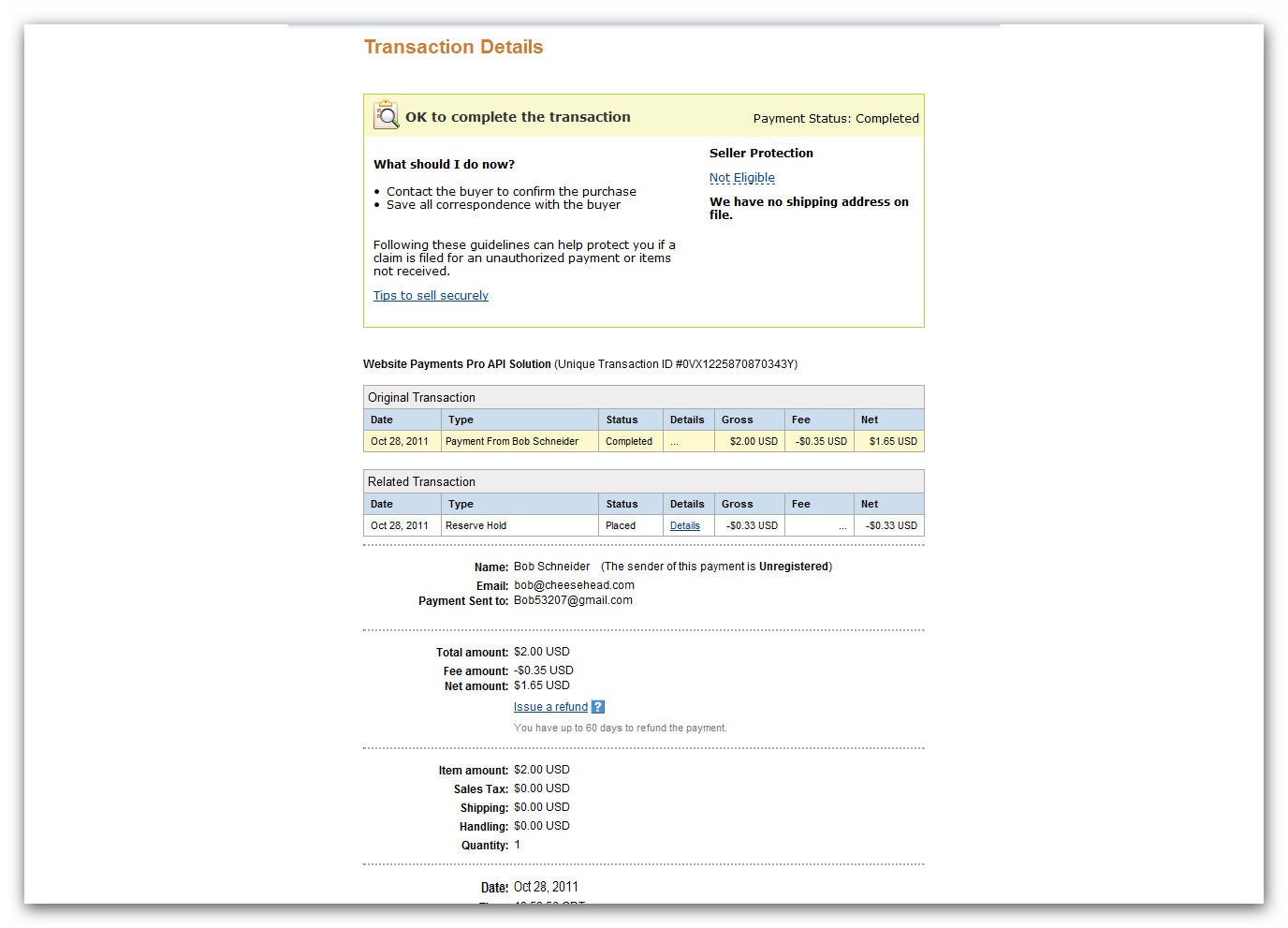
Testing your PayPal Pro plugin, all I get is the amount paid and customer name (see attached).
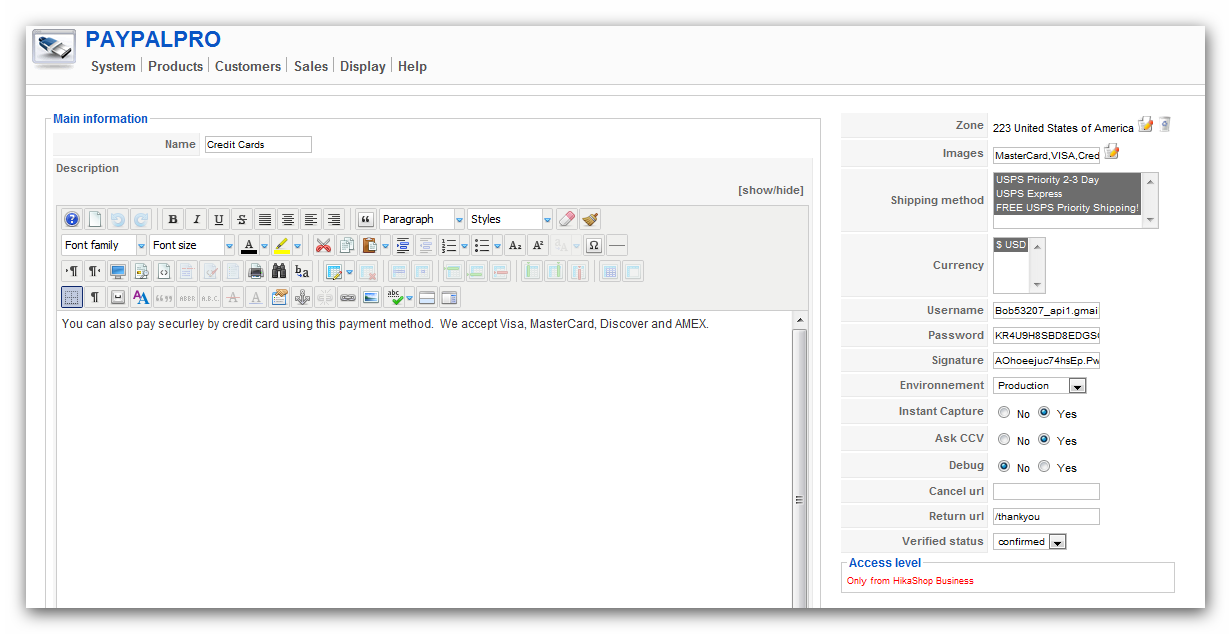
I've gone over the plug-in info and do not see anything that may or may not prevent the flow of this info to PayPal Pro (see attached in next message).
The reason I bought HikaShop Essentials was to be able to use PayPal Pro and keep shoppers on my site. If that means copying and pasting all of the shipping info into PayPal so that I can ship, I do NOT want this cart and hope to receive a full refund.
This attachment is hidden for guests.
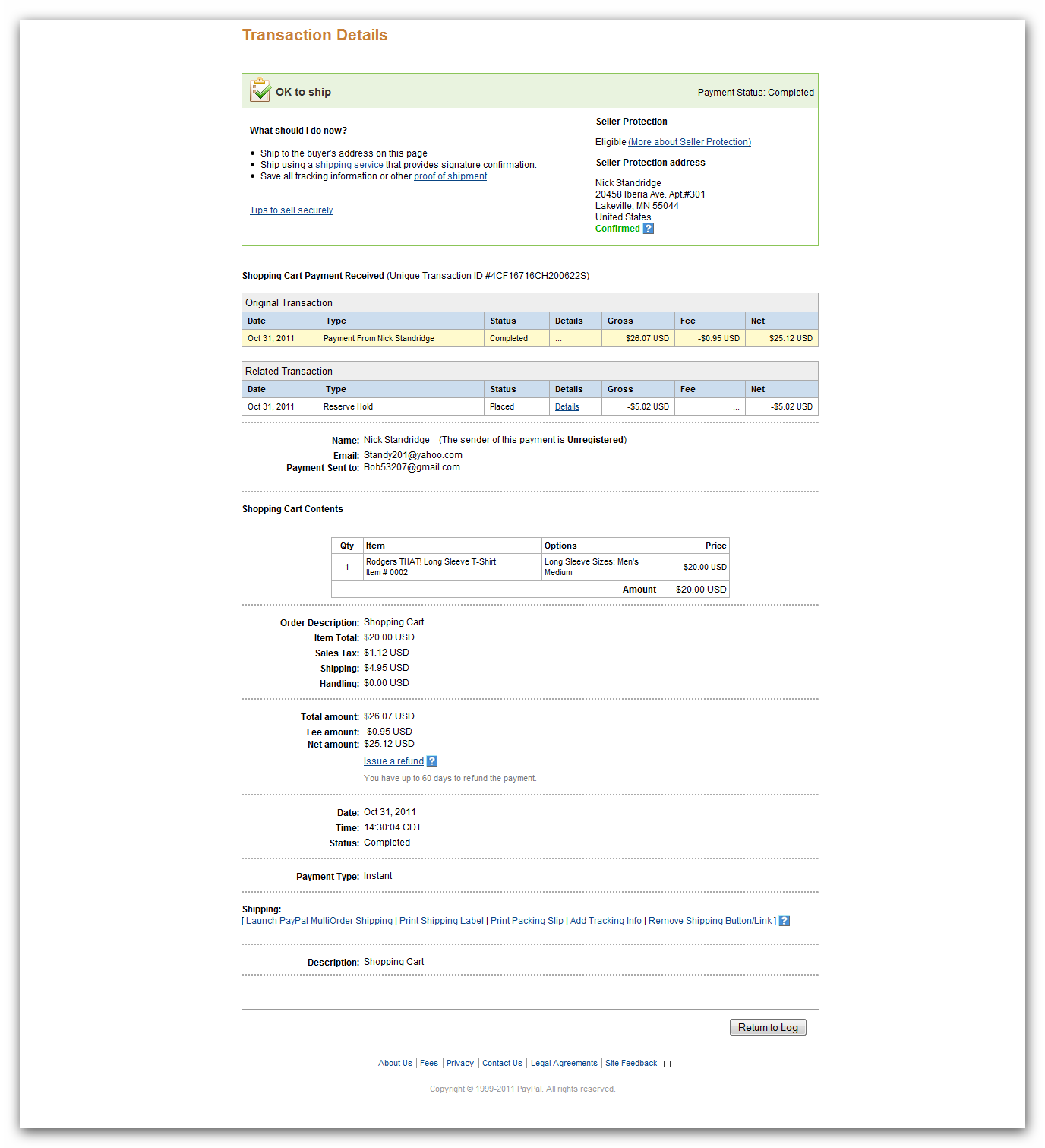
Testing your PayPal Pro plugin, all I get is the amount paid and customer name (see attached).
I've gone over the plug-in info and do not see anything that may or may not prevent the flow of this info to PayPal Pro (see attached in next message).
The reason I bought HikaShop Essentials was to be able to use PayPal Pro and keep shoppers on my site. If that means copying and pasting all of the shipping info into PayPal so that I can ship, I do NOT want this cart and hope to receive a full refund.
This attachment is hidden for guests.
Please log in or register to see it.
Please Log in or Create an account to join the conversation.
14 years 11 months ago #28812
by Bob53207
Replied by Bob53207 on topic Re: Checkout Loop
PayPal Pro
Please Log in or Create an account to join the conversation.
14 years 11 months ago #28813
by Bob53207
Replied by Bob53207 on topic Re: Checkout Loop
When using HikaShop PayPal Pro plugin, I do not get the order nor shipping address.
Please Log in or Create an account to join the conversation.
14 years 11 months ago #28830
by nicolas
Replied by nicolas on topic Re: Checkout Loop
The PayPal Pro plugin is included with all the versions of HikaShop, even the free edition.
The problem is not in HikaShop. It's not possible to do what you want with PayPal Pro, using HikaShop or something else. Only with PayPal standard will you be able to send the address information to PayPal as well as the details of the transaction. You should use the PayPal standard plugin if you want to continue to work as you were doing previously. Unfortunately, there is nothing we can do to help you on that end as that restriction comes from PayPal.
If you still want a refund, please use our contact form to request it.
The problem is not in HikaShop. It's not possible to do what you want with PayPal Pro, using HikaShop or something else. Only with PayPal standard will you be able to send the address information to PayPal as well as the details of the transaction. You should use the PayPal standard plugin if you want to continue to work as you were doing previously. Unfortunately, there is nothing we can do to help you on that end as that restriction comes from PayPal.
If you still want a refund, please use our contact form to request it.
Please Log in or Create an account to join the conversation.
14 years 11 months ago #28912
by Bob53207
Replied by Bob53207 on topic Re: Checkout Loop
I called the Developers group at PayPay and they told me that PayPal Pro most certainly CAN accept order and shipping info. HikaShop does NOT transfer shipping and order info simply because it was not set-up to do so. Here are the tags you need:
SHIPTONAME
Person’s name associated with this shipping address. Required if using a
shipping address.
Character length and limitations: 32 single-byte characters.
SHIPTOSTREET
First street address. Required if using a shipping address.
Character length and limitations: 100 single-byte characters.
SHIPTOSTREET2
(Optional) Second street address.
Character length and limitations: 100 single-byte characters.
SHIPTOCITY
Name of city. Required if using a shipping address.
Character length and limitations: 40 single-byte characters.
SHIPTOSTATE
State or province. Required if using a shipping address.
Character length and limitations: 40 single-byte characters.
SHIPTOZIP U.S. zip code or other country-specific postal code. Required if using a U.S.
shipping address; may be required for other countries.
Character length and limitations: 20 single-byte characters.
SHIPTOCOUNTRY
Country code. Required if using a shipping address.
Character limit: 2 single-byte characters.
SHIPTOPHONENUM
(Optional) Phone number.
Character length and limit: 20 single-byte characters.
L_NAMEn
(Optional) Item name.
These parameters must be ordered sequentially beginning with 0 (for example
L_NAME0, L_NAME1).
Character length and limitations: 127 single-byte characters
L_DESCn
(Optional) Item description.
Character length and limitations: 127 single-byte characters
I have wasted several weeks on the setting up HikaShop - then to discover it would create MORE work for me to process orders. I will request the refund via your contact form as asked.
SHIPTONAME
Person’s name associated with this shipping address. Required if using a
shipping address.
Character length and limitations: 32 single-byte characters.
SHIPTOSTREET
First street address. Required if using a shipping address.
Character length and limitations: 100 single-byte characters.
SHIPTOSTREET2
(Optional) Second street address.
Character length and limitations: 100 single-byte characters.
SHIPTOCITY
Name of city. Required if using a shipping address.
Character length and limitations: 40 single-byte characters.
SHIPTOSTATE
State or province. Required if using a shipping address.
Character length and limitations: 40 single-byte characters.
SHIPTOZIP U.S. zip code or other country-specific postal code. Required if using a U.S.
shipping address; may be required for other countries.
Character length and limitations: 20 single-byte characters.
SHIPTOCOUNTRY
Country code. Required if using a shipping address.
Character limit: 2 single-byte characters.
SHIPTOPHONENUM
(Optional) Phone number.
Character length and limit: 20 single-byte characters.
L_NAMEn
(Optional) Item name.
These parameters must be ordered sequentially beginning with 0 (for example
L_NAME0, L_NAME1).
Character length and limitations: 127 single-byte characters
L_DESCn
(Optional) Item description.
Character length and limitations: 127 single-byte characters
I have wasted several weeks on the setting up HikaShop - then to discover it would create MORE work for me to process orders. I will request the refund via your contact form as asked.
Please Log in or Create an account to join the conversation.
14 years 11 months ago #28933
by nicolas
Replied by nicolas on topic Re: Checkout Loop
Indeed the documentation I had looked at was only partial. You are right.
The modification is actually not complicated to do.
Here is a new version of the plugin that you can install via the joomla installer and which should give the information to PayPal.
Thank you for sharing that.
This attachment is hidden for guests.
The modification is actually not complicated to do.
Here is a new version of the plugin that you can install via the joomla installer and which should give the information to PayPal.
Thank you for sharing that.
This attachment is hidden for guests.
Please log in or register to see it.
Please Log in or Create an account to join the conversation.
Less
More
- Posts: 18
- Thank you received: 0
13 years 10 months ago #81794
by pattychocs
Replied by pattychocs on topic Checkout Loop
Hi Nicolas,
Some of my customers are getting stuck in a loop at checkout when submitting their order, preventing the order from going through, and some have no problem placing an order. We're using the PayPal Payments Pro plugin. I know its configured right because most of the orders are coming through. Any ideas why it the checkout process would be so selective? Going crazy here and having to resort to accepting orders manually via email and invoicing - which is taking me away from producing the products I sell, and defeats the purpose of having a shopping cart.
Please help.
Some of my customers are getting stuck in a loop at checkout when submitting their order, preventing the order from going through, and some have no problem placing an order. We're using the PayPal Payments Pro plugin. I know its configured right because most of the orders are coming through. Any ideas why it the checkout process would be so selective? Going crazy here and having to resort to accepting orders manually via email and invoicing - which is taking me away from producing the products I sell, and defeats the purpose of having a shopping cart.
Please help.
Please Log in or Create an account to join the conversation.
Time to create page: 0.316 seconds