

- Posts: 262
- Thank you received: 9
product listing in back-office with tax
14 years 11 months ago #27434
by laurent
product listing in back-office with tax was created by laurent
Is there any way to display the product listing in the back-office with prices including taxes instead of the current "without tax" listing ?
Please Log in or Create an account to join the conversation.

14 years 11 months ago #27447
by nicolas
Replied by nicolas on topic Re: product listing in back-office with tax
Yes. You can edit the file listing of the view product of the back end for your backend template via the menu Display->Views and then change the code:
echo $this->currencyHelper->displayPrices(@$row->prices);
to:
echo $this->currencyHelper->displayPrices(@$row->prices,'price_value_with_tax');
echo $this->currencyHelper->displayPrices(@$row->prices);
to:
echo $this->currencyHelper->displayPrices(@$row->prices,'price_value_with_tax');
Please Log in or Create an account to join the conversation.
14 years 11 months ago #27449
by laurent
Replied by laurent on topic Re: product listing in back-office with tax
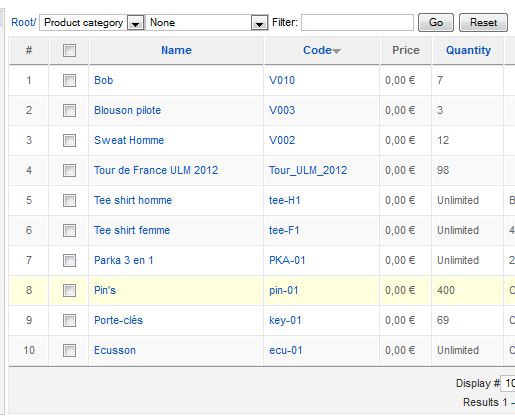
Now all prices show 0 and the column is no longer sortable. I made the mod in the "listing" view for products categorie for the backend.
Please Log in or Create an account to join the conversation.
14 years 11 months ago #27452
by nicolas
Replied by nicolas on topic Re: product listing in back-office with tax
Try like that then:
if(!empty($row->prices)){
foreach($row->prices as $k => $p){
$row->prices[$k]->price_value_with_tax = $this->currencyHelper->getTaxedPrice($p->price_value,hikashop_getZone(),$row->product_tax_id,2);
}
}
echo $this->currencyHelper->displayPrices(@$row->prices,'price_value_with_tax');
if(!empty($row->prices)){
foreach($row->prices as $k => $p){
$row->prices[$k]->price_value_with_tax = $this->currencyHelper->getTaxedPrice($p->price_value,hikashop_getZone(),$row->product_tax_id,2);
}
}
echo $this->currencyHelper->displayPrices(@$row->prices,'price_value_with_tax');
Please Log in or Create an account to join the conversation.
14 years 11 months ago #27456
by laurent
Replied by laurent on topic Re: product listing in back-office with tax
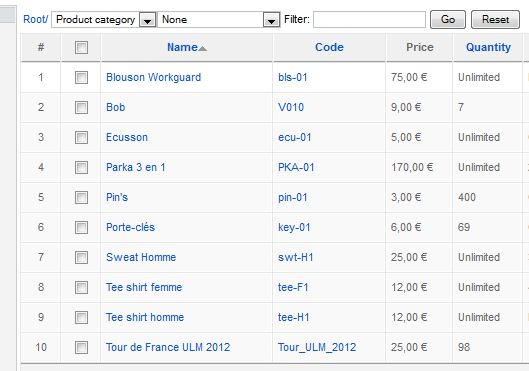
Now prices show off ! The column is still not sortable and prices are left align instead of right. However, it's fair for me with this if it's too complicated....
Please Log in or Create an account to join the conversation.
14 years 11 months ago #27458
by nicolas
Replied by nicolas on topic Re: product listing in back-office with tax
The price column is not sortable. The problem is that a product can have several prices which are stored in the different table in the database. So it's way more complicated to sort the listing by the price and it will give out strange results in some cases.
For the alignment, you can just change the <td> to <td align="right"> before that line of code.
For the alignment, you can just change the <td> to <td align="right"> before that line of code.
Please Log in or Create an account to join the conversation.
14 years 11 months ago #27460
by laurent
Replied by laurent on topic Re: product listing in back-office with tax
I was almost 100% sure that the column was right align and sortable before making the change....
I can live without the sort. For the align, I should have fix this one by myself....
Thanks again for this very robust support
I can live without the sort. For the align, I should have fix this one by myself....
Thanks again for this very robust support
Please Log in or Create an account to join the conversation.
Time to create page: 0.160 seconds