

- Posts: 108
- Thank you received: 2
Few Questions: Backend order, Taxes and checkouts
14 years 11 months ago #28197
by bars92
Few Questions: Backend order, Taxes and checkouts was created by bars92
Hello again.
After installing the new version i was very impressed by the many upgrades.
I have some questions i cannot find answers:
1. I would like to make an order from the back-end, if i do so, i need to charge the customer too. Example: i make an order filling all the products and info and when i choose the payment method nothing happens, so i cannot charge him via back-end order. I need the option Payment method to be able to run the onAfterOrderConfirm(), how can i manage that?
2. I need to have checkout by registration info. Means when i checkout without checkbox that says affiliate i want him to pay more for products and display less fields in the registration.
Example: An affiliate is trying to register, he marks the box and fields are added (Done that), now i want him to recieve a discount on some products and district him to only part of payment methods. When a normal customer trying to register, part of the fields are displayed and checkout goes without any affiliate discounts.
3. Can i have a custom fields visible or invisble in the registration depands on the products in the cart? lets say if this products is the only one then i want him to view less fields.
4. I have read the USA tax system and i did not understand one thing. Can i choose a different product price per state?
I know thats many questions.. but
Thank you very much for the attention!
After installing the new version i was very impressed by the many upgrades.
I have some questions i cannot find answers:
1. I would like to make an order from the back-end, if i do so, i need to charge the customer too. Example: i make an order filling all the products and info and when i choose the payment method nothing happens, so i cannot charge him via back-end order. I need the option Payment method to be able to run the onAfterOrderConfirm(), how can i manage that?
2. I need to have checkout by registration info. Means when i checkout without checkbox that says affiliate i want him to pay more for products and display less fields in the registration.
Example: An affiliate is trying to register, he marks the box and fields are added (Done that), now i want him to recieve a discount on some products and district him to only part of payment methods. When a normal customer trying to register, part of the fields are displayed and checkout goes without any affiliate discounts.
3. Can i have a custom fields visible or invisble in the registration depands on the products in the cart? lets say if this products is the only one then i want him to view less fields.
4. I have read the USA tax system and i did not understand one thing. Can i choose a different product price per state?
I know thats many questions.. but
Thank you very much for the attention!
Please Log in or Create an account to join the conversation.

14 years 11 months ago #28211
by nicolas
Replied by nicolas on topic Re: Few Questions: Backend order, Taxes and checkouts
1. That's not possible. Usually, you don't know the credit card information of your user so you can't enter it for him.
The order creation system just allows you to create the order. Then, you can send him an email notification (by changing the status for example), and ask him to pay his order from the front end (there is an option in the Checkout tab of the config so that the user can pay orders from his orders listing when he is logged in).
2. There is no option for that. That will require to add custom code in one of the files of the checkout view to add the coupon based on the affiliate checkbox value.
3. Not in the registration. You can do that with custom item fields on the product page for each product.
4.No. You will have to setup the taxes in the taxation menu
The order creation system just allows you to create the order. Then, you can send him an email notification (by changing the status for example), and ask him to pay his order from the front end (there is an option in the Checkout tab of the config so that the user can pay orders from his orders listing when he is logged in).
2. There is no option for that. That will require to add custom code in one of the files of the checkout view to add the coupon based on the affiliate checkbox value.
3. Not in the registration. You can do that with custom item fields on the product page for each product.
4.No. You will have to setup the taxes in the taxation menu
Please Log in or Create an account to join the conversation.
14 years 11 months ago - 14 years 11 months ago #28227
by bars92
Replied by bars92 on topic Re: Few Questions: Backend order, Taxes and checkouts
ok so ill work on that..
if i want to display like paypal payment plugin that displays redirection to paypal and purchase through paypal, could that be implant in the back-end order?
Another question i need to find is the export button for orders:
If you can help me with that, it will be great..
How can i modify or view the .csv file? ( i need to export orders to excel)
if i want to display like paypal payment plugin that displays redirection to paypal and purchase through paypal, could that be implant in the back-end order?
Another question i need to find is the export button for orders:
If you can help me with that, it will be great..
How can i modify or view the .csv file? ( i need to export orders to excel)
Last edit: 14 years 11 months ago by bars92.
Please Log in or Create an account to join the conversation.
14 years 11 months ago #28242
by nicolas
Replied by nicolas on topic Re: Few Questions: Backend order, Taxes and checkouts
Sure it could be implemented. But you need to know PHP for that. You could take example on the pay function of the file components/com_hikashop/controllers/order.php which handles the payment of the order on the front end.
The export button for orders in the sales listing page at the top right.
That will give you a CSV that you can open with Excel.
The export button for orders in the sales listing page at the top right.
That will give you a CSV that you can open with Excel.
Please Log in or Create an account to join the conversation.
14 years 11 months ago #28250
by bars92
Replied by bars92 on topic Re: Few Questions: Backend order, Taxes and checkouts
When i open it with excel it just putting some html im the first column along the rows, surely this is not right..
im asking how can i see the params he is taking and manage them, and how can i view it normaly in the excel?
im asking how can i see the params he is taking and manage them, and how can i view it normaly in the excel?
Please Log in or Create an account to join the conversation.
14 years 11 months ago #28254
by nicolas
Replied by nicolas on topic Re: Few Questions: Backend order, Taxes and checkouts
You should not have any HTML in the CSV.
Could you do a screenshot ?
Could you check that the option "menu position" of the configuration is set to "under the title" and try again after changing it if that's not the case ?
The CSV is generated in the file export of the view product of the back end. You can edit it via the menu Display->Views.
Could you do a screenshot ?
Could you check that the option "menu position" of the configuration is set to "under the title" and try again after changing it if that's not the case ?
The CSV is generated in the file export of the view product of the back end. You can edit it via the menu Display->Views.
Please Log in or Create an account to join the conversation.
14 years 11 months ago - 14 years 11 months ago #28259
by bars92
Replied by bars92 on topic Re: Few Questions: Backend order, Taxes and checkouts
I changed to "under the title" and there is no html now, but the excel shows the csv wrong.. i added a screenshot
I have seen the export view and it looks good, i will customize it later.
Thank you.
I have seen the export view and it looks good, i will customize it later.
Thank you.
Last edit: 14 years 11 months ago by bars92. Reason: removed picture
Please Log in or Create an account to join the conversation.
14 years 11 months ago #28267
by nicolas
Replied by nicolas on topic Re: Few Questions: Backend order, Taxes and checkouts
That's just because your version of Excel prefers comma instead of semi colons.
You should change that in the "Files" tab of the configuration.
You should change that in the "Files" tab of the configuration.
Please Log in or Create an account to join the conversation.
14 years 11 months ago - 14 years 11 months ago #28296
by bars92
Replied by bars92 on topic Re: Few Questions: Backend order, Taxes and checkouts
Exellent. All done.
One problem is how can i set a fields to be UTF-8, because i have some hebrew text that is displayed as gibberish?
And another question, i managed to delete from echoing the fields i dont need, but the excel is showing me empty columns as if it counted them before..
How can i remove the spaces created when i filtered the echo by my require fields?
One problem is how can i set a fields to be UTF-8, because i have some hebrew text that is displayed as gibberish?
And another question, i managed to delete from echoing the fields i dont need, but the excel is showing me empty columns as if it counted them before..
How can i remove the spaces created when i filtered the echo by my require fields?
Last edit: 14 years 11 months ago by bars92.
Please Log in or Create an account to join the conversation.
14 years 11 months ago #28311
by nicolas
Replied by nicolas on topic Re: Few Questions: Backend order, Taxes and checkouts
All the text in the CSV is outputed as UTF8. If you don't see it in Excel, it's excel which is not openning the file using the UTF8 encoding.
Your second question is too vague so I can't help you
Your second question is too vague so I can't help you
Please Log in or Create an account to join the conversation.
14 years 11 months ago #28312
by bars92
Replied by bars92 on topic Re: Few Questions: Backend order, Taxes and checkouts
I added a screenshot to help you understand my situation.
I am trying to remove the spaces created when i told the export not to echo some fields.
like that:
if($key != "order_product_name" )
echo '"'.str_replace('"','""',$val).'"';
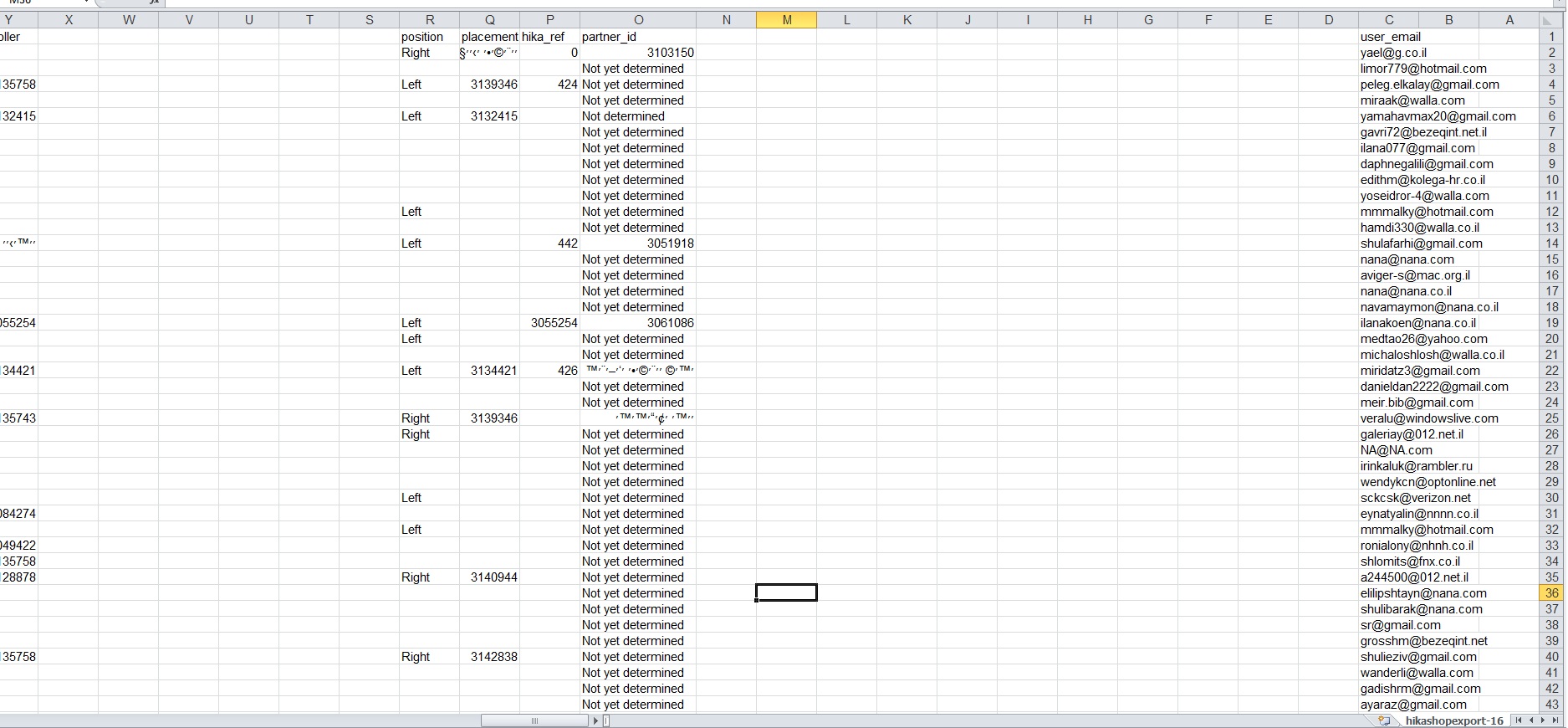
I am trying to remove the spaces created when i told the export not to echo some fields.
like that:
if($key != "order_product_name" )
echo '"'.str_replace('"','""',$val).'"';
Please Log in or Create an account to join the conversation.
14 years 11 months ago #28326
by nicolas
Replied by nicolas on topic Re: Few Questions: Backend order, Taxes and checkouts
If you don't tell me what modification you did I can't tell you what is the problem.
Please Log in or Create an account to join the conversation.
14 years 11 months ago #28333
by bars92
Replied by bars92 on topic Re: Few Questions: Backend order, Taxes and checkouts
At the column name i used:
if($key != "order_product_name" && $key != "user_id" && ...){
echo '"'.str_replace('"','""',$key).'"';
}
Means i do not echo user_id ,order_product_name and so on titles.
and for the values i did the same:
if($key != "order_product_name" && $key != "user_id" && ...){
echo '"'.str_replace('"','""',$val).'"';
}
Means i do not echo the values of all fields named user_id ,order_product_name and so on.
Somehow the excel still consider the columns and fill them with blank. (as seen in the screenshot)
if($key != "order_product_name" && $key != "user_id" && ...){
echo '"'.str_replace('"','""',$key).'"';
}
Means i do not echo user_id ,order_product_name and so on titles.
and for the values i did the same:
if($key != "order_product_name" && $key != "user_id" && ...){
echo '"'.str_replace('"','""',$val).'"';
}
Means i do not echo the values of all fields named user_id ,order_product_name and so on.
Somehow the excel still consider the columns and fill them with blank. (as seen in the screenshot)
Please Log in or Create an account to join the conversation.
14 years 11 months ago #28361
by nicolas
Replied by nicolas on topic Re: Few Questions: Backend order, Taxes and checkouts
Where did you put that code ?
Normally, that should have been in:
foreach($columns as $column){
if(!empty($column)){
$output.= '"'.str_replace('"','\\'.'"',$column).'"';
}
$output.= $separator;
}
and:
foreach($products_columns as $column){
echo '"'.str_replace('"','""',$product->$column).'"'.$separator;
}
If excel still leave the column, it means that you're still displaying the $separator for that column.
Normally, that should have been in:
foreach($columns as $column){
if(!empty($column)){
$output.= '"'.str_replace('"','\\'.'"',$column).'"';
}
$output.= $separator;
}
and:
foreach($products_columns as $column){
echo '"'.str_replace('"','""',$product->$column).'"'.$separator;
}
If excel still leave the column, it means that you're still displaying the $separator for that column.
Please Log in or Create an account to join the conversation.
Time to create page: 0.228 seconds