
- Posts: 38
- Thank you received: 0
Customize address information form (SOLVED)
14 years 10 months ago - 14 years 10 months ago #29768
by sdebaun
Customize address information form (SOLVED) was created by sdebaun
As this is my first post I wanted to say great job on HikaShop
Now, on to my issue...
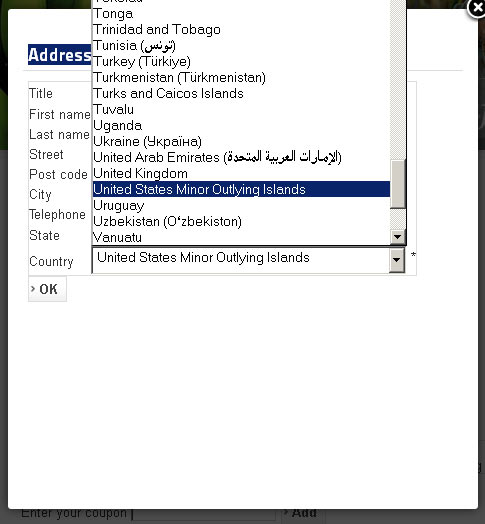
1. There is no option for USA (United States of America, only USA outlying islands is displayed) on the country drop down for customer registration (Address Information during checkout process)
2. How do I change the default country? I don't live in France.. and most of my customers don't either.
3. How do I customize the form (where is the file?), and the format is wrong for US addresses, as State goes before postal code (and Postal Code is Mandatory)
Thanks in advance
Now, on to my issue...
1. There is no option for USA (United States of America, only USA outlying islands is displayed) on the country drop down for customer registration (Address Information during checkout process)
2. How do I change the default country? I don't live in France.. and most of my customers don't either.
3. How do I customize the form (where is the file?), and the format is wrong for US addresses, as State goes before postal code (and Postal Code is Mandatory)
Thanks in advance
Last edit: 14 years 10 months ago by sdebaun.
Please Log in or Create an account to join the conversation.
14 years 10 months ago #29770
by sdebaun
Replied by sdebaun on topic Re: Customize address information form (Registration)
OK, I found out the answers to my questions (above) regarding customization.... very nicely done! 
However, United States of America is missing from the list of counties available.... is this from a file somewhere?
Cheers
However, United States of America is missing from the list of counties available.... is this from a file somewhere?
Cheers
Please Log in or Create an account to join the conversation.
14 years 10 months ago #29774
by sdebaun
Replied by sdebaun on topic Re: Customize address information form (Registration)
It seems that the data for Country is pulled from the database, (which does contain an entry for United States of America..) but if that is so why is it not showing up?
Please Log in or Create an account to join the conversation.

14 years 10 months ago #29792
by nicolas
Replied by nicolas on topic Re: Customize address information form (Registration)
The USA country is there by default. If you don't have it in the menu System->Zones, it means that you deleted it.
You say that you see it in the database, so it's likely that you just unpublished it or changed its type.
You should try to edit it via the menu System->Zones and change back its options so that it displays again.
The default country can be changed via the menu Display->Custom fields (same for the other fields).
You say that you see it in the database, so it's likely that you just unpublished it or changed its type.
You should try to edit it via the menu System->Zones and change back its options so that it displays again.
The default country can be changed via the menu Display->Custom fields (same for the other fields).
Please Log in or Create an account to join the conversation.
14 years 10 months ago - 14 years 10 months ago #29793
by sdebaun
Replied by sdebaun on topic Re: Customize address information form (Registration)
Hi Nicolas, thanks for the reply
Got it Thanks! I must have altered it when I was trying to figure out the tax zones....
:silly:
Disregard the following
However, I did not delete it, or unpublish it. In fact I haven't done much at all, it is a new install... testing it out.
I have added 2 products, some categories and a tax zone
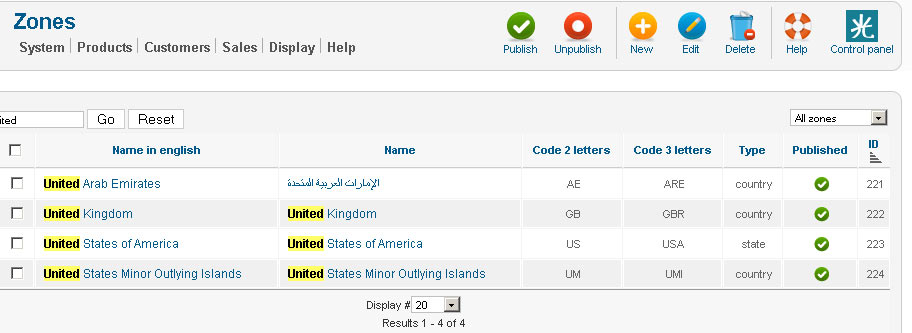
Anyways, am including pic of System > Zones that clearly shows the published state
???
Got it Thanks! I must have altered it when I was trying to figure out the tax zones....
:silly:
Disregard the following
However, I did not delete it, or unpublish it. In fact I haven't done much at all, it is a new install... testing it out.
I have added 2 products, some categories and a tax zone
Anyways, am including pic of System > Zones that clearly shows the published state
???
Last edit: 14 years 10 months ago by sdebaun. Reason: I might be.... blind...?
Please Log in or Create an account to join the conversation.
14 years 10 months ago #29794
by sdebaun
Replied by sdebaun on topic Re: Customize address information form (Registration)
OH! I see it... Type = State!
Now, how did that happen??
Thanks I've got it
Now, how did that happen??
Thanks I've got it
Please Log in or Create an account to join the conversation.
14 years 10 months ago #29796
by nicolas
Replied by nicolas on topic Re: Customize address information form (Registration)
Yes, that's the problem. The USA is a state instead of being a country. So it's not displaying in the country dropdown. Just changing it to country will make it display.
Please Log in or Create an account to join the conversation.
14 years 10 months ago - 14 years 10 months ago #29797
by sdebaun
Replied by sdebaun on topic Re: Customize address information form (Registration)
And just to clarify for anyone else following .... the default country can be set at:
Display > Custom Fields - address_country
Not readily apparent on first examination, but now that I know where it is it all makes sense.
I continue to be impressed by HikaShop
Now, to figure out how to make the cool minicart and ajax work....
Display > Custom Fields - address_country
Not readily apparent on first examination, but now that I know where it is it all makes sense.
I continue to be impressed by HikaShop
Now, to figure out how to make the cool minicart and ajax work....
Last edit: 14 years 10 months ago by sdebaun. Reason: Is there a way to mark the post as answered?
Please Log in or Create an account to join the conversation.
Time to create page: 0.174 seconds