
- Posts: 152
- Thank you received: 0
Price Range not displaying
- plantpotphil
-
 Topic Author
- Offline
Less
More
14 years 10 months ago #30801
by plantpotphil
Create your own style of luxury bespoke furniture online
Price Range not displaying was created by plantpotphil
Hi,
I've set the price to be displayed as "Price Range" for a content module displaying a category. However, nothing seems to have changed.
I've changed this setting in the content module itself, not the default settings. I assume this is the right place?
Any ideas why it's not changing anything?
Phil
I've set the price to be displayed as "Price Range" for a content module displaying a category. However, nothing seems to have changed.
I've changed this setting in the content module itself, not the default settings. I assume this is the right place?
Any ideas why it's not changing anything?
Phil
Create your own style of luxury bespoke furniture online
Please Log in or Create an account to join the conversation.

14 years 10 months ago #30828
by nicolas
Replied by nicolas on topic Re: Price Range not displaying
Hi,
That's the correct place yes.
The two prices will be displayed only if HikaShop can find more than one price for the product. So from what I understand it can only find one price for your products and thus does not display a range.
That's the correct place yes.
The two prices will be displayed only if HikaShop can find more than one price for the product. So from what I understand it can only find one price for your products and thus does not display a range.
Please Log in or Create an account to join the conversation.
- plantpotphil
-
Topic Author
- Offline
Less
More
- Posts: 152
- Thank you received: 0
14 years 10 months ago #30849
by plantpotphil
Create your own style of luxury bespoke furniture online
Replied by plantpotphil on topic Re: Price Range not displaying
Oh I see, I think the problem here may be my misunderstanding.
I have product variants which have different prices, is this what is displayed in the range? Or is it when you add different prices to a product? Although I've just tried adding multiple prices to a product and the range still doesn't seem to display.
Is it possible to display the range of prices accross the variants of a product?
I have product variants which have different prices, is this what is displayed in the range? Or is it when you add different prices to a product? Although I've just tried adding multiple prices to a product and the range still doesn't seem to display.
Is it possible to display the range of prices accross the variants of a product?
Create your own style of luxury bespoke furniture online
Please Log in or Create an account to join the conversation.
14 years 10 months ago #30887
by nicolas
Replied by nicolas on topic Re: Price Range not displaying
Yes it's possible to display the range of the variant prices. For that, you should make sure that you don't have a price for the main product.
If you don't see the range on the listing, it's either that you didn't set the option in the menu/module options or that there are no more than one price for the product/its variants.
If you can't find the problem you can give us a back end access to your website via our contact page (please mention this thread) and we'll check your settings.
If you don't see the range on the listing, it's either that you didn't set the option in the menu/module options or that there are no more than one price for the product/its variants.
If you can't find the problem you can give us a back end access to your website via our contact page (please mention this thread) and we'll check your settings.
Please Log in or Create an account to join the conversation.
- plantpotphil
-
Topic Author
- Offline
Less
More
- Posts: 152
- Thank you received: 0
14 years 10 months ago - 14 years 10 months ago #30944
by plantpotphil
Create your own style of luxury bespoke furniture online
Replied by plantpotphil on topic Re: Price Range not displaying
Ah yes, that was it Nicolas. I had a price for the main product.
One final thing, how do you change how the range is displayed? Is this handled in views or the language file?
It is currently displayed as in the attached image. however, I'd like to change this so that the price would say "£515.00 - £825.00" under the image.
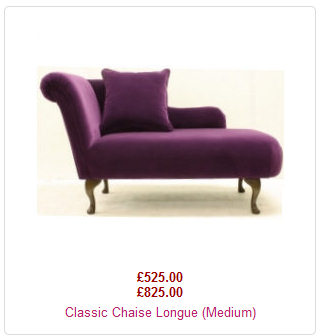
One final thing, how do you change how the range is displayed? Is this handled in views or the language file?
It is currently displayed as in the attached image. however, I'd like to change this so that the price would say "£515.00 - £825.00" under the image.
Create your own style of luxury bespoke furniture online
Last edit: 14 years 10 months ago by plantpotphil.
Please Log in or Create an account to join the conversation.
14 years 10 months ago #30955
by nicolas
Replied by nicolas on topic Re: Price Range not displaying
You can override the PRICE_SEPARATOR translation key as explained there:
www.hikashop.com/en/download/languages.html#modify
www.hikashop.com/en/download/languages.html#modify
Please Log in or Create an account to join the conversation.
- plantpotphil
-
Topic Author
- Offline
Less
More
- Posts: 152
- Thank you received: 0
14 years 10 months ago #30971
by plantpotphil
Create your own style of luxury bespoke furniture online
Replied by plantpotphil on topic Re: Price Range not displaying
Ah that was a lot easier than I thought it would be. Thanks 
Create your own style of luxury bespoke furniture online
Please Log in or Create an account to join the conversation.
Time to create page: 0.202 seconds