
- Posts: 188
- Thank you received: 0
Custom field
- paulocamacho
-
 Topic Author
- Offline
Less
More
14 years 10 months ago #31494
by paulocamacho
Custom field was created by paulocamacho
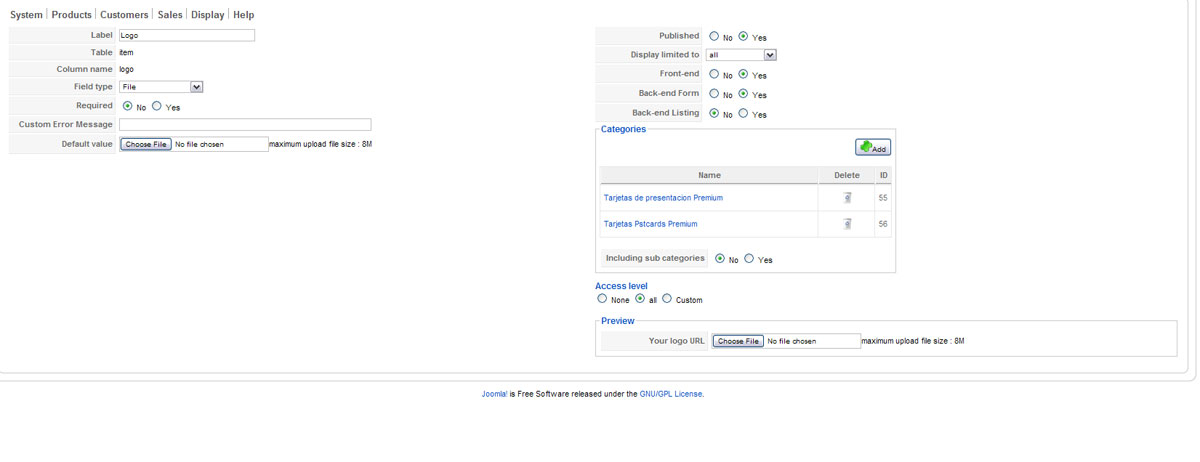
HI, please look at this screenshot, I create a custom field , Item > file , AND LOOK THE PREVIEW AND THE LABEL OR COLUMN NAME .
THANKS SO MUCH
THANKS SO MUCH
Please Log in or Create an account to join the conversation.

14 years 10 months ago #31519
by nicolas
Replied by nicolas on topic Re: Custom field
That's because the custom fields use the translation system in order to translate labels dynamically.
In your translation files you must have somewhere the line:
LOGO="Your logo URL"
and that's why you see this.
If you want, you can override that translation by editing your HikaShop translation file via the Languages tab of the configuration and add the line below in the override area:
LOGO="Logo"
And that will fix the problem.
In your translation files you must have somewhere the line:
LOGO="Your logo URL"
and that's why you see this.
If you want, you can override that translation by editing your HikaShop translation file via the Languages tab of the configuration and add the line below in the override area:
LOGO="Logo"
And that will fix the problem.
Please Log in or Create an account to join the conversation.
- paulocamacho
-
Topic Author
- Offline
Less
More
- Posts: 188
- Thank you received: 0
14 years 10 months ago #31529
by paulocamacho
Replied by paulocamacho on topic Re: Custom field
nice , thanks so much
Please Log in or Create an account to join the conversation.
Time to create page: 0.134 seconds