
Some Questions
- condorazul
-
 Topic Author
- Offline
Less
More
14 years 9 months ago - 14 years 9 months ago #33929
by condorazul
Some Questions was created by condorazul
1.- what is the css adress to change the button choose options?
2.- i´m still in developing and i have some doubts about whats next, in the checkout can i put fields to be filled with for example the text they want to send in a postcard? or do i have to do it before checking out in products options?
3.-How to activate related products? i cant see them under the products.I followed the instruction, created a module in joomal no position set unpublished, save, modify in hikashop module, porducts an related products, save, go to syste configuration and select the module i wanted to be under the product page that returns to joomla module, enable it and save. Nothing happens
2.- i´m still in developing and i have some doubts about whats next, in the checkout can i put fields to be filled with for example the text they want to send in a postcard? or do i have to do it before checking out in products options?
3.-How to activate related products? i cant see them under the products.I followed the instruction, created a module in joomal no position set unpublished, save, modify in hikashop module, porducts an related products, save, go to syste configuration and select the module i wanted to be under the product page that returns to joomla module, enable it and save. Nothing happens
Last edit: 14 years 9 months ago by condorazul.
Please Log in or Create an account to join the conversation.

14 years 9 months ago #33965
by nicolas
Replied by nicolas on topic Re: Some Questions
1. It depends on your template CSS and the options of HikaShop so it's hard to tell like that. Could you give a link to the page where you have them so that we can tell you ?
2. You can do both with custom fields in the Business edition. You should choose the table "order" to have them on the checkout and of the table "item" to have them on the product page.
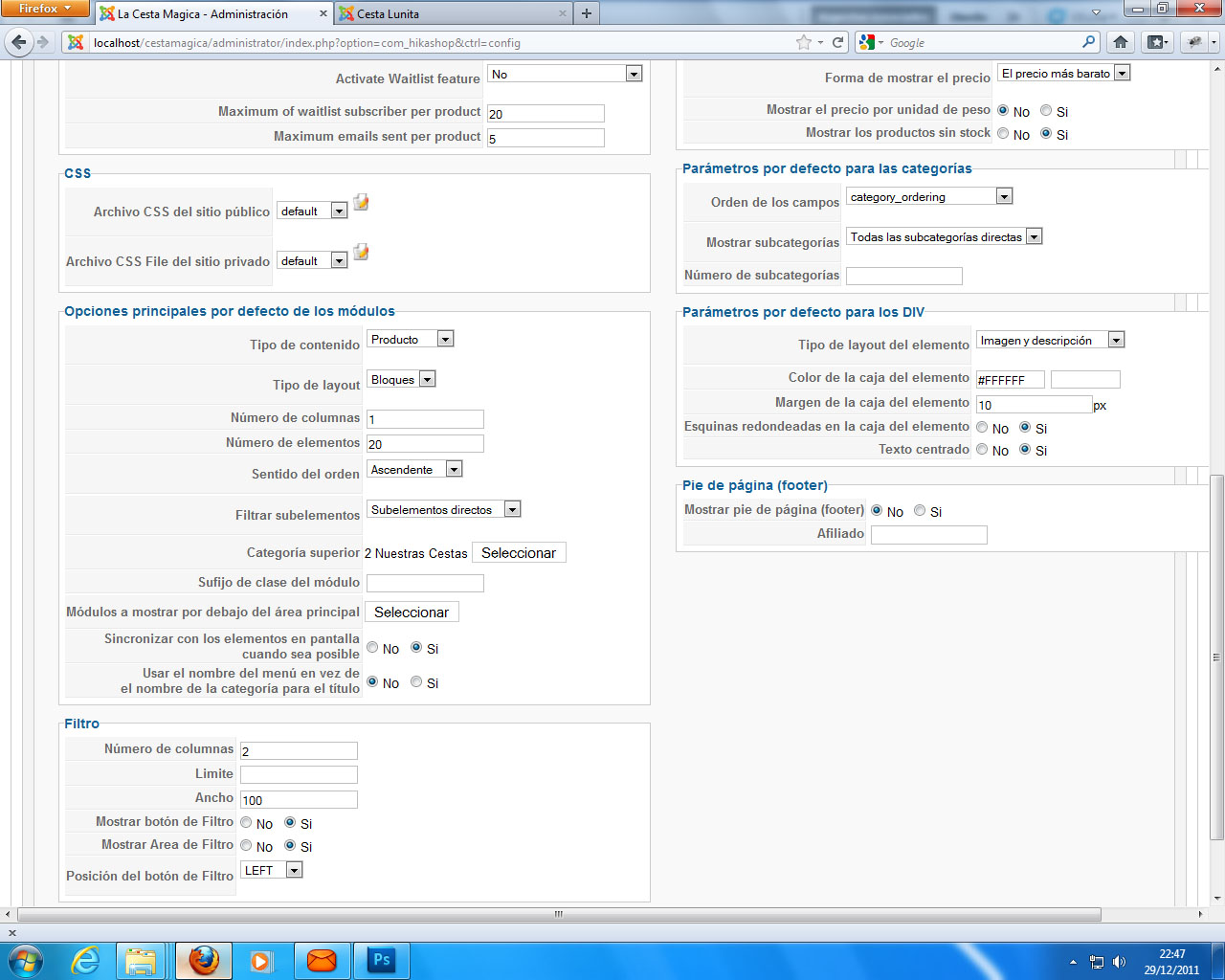
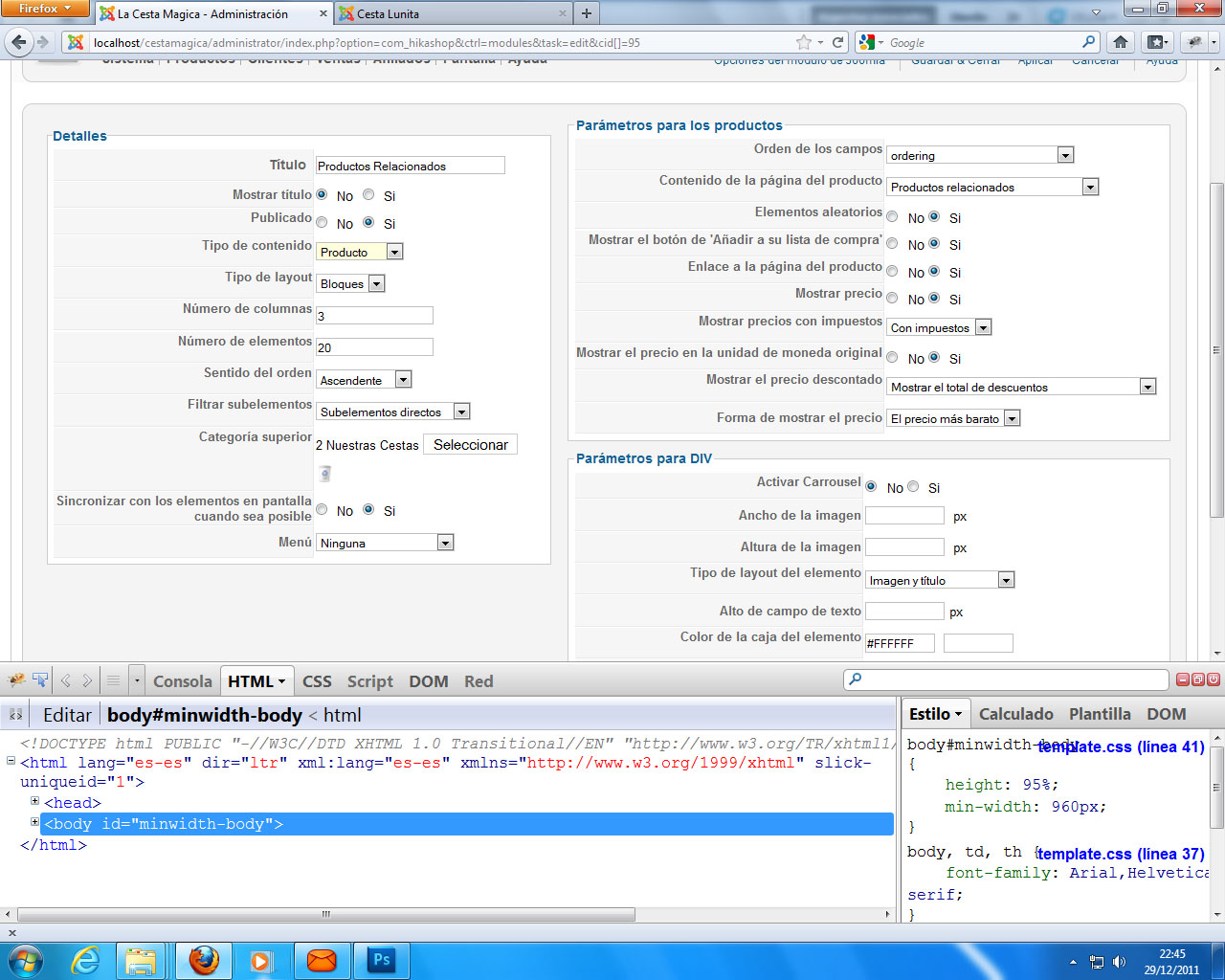
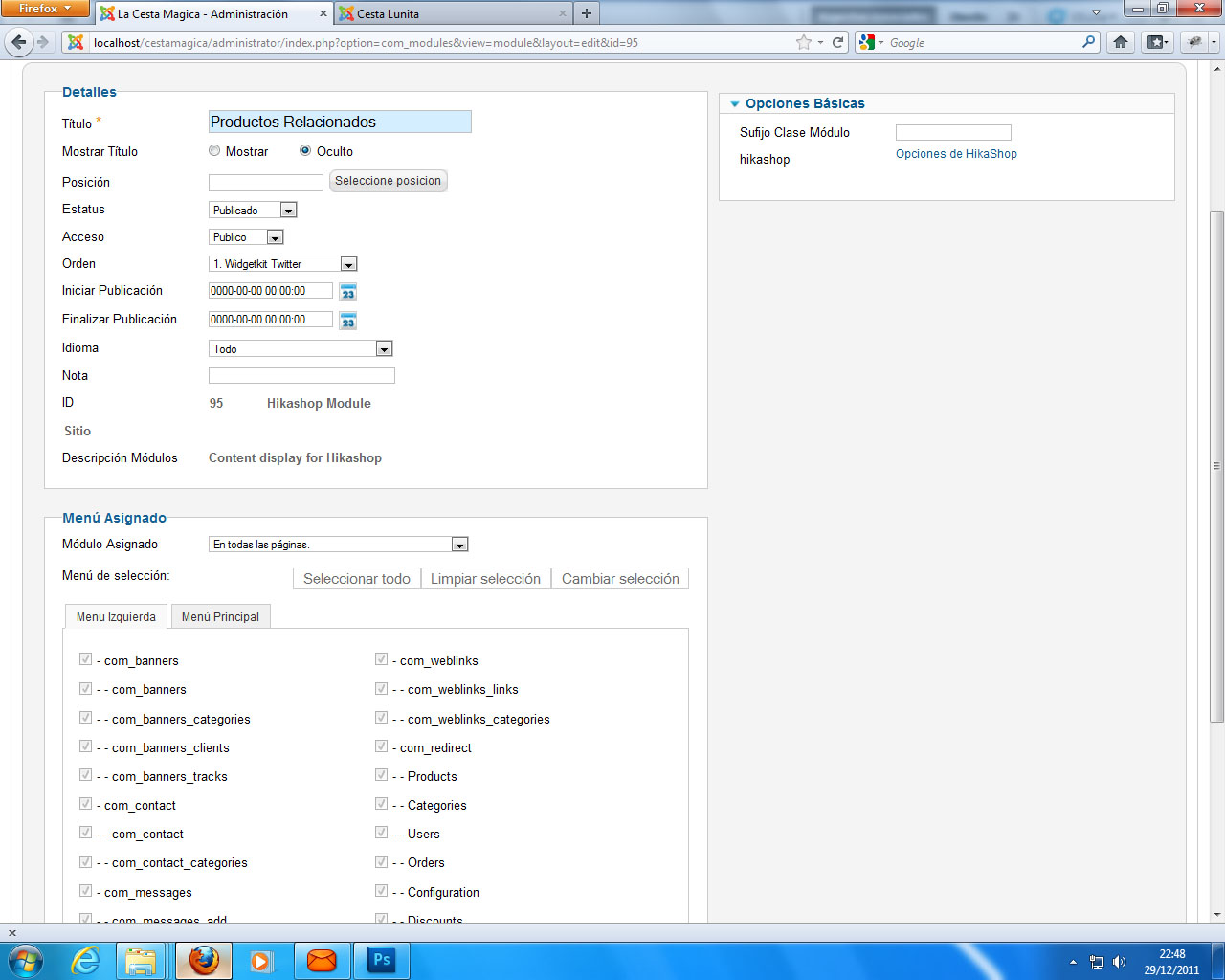
3. If you followed the instructions, it should works. You have have a problem with the hikashop options of the module. Could you do a screenshot of that page ?
2. You can do both with custom fields in the Business edition. You should choose the table "order" to have them on the checkout and of the table "item" to have them on the product page.
3. If you followed the instructions, it should works. You have have a problem with the hikashop options of the module. Could you do a screenshot of that page ?
Please Log in or Create an account to join the conversation.
- condorazul
-
Topic Author
- Offline
14 years 9 months ago #34001
by condorazul
Replied by condorazul on topic Re: Some Questions
Please Log in or Create an account to join the conversation.
- condorazul
-
Topic Author
- Offline
14 years 9 months ago #34002
by condorazul
Replied by condorazul on topic Re: Some Questions
Please Log in or Create an account to join the conversation.
- condorazul
-
Topic Author
- Offline
14 years 9 months ago #34003
by condorazul
Replied by condorazul on topic Re: Some Questions
Please Log in or Create an account to join the conversation.
- condorazul
-
Topic Author
- Offline
14 years 9 months ago #34007
by condorazul
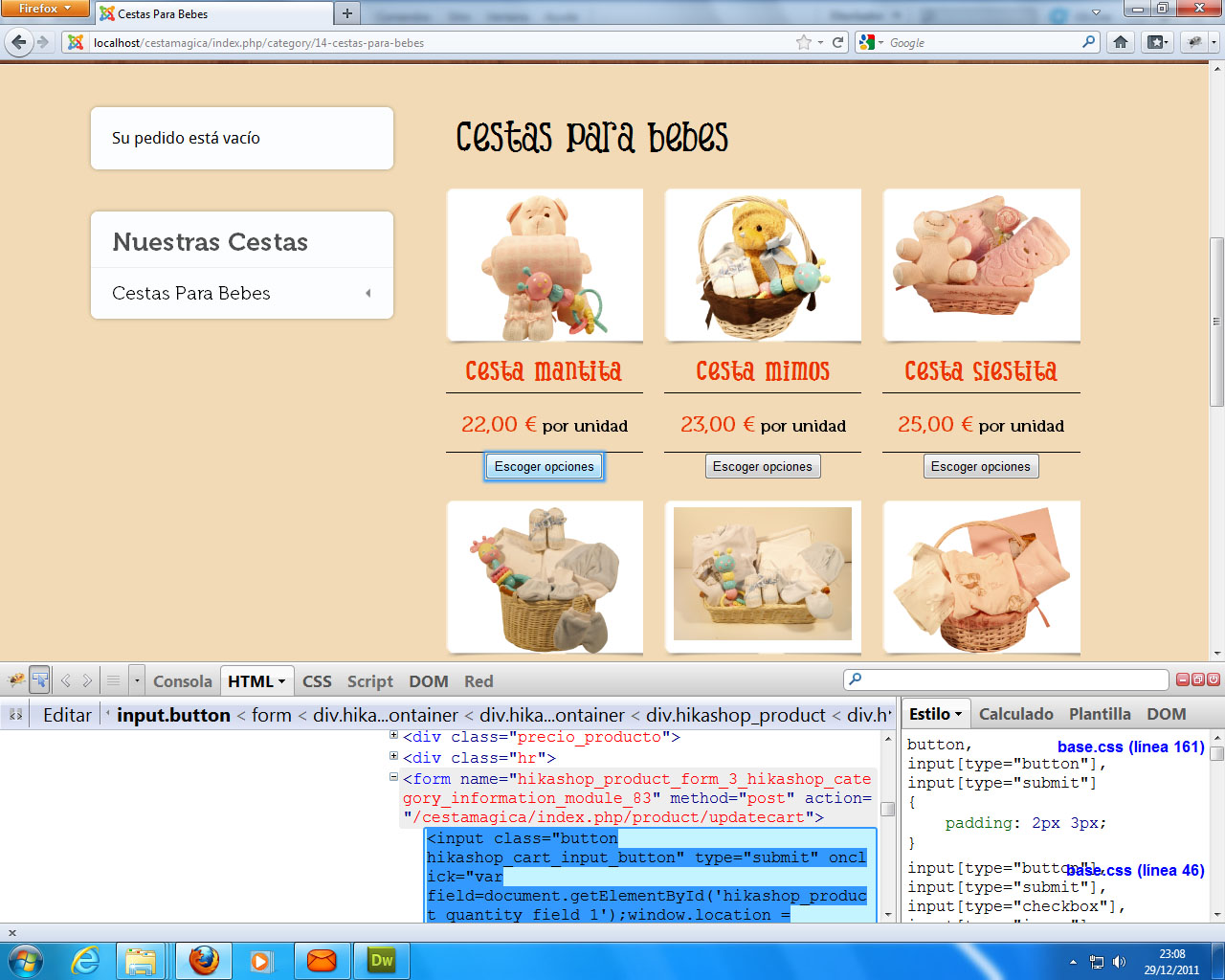 and this one is the button that appears after insert in the product some options to choose, before it was the add to shopping cart button and now i dont know how to change this one
Replied by condorazul on topic Re: Some Questions
Please Log in or Create an account to join the conversation.
14 years 9 months ago #34044
by nicolas
Replied by nicolas on topic Re: Some Questions
You can change that button like that:
.hikashop_cart_input_button{
//your CSS goes here
}
Your module settings are fine so it must come from the option "Module under the product page" of the Display tab of the configuration. Could you double check it to make sure that you selected the module there (and not in the option "Modules under the main area")?
.hikashop_cart_input_button{
//your CSS goes here
}
Your module settings are fine so it must come from the option "Module under the product page" of the Display tab of the configuration. Could you double check it to make sure that you selected the module there (and not in the option "Modules under the main area")?
Please Log in or Create an account to join the conversation.
- condorazul
-
Topic Author
- Offline
14 years 9 months ago - 14 years 9 months ago #34065
by condorazul
Replied by condorazul on topic Re: Some Questions
Related Product is wonrking now.
The problem continues with the button, because if i use this css sentence it changes the whole buttons of the web page and in others i can change the buttons only where it should be changed, example:
.hikashop_product_quantity_main .hikashop_product_stock .button {
css
}
or
.hikashop_product_quantity_main .hikashop_product_stock td a {
css
}
that ones only changes the buttons where i want to be changed if i use just the one you give it changes the whole input butons. That only happens when i add options to the product and they have to choose and instead of add to cart button appears this one.
Is there any way to add a class to this button to modify only this one an no one more?. Perhaps the solution could be adding one div with I'd and class to refer tu the input button, in tagt case what view should I change and where?
The problem continues with the button, because if i use this css sentence it changes the whole buttons of the web page and in others i can change the buttons only where it should be changed, example:
.hikashop_product_quantity_main .hikashop_product_stock .button {
css
}
or
.hikashop_product_quantity_main .hikashop_product_stock td a {
css
}
that ones only changes the buttons where i want to be changed if i use just the one you give it changes the whole input butons. That only happens when i add options to the product and they have to choose and instead of add to cart button appears this one.
Is there any way to add a class to this button to modify only this one an no one more?. Perhaps the solution could be adding one div with I'd and class to refer tu the input button, in tagt case what view should I change and where?
Last edit: 14 years 9 months ago by condorazul. Reason: Solu
Please Log in or Create an account to join the conversation.
14 years 9 months ago #34113
by nicolas
Replied by nicolas on topic Re: Some Questions
You should try with some CSS like that:
.hikashop_products_listing .hikashop_product_quantity_main .hikashop_product_stock .button {
css
}
or:
.hikashop_products_listing .hikashop_product_quantity_main .hikashop_product_stock td a {
css
}
.hikashop_products_listing .hikashop_product_quantity_main .hikashop_product_stock .button {
css
}
or:
.hikashop_products_listing .hikashop_product_quantity_main .hikashop_product_stock td a {
css
}
Please Log in or Create an account to join the conversation.
- condorazul
-
Topic Author
- Offline
14 years 9 months ago #34132
by condorazul
Replied by condorazul on topic Re: Some Questions
none worked the solution was adding a div wid id and class in the product_listing file so i could refer it to .divclass .button {css }.
Please Log in or Create an account to join the conversation.
Time to create page: 0.206 seconds