
- Posts: 121
- Thank you received: 0
Variations adding extra charges to base product $?
- bluetonguedesigns
-
 Topic Author
- Offline
Less
More
14 years 9 months ago #34375
by bluetonguedesigns
I have a client who wishes to use multiple variations/characteristics.
For example the base product is a box which costs say $5.00
The characteristics may be...
Chocolates (Multiple colour variations) if they select one, it adds $2.00 to the base cost
Sweets (Multiple colours again) again, if they select one, it adds $2.00 to the cost.
And so on, does the system have the ability to add extra charges to a base product cost WITHOUT having to edit a zillion variations? I tried setting costs on variations, but that cost just replaced the base charge, my clients charges need to be added on to the base cost.
Is that possible without her having to tear her hair out to get one product listed?
Lastly, is it possible to have a custom "comment" field PER PRODUCT? So, one of her options is gift cards, blank cards cost nothing, custom printed is an extra charge and we need the shopper to be able to enter the greeting to go on the card on a per product basis. is that possible at all?
Cheers
For example the base product is a box which costs say $5.00
The characteristics may be...
Chocolates (Multiple colour variations) if they select one, it adds $2.00 to the base cost
Sweets (Multiple colours again) again, if they select one, it adds $2.00 to the cost.
And so on, does the system have the ability to add extra charges to a base product cost WITHOUT having to edit a zillion variations? I tried setting costs on variations, but that cost just replaced the base charge, my clients charges need to be added on to the base cost.
Is that possible without her having to tear her hair out to get one product listed?
Lastly, is it possible to have a custom "comment" field PER PRODUCT? So, one of her options is gift cards, blank cards cost nothing, custom printed is an extra charge and we need the shopper to be able to enter the greeting to go on the card on a per product basis. is that possible at all?
Cheers
Please Log in or Create an account to join the conversation.

14 years 9 months ago #34408
by nicolas
Replied by nicolas on topic Re: Variations adding extra charges to base product $?
Hi,
Yes you can do that. Instead of variants/characteristics, you should use options which have that ability of adding their own price to the price of the product:
www.hikashop.com/en/support/documentatio...ct-form.html#options
That is only possible in our commercial editions.
For custom comment fields, you can add them via the menu Display->Custom fields by creating custom fields of the table "item" in the Business edition. You will be able to restrict them only to some categories of products if you don't want to have them everywhere.
If you want to add an extra charge based on the value entered by the customer, that will require a custom quantity price calculation plugin to be created as explained in the developer's documentation:
www.hikashop.com/en/support/documentatio...r-documentation.html
Yes you can do that. Instead of variants/characteristics, you should use options which have that ability of adding their own price to the price of the product:
www.hikashop.com/en/support/documentatio...ct-form.html#options
That is only possible in our commercial editions.
For custom comment fields, you can add them via the menu Display->Custom fields by creating custom fields of the table "item" in the Business edition. You will be able to restrict them only to some categories of products if you don't want to have them everywhere.
If you want to add an extra charge based on the value entered by the customer, that will require a custom quantity price calculation plugin to be created as explained in the developer's documentation:
www.hikashop.com/en/support/documentatio...r-documentation.html
Please Log in or Create an account to join the conversation.
- bluetonguedesigns
-
Topic Author
- Offline
Less
More
- Posts: 121
- Thank you received: 0
14 years 9 months ago #34428
by bluetonguedesigns
Replied by bluetonguedesigns on topic Re: Variations adding extra charges to base product $?
Thankyou Nicolas. I have used the commercial version a few times now but never noticed that option so will look at that.
What about the custom "Comment" field on a per product basis like described above?
Many thanks
Neil
What about the custom "Comment" field on a per product basis like described above?
Many thanks
Neil
Please Log in or Create an account to join the conversation.
14 years 9 months ago #34481
by nicolas
Replied by nicolas on topic Re: Variations adding extra charges to base product $?
As I said, you can restrict custom item fields to product categories.
If you want a custom item field for only one product, you can create a special category, leave it unpublished, add it to your product and then use it in your custom field.
If you want a custom item field for only one product, you can create a special category, leave it unpublished, add it to your product and then use it in your custom field.
Please Log in or Create an account to join the conversation.
- bluetonguedesigns
-
Topic Author
- Offline
Less
More
- Posts: 121
- Thank you received: 0
14 years 8 months ago #34611
by bluetonguedesigns
Replied by bluetonguedesigns on topic Re: Variations adding extra charges to base product $?
Hi Nicolas
Thanks for that, sorry, I miss-read it thinking the whole answer was to do with the options.
I have achieved what I basically needed to which is great. Though now I would like to do a bit of styling work, I know I can do this but need to know what file I do the custom changes to...
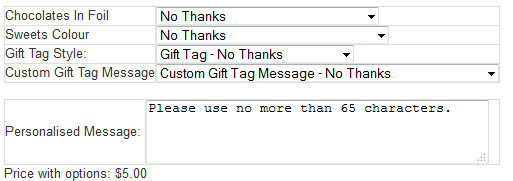
I'd like a bit of spacing around the names and fields and also get the custom field to shuffle up and align with the other options so it looks like it is part of the whole group.
Thanks again.
Thanks for that, sorry, I miss-read it thinking the whole answer was to do with the options.
I have achieved what I basically needed to which is great. Though now I would like to do a bit of styling work, I know I can do this but need to know what file I do the custom changes to...
I'd like a bit of spacing around the names and fields and also get the custom field to shuffle up and align with the other options so it looks like it is part of the whole group.
Thanks again.
Please Log in or Create an account to join the conversation.
- bluetonguedesigns
-
Topic Author
- Offline
Less
More
- Posts: 121
- Thank you received: 0
14 years 8 months ago #34613
by bluetonguedesigns
Replied by bluetonguedesigns on topic Re: Variations adding extra charges to base product $?
Actually, I just noticed something with some tests I was running.
EVERY option gets added to the cart whether you want it or not? Like the image above, if I have a choice of no thanks and 0 cost, that means, don't want to add that to the card, the system is adding x number like everything else for free.
Is that "fixable?"
Cheers
EVERY option gets added to the cart whether you want it or not? Like the image above, if I have a choice of no thanks and 0 cost, that means, don't want to add that to the card, the system is adding x number like everything else for free.
Is that "fixable?"
Cheers
Please Log in or Create an account to join the conversation.
14 years 8 months ago #34652
by nicolas
Replied by nicolas on topic Re: Variations adding extra charges to base product $?
For the spacing and other styling, you can add your CSS code in the front end CSS file of HikaShop that you can edit via the Display tab of the configuration.
Indeed, the option is added regardless of its price. However, you should see they options below the product name on the cart and that should confuse users. If you see the options in the cart as regular products, that's because either you're using an old version of HikaShop or the option "Group options with product" of the Checkout tab of the configuration is turned off.
If you really do not want to see the option selection at all, you will have to edit the file "cart" of the view "checkout" via the menu Display->Views to hide the options if they don't have a price.
Indeed, the option is added regardless of its price. However, you should see they options below the product name on the cart and that should confuse users. If you see the options in the cart as regular products, that's because either you're using an old version of HikaShop or the option "Group options with product" of the Checkout tab of the configuration is turned off.
If you really do not want to see the option selection at all, you will have to edit the file "cart" of the view "checkout" via the menu Display->Views to hide the options if they don't have a price.
Please Log in or Create an account to join the conversation.
Time to create page: 0.208 seconds